
Keep identities separate; make the scene shared
The useful split is one identity description per person and one camera description for the whole photograph. To combine two AI characters, keep the input order stable, assign each outfit to its owner and give each hand a clear job.
- Use two individual references rather than asking the model to invent both faces.
- Write “viewer’s left” and “viewer’s right,” then keep those labels consistent.
- Remove template instructions that contradict the intended clothes or interaction.
- Inspect both faces and all visible hands at full resolution before calling the photo finished.
This guide is about two AI influencers in the same photo. For creating the first identity, start with how to create an AI influencer. For continuity across separate shoots, use the AI influencer consistency guide.
Why do two AI characters mix faces?
Mixing becomes more likely when the request does not clearly assign visible features to individual people. References condition a newly generated image; they are not two immutable face cutouts. A shared phrase such as “both have dark hair and blue jackets” gives weak ownership cues.
| Symptom | What to inspect | First change to try |
|---|---|---|
| Face fusion | One face appears to borrow the other’s features | Separate identity clauses; leave space between heads |
| Identity drift | One person looks like a new person | Return to that person’s clear original; reduce occlusion and extreme angles |
| Wardrobe mismatch | A’s jacket, scarf or color appears on B | Assign each garment to a named owner; remove competing template clothing |
| Extra person | A third face appears in the scene or mirror | Use an empty setting and specify exactly two adults |
| Merged anatomy | Hands or arms no longer belong to a readable body | Simplify the interaction and separate hand tasks |
These are practical failure categories, not a claim about a model’s internal mechanism. Our documented café problem below was a conflicting garment instruction. We did not observe every failure in this table.
How to put two AI characters in one image, step by step
The current Group Photo workflow has two independent face inputs, an optional location image and an editable Prompt. We checked its signed-in controls and code on October 22, 2026. There is no separate left/right switch or guaranteed identity-lock control.
Prepare one clear reference per adult
Choose a readable face, natural even light and enough hair and neckline detail to identify the person. Avoid heavy filters, extreme profiles and another person in the same input. Keep the two files clearly named A and B. Our examples use generated fictional adults; use photos you have permission to use.
Upload Face 1 and Face 2 separately
Open the AI Group Photo Generator, then its Studio and sign in. Click Face 1 to upload A and Face 2 to upload B. Alternatively, use each slot’s Choose AI Influencer selector for a saved adult character. Confirm both previews before continuing.
Choose a scene, then resolve its conflicts
Choose a scene offers 24 templates across Couples, Friends, Fashion, Travel and Fitness. Applying one writes a scene brief into Prompt. Read it: a spa template, for example, requests towel wraps and cannot also preserve a reference bomber unchanged. Edit or replace those instructions. Expand Location Image · Optional only if you have a setting reference; that slot is not a third face or a product input.
Assign identity, position, outfit and action
Use [FACE 1] for A and [FACE 2] for B in the editable prompt. Studio translates these placeholders into image references; plain-language A/B labels are just a writing aid. Define the viewer’s left/right, each person’s own hair and outfit, one interaction and a shared camera/light description. The exact café request is included below.
Check settings, permission and the quote
Choose an available model in the model picker and set the aspect ratio and resolution in Generation settings. Confirm permission to use both adult likenesses and any location image. Read the current credit quote, then press Generate Group photo. Our supplier experiment used GPT Image 2.5 Flare, 2K, 4:3; the inspected form displayed Sunburst with different settings. Your current selection and quote govern your request.
Compare both identities and download
Review the completed image in My Images or History. Compare A against Face 1 and B against Face 2, then check count, clothing, hands and scene. Use the result’s download action once approved. For a revision, return to the original references and name the precise mismatch; check the new quote. Check task status before submitting a duplicate request.
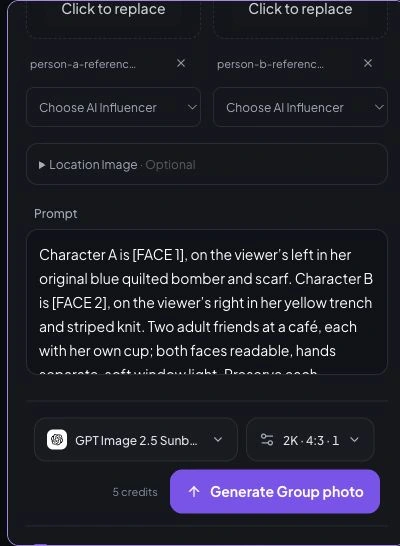
Sign in to upload your two references. Check the current model, settings and credit quote before generating.
Three real generated examples, with their actual prompts
Each result below was generated with the same two separate references. These are documented fictional scenes, not records of real meetings, customers or campaigns. The archived collaboration intentionally changes clothes; the new café and headphone briefs ask to retain them.
1. Friends Together: a café conversation
Two separate cups give each person a simple physical task. A is left in her blue bomber; B is right in her yellow trench.
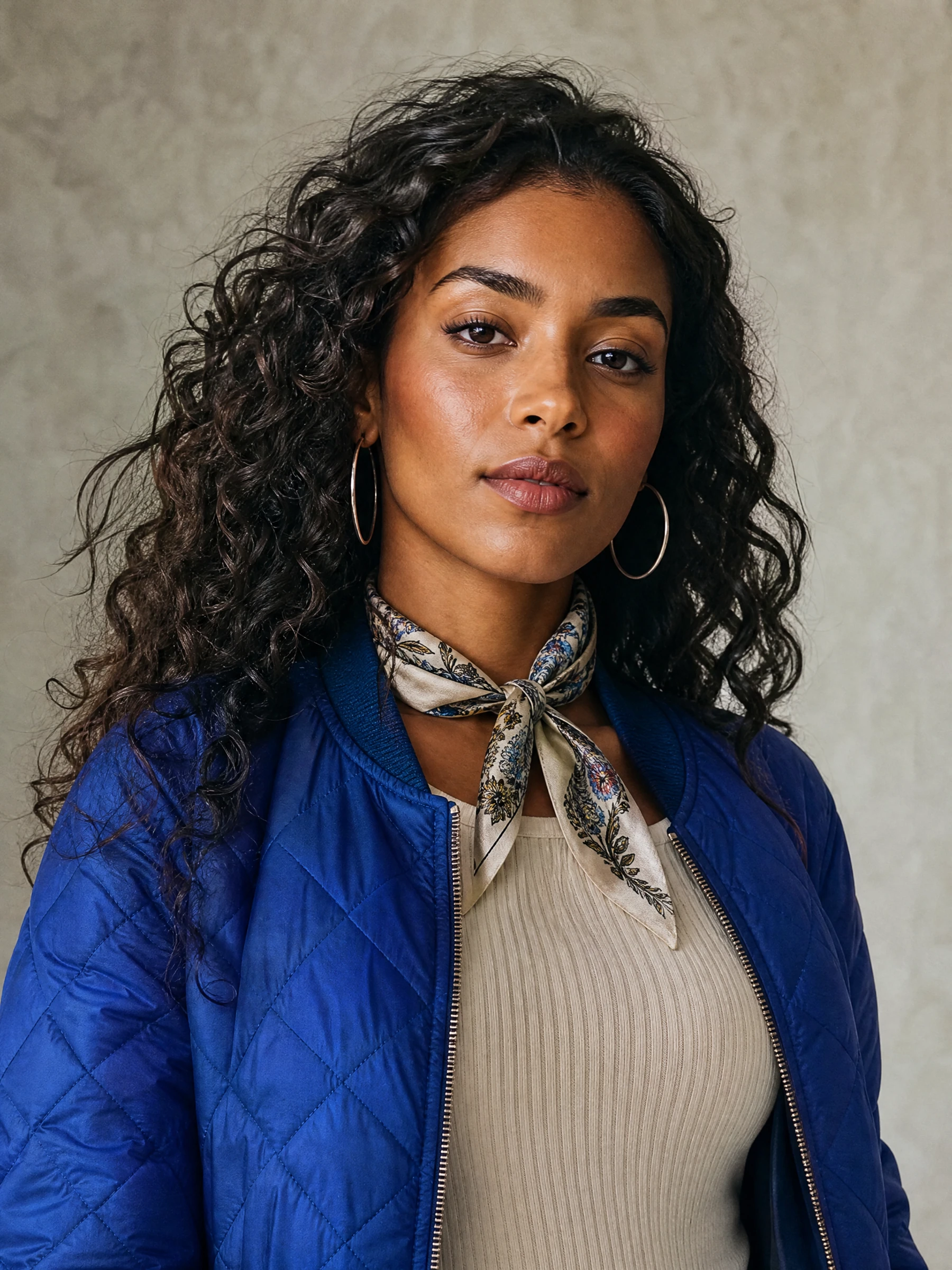
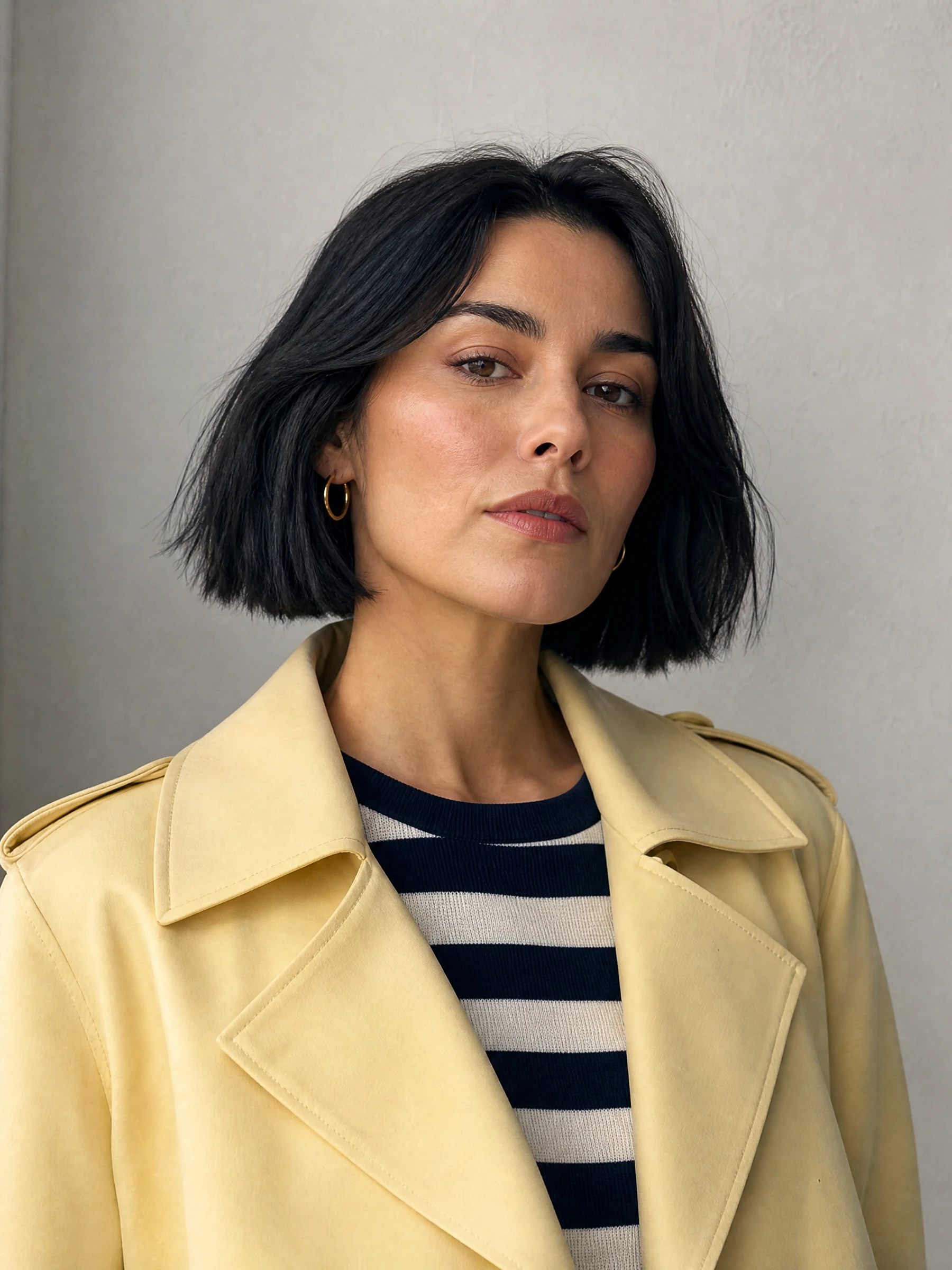
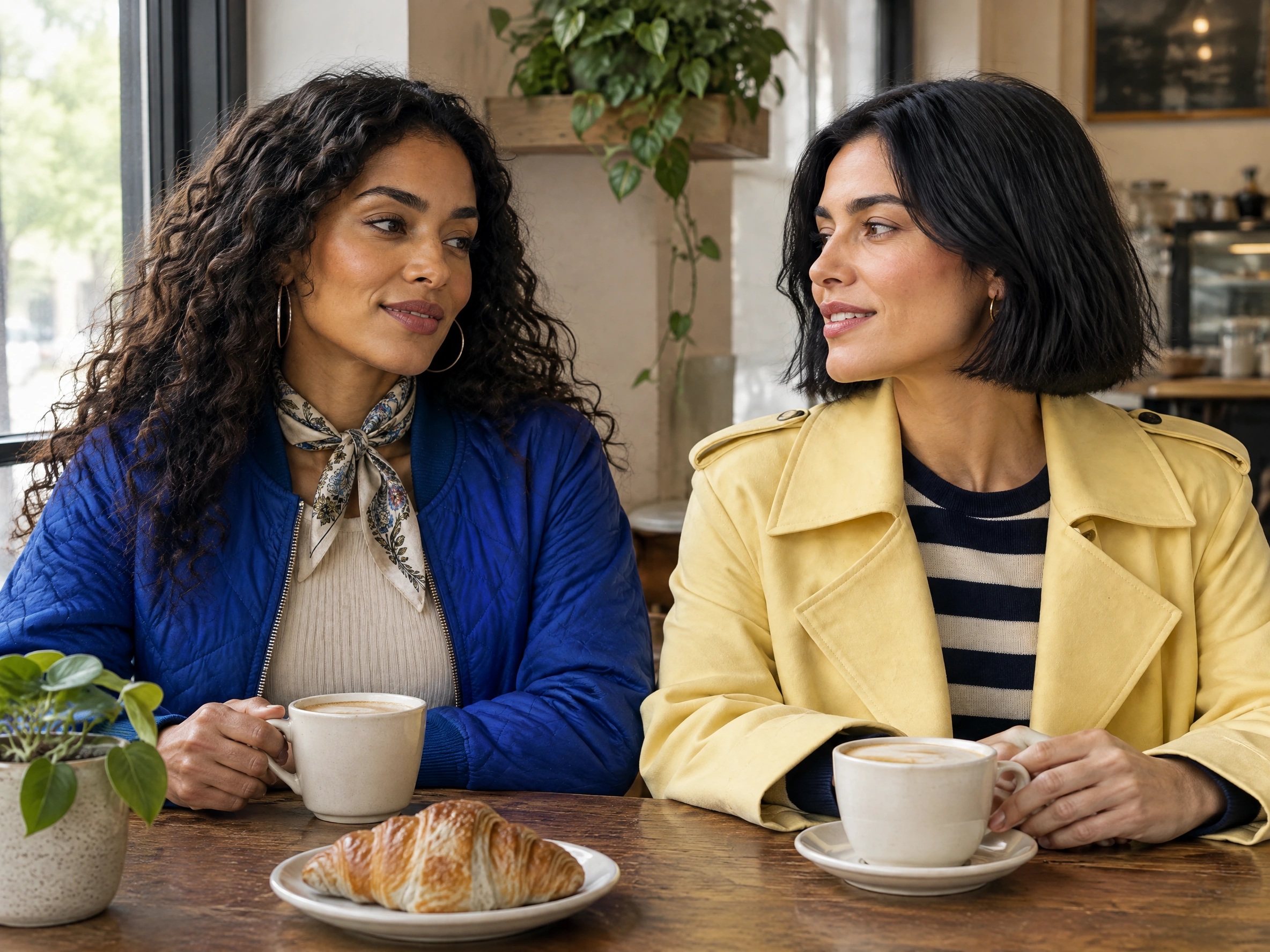
Manual inspection: A retains the blue quilted bomber and scarf; B retains the trench and stripes. Both faces are readable and hands remain with separate cups. The scarf motif and jacket stitching are recognizable rather than pixel-identical; cup handling is partly occluded.
View actual prompt · Friends Together
Character A is Image 1 (Face 1): the clearly adult woman with warm brown skin, long dark curls, silver hoop earrings, a patterned cream neck scarf, cobalt-blue quilted bomber and cream ribbed top. Character B is Image 2 (Face 2): the clearly adult woman with light olive skin, a sharp chin-length straight black bob, small gold hoop earrings, butter-yellow trench and navy-and-cream striped knit. Keep A on the viewer's LEFT and B on the viewer's RIGHT, from the camera's viewpoint. Preserve each person's own face shape, eyes, nose, skin tone, hairline and hair texture from her respective reference. Keep the exact visible reference clothes and accessories assigned to their owner. Do not exchange hair, skin tone, scarf or clothing. Exactly two distinct adults, no extra person, reflected person or duplicated face. Keep both faces readable with space between their heads. Natural skin texture, believable hands and contact, one complete photograph rather than a collage.

An independent neighborhood cafe beside a tall window, worn walnut table, cream ceramic coffee cups, one croissant plate and a potted plant. Eye-level waist-up horizontal photograph with a natural 50mm perspective. A sits at the left, resting one hand around her own cup on the table. B sits at the right, her hands resting near her own cup. They turn slightly toward one another during a relaxed conversation, with small unforced smiles; both faces remain visible in three-quarter view. Soft morning side light reaches both people. Keep their hands separate and purposeful. IMPORTANT CORRECTION: A wears her original quilted blue BOMBER, not a knitted cardigan; B keeps her yellow trench and striped knit. Preserve the reference scarf with A only.
Reference handling: Image 1 is Face 1. Image 2 is Face 2. Preserve both adults' distinct facial features, skin tones and signature hair; never blend or swap their identities. Create the environment from the scene description. Create one physically believable photograph of exactly two adults. No minors, text, logo, watermark or collage.
2. Influencer Collaboration: planning a shared project
An archived collaboration concept. The blue vest and saffron blouse were explicitly requested; this example preserves distinct identities while deliberately changing outfits.

Manual inspection: A wears a blue knit vest and white shirt; B wears a saffron blouse and navy bandana, as explicitly requested. Faces and hair remain distinguishable. Some fingers are hidden by the laptop; unseen anatomy cannot be certified.
View actual prompt · Influencer Collaboration
Use the two supplied fictional adult references as distinct people. Work mode in a warm apartment studio: both lean over an open laptop angled away so the screen is not visible, real notebook with only abstract sketches, pencils, ceramic coffee mugs, fabric samples with patterns, headphones, charging cable and a small desk lamp. Person A wears a cobalt knit vest over a white shirt; person B wears a saffron blouse with a navy bandana. Focused expressions, natural hand positions, believable clutter, afternoon light, documentary editorial photography. No readable text, logos, watermarks, brands, celebrity resemblance, real people, public figures, fake interface, social metrics, testimonials, or minors. Every person is fictional, adult, and non-famous.
3. Two-Person Product Shoot: a headphone demonstration
A supports one finished headset; B points toward its hinge. A fictional demonstration concept, with no real product campaign, endorsement or brand-accuracy claim.
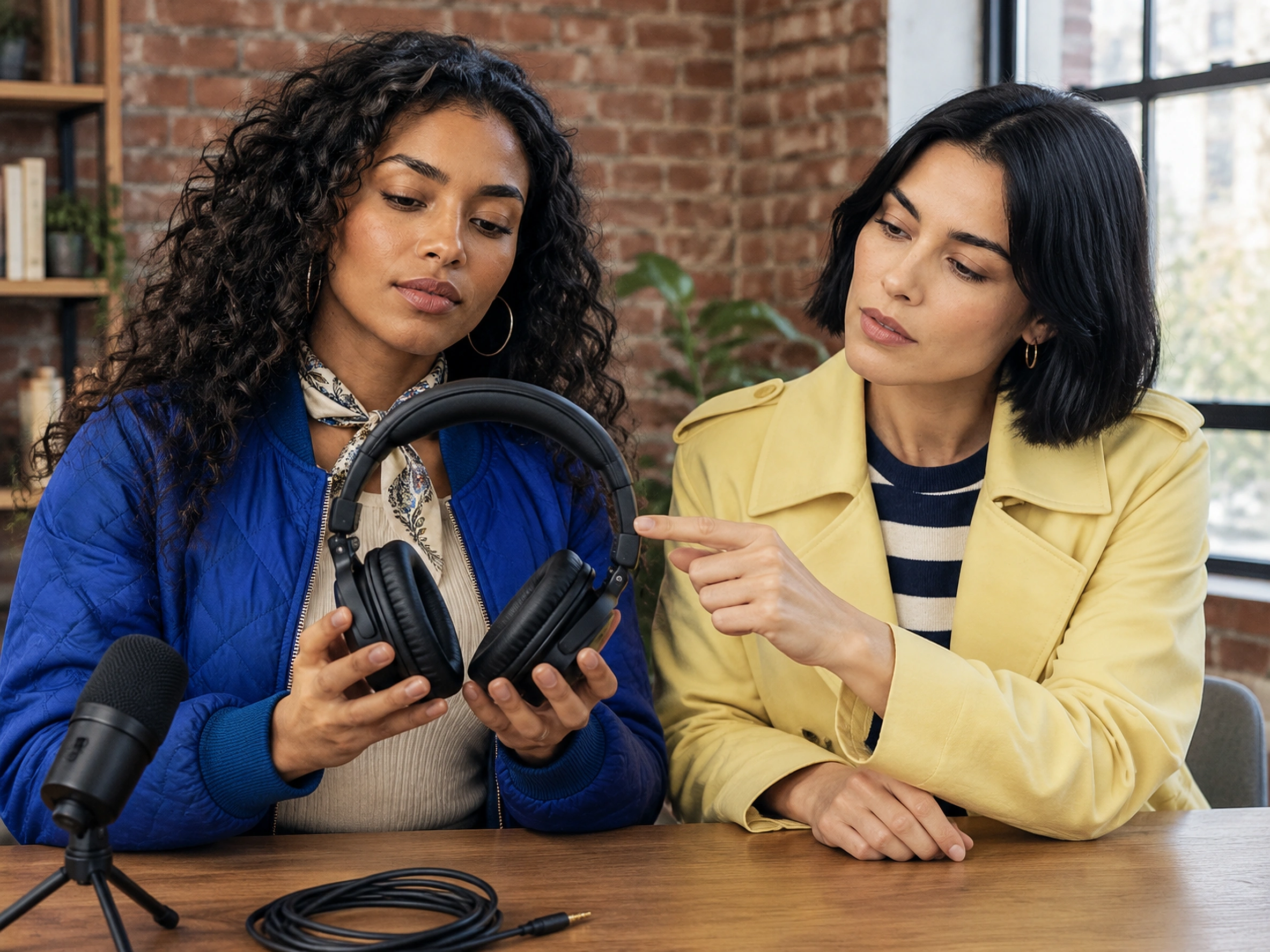
Manual inspection: A supports one coherent headset by its ear cups; B points toward its hinge with a separate hand. Original outfits and distinct faces remain readable. This described object is a concept, not a verified match to a product reference or a real endorsement.
View actual prompt · Two-Person Product Shoot
Character A is Image 1 (Face 1): the clearly adult woman with warm brown skin, long dark curls, silver hoop earrings, a patterned cream neck scarf, cobalt-blue quilted bomber and cream ribbed top. Character B is Image 2 (Face 2): the clearly adult woman with light olive skin, a sharp chin-length straight black bob, small gold hoop earrings, butter-yellow trench and navy-and-cream striped knit. Keep A on the viewer's LEFT and B on the viewer's RIGHT, from the camera's viewpoint. Preserve each person's own face shape, eyes, nose, skin tone, hairline and hair texture from her respective reference. Keep the exact visible reference clothes and accessories assigned to their owner. Do not exchange hair, skin tone, scarf or clothing. Exactly two distinct adults, no extra person, reflected person or duplicated face. Keep both faces readable with space between their heads. Natural skin texture, believable hands and contact, one complete photograph rather than a collage.

Two fictional creators recording a practical headphone demonstration at a lived-in audio creator's worktable. Warm red-brick wall, a tall window, a small desk microphone and a coiled audio cable on the table; no other person or reflection. Eye-level waist-up horizontal photograph, natural 50mm perspective and soft afternoon window light. A is at the left, holding ONE finished matte-black over-ear headset with both hands: fingers support the outer ear cups below her face, with the padded headband and two ear cups fully visible. B is at the right, looking toward the headset and pointing to one hinge with her right index finger from a small distance; her other hand rests on the table. The hands do not overlap and B does not hold a second headset. The headset has coherent padded cushions, hinges, headband and a physically plausible scale. No packaging, display plinth, invented product claim or endorsement. Preserve both reference faces and clothes; this is a fictional product-demonstration concept, not a customer campaign.
Reference handling: Image 1 is Face 1. Image 2 is Face 2. Preserve both adults' distinct facial features, skin tones and signature hair; never blend or swap their identities. Create the environment from the scene description. Create one physically believable photograph of exactly two adults. No minors, text, logo, watermark or collage.
The product example uses a described finished headset. Group Photo does not accept a dedicated product reference, and its compiler excludes text and logos. For branded packaging work, use the AI Product Image Generator and logo and packaging preservation guide.
Explore the tool, or open the two-face Studio to upload.
A real repair: the faces were right, but the brief changed the jacket
Fix a contradictory instruction before blaming identity conditioning. Our August café prompt said “Person A wears a cobalt cardigan.” The result followed that request. It would be wrong for a reference-outfit-preservation task, even though both identities remained recognizable.
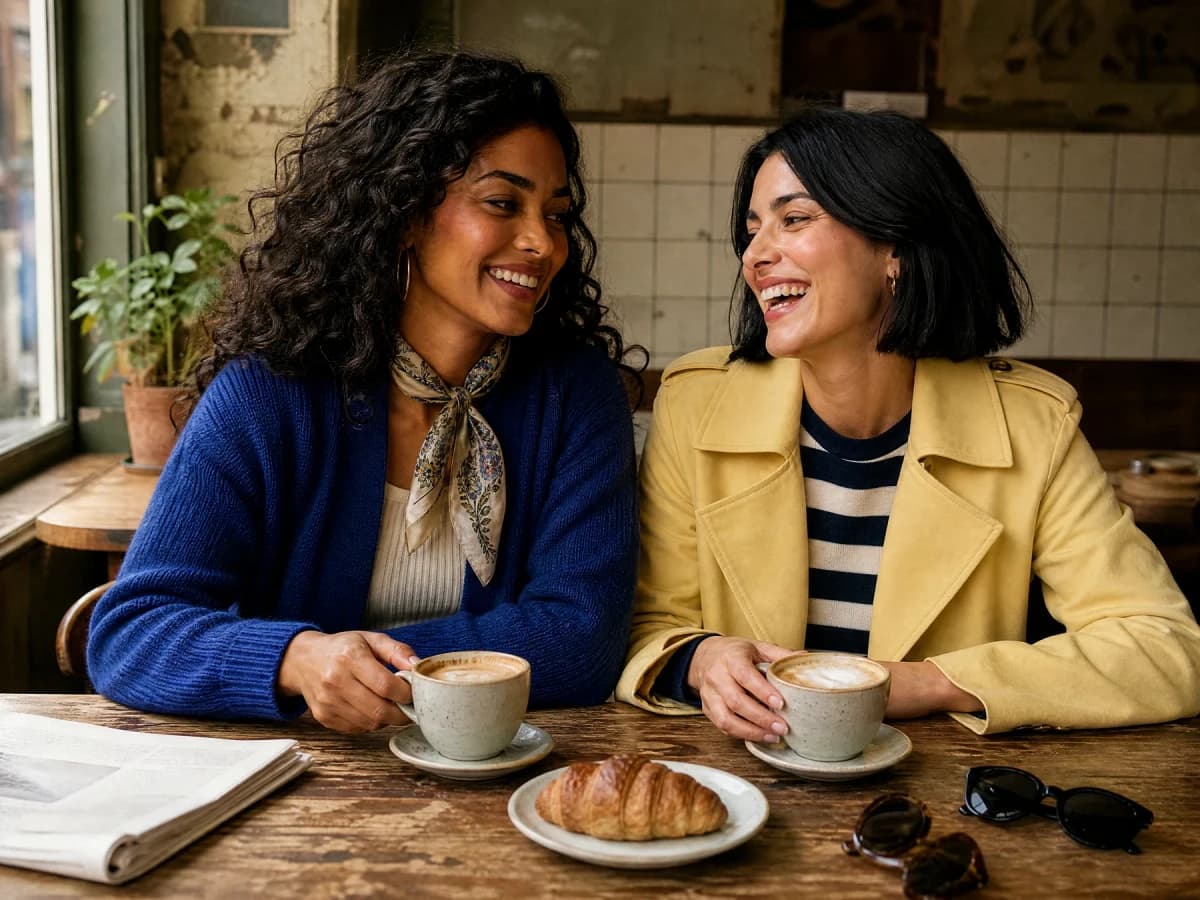
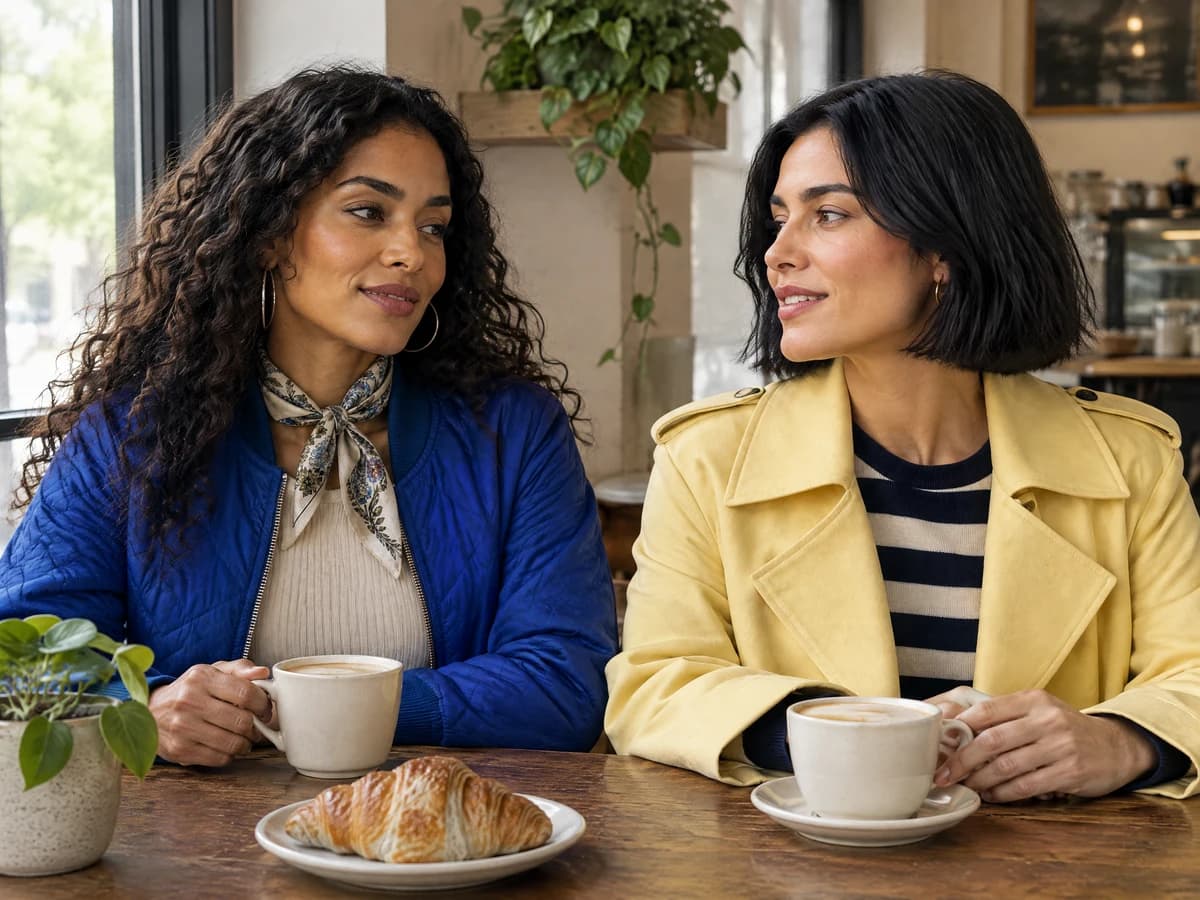
These are separate generations with different framing, dates and models, not a pixel-aligned retouch or a controlled comparison. Inspect the archived image in HD and compare it with the new café case above.
View the exact archived café prompt
Use the two supplied fictional adult references as distinct people. Candid coffee date at a characterful independent cafe with tiled walls, worn wood table, ceramic cappuccino cups with natural foam, a croissant plate, sunglasses and a folded newspaper turned away so no text is readable. Person A wears a cobalt cardigan with patterned scarf; person B wears a butter-yellow trench over stripes. They lean in mid-laugh, one hand around a cup, believable lived-in details, warm morning window light, stylish street-photography feel. No readable text, logos, watermarks, brands, celebrity resemblance, real people, public figures, fake interface, social metrics, testimonials, or minors. Every person is fictional, adult, and non-famous.
Correction used: “A wears her original quilted blue BOMBER, not a knitted cardigan; B keeps her yellow trench and striped knit. Preserve the reference scarf with A only.” We returned to both originals and added clear ownership and viewer-side instructions. The new output restores the bomber. Its scarf motif and stitching are not pixel-identical reproductions.
How the four reviewed outputs compare
Pass means no material visible contradiction at the shown angle during one editorial inspection. Conflict means the brief contradicts the intended reference outfit. Intentional change means the actual prompt requested different clothing. No numerical facial-similarity scores or population success rates are inferred. Hidden details remain unverified.
| Output | Face A | Face B | Clothes | Count & sides | Pose & contact | Shared scene |
|---|---|---|---|---|---|---|
| Archived café · original brief | Pass | Pass | Conflict | Pass | Pass | Pass |
| Café · corrected brief | Pass | Pass | Pass | Pass | Pass | Pass |
| Archived collaboration | Pass | Pass | Intentional change | Pass | Pass | Pass |
| Headphone demonstration | Pass | Pass | Pass | Pass | Pass | Pass |
Four selected outputs: two archived GPT Image 2 requests and two new GPT Image 2.5 Flare requests. They differ in date, model and scene. This is not a controlled prompt-strategy or model comparison. Only the café garment instruction conflict was observed; other troubleshooting failures are prospective guidance. We do not convert these selected checks into an accuracy percentage.
Common mistakes and copyable repair instructions
Repair the smallest visible contradiction and recheck both people afterward. Reattach the clean originals, remove conflicting text and simplify contact before adding more detail. The failures below are troubleshooting scenarios; only the garment conflict above is documented in our selected images.
| Problem | Likely prompt issue | Copyable repair wording |
|---|---|---|
| Faces blend or look alike | Ambiguous identity ownership or overlapping heads | Face 1 belongs only to A on the viewer’s left; Face 2 belongs only to B on the viewer’s right. Restore each reference’s own facial proportions and hair. Leave visible space between their heads. |
| Faces swap sides | Left/right described from different viewpoints | From the camera’s viewpoint: A / Image 1 on the LEFT; B / Image 2 on the RIGHT. Keep A’s face and outfit together. Do not reverse them. |
| Clothes swap or change | A template or garment description conflicts with the reference | A keeps the blue quilted bomber and cream scarf from Image 1. B keeps the yellow trench and striped knit from Image 2. Remove all cardigan, vest and blouse instructions. |
| A third person appears | Crowded scene or a reflection interpreted as another subject | Exactly two adults. Use an empty café corner, no patrons, no mirrors, no reflected people and no duplicate faces. |
| Arms cross or hands merge | Too many simultaneous interactions or shared grip | Separate their forearms. A holds A’s own cup; B rests both hands beside B’s cup. Keep a clear gap between their hands. |
| One person floats or looks pasted in | Conflicting camera height, scale or light | Place both adults on the same floor plane, at the same table, photographed by one eye-level camera with soft window light from the same side. |
If a face is obscured by hair, a hand or an extreme angle, first ask for both faces in a readable three-quarter view. If hands remain unclear, use separate objects or no shared grip. “Make it perfect” does not identify the error.
Two-Character AI Prompt Builder
Set input ownership once, then choose positions, clothing and one shared interaction. This free writing tool builds a complete two-person AI photo prompt. Switching A’s side also switches B’s side while keeping Face 1 and Face 2 attached to their original identities.
No account needed to build or copy. Attach your two references in Studio; copying text does not attach images or generate a photo. Choose a scene and action that agree with each other.
Copy your brief into Group Photo, upload the two matching references and inspect the result. For scene inspiration, explore AI People Together. For a recurring duo’s action-and-reaction format, read the Harold Puddington case study; that source analysis is separate from these fictional examples.
Frequently asked questions
Can I use two separate photos to make one AI image?
Yes. In Group Photo, put the first authorized adult portrait in Face 1 and the second in Face 2. A template supplies the scene; your prompt assigns positions, clothing and interaction. A new generated photograph may still change details, so compare both originals before using it.
How do I keep two AI faces consistent?
Use one clear individual reference per person, keep input order stable and describe each identity separately. Avoid conflicting hair or clothing instructions. Review A against A and B against B at full size; a two-person thumbnail can hide identity drift.
How do I control who appears on the left?
Write ‘Character A / Face 1 on the viewer’s left; Character B / Face 2 on the viewer’s right, from the camera’s viewpoint.’ The face slots identify the people; they do not automatically determine screen position. Check the generated result.
What should I do after the model mixes the faces?
Return to the two clean originals, remove conflicting descriptors and simplify the pose. Name which face is wrong and which reference should replace its features. Generate a new attempt and inspect both people again; the correction can affect the other face.
Can I upload a product reference as well?
This Group Photo workflow has two face slots and an optional location image. It does not have a dedicated product-reference slot. A described object can support a concept, but this is not a promise to reproduce a branded product or label exactly.
Are Character A and Character B special controls?
No. They are plain-language labels in this tutorial. The actual inputs are Face 1 and Face 2; Studio compiles its face placeholders into image references. There is no separate identity-lock or left/right switch.
Can I make videos with the pair afterward?
Approve a still with both identities and a readable interaction first. If you then use an image-to-video workflow, start with a restrained motion brief and inspect both faces throughout the clip. A successful still does not prove that video identity will remain stable.
Sources, generation method and limitations
Our evidence is a traceable editorial case, with full prompts and file hashes. Two existing fictional adult references and two archived scenes came from the August 31, 2026 GPT Image 2 asset record. Two fresh outputs were generated on October 22, 2026 using those same two original references.
| Item | Method / boundary |
|---|---|
| New generation | 2 accepted, completed requests; gpt-image-2-5-flare-image-to-image; 2K; 4:3; opaque background; two reference URLs per request; no seed exposed |
| New supplier usage | 20 supplier credits total, as returned by creditsConsumed. This is not app credits, a currency cost or a customer price. |
| Archive | 2 reference portraits and 2 selected scene outputs, GPT Image 2, August 31, 2026; historical usage retained separately in the downloadable record |
| Image processing | WebP resizing and compression only; original-resolution WebP links. No face replacement, concealed repair, montage presented as an output or product compositing. |
| Review | One editorial full-size inspection against both originals, across face A, face B, clothing, count/sides, contact and shared scene. Qualitative, not biometric scoring. |
| Product workflow check | Signed-in uploads, saved-character selectors, template application, editable Prompt and permission validation checked separately; no paid Studio request submitted for this article. |
Download the sanitized generation and review record: exact prompts, provider task IDs, models, dates, dimensions, supplier usage and source/output hashes. Temporary supplier result URLs and credentials are omitted.
A selected pair of distinct hairstyles is easier to tell apart than two nearly identical characters. Close contact, matching clothes, extreme profiles, low-quality inputs and more people can create different difficulties. One reviewer and four selected outputs cannot establish a benchmark, guarantee exact identity or isolate which prompt clause caused an improvement.
First-party references
- Runway: Creating with Gen-4 Image References — first-party guidance on combining references, including clear character inputs and named references.
- Runway: Advanced References Use Cases — first-party examples of separating character references and guiding composition with labels or sketches.
Sources checked October 22, 2026 through indexed excerpts of the official pages; direct page retrieval was restricted. Runway’s named references and annotation examples are Runway-specific. Our Group Photo tool uses its own Face 1 / Face 2 workflow; this article does not claim it offers Runway controls or uses that model. Repair wording and the review rubric are our operational recommendations.
Give each character a clear role in the same photograph
Start with two clean references, one shared scene and one readable interaction. Keep the inputs, prompts and approved output together so the next scene has a reliable identity standard. Review the whole photo before expanding the pose or adding motion.
Explore the tool, or open the two-face Studio to upload.
Plan Content
Measure Engagement
Build Your Profile
Price Your Work
Write Post Copy
Brand Partnerships