
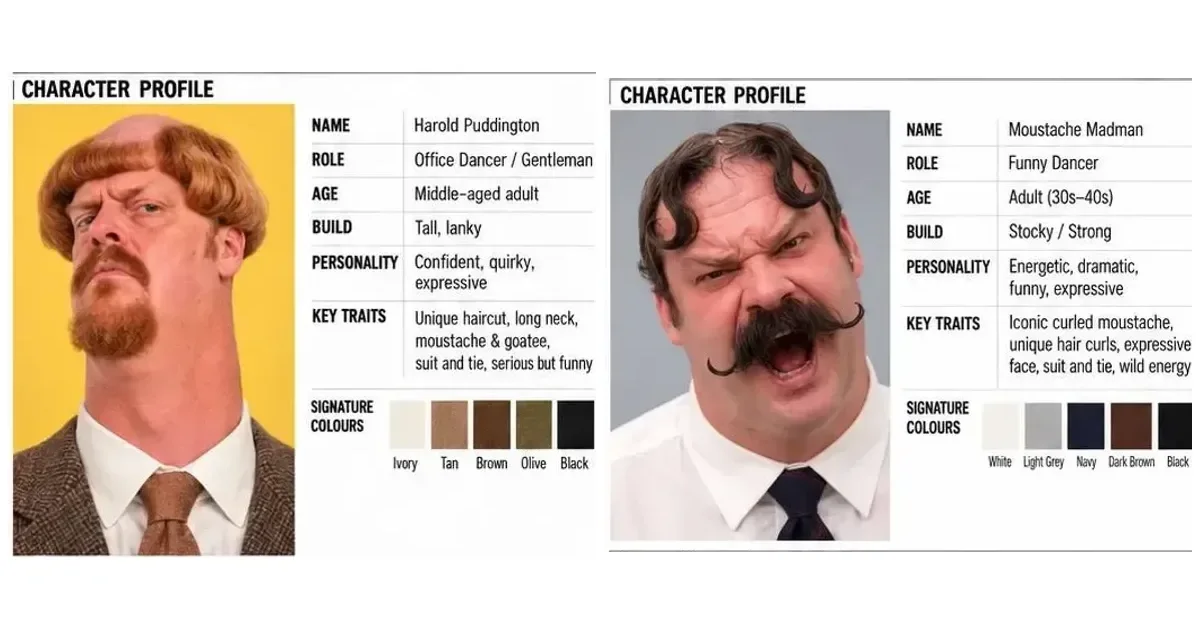
Harold Puddington AI: the account and the reported growth
AI Influencer Generator helps creators develop reusable fictional identities. This independent case study examines @haroldpuddington, whose source profile screenshot labels it an “AI-generated profile” and uses the line “Suit on. Ready to dance.” We have no evidence that our product was used to make it.
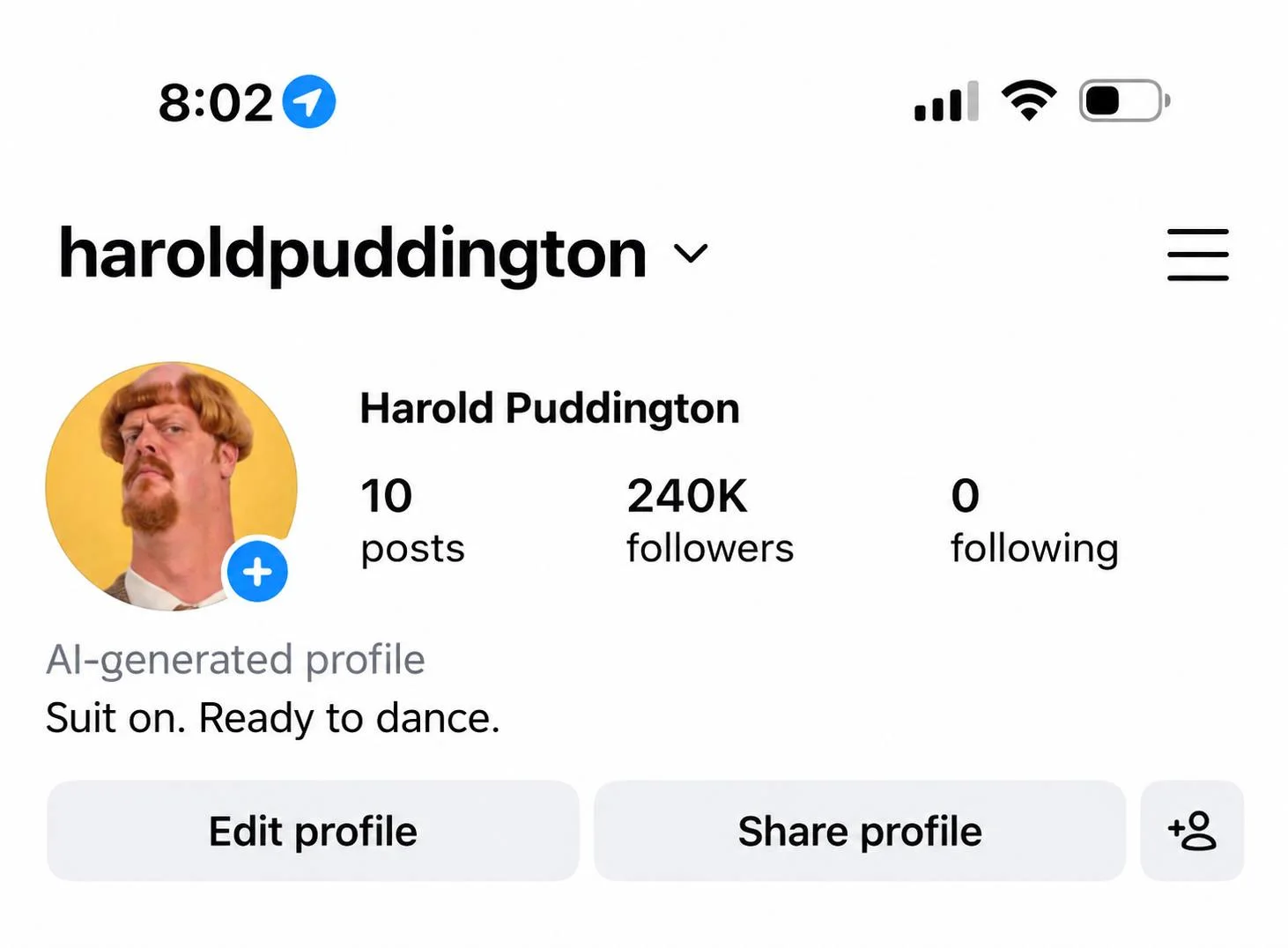
In an X post published October 16, 2026 at 00:19 UTC, @0xAI42exe reports that the account grew from 191K to 240K followers in a few days, with 10 posts and a clip approaching 563,000 views. The attached profile screenshot supports the displayed 240K and 10-post snapshot. It cannot independently establish the earlier count, elapsed time or video views.
A later check does not match
Our public Instagram check on October 17, 2026, around 09:30 China Standard Time (UTC+8), displayed 202K followers; the page's accessible label read 202,503. That conflicts with the attached 240K snapshot. We could not reconcile the difference.
Treat the 49K figure as a reported historical gain. These observations do not prove a subsequent decline, a false screenshot or a caching explanation. They also do not show that the second character caused growth.

| Claim or observation | Source | What we can conclude |
|---|---|---|
| 240K followers / 10 posts | Profile image attached to the October 16 X post | Visible rounded counters; capture time unknown |
| 191K → 240K in a few days | October 16 X author's report | 49K is the difference between reported rounded counts; interval unverified |
| About 563K views on one clip | Same X post | Reported Instagram reach; original Reel analytics not obtained |
| Half the posts followed Madman's arrival | Same X post | Reported sequence, not a dated post-by-post audit |
| 202K / accessible label 202,503 | Our October 17 public Instagram check | Conflicts with the source snapshot; reason unknown |
| 192K followers | Earlier October 11 X post quoted by the author | Another reported baseline; it does not corroborate an exact 191K starting count |
The arithmetic 240K − 191K = 49K is straightforward. Dividing 49K by 191K gives about 25.7%, but both inputs are rounded reports. Neither calculation supplies a verified growth rate, retention result or revenue figure. X's own post-view counter is also separate from the reported Instagram video views.
Why two consistent AI characters can make a better series
A second character adds a reaction, a relationship and a reason for the next shot. That is the useful creative lesson here. It is an interpretation of the visible material, not a controlled explanation for the follower claim.
1. Make the contrast readable before the joke begins
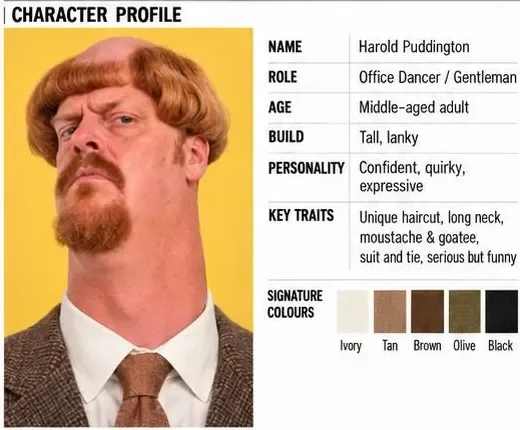
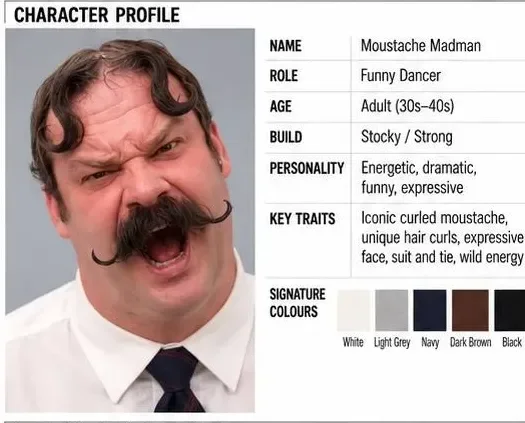
Harold has a long, narrow silhouette, ginger hair and facial hair, and a brown suit. Madman has a broader build, dark hair curls, a large handlebar moustache, a white shirt, a dark tie and mustard trousers. A viewer can distinguish them even when one face is small in the background. Their formal clothes belong to a shared visual world, while their proportions and grooming separate their identities.
2. Give the setting a recurring job
The wooden fence, climbing plants and paved yard keep the scene familiar. Reusing that environment leaves the performance to supply the variation. It also gives an editor continuity anchors: fence lines, light direction, camera height and the distance between the two bodies. A new location in every clip would ask viewers to decode more before reaching the joke.
3. Write a relationship that can reverse
In the opening, Madman dominates the foreground while Harold claps behind him. Later, Harold takes the foreground reaction and Madman responds behind him. The comic role moves between the pair. A background performer remains part of the story rather than becoming decorative scenery.
This creates a reusable episode structure: one starts a routine, the other reacts, the reaction escalates, then the roles reverse. Viewers can anticipate the pattern while a new gesture, timing change or interruption supplies the surprise. That is how a pair can support a series without requiring a new identity for every post.
One AI character creates content.
Two consistent characters create a show.
The distinction from our Baki case study is the focus on an exchange between two recurring performers. The Magnus Brick case study explores another kind of pairing: a visual contradiction between a bodyguard and his duck. Here, both characters can initiate and answer a comic beat.
AI character consistency: what the two Character Sheets contain
A Character Sheet is a visual specification for one identity across changing views and performances. Both source sheets use the same broad structure, but their values and acting references differ. It is helpful to separate what defines the person from what changes during a shot.
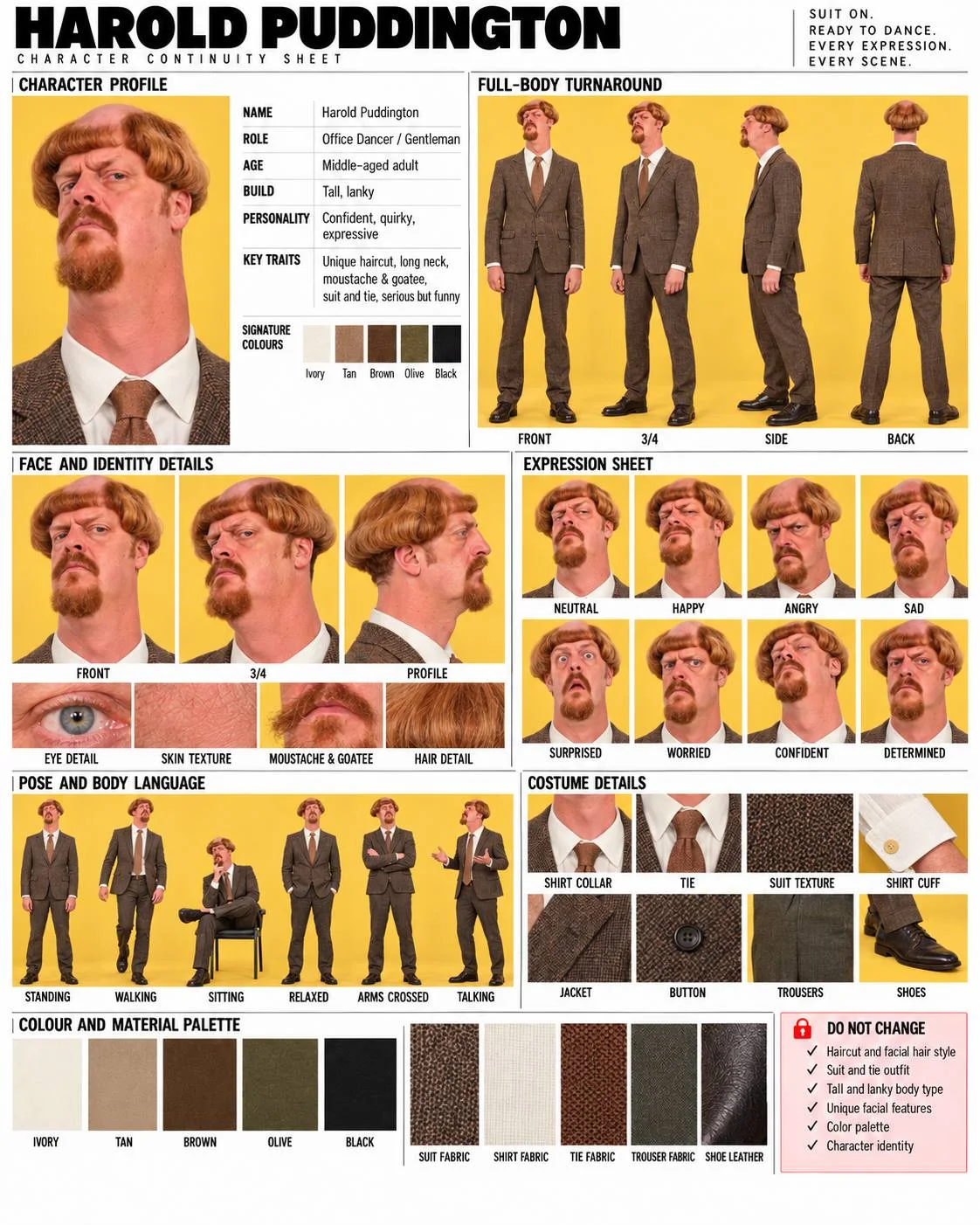
Multi-angle views describe shape, not just a flattering portrait
Each full-body turnaround contains front, three-quarter, side and back views. Those panels explain silhouette, trouser fit, jacket or shirt shape and hair from behind. The separate front, three-quarter and profile face views make the nose, jaw, facial hair and hairline easier to compare when the head turns. Eye, skin and hair detail crops encourage texture checks instead of judging identity only from a distant face.
Eight expressions preserve identity while changing the performance
| Harold Puddington | Moustache Madman |
|---|---|
| Neutral · Happy · Angry · Sad | Neutral · Happy · Angry · Sad |
| Surprised · Worried · Confident · Determined | Surprised · Confused · Excited · Determined |
The lower row is tailored to each personality. Harold's confidence and worry suit a self-serious dancer; Madman's confusion and excitement support bigger reactions. An expression should change the mouth, eyebrows and cheek tension while leaving the person recognizable. A wide-open mouth is a particularly useful review case because teeth, moustache edges and jaw shape can shift.
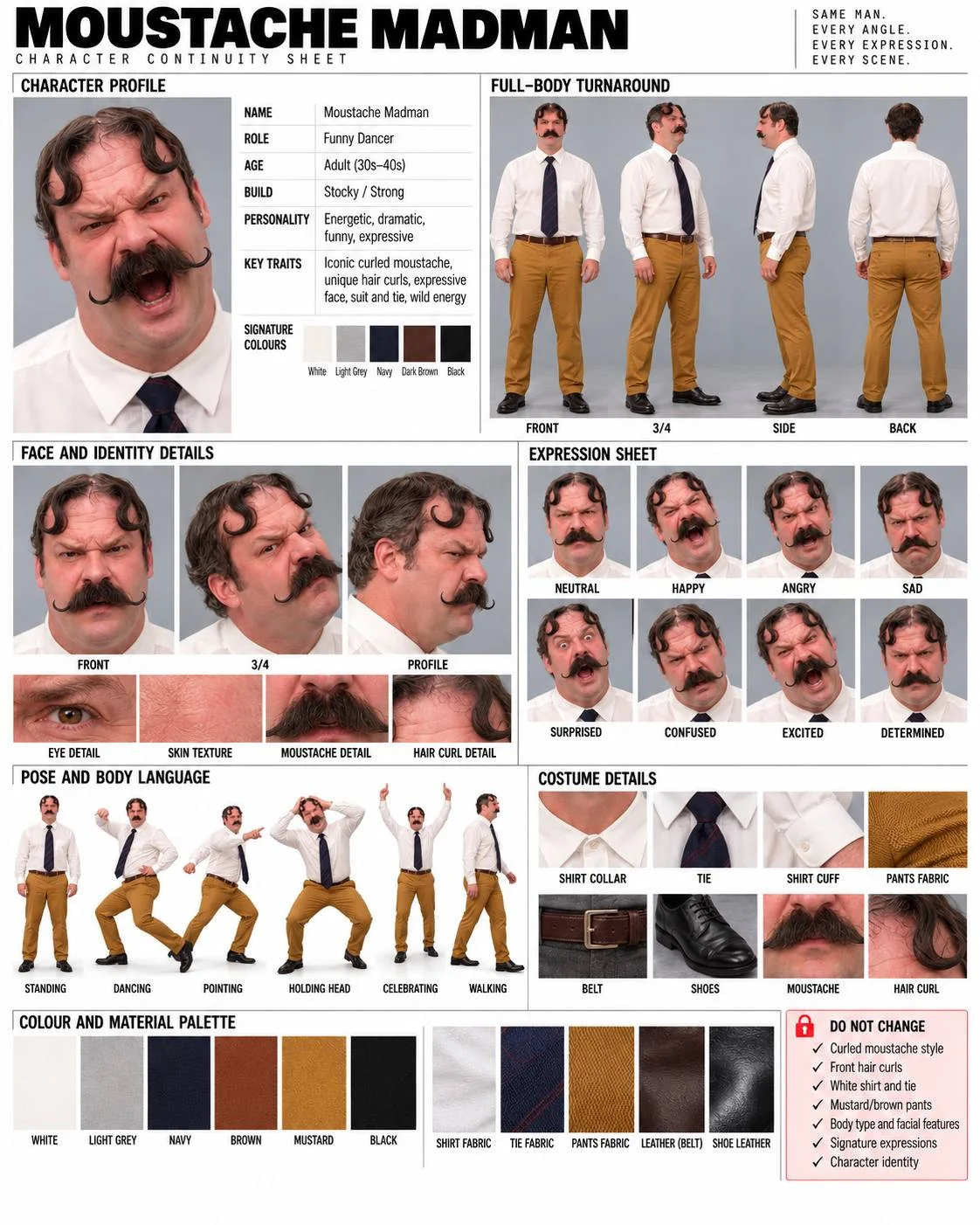
Six poses turn personality into body language
Harold's six references are standing, walking, sitting, relaxed, arms crossed and talking. Madman's are standing, dancing, pointing, holding head, celebrating and walking. The head-holding pose is directly relevant to the video's comic reaction. These are still pose references; they do not provide movement timing, foot trajectories or evidence of a motion-capture system.
Clothing, materials and color keep the pair in one world
Harold's sheet breaks down the shirt collar, tie, suit texture, cuff, jacket, button, trousers and shoes. Its five-color palette is ivory, tan, brown, olive and black, with fabric and leather swatches underneath. Madman's sheet emphasizes white shirt fabric, a dark patterned tie, mustard trouser fabric, a brown belt and dark shoes, alongside moustache and hair-curl close-ups.
The X post describes “3 of 5” shared colors. The images are more nuanced: Madman's signature strip has five swatches, while his bottom palette has six—white, light grey, navy, brown, mustard and black. Harold uses ivory rather than a literally identical white. The practical lesson is coordinated light, brown and dark tones with distinct accent colors; it is not a mathematically identical palette.
| Layer | Harold | Madman |
|---|---|---|
| Head and face | Ginger bowl-shaped side hair, long neck, moustache and goatee; blue eyes reported in the post | Curled handlebar moustache, dark front hair curls and exposed crown |
| Body | Tall and lanky | Stocky / strong |
| Wardrobe | Brown textured suit, light shirt and brown tie | White shirt, navy tie, mustard/brown trousers |
| Sheet's DO NOT CHANGE block | Haircut/facial hair; suit and tie; body type; facial features; palette; identity | Moustache; front curls; shirt and tie; trousers; body/facial features; signature expressions; identity |
DO NOT CHANGE is a review contract, not a magic command
The lock blocks distinguish stable identity from variable action. Keep face geometry, grooming, body proportions and the established costume fixed for this series; vary head angle, gesture, expression and who leads the scene. A new outfit can be a deliberate later chapter, but an unplanned costume swap halfway through a shot is a continuity failure.
A sheet helps a creator choose clean reference images and reject drift. It does not prove that the video system automatically reads all panels or enforces each rule. The source does not establish custom training, LoRAs, face embeddings, a fixed seed or any other hidden identity mechanism.
Multiple AI characters in one video: the foreground handoff
The visible trick is an exchange of attention within a stable setting. The approximately 15-second source video moves from Madman's large foreground reaction to Harold's. The following stills preserve their original frame proportions; no replacement faces or generated details have been added.
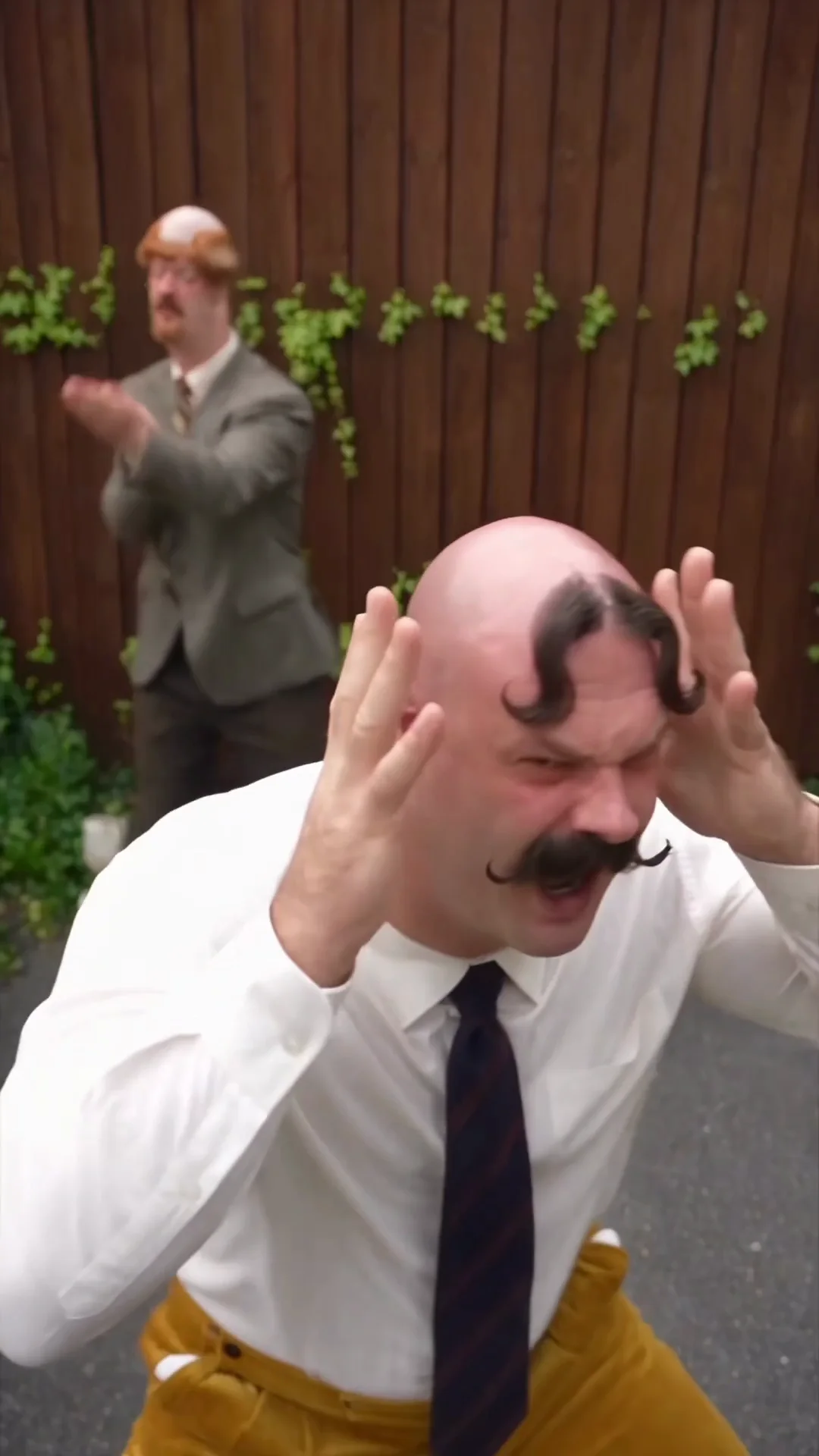
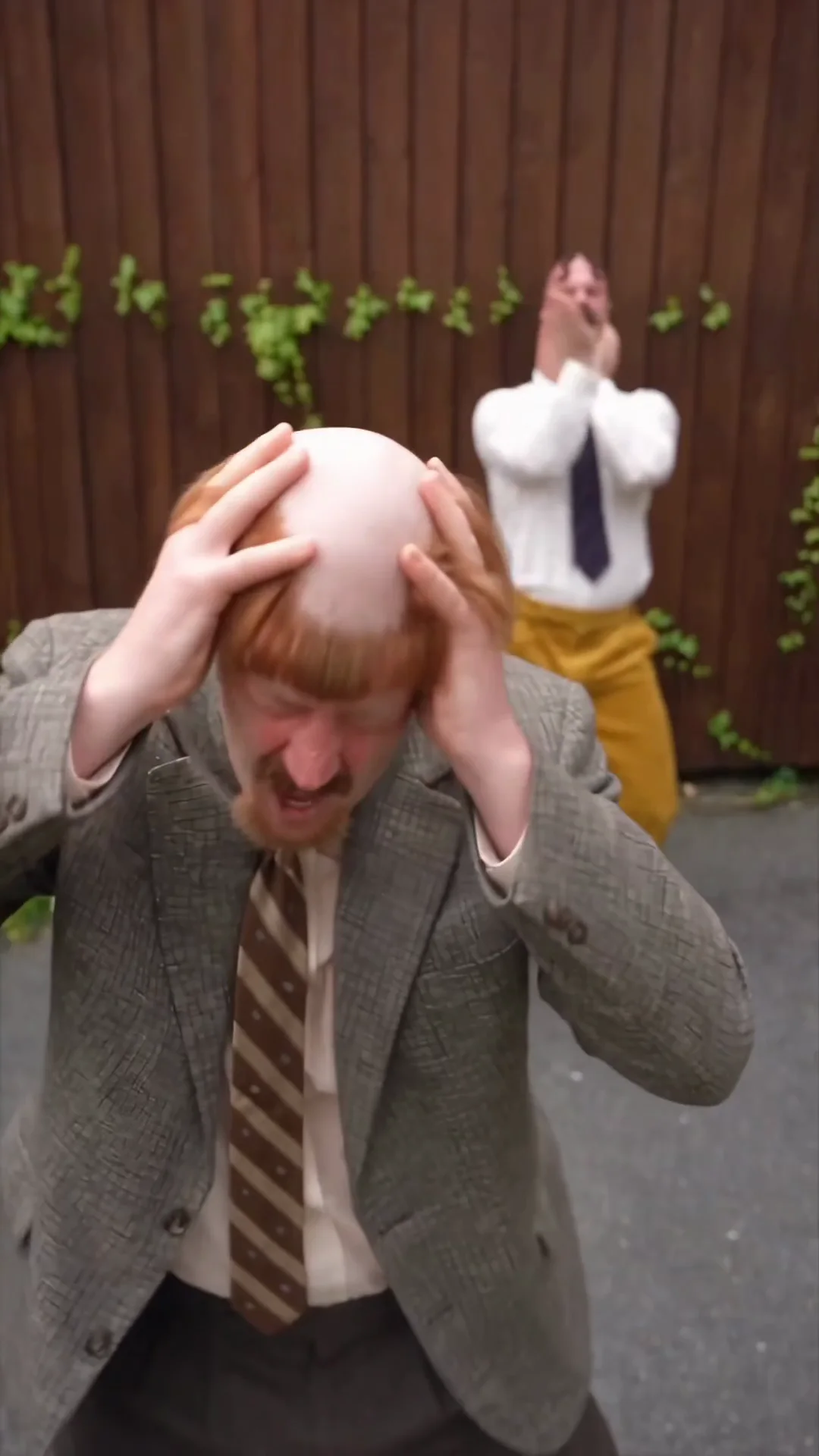
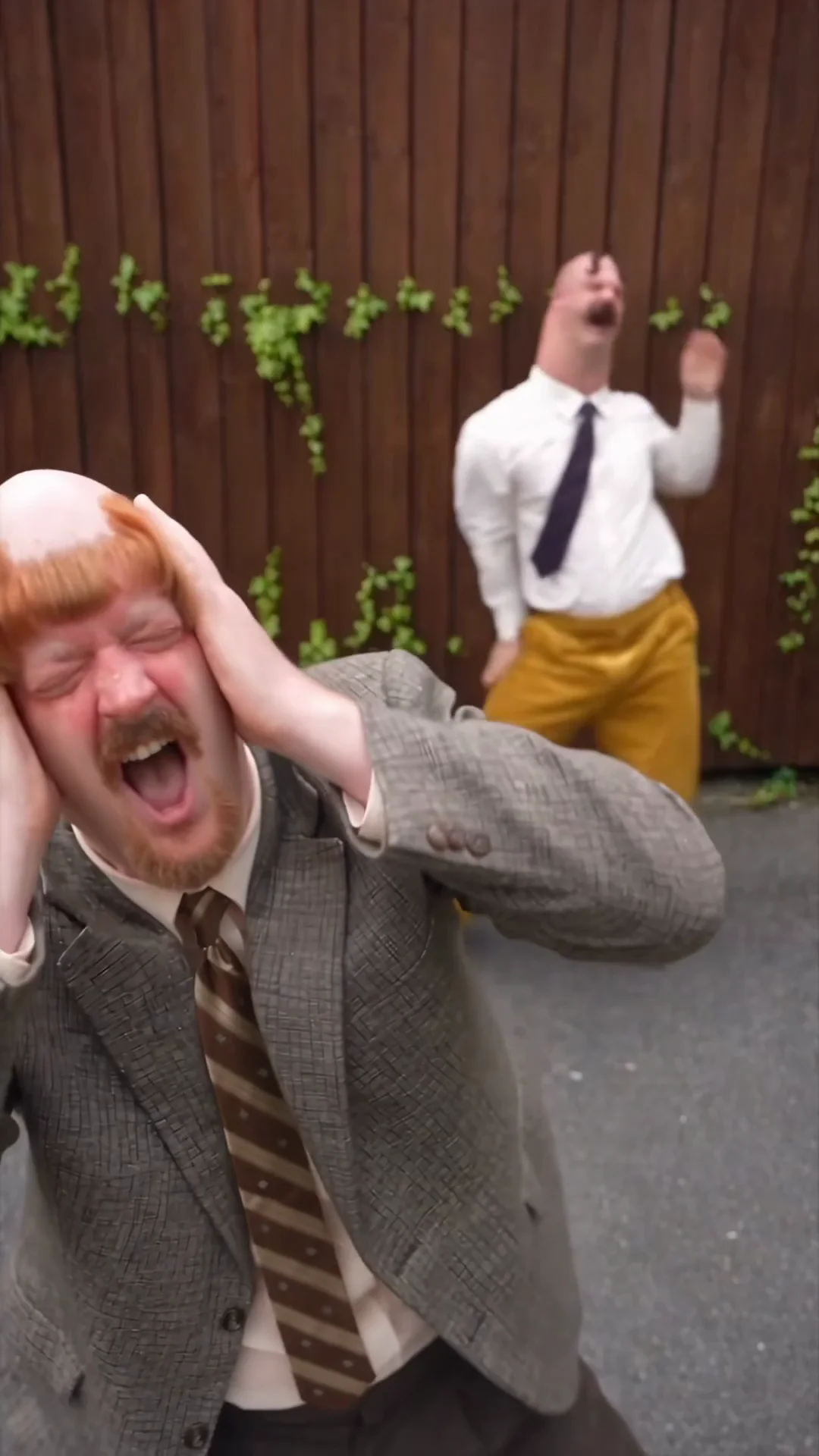
Frames extracted from the video attached to @0xAI42exe's October 16 post. The source has motion softness and defocused background faces. These are editorial evidence, not approved product-quality examples or proof of “zero drift.”
What the frames show—and what they cannot show
The camera distance makes the foreground face and hands the main event. The other performer's smaller silhouette, outfit and response keep the pair legible. The consistent fence and planting tie the views together. The clip demonstrates a role reversal across shots; it does not establish that both bodies travel past one another in one continuous, unedited take.
The author points to a Madman reaction around 0:04 and a Harold reaction around 0:12, describing three shots and “zero drift.” Our sampled frames support the broad handoff, but not an exhaustive identity score. Background blur makes fine facial comparison difficult. Even recognizable characters still need checks for hands, hairlines, tie patterns, facial hair and body proportions during fast movement.
A plausible production workflow, with the unknowns left open
A practical reconstruction would establish each identity, approve a shared-scene still, generate short action shots, then edit the strongest reactions into a sequence. Image-to-video, reference-driven motion and compositing are possible techniques. The finished clip alone cannot tell us which was used.
The author's October 11 post reports creating a sheet in Nano Banana 2. That attribution does not identify the video model or verify how the second sheet was produced. The October 16 material provides no generation history, motion reference, prompts, seed settings or editing project. Our tutorial below describes a route through our own tools, not the account operator's verified stack.
How to create your own consistent AI character duo
Build two original adult identities, approve them separately, then test them together. Reproduce the structure of a recurring partnership with your own faces, styling, premise and performance material. The examples below are written briefs, not new generated results.
- Two saved identitiesOne approved reference for each adult.
- One shared stillFace 1 + Face 2, clear positions and light.
- Short action shotsSimple shared motion or individual performances.
- Review and repeatCheck continuity; publish a new story beat.
Step 1. Create two characters with a playable contrast
Use Create AI Influencer twice. Give each fictional adult a name, distinct face, readable silhouette and a different way of responding to the same problem. Save them as separate identities. A useful pairing has a relationship as well as different clothes.
Nola: a lean adult in her fifties with a long silver braid, square black glasses, plum work jacket and slate trousers. Patient and exacting; she treats a tiny gardening task like a formal ceremony.
Ivo: a stocky adult in his forties with close dark curls, a clean-shaven round face, ochre chore jacket and dark jeans. Eager and theatrical; he celebrates before the task is finished.
Recurring premise: Nola demonstrates one simple routine. Ivo overcommits. In the next episode, Ivo leads and Nola tries to keep up. Their courtyard and tools stay familiar.
For a deeper identity brief, follow our AI influencer persona guide. Approve the face before generating a large batch of scenes.
Create the first character in your duo
Step 2. Build a Character Sheet and keep each identity separate
Open your saved identities in My Influencers and inspect the available Character Sheet views. Use the Consistent Character Generator workflow to reuse each saved person across scenes. The product's sheet is not a promise to reproduce the source's exact eight-expression, six-pose poster automatically.
Keep a compact identity guide beside each sheet: fixed face and hair, apparent adult age, body proportions, signature styling, permitted expressions and prohibited changes. Check a front view, profile and expressive face. For an additional scene test, use Create Photos with the same saved character in a different pose. Reject a reference if it already looks like a different person.
For Nola, the silver braid, square glasses and facial structure belong in the lock list; “raises one eyebrow” belongs in the shot instruction. For Ivo, keep the round face and close curls fixed while changing his gesture. This separates identity from acting.
Build consistent character references
Step 3. Make a two-person reference with AI Group Photo Generator
Open AI Group Photo Generator and continue to its Group Photo workspace. Assign Nola to Face 1 and Ivo to Face 2, using a saved influencer or a clear authorized portrait for each. The current tool supports exactly two adults and an optional location reference.
Use a clean single-person portrait in each face slot. Keep the full Character Sheets for continuity review rather than assuming a multi-panel collage will be parsed as one face. Describe left/right positions, distance from the camera, the action and a shared light direction.
Two adult allotment neighbors in a paved courtyard beside a weathered green potting shed, soft overcast daylight. Nola, Face 1, stands left in the foreground, silver braid over her shoulder, square black glasses, plum work jacket and slate trousers, one eyebrow raised. Ivo, Face 2, stands a step behind on the right, close dark curls, clean-shaven round face, ochre chore jacket and dark jeans, preparing to clap. Their arms do not overlap. Keep both identities distinct and both bodies grounded on the same paving.
Review both faces, scale, hands, foot contact and shadows. Save the accepted image as the scene reference. A group photo establishes composition; it does not guarantee that a video model will preserve two identities throughout motion.
Bring your two original characters into one photo
Step 4. Choose the right AI Video or Motion Transfer route
For a shared shot, open Image to Video and upload the approved still in Animate Photo. Request one simple action per character with a stable camera: “Nola raises one eyebrow; Ivo claps once behind her; both remain in their starting positions.” Check the available model, duration and credit quote before generating.
This is a proposed starting test, not a verified guarantee of reliable two-person animation. Our current image-first workspace accepts a still image and an action prompt; this research did not run a new paid dual-character generation. Start with a short, low-complexity shot before attempting two people dancing, crossing paths or touching.
For a specific dance, AI Motion Transfer pairs a character image with an authorized movement reference. The current Motion Transfer workspace is oriented around one clearly visible performer. Make individual dance and reaction shots, then assemble them in an editor. Do not assume that a two-person reference clip can independently map its performers onto Face 1 and Face 2.
Our Motion Control dance tutorial explains the single-character workflow. For a true two-person continuous shot, use only controls explicitly supported by the chosen video model and judge the actual result. If faces blend or roles swap, simplify the scene or use separate reaction shots.
Test a simple shared-scene video
Create an individual dance or reaction shot
Step 5. Make the next episode recognizable and different
Keep the identities and relationship, then change one story beat. For Nola and Ivo, an initial sequence could be: Nola leads a warm-up; Ivo celebrates too early; Ivo teaches the return routine. This is an editorial test plan, not a growth forecast. Use your saved influencers for continuity and return to the same Group Photo pair when planning a new shared scene.
Record which episode, opening action and role reversal you tested. Compare completion, repeat viewing, comments about the characters and profile follows using the platform's available analytics. Different publication windows and distribution make raw view totals hard to compare. Our Instagram growth guide covers the broader publishing loop.
Plan the next episode with your saved duo
A continuity check before publishing
Review each person independently, then review the relationship. A believable foreground face can hide a failed background identity. Compare the sheet, the shared still and several frames during the action.
| Check | Pass condition | Reject or revise when |
|---|---|---|
| Face and grooming | Each face remains recognizable in front, profile and expression | Moustaches, hairlines, glasses or face shapes migrate between people |
| Body and costume | Proportions and outfit belong to the correct identity | Builds blend, jackets switch owners or ties change during the shot |
| Position and attention | The prompt's foreground/background roles remain readable | The model swaps performers or hides the responding character |
| Physical interaction | Hands have a clear purpose; feet and shadows remain grounded | Fingers merge, bodies overlap implausibly or contact floats |
| Cut-to-cut continuity | The yard, light and wardrobe support the same episode | A cut silently changes the person, costume or setting |
Inspect the source at full size, then the final vertical crop on a phone. Watch once for the joke and once for anatomy and identity. Keep AI disclosure clear and use characters, performances and music you have permission to publish. The Harold materials are references for analysis, not a likeness or choreography pack to copy.
What this case teaches about consistent AI characters
Two consistent AI characters create a reusable relationship: an action, a response and the option to reverse roles. Character Sheets support that relationship by making identity stable across different angles and expressions. A shared-scene reference then establishes where both people belong before movement is added.
The Harold Puddington AI case illustrates that creative structure. It does not verify that the partnership caused 49K new followers, that the clip has perfect consistency or that any specific video model was used. The repeatable lesson is to design the pair, preserve each identity and test one readable interaction at a time.
Start your own original AI character duo
Frequently asked questions
Who is Harold Puddington AI?
Harold Puddington is the fictional, AI-generated dancing character associated with Instagram account @haroldpuddington. The source Character Sheet describes a tall, lanky, middle-aged office dancer in a brown suit. Moustache Madman is the contrasting recurring partner shown in the October 16, 2026 X breakdown.
Did Harold Puddington gain 49K followers in a few days?
That is the X author's report, not independently verified growth. The October 16, 2026 post says 191K became 240K, and its attached screenshot shows 240K followers and 10 posts. Our October 17 public Instagram check displayed 202K, with 202,503 in the page's accessible label. The conflicting snapshots do not establish an exact growth interval or its cause.
How do Character Sheets help AI character consistency?
A Character Sheet defines the same identity across body angles, face angles, expressions, poses, clothing and materials. A DO NOT CHANGE block makes fixed traits explicit. It helps select references and review outputs, but does not guarantee identity preservation or prove that a generator consumes every panel as a separate control.
How can I create multiple AI characters in one video?
Create and save two separate original adult identities, approve a reference for each, and combine them with AI Group Photo Generator. Use the approved two-person still as an Image to Video input and request one simple action per person. Review both identities frame by frame. This is a suggested workflow; reliable independent control of two performers has not been verified in our product.
Can Motion Transfer animate two dancers independently?
Our current Motion Transfer workflow is designed around one clearly visible reference performer and one character image. It has not been verified as two-person motion control. Use it for individual dance or reaction shots, then edit those into a sequence, or test a simple shared-scene action through Image to Video.
Which AI tools made the Harold Puddington videos?
The October 11 X post reports generating a Character Sheet in Nano Banana 2. The October 16 post supplies two sheets and a finished video, but does not establish the video model, motion reference, editing method or generation settings. There is no evidence that AI Influencer Generator made this account's content.
Does adding a second consistent AI character guarantee followers?
No. A second character creates opportunities for reactions, role reversals and recurring stories. The Harold example illustrates that creative structure, but the available evidence does not isolate its effect on follower growth, retention or revenue.
Sources and research method
Reviewed October 17, 2026. We read the original X post in Chrome, downloaded its profile screenshot and two Character Sheets, inspected them at full size, and extracted frames at 0.5, 7.5 and 12.2 seconds from its attached video. We separately inspected the public Instagram header around 09:30 UTC+8. We did not obtain Instagram Insights, an operator interview or production project files.
- @0xAI42exe, October 16, 2026: two-character breakdown, reported counters, source sheets and video
- @0xAI42exe, October 11, 2026: earlier follower report and Nano Banana 2 sheet attribution
- @haroldpuddington on Instagram: separate public-profile observation
Product instructions were checked against the current character, Group Photo, Image to Video and Motion Transfer workflows. No paid generation was submitted for this article. Source materials are reproduced for focused editorial analysis with attribution; ownership remains with their respective holders. They do not constitute a customer testimonial, an endorsement or proof of our product's results.
Plan Content
Measure Engagement
Build Your Profile
Price Your Work
Write Post Copy
Brand Partnerships