
For TikTok-specific program requirements, six revenue paths and a free profit calculator, read our AI TikTok monetization guide. Creating a clip and qualifying for payment are separate steps.
For platform income, sponsorships and the complete operating stack, use the AI influencer money and tools guide. A generated TikTok clip does not establish monetization eligibility.
How do I create an AI influencer for TikTok?
To create an AI influencer for TikTok, choose a focused niche and build an original fictional adult character with a recognizable face and personality. Save that identity, generate consistent 9:16 images, and turn selected images into short clips or talking videos. Give each post one useful idea, a clear opening hook, and an ending that resolves the promise. Review identity, motion, voice rights and claims, then assemble the edit. AI Influencer Generator supports connecting TikTok in Publish for immediate or scheduled video delivery. Verify required disclosures and the resulting post; use TikTok Studio to review audience performance.
New to character creation? Start with the from-scratch AI influencer guide. This page focuses on the decisions that change when the destination is TikTok: vertical framing, hooks, short scenes, audio, disclosure, and a repeatable posting plan.
Already have a reviewed video? Follow how to post AI influencers on TikTok for account connection, Publish settings, scheduling and delivery status.
What you need before you start
- A niche and original adult character brief.
- A Studio account and a budget for generation and additional attempts.
- Permitted source images, audio, music, and product references.
- A TikTok account and an editor for assembling the final post.
Step 1. Choose a TikTok niche
Write a promise specific enough to guide the next three posts. “Fashion” is broad; “three ways to restyle one everyday jacket” gives you scenes, outfits, and a clear visual task. A fictional creator could also explain camera framing, demonstrate desk organization, or host short language practice. Choose a topic where the content can be useful without pretending the character has real credentials or lived experience.
Set three pillars: a recurring question, a visual demonstration, and a behind-the-scenes explanation of how the content was made. Build the voice and boundaries with the persona guide. Treat trends as possible presentation formats, not a reason to abandon the account's topic or use audio without permission.
Step 2. Create one recognizable character
Open Guided Character Builder. Define the fictional adult's identity anchors, signature styling, and tone. Review the face, hands, proportions, and apparent age before saving. Only use an image or video reference when you have permission to use the adult subject.
A useful brief is: “An original fictional adult creator who helps [audience] with [topic]. Keep [face, complexion, hair, signature detail] stable. Speak in [three tone traits]. Never claim [boundaries].” Keep one approved identity instead of inventing a new face for every post.
Step 3. Keep the character consistent on TikTok
In the consistent-photo workflow, select the saved character and choose a vertical 9:16 composition. Change the action, clothing, location, and camera distance deliberately. Avoid redefining the face in the scene prompt. References improve continuity but do not guarantee a perfect match.
Review the full frame and a face crop. Check hairline, eye spacing, complexion, jewelry, hands, and object contact. In video, also check the identity halfway through and at the end. Reject a clip that begins correctly but changes face during movement. Keep captions and important details away from the edges; preview the actual upload because TikTok controls and caption lengths affect what remains visible.
Choose the saved Influencer or Upload photo → Source image, enter Direction, then select GPT Image 2, 2K, 9:16 and one output. The observed quote is five credits; this input demonstration was not submitted.
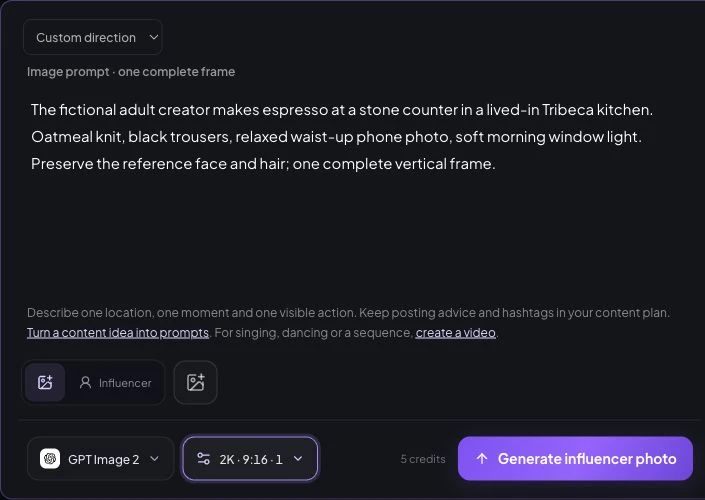
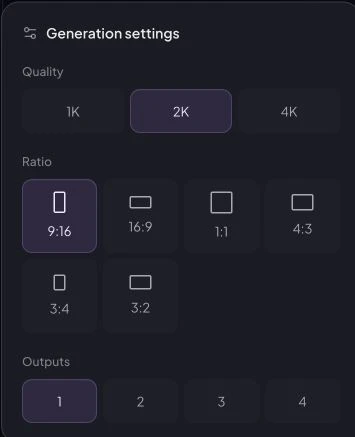
Best TikTok formats for an AI influencer
These are formats to test, not a ranking of what the algorithm will favor. Pick the format that makes your specific idea easiest to understand.
- Talking-head answer: one question, a short explanation, and a useful next step. Use the talking-avatar workflow with suitable permitted inputs.
- Day-in-the-life scene: show one clearly fictional routine. An approved image plus subtle movement is enough for a short visual beat.
- Outfit or scene variation: compare two reviewed looks while keeping the character recognizable. Assemble separate shots in your editor.
- Trend interpretation: adapt a format to your niche with original ideas and permitted audio; avoid copying a creator's identity or passing off their footage as yours.
- Product explanation: show an authorized product accurately. Do not turn a fictional presenter into an invented customer testimonial.
Step 4. Write TikTok hooks and generate the clip
A hook gives the viewer a concrete reason to keep watching. Promise something the clip actually delivers. Try a question (“Which framing makes this outfit easier to see?”), a demonstration (“Watch the difference when the camera steps back”), or a constraint (“One jacket, two simple outfit ideas”). Avoid fabricated purchases, results, urgency, or expertise.
TikTok AI influencer prompt examples
Image direction: “Use the saved adult character. She adjusts the cuff of a charcoal jacket beside a hallway mirror, relaxed posture, full outfit visible, soft window light, vertical 9:16. Keep her approved facial identity and signature ear cuff.” This is a suggested prompt, not a documented generated result.
Motion direction: “The character takes one small step back and settles naturally. Locked camera, subtle breathing, stable clothing and room geometry.” Start with one motion rather than asking for several outfit changes in a single shot. Use Animate Photo for an approved still, or motion transfer for an authorized performance reference.
Script direction: “Hook: One jacket, two outfit ideas. Body: Explain one visible difference between the reviewed looks. Ending: Ask which version viewers would choose.” Record or source authorized audio; check pronunciation and lip sync. Use the prompt guide and video tutorial for production details.
For a silent motion draft, open Create Video with the approved still as Source image. Select Wan 2.6, 720p, 5s and 9:16; the demonstrated quote is 27 credits. Review the first and last frames in History before downloading.
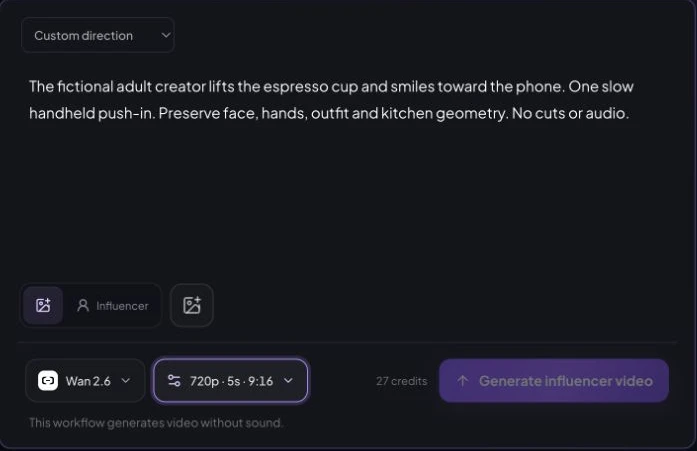
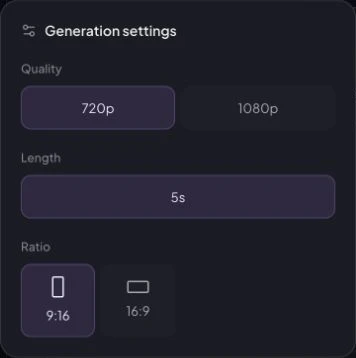
A real source set, with a proposed TikTok edit
The existing homepage creator examples include a fictional NYC Finance Creator identity reference, a Tribeca kitchen coffee scene, and a SoHo workday scene. Their retained records contain separate generation tasks and prompts, and the release record approved the set on July 30, 2026. It demonstrates reuse across three images; it is not evidence of a published TikTok account or audience performance.
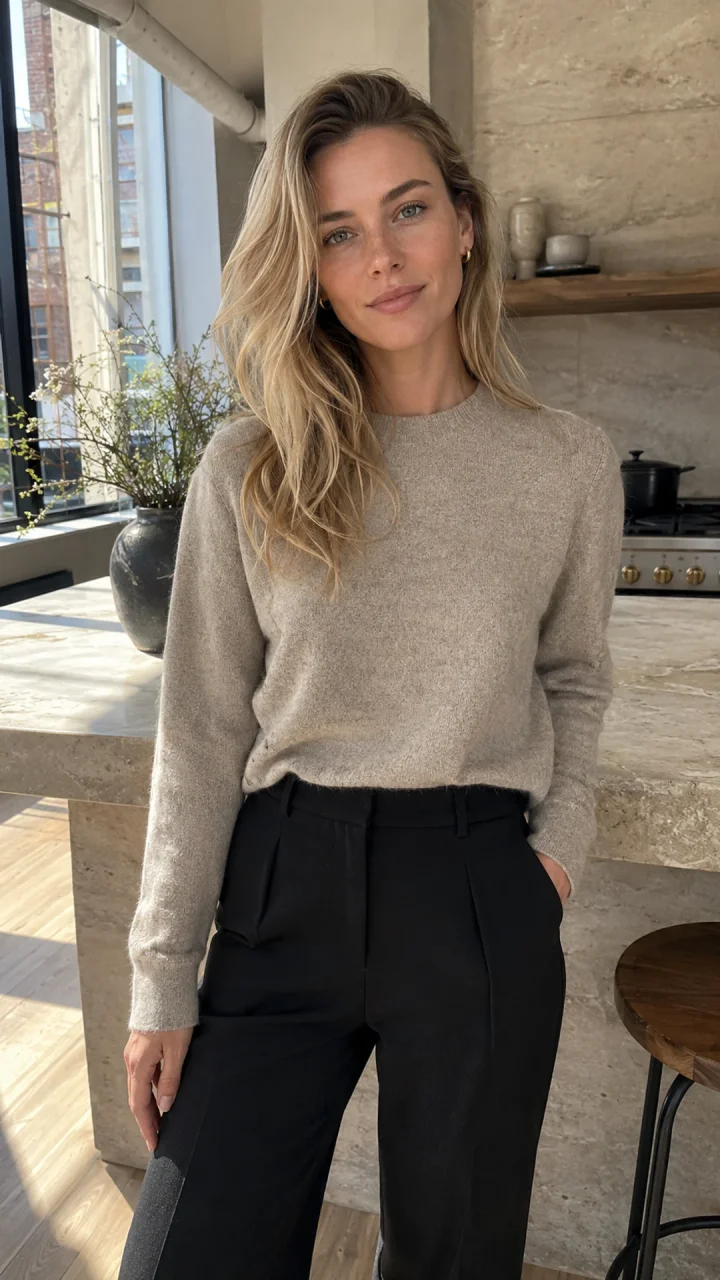
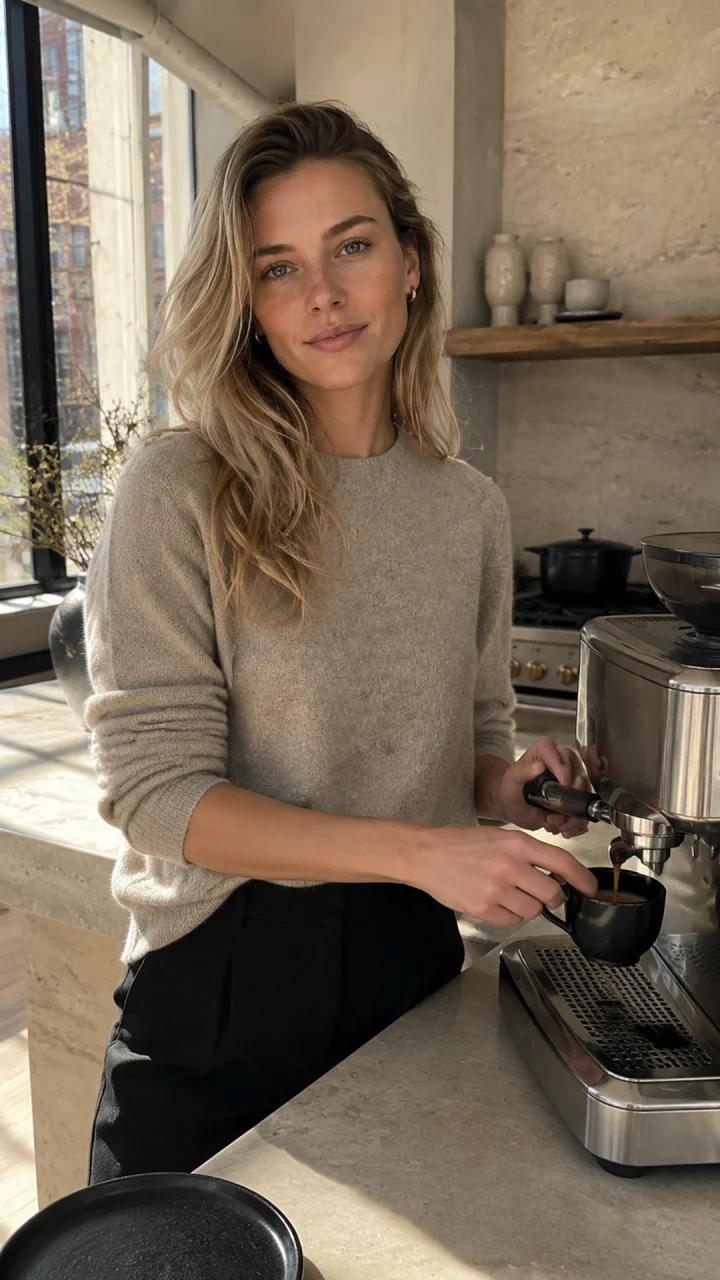
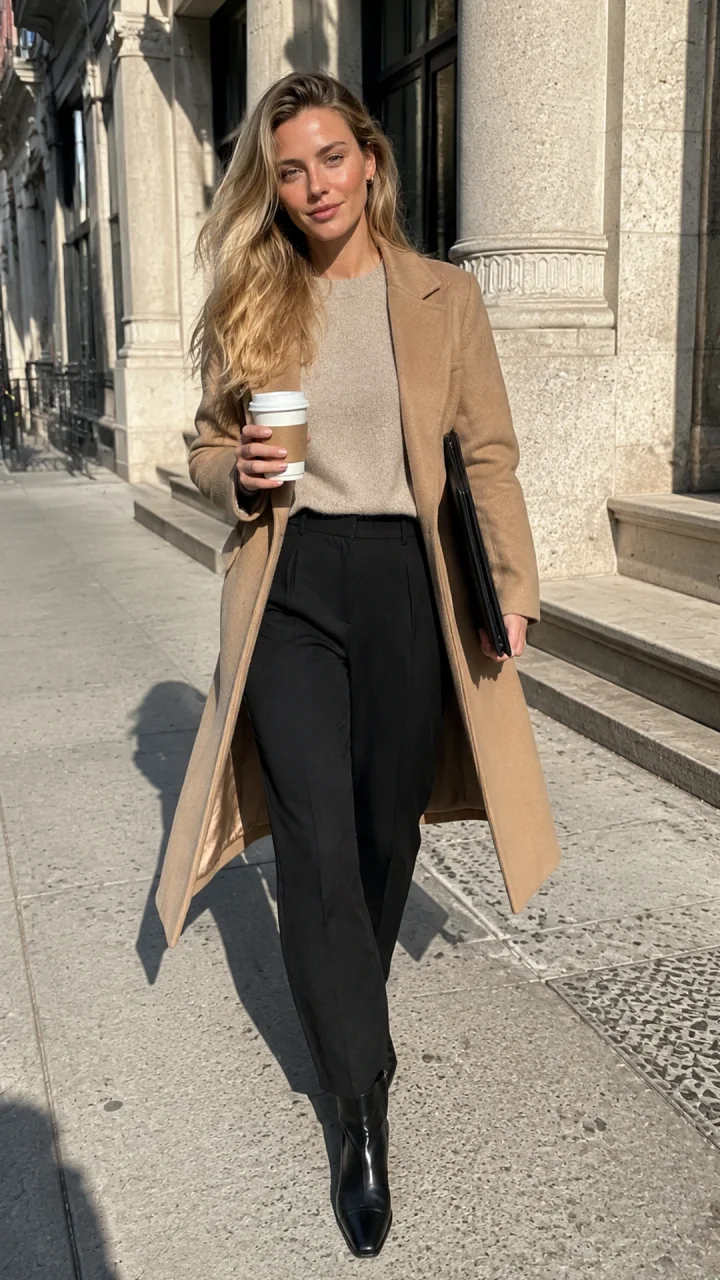
The archived Seedance 2 kitchen clip is a source shot, not the proposed final TikTok edit. It used 720p, 9:16, five seconds and no audio. Full original prompts and unknown customer charges are documented in the recorded case.
A proposed adaptation is a short “same character, different scene” edit: establish the identity, show the kitchen variation, then show the workday variation. Use the hook “What stays the same when the scene changes?” and explain the repeated identity anchors. This script and final edit are a plan, not an already generated video. No TikTok screenshot, engagement figure, or new production time is claimed.
For your own production record, save the approved character, exact prompt, model, resolution, aspect ratio, duration, task result, and actual credit charge. Record failed attempts separately. A generated five-second clip is a source shot; a finished TikTok may require several shots, captions, audio, review, and editing.
Budget the draft before generating
The worked starter budget calculates the current configured cost of a complete guided character, ten photos, and three five-second video drafts. Use your actual Studio quote for the selected model and settings. Voice, extra attempts, editing, music, and account work need separate allowances. Do not treat historical provider records as today's customer price.
Step 5. Review, label, and publish
Review the finished 9:16 video on a phone, with sound both on and off. If it needs assembly, download approved outputs from History, edit with authorized audio and captions, then upload the finished MP4 into Publish. Otherwise, select the eligible generated video directly from Generation history in Publish, connect TikTok, and choose Now or Schedule. Verify the delivery and actual TikTok post. The current composer requests an AI flag but does not expose every commercial-disclosure control; use a suitable TikTok posting route when those controls are required. See the complete publishing walkthrough.
Do you have to disclose an AI influencer on TikTok?
For a realistic synthetic creator, use TikTok's AI-generated content disclosure controls and make the fictional identity clear. Check TikTok's official AI-generated content guidance and Community Guidelines at upload time. Do not assume an automatic label covers every edit, or that an AI label makes otherwise misleading content acceptable.
AI disclosure and commercial disclosure serve different purposes. If a post promotes a product or business, check the applicable commercial-content controls too. Avoid misleading impersonation, fabricated endorsements, and unsupported product claims. Permission to publish is separate from eligibility for monetization programs; check the specific program and region instead of assuming a virtual account qualifies.
30-day TikTok AI influencer content plan
This is a test schedule, not a growth forecast. Three reviewed posts per week is a starting example; reduce the pace if quality or rights review suffers.
- Days 1–7: approve the character, introduce the fictional identity, and test a useful answer, a lifestyle scene, and a demonstration.
- Days 8–14: test three hook styles across comparable ideas. Keep clip length and topic similar enough that the comparison is useful.
- Days 15–21: repeat the format with the clearest audience response. Improve one variable at a time, and respond to real questions without inventing comments.
- Days 22–28: test one relevant product explanation only if you have appropriate rights and accurate claims; otherwise deepen the strongest educational series.
- Days 29–30: review results and plan the next month. Retain the useful format, stop weak or misleading concepts, and record what remains uncertain.
Use TikTok's available analytics to record views, average watch time, completion, shares, comments, and follows attributed to a post when that metric is provided. Compare similar durations over the same observation window. If a metric is unavailable, mark it unavailable rather than guessing. Small samples do not establish why a post performed well, and daily posting is not a guarantee of distribution.
Reuse the identity across channels, but adapt the edit. The Instagram account guide covers the separate profile and publishing decisions.
Frequently asked questions
How do I create an AI influencer for TikTok?
Choose a niche, create and save an original adult character, generate consistent vertical images, turn approved images into short clips, add a hook and authorized audio, review the edit, and publish through TikTok with appropriate disclosures.
Can I create an AI influencer for TikTok for free?
You can start with the signup credits currently offered by AI Influencer Generator. A complete set of clips, retries, voice work, and editing may require a paid budget. Check each Studio quote before submitting.
What is the best AI influencer generator for TikTok?
Choose a tool that supports reusable characters, 9:16 output, the video or talking workflow you need, visible costs and publishing. AI Influencer Generator supports these production stages and connecting TikTok in Publish for immediate or scheduled video posting. Check disclosure controls and delivery status; no tool guarantees TikTok growth.
How do I keep my AI influencer consistent?
Reuse the saved character and approved references. Keep face shape, complexion, hair, and signature details stable, then vary the scene and action. Check both the first frame and the moving clip for identity drift.
How do I make my AI influencer talk?
Use a supported talking-avatar or lip-sync workflow with a suitable character image and permitted voice or audio input. Review pronunciation, timing, mouth movement, and the accuracy of every spoken claim before export.
Can AI influencers make money on TikTok?
Commercial work is possible, but earnings and program eligibility are not guaranteed. Check the current rules for your region and program separately from whether a post is allowed. Brand work also requires accurate claims, usage rights, and commercial disclosure.
Does TikTok allow AI influencers?
AI creation is not a blanket exemption from TikTok's rules. Check its current AI-generated content and Community Guidelines, disclose realistic synthetic media appropriately, and avoid misleading impersonation or fabricated endorsements.
Do I need to label an AI influencer on TikTok?
For a realistic fictional creator, use TikTok's AI-generated content disclosure controls and make the fictional identity clear. Also check commercial disclosure requirements when promoting a product. A profile bio alone is not a substitute for the disclosures a post requires.
How often should an AI influencer post on TikTok?
Start with a schedule you can review properly, such as three posts per week. This is a planning example, not an algorithm rule. Increase output only when quality, rights review, and useful ideas remain sustainable.
What content should an AI influencer post?
Try one useful talking-head answer, one lifestyle scene, and one niche-specific demonstration. Label fictional scenarios clearly and avoid invented personal experience. Compare audience response before expanding into more formats.
Can I use the same AI influencer on TikTok and Instagram?
Yes, reuse the identity and approved source assets, but adapt captions, framing, audio rights, and disclosures to each platform. A reusable character does not make every exported clip suitable for every channel.
Plan Content
Measure Engagement
Build Your Profile
Price Your Work
Write Post Copy
Brand Partnerships