
Explore the tool, or open Carousels in Studio if you are ready to upload.
The four things that make this work
A coherent photo dump needs a fixed scene and a deliberate shot list. Four attractive portraits are not enough if the jacket, door or afternoon light changes between them.
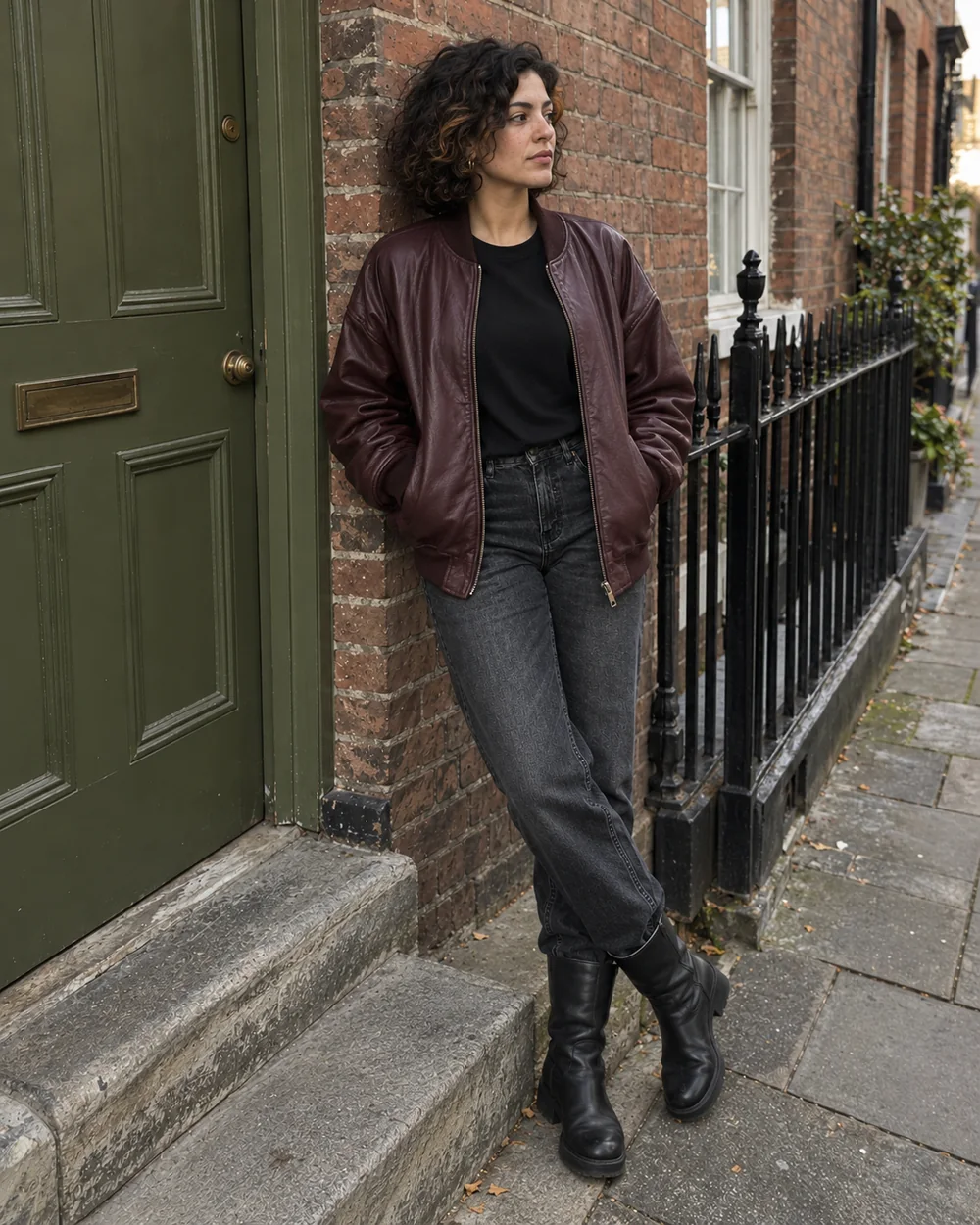
- Choose an original that already shows the intended identity, clothes and setting.
- Lock the whole shoot, then vary only camera distance, body angle and a small action.
- Use the original as the comparison standard, even when a tool uses a generated anchor internally.
- Inspect all four together. A believable face does not excuse changed door hardware or invented jewelry.
What makes a carousel look like one photoshoot?
Continuity comes from details that survive a camera move. Identity includes facial proportions and hair texture. An outfit includes construction, not just color. A location includes the arrangement of objects, not just “a brick street.”
| Keep fixed | What to compare | Allowed variation |
|---|---|---|
| Person | Jaw, nose, eyebrows, complexion, dark curly bob and warm streak | Gaze, small expression, head angle |
| Clothes & accessories | Burgundy bomber zipper and cuffs; black crewneck; charcoal jeans; black boots; gold hoops | Natural folds and perspective |
| Location | Olive door, brass mail slot and knob, gray doorstep, white window, black railings | How much of each landmark enters the frame |
| Lighting & photography | Overcast daylight, soft shadows, neutral-warm color, natural skin | Camera distance and viewpoint |
A single photo cannot prove what is behind the person or outside the frame. Keep changes small when unseen details matter. For broader identity management, read how to keep an AI influencer consistent. For seams, fabric and garment references, use the same-outfit guide.
How to create the set in Carousels Studio
Use one shared Direction and select four photos. The current AI Carousel Generator supplies its own per-shot variations. It does not expose four separate prompt fields or a separate “lock location” switch. These steps follow the interface and pipeline checked on October 22, 2026.
Open Carousels and attach the starting photo
Go to Carousels in Studio and sign in. Use Upload reference image beside Direction. Start with a sharp, authorized photo where the face, clothing and useful background landmarks are visible. A full-body source makes footwear and proportions easier to verify.
Choose a saved influencer only if you need one
Add creator or asset opens the saved-asset picker. A clear starting image can supply the identity by itself. If you add a saved influencer, ensure it is the same intended adult character; competing faces and outfits make the brief less clear.
Write the shared shoot direction
Describe the exact outfit, visible landmarks and light. You can apply a Carousel template, then edit its scene to agree with your photo. Templates are scene briefs, not a guarantee that every landmark will remain unchanged. For our example, the shared direction is:
View shared Studio direction
Use the single attached image as the reference for this fictional adult woman and this exact photoshoot. IDENTITY: preserve her face shape, olive complexion, dark curly bob with its warm brown streak, apparent adult age and body proportions. OUTFIT: keep the oversized burgundy leather bomber, plain black crewneck T-shirt, faded charcoal straight-leg jeans, black leather heeled ankle boots, small gold hoop earrings and the same visible rings. LOCATION: stay on this weathered red-brick residential pavement, beside the olive-green paneled door with brass mail slot and round knob, gray stone doorstep, white sash window and black iron railings. Keep their physical arrangement; do not move the door hardware or invent a new street. LIGHTING: the same soft overcast afternoon daylight, neutral-warm color and gentle shadows. Keep photographic skin texture, fabric creases and handheld street-style realism. One person, one complete photograph, no collage, watermark or added text. Change only the camera framing, pose and expression described below.

Create a coherent four-photo street-style session with varied camera distances, three-quarter viewpoints and small natural gestures. Avoid four near-identical portraits. Keep the reference outfit and location in every frame.
Select four photos and inspect the quote
In Photo variations, choose 4 photos. Use the model picker and Generation settings for available sizes and aspect ratios. GPT Image 2.5 Flare is the current default; our separate experiment used its 2K, 3:4 image-to-image setting. Account eligibility can limit settings. Check the total credit quote before pressing Generate 4 images.
Review the lead, then compare the full set
The first photo establishes the shoot. The remaining photos use that generated lead as their visual anchor; they do not each receive the uploaded original and do not form a slide-to-slide chain. The internal shot sequence is environmental portrait → wider candid → closer opposite angle → medium frame. It may differ from the four-shot editorial plan below. Reorder your approved downloads for the best cover.
Repair a weak photo and export
In Your carousel, inspect every frame. Edit photo opens an individual result in the existing editor; use a targeted correction and check the new credit quote. If a generated lead is already wrong, create a corrected set rather than building on its error. Use Download set for ready originals, or Download photo for one. Partial results show Download N ready; check History before starting a duplicate batch.
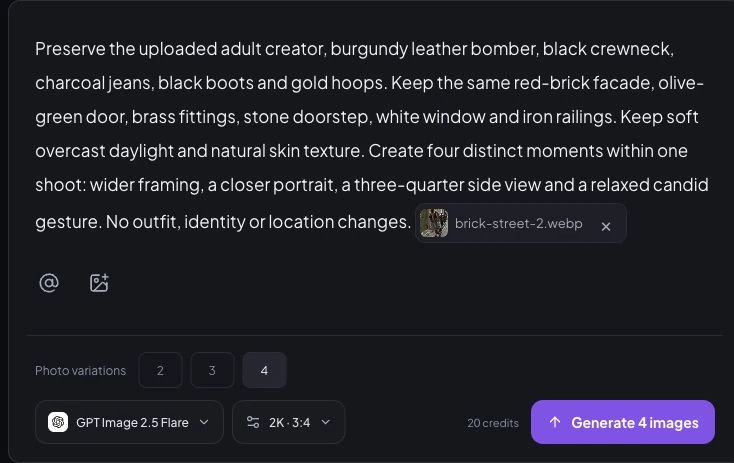
For exact control of the following four briefs, use separate reference-guided photo edits with the same original attached each time. That is how the editorial experiment was made. It is a different workflow from pressing one Carousels button.
Four shots, four complete prompts
Repeat the fixed identity, outfit, location and lighting block in every request. Only the camera, pose and expression block changes. Each image below links to its full-resolution WebP, actual prompt and manual review.
Our shot plan is cover → connection → viewpoint change → movement. The starting image was attached separately to every request. No output became the next request’s input.
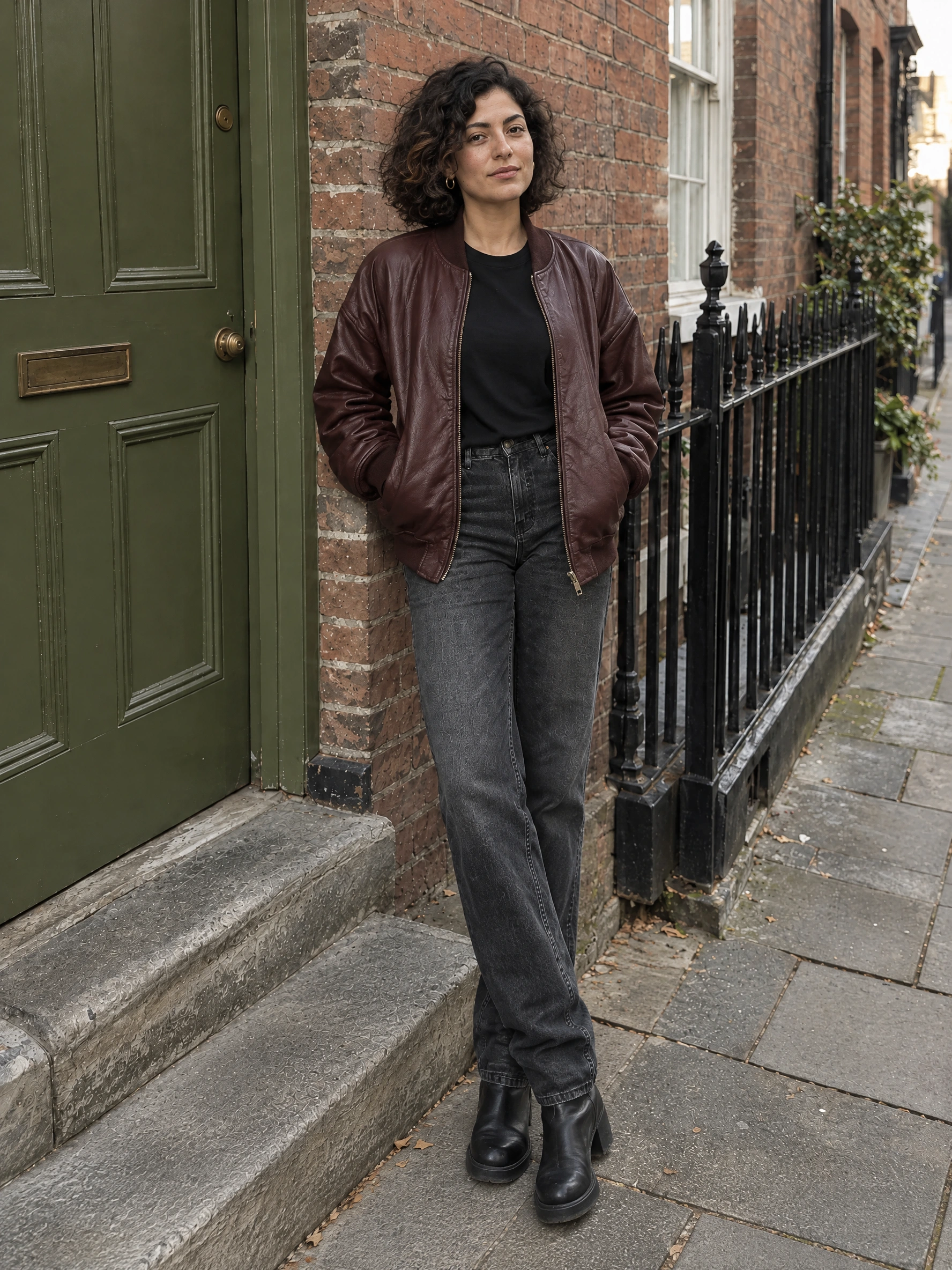
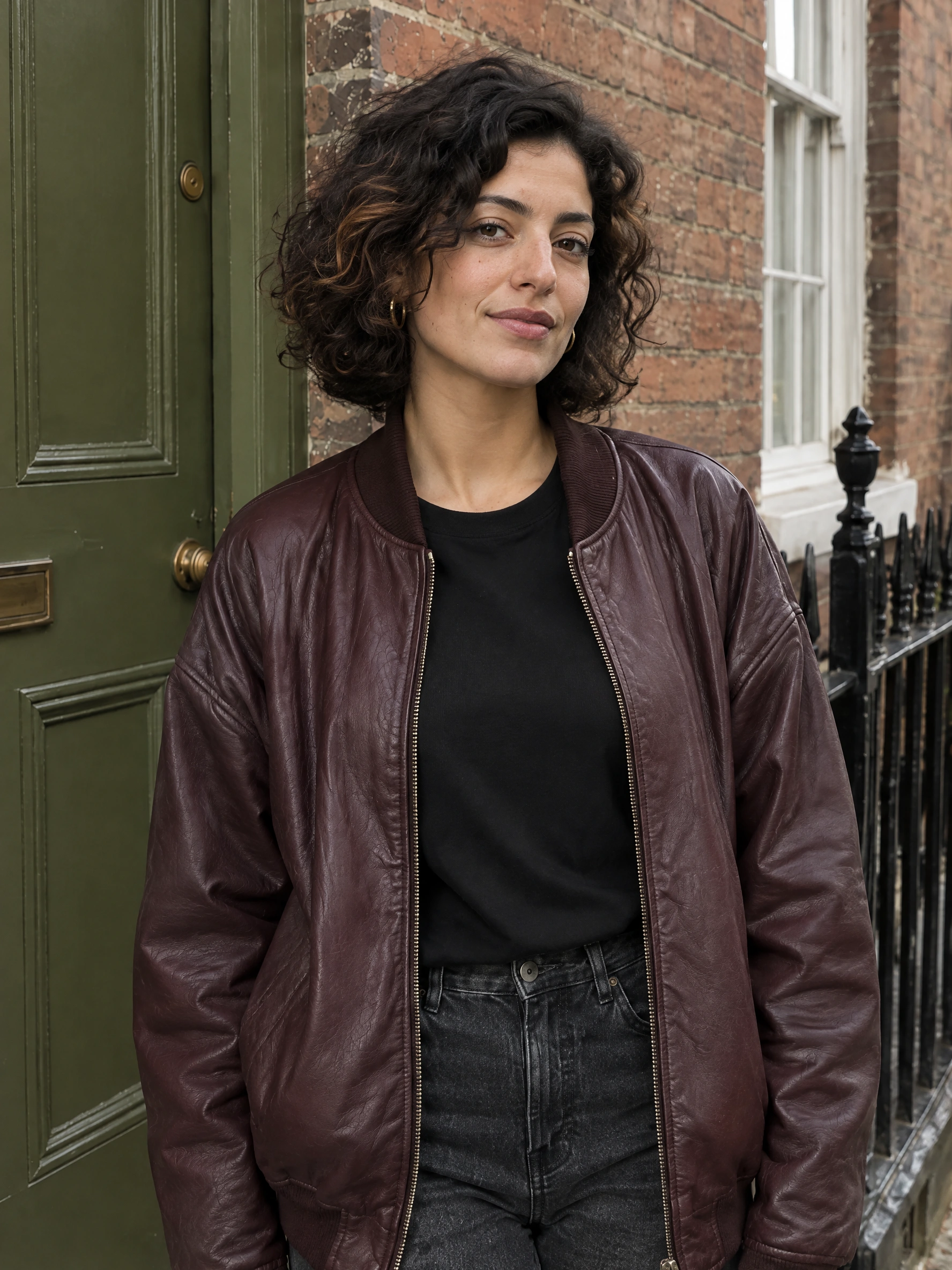
Swipe sideways on mobile. This reading preview shows photo order; it is not a live Instagram post.
| Photo | Camera & action | Why it earns a place |
|---|---|---|
| 1. Full-Body Hero Shot | Full body, eye level; grounded stance | Establish the outfit and the street before moving closer. |
| 2. Medium Shot | Waist up; relaxed direct eye contact | Bring the reader closer to the face, jacket and jewelry. |
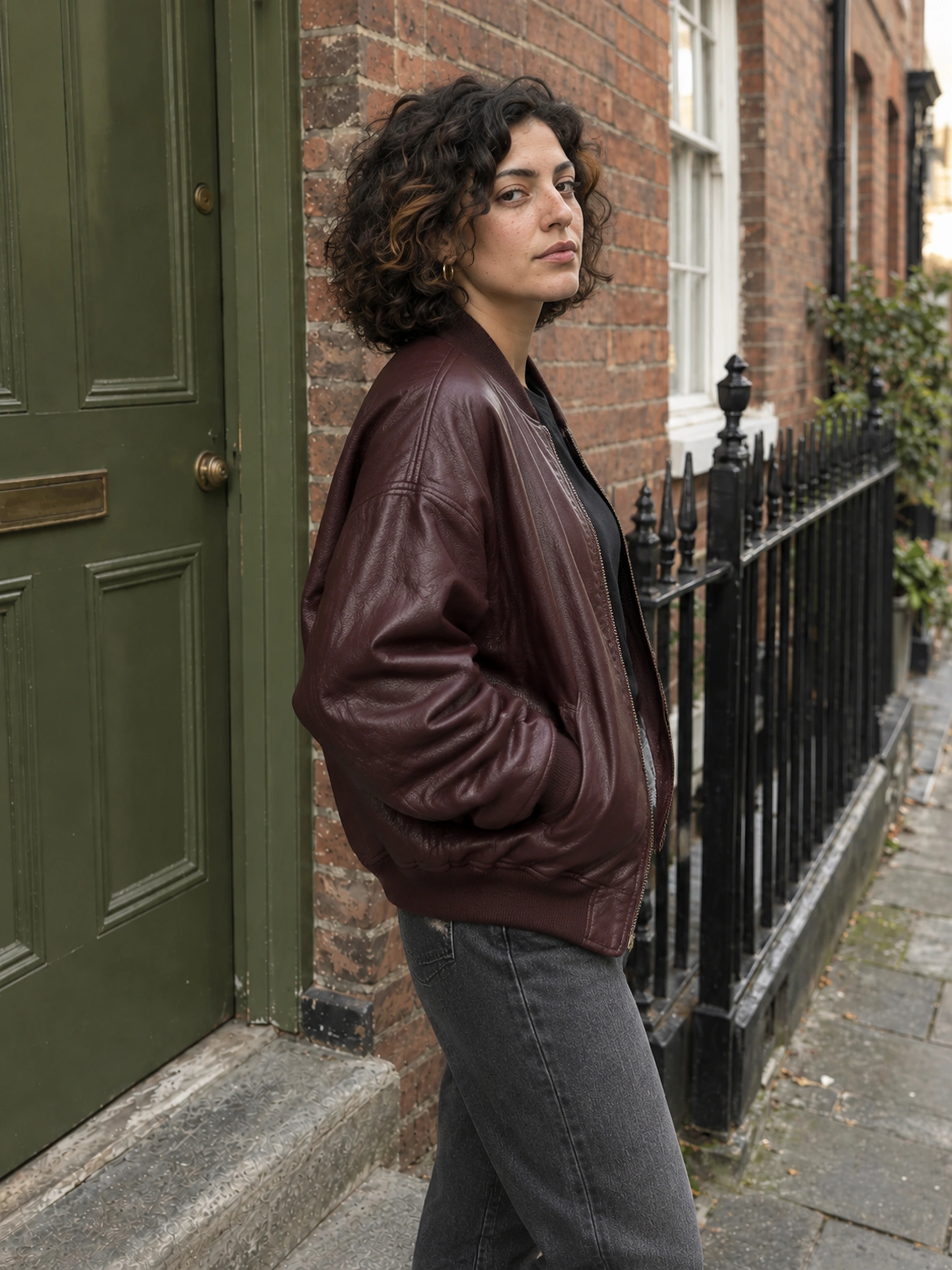
| 3. Side-Angle Shot | Three-quarter side; face slightly back | Change the viewpoint while keeping enough face visible to inspect identity. |
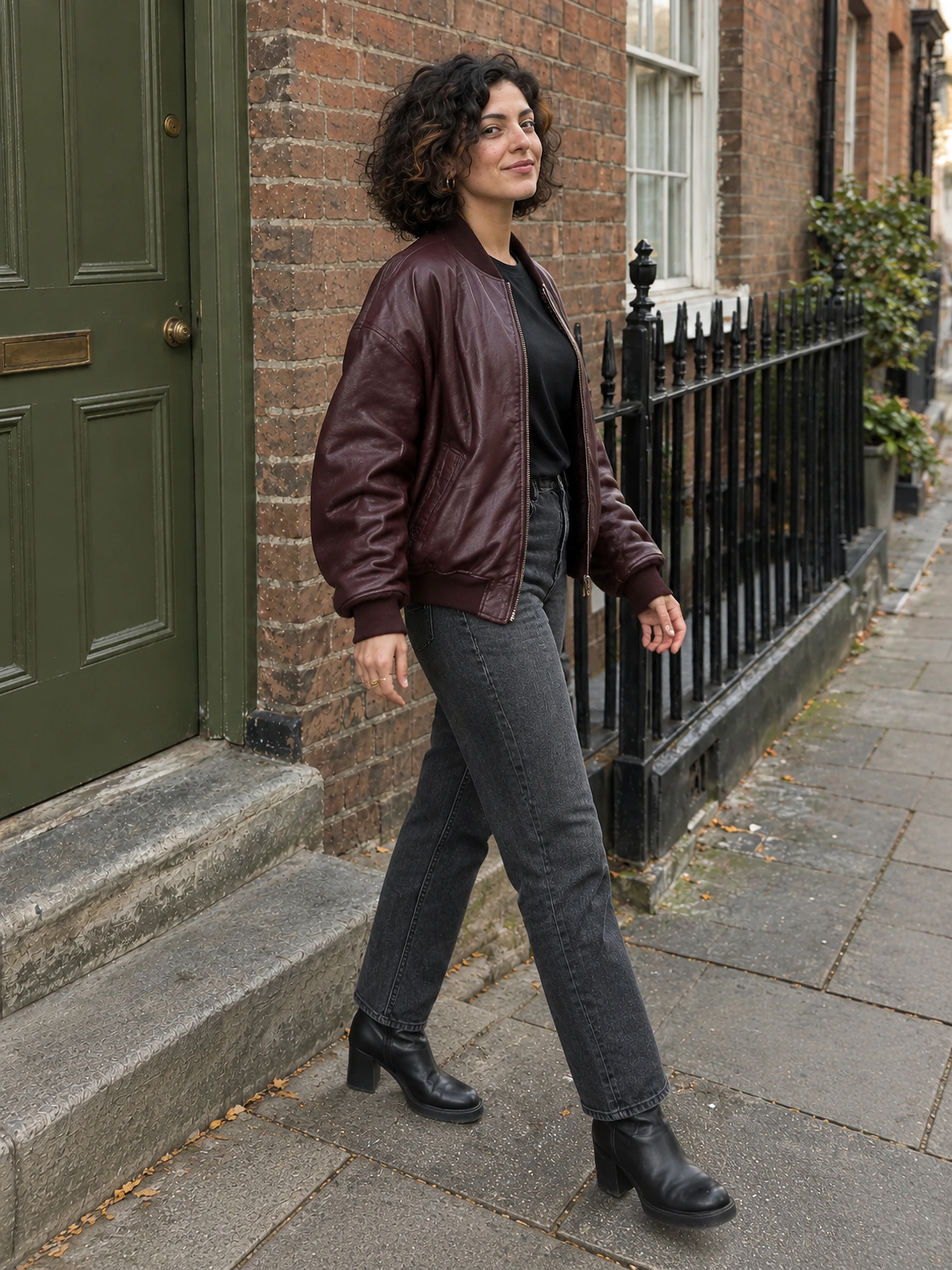
| 4. Natural Candid Shot | Wider frame; small step and glance back | Finish with movement, as if the photographer caught one last moment. |
Copyable original brief 1: Full-Body Hero Shot
Use the single attached image as the reference for this fictional adult woman and this exact photoshoot. IDENTITY: preserve her face shape, olive complexion, dark curly bob with its warm brown streak, apparent adult age and body proportions. OUTFIT: keep the oversized burgundy leather bomber, plain black crewneck T-shirt, faded charcoal straight-leg jeans, black leather heeled ankle boots, small gold hoop earrings and the same visible rings. LOCATION: stay on this weathered red-brick residential pavement, beside the olive-green paneled door with brass mail slot and round knob, gray stone doorstep, white sash window and black iron railings. Keep their physical arrangement; do not move the door hardware or invent a new street. LIGHTING: the same soft overcast afternoon daylight, neutral-warm color and gentle shadows. Keep photographic skin texture, fabric creases and handheld street-style realism. One person, one complete photograph, no collage, watermark or added text. Change only the camera framing, pose and expression described below.

CAMERA: eye-level full-body vertical photograph, natural 35mm perspective, show both boots with breathing room above her head and below her feet. POSE: stand a small step away from the doorstep, body three-quarter toward camera, right hand resting inside jacket pocket, left arm relaxed. Feet grounded, weight on one leg. EXPRESSION: calm, engaged eye contact with a slight closed-mouth smile. Keep the olive door to the left and railings to the right, matching the reference geography.
Copyable original brief 2: Medium Shot
Use the single attached image as the reference for this fictional adult woman and this exact photoshoot. IDENTITY: preserve her face shape, olive complexion, dark curly bob with its warm brown streak, apparent adult age and body proportions. OUTFIT: keep the oversized burgundy leather bomber, plain black crewneck T-shirt, faded charcoal straight-leg jeans, black leather heeled ankle boots, small gold hoop earrings and the same visible rings. LOCATION: stay on this weathered red-brick residential pavement, beside the olive-green paneled door with brass mail slot and round knob, gray stone doorstep, white sash window and black iron railings. Keep their physical arrangement; do not move the door hardware or invent a new street. LIGHTING: the same soft overcast afternoon daylight, neutral-warm color and gentle shadows. Keep photographic skin texture, fabric creases and handheld street-style realism. One person, one complete photograph, no collage, watermark or added text. Change only the camera framing, pose and expression described below.

CAMERA: eye-level waist-up portrait from a slightly closer position, natural 50mm perspective, keep the door edge and red brick visible. POSE: body turned gently toward the camera, shoulders relaxed, hands resting below the frame rather than lifted to her face. EXPRESSION: natural direct eye contact and a small relaxed smile. Make a new photograph, not an enlarged crop of the reference.
Copyable original brief 3: Side-Angle Shot
Use the single attached image as the reference for this fictional adult woman and this exact photoshoot. IDENTITY: preserve her face shape, olive complexion, dark curly bob with its warm brown streak, apparent adult age and body proportions. OUTFIT: keep the oversized burgundy leather bomber, plain black crewneck T-shirt, faded charcoal straight-leg jeans, black leather heeled ankle boots, small gold hoop earrings and the same visible rings. LOCATION: stay on this weathered red-brick residential pavement, beside the olive-green paneled door with brass mail slot and round knob, gray stone doorstep, white sash window and black iron railings. Keep their physical arrangement; do not move the door hardware or invent a new street. LIGHTING: the same soft overcast afternoon daylight, neutral-warm color and gentle shadows. Keep photographic skin texture, fabric creases and handheld street-style realism. One person, one complete photograph, no collage, watermark or added text. Change only the camera framing, pose and expression described below.

CAMERA: three-quarter side-angle photograph from her left, framed from head to mid-thigh at eye level, natural 50mm perspective. POSE: torso turned toward the street on the right side of the reference, chin turned slightly back toward the camera so both eyes remain recognizable. Arms relaxed, one hand resting in the jacket pocket. EXPRESSION: quietly attentive, no exaggerated smile. Preserve the door, brass fittings, doorstep and railings in their original positions.
Copyable original brief 4: Natural Candid Shot
Use the single attached image as the reference for this fictional adult woman and this exact photoshoot. IDENTITY: preserve her face shape, olive complexion, dark curly bob with its warm brown streak, apparent adult age and body proportions. OUTFIT: keep the oversized burgundy leather bomber, plain black crewneck T-shirt, faded charcoal straight-leg jeans, black leather heeled ankle boots, small gold hoop earrings and the same visible rings. LOCATION: stay on this weathered red-brick residential pavement, beside the olive-green paneled door with brass mail slot and round knob, gray stone doorstep, white sash window and black iron railings. Keep their physical arrangement; do not move the door hardware or invent a new street. LIGHTING: the same soft overcast afternoon daylight, neutral-warm color and gentle shadows. Keep photographic skin texture, fabric creases and handheld street-style realism. One person, one complete photograph, no collage, watermark or added text. Change only the camera framing, pose and expression described below.

CAMERA: a wider head-to-boot candid frame at eye level, natural 35mm perspective, enough pavement to read her step. POSE: take one small natural step parallel to the brick facade, turn her head back toward the photographer, arms moving gently with her stride. Keep hands relaxed and fingers anatomically plausible; no new prop. EXPRESSION: an unforced small smile caught between poses. Keep the green door, window and railings as the same recognizable location, with unchanged overcast light.
Upload your own reference in Carousels. Sign in and check the current quote before generating.
What is the best Instagram carousel order?
Start wide, move closer, change the viewpoint, then end on a natural moment. That gives this outfit-led shoot a reason to continue swiping without changing the subject or scene.
- Full-body hero: establish who, what they are wearing and where they are.
- Medium portrait: add expression and visible jacket or jewelry detail.
- Side angle: create visual variety while retaining a readable face.
- Candid ending: make the sequence feel like a moment continuing beyond the last slide.
This is an editorial recommendation, not a tested engagement formula. If the medium portrait is clearly stronger, try it as the cover and compare your own results. Keep each slide’s crop deliberate. Our 3:4 files are portrait originals; preview the framing Instagram actually offers on your account before sharing.
Choose the post’s purpose with what an AI influencer should post, then use the Instagram growth guide to measure audience response. This case measures image continuity, not reach, saves or conversions.
4-Photo Consistency Scorecard
Judge visible continuity, not similarity at thumbnail size. We compared every output at full resolution with the original and then reviewed the four as a set. Scores are a subjective editorial inspection, not face-recognition measurements.
A 2 is limited to what the image shows. It does not certify hidden fingers, unseen garment panels or exact 3D geometry. For this shoot, a publishable frame needs no zeros and no visible anatomical defect; a location mismatch still needs an explicit editorial decision.
| Attempt | Face & Hair | Outfit & Accessories | Background & Location | Lighting & Color | Anatomy & Realism | Total |
|---|---|---|---|---|---|---|
| Hero — initial | 2 — Pass | 1 — Review | 2 — Pass | 2 — Pass | 2 — Pass | 9/10 |
| Medium | 2 — Pass | 2 — Pass | 2 — Pass | 2 — Pass | 2 — Pass | 10/10 |
| Side angle | 2 — Pass | 2 — Pass | 2 — Pass | 2 — Pass | 2 — Pass | 10/10 |
| Candid | 2 — Pass | 1 — Review | 2 — Pass | 2 — Pass | 2 — Pass | 9/10 |
| Hero — repair | 2 — Pass | 2 — Pass | 2 — Pass | 2 — Pass | 2 — Pass | 10/10 |
Across the four selected photos, 19 of 20 visible category checks passed, 1 needed review and 0 failed under this rubric. These are category counts in one manually selected case, not a generation success rate.
Each segment is one category: green = 2, amber = 1, rose = 0. Scores are also written in the table. One creator, one outfit, one location, four planned photos; this small selected case cannot establish an average success rate or compare models.
What changed, and what the repair actually fixed
The initial hero shortened the visible denim hem and exposed rings that the pocketed hands in the original cannot verify. The repair restores longer denim over the boots and puts both hands inside the jacket pockets. That removes the unverifiable ring detail from the hero; it does not prove that hidden jewelry is identical. The candid still exposes invented rings and remains a review item. We selected the repaired hero, medium, side and candid frames for the teaching sequence, with that remaining limitation visible. The tighter portraits cannot verify shoes or hidden hands.
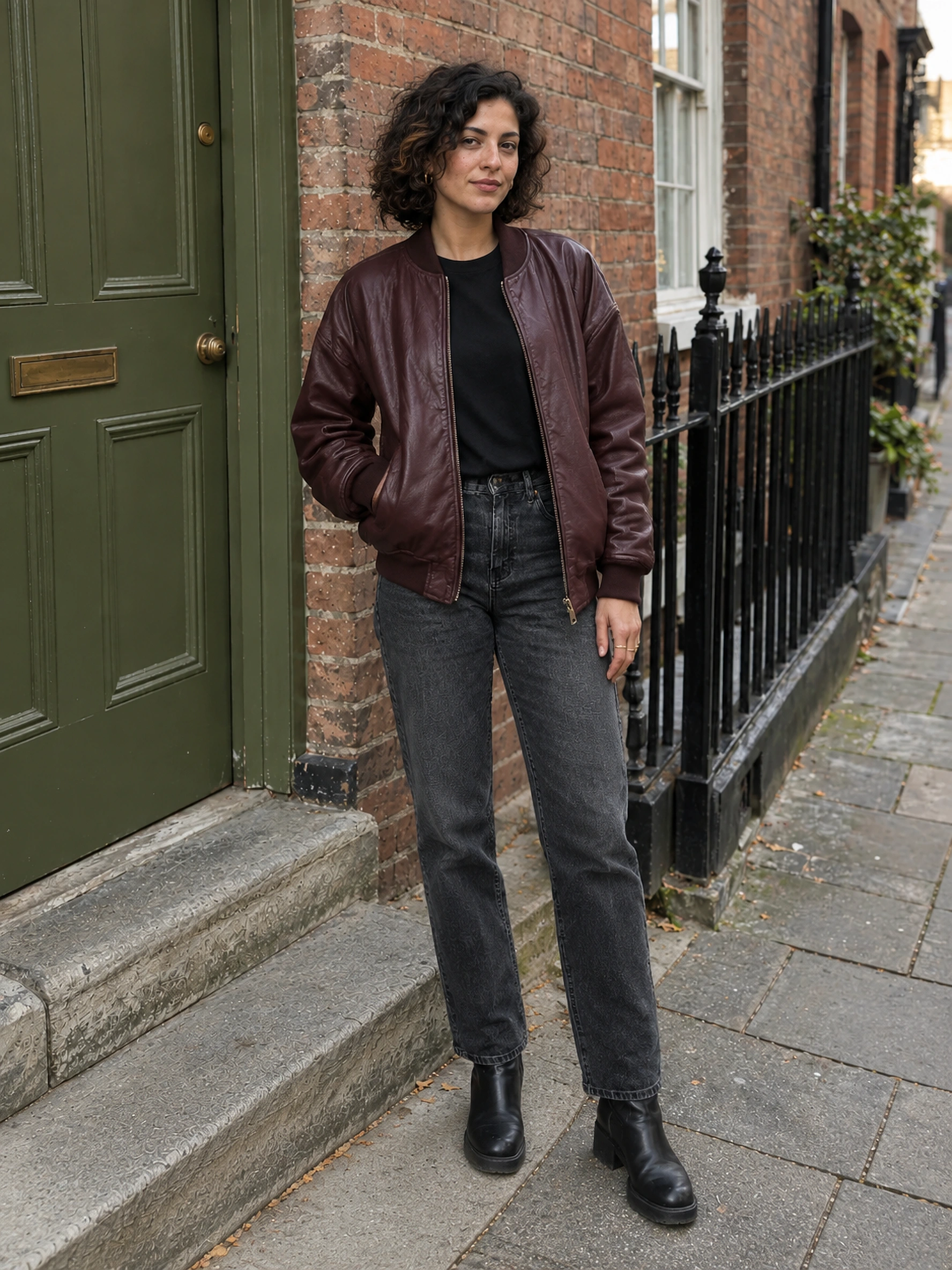
Targeted brief: The initial full-body output shortened the jeans to expose more boot shaft and introduced visible rings that cannot be verified from the source's pocketed hands. Restore the exact long straight-leg denim fit in the original: full-length jeans with natural stacking over the top of the black boots, not cropped ankle-length denim. Override the earlier one-hand-out pose: rest both hands naturally inside the bomber pockets, as in the original; do not expose or invent rings. Keep both boot soles visible with breathing room at the bottom. Maintain the same face, earring size, leather bomber, doorstep and door fittings. This is a fresh full-body photograph using the original reference, not an edit of the earlier output.
Observed result: Longer jeans now meet and stack over the boots. Both hands remain in pockets, removing unverifiable ring details from view. Face, jacket, setting and soft daylight remain recognizable; hidden hands and jewelry are unverified.
Build your own four-shot prompts
Match the scene in your source, choose one photographic treatment and give the candid frame one action. Copy the four complete briefs for individual reference-guided edits. For Carousels, use their fixed scene instructions as one shared Direction; the tool chooses its own shot variations.
Choose a scene already visible in your starting image. These are four independent edit briefs, not separate fields in Carousels. Reattach the same original for every manual edit; do not feed in the preceding output.
1. Full-Body Hero Shot
Use the same original reference image for this photograph. Preserve the clearly adult person's face, body proportions, skin tone, hairstyle, exact clothes, garment details, shoes and visible accessories. Keep the exact location and visible landmarks in the reference. Preserve the reference's time of day, light direction, shadow softness and color balance. Photography style: candid phone photography. One complete photograph with natural skin texture and believable anatomy. Change only the following camera framing, pose and expression; no collage or added text.

Full-body hero: eye-level wide frame with room around the head and feet. Stand naturally, weight on one leg, hands relaxed. Calm direct eye contact. Establish the outfit and recognizable setting.
2. Medium Shot
Use the same original reference image for this photograph. Preserve the clearly adult person's face, body proportions, skin tone, hairstyle, exact clothes, garment details, shoes and visible accessories. Keep the exact location and visible landmarks in the reference. Preserve the reference's time of day, light direction, shadow softness and color balance. Photography style: candid phone photography. One complete photograph with natural skin texture and believable anatomy. Change only the following camera framing, pose and expression; no collage or added text.

Medium portrait: eye-level waist-up frame. Relax the shoulders and keep hands naturally below the crop. Look at the camera with a small unforced smile. Show clothing texture and facial detail; make a new photograph rather than a crop.
3. Side-Angle Shot
Use the same original reference image for this photograph. Preserve the clearly adult person's face, body proportions, skin tone, hairstyle, exact clothes, garment details, shoes and visible accessories. Keep the exact location and visible landmarks in the reference. Preserve the reference's time of day, light direction, shadow softness and color balance. Photography style: candid phone photography. One complete photograph with natural skin texture and believable anatomy. Change only the following camera framing, pose and expression; no collage or added text.

Side angle: head-to-mid-thigh composition from a three-quarter viewpoint. Turn the body toward the surroundings and the face slightly back, keeping enough facial detail to recognize the same person. Quiet attentive expression; no new prop.
4. Natural Candid Shot
Use the same original reference image for this photograph. Preserve the clearly adult person's face, body proportions, skin tone, hairstyle, exact clothes, garment details, shoes and visible accessories. Keep the exact location and visible landmarks in the reference. Preserve the reference's time of day, light direction, shadow softness and color balance. Photography style: candid phone photography. One complete photograph with natural skin texture and believable anatomy. Change only the following camera framing, pose and expression; no collage or added text.

Natural candid: wider head-to-foot frame. Take a small step. Capture a relaxed expression between poses, with purposeful arms, plausible fingers and grounded feet. Keep the original location and light.
How to check and repair a set before posting
Place the original beside all four outputs and fix the first mismatch you can name. “Make it more consistent” is less useful than “restore the original brass knob and mail slot positions.” Keep failed outputs and compare the repair rather than assuming a rerun worked.
| Problem | Likely cause | What to change |
|---|---|---|
| The face changes | The reference face is small, hidden or under different light. | Choose a sharper original; retain the same adult identity reference and simplify the angle. Check jaw, nose, eyes and hairline, not just hair color. |
| The outfit changes | A style instruction overrides the garment or the source hides it. | Keep neckline, zipper, cuffs, denim wash and footwear explicit. Remove contradictory fashion words. Use the outfit guide for garment-specific checks. |
| The background drifts | The model rebuilds a plausible street instead of preserving its geometry. | Name two or three landmarks and their relative positions. Ask for a small camera move. Reject or regenerate misplaced windows and door fittings. |
| The light or color changes | A new mood introduces a different time of day or grading. | Keep the original light direction, softness and white balance. Remove golden-hour or cinematic instructions when the reference is overcast. |
| Hands or walking look wrong | The action combines too many simultaneous gestures. | Give hands one simple purpose; try a small step rather than a stride. Inspect fingers, sleeve contact, feet and contact shadows at full size. |
| Every angle looks the same | The brief only says ‘four variations’. | Plan wide → medium → side → candid, then select genuinely different frames. Current Studio controls the internal shot sequence; use Edit photo for a targeted change. |
Frequently asked questions
Can one photo generate multiple believable angles?
Yes, a reference-guided image model can synthesize new viewpoints, but it invents anything the original cannot show. A three-quarter angle is easier to verify than a complete rear view. Review the results against the original before posting.
How do I keep the same outfit in every photo?
Use a starting photo that shows the clothes clearly and repeat the exact garment construction, colors, shoes and accessories in the shared direction. Avoid new styling requests. A hidden logo, back panel or shoe detail cannot be verified from one front reference.
How do I keep the location and lighting the same?
Describe visible landmarks and their positions, plus light direction, softness and color. Ask for small camera moves within that scene. ‘Same café’ is weaker than ‘same black-framed window, green bench and walnut table.’ Prompting does not guarantee architectural accuracy.
Can I enter a different prompt for each slide in Carousels?
The current Carousels workspace has one shared Direction field and a two-, three- or four-photo selector. It supplies the individual shot directions internally. The four prompts in this article are separate shot briefs for manual reference-guided edits, not four hidden Studio input fields.
Does every Studio slide use my uploaded original?
The current pipeline generates the lead photo from the original references, then uses that lead as the visual reference for the remaining photos. It does not chain slide two into slide three. Our separately labeled editorial experiment uses the same original for every individual request.
How do I stop the AI person changing between photos?
Keep one approved identity reference, hair and accessories throughout the shoot. Do not repeatedly feed each new result into the next edit: errors can accumulate. Reject an identity change rather than treating a similar-looking face as a match.
How do I export the four photos for Instagram?
In Your carousel, review each result, then use Download set for the ready originals or Download photo for one image. A partial batch offers Download N ready. Upload the approved photos as one Instagram carousel in your chosen order; check the crop of each slide in Instagram before sharing.
Is this free, and do I need to sign in?
Sign in to configure generation, use saved influencers and create photos. The interface shows the credit quote before generation; model, size, photo count and account eligibility affect the available settings. This guide and its prompt builder are public. Supplier experiment credits below are not website credits or a price promise.
Original generation method, cost and limits
This is a documented image-generation experiment, not a customer case or an app conversion study. We reused one previously generated, fictional adult source from our Brick Street asset archive. Its source record dates to October 12, 2026; the new individual requests were made on 2026-10-22.
| Item | Recorded setting |
|---|---|
| Source | One 1000 × 1250 WebP, the existing Brick Street photo 2; no real-person photo used |
| Provider model | gpt-image-2-5-flare-image-to-image |
| Parameters | 2K, 3:4, opaque background; one image input per request; no seed exposed |
| Method | Fixed reference + shared continuity block + separate shot instruction. The same source hash in every request, including repair. |
| Attempts & actual supplier usage | 5 completed requests; 50 supplier credits total, as returned by creditsConsumed. Not website credits, currency cost or a customer price. |
| Review | Manual full-size comparison across five categories; no independent reviewers, identity embedding test or measured engagement |
| Processing | WebP compression and responsive resizing only; no face replacement, background compositing or hidden retouching |
Generation via a supplier script proves these reference-conditioned requests and outputs. It does not verify the complete signed-in Studio → payment/credits → History path. We inspected the actual Carousels controls separately and traced its lead-anchor implementation. Its automated internal framing can differ from our manual shot list.
The case is intentionally narrow: one adult identity, one recognizable jacket and one overcast street. A different face, complex hands, patterned clothes, shiny accessories or a larger viewpoint change may behave differently. We retained imperfect attempts. Scores do not imply a model benchmark, universal preservation guarantee or typical user cost.
Download the sanitized experiment record for task IDs, exact prompts, parameters, timestamps, supplier usage, source and output hashes, scores and review notes. Original provider PNGs remain in the editorial archive; each image links to a high-resolution WebP.
References and editorial boundaries
- ZenCreator: AI Carousel Generator — first-party description of multi-view generation and consistency controls; competitor product claims are not our test results.
- Rasgo: Instagram Photo Dump Generator — first-party photo-dump workflow and candid variation positioning; its marketing statistics are not reproduced here.
- SomaLabs: Create a carousel, a coordinated multi-image set — May 21, 2026 guide explaining a lead frame and deliberate variation; useful workflow comparison, not a benchmark.
References checked October 22, 2026. Shot order, troubleshooting and the scoring rubric are our operational recommendations. No third-party engagement figure is used to predict the performance of AI influencer posts.
Make one believable shoot, then choose the four best moments
Start with a strong original, keep the shoot fixed and review the details. The cover establishes the scene; the remaining frames earn their place through expression, viewpoint and natural movement. Save the reference and prompts so the next edit has a clear standard.
Upload your own reference in Carousels. Sign in and check the current quote before generating.
Plan Content
Measure Engagement
Build Your Profile
Price Your Work
Write Post Copy
Brand Partnerships