
Who is Carrie Parker?
Carrie Parker is the disclosed AI persona on Instagram @carrieparker.ai. The profile is labeled AI, and pinned captions describe the character and scenes as synthetic. The human operator can remain off camera while the recurring persona supplies the visible identity.
Her recognizable visual language includes long honey-blonde hair, styled brows, glam makeup and fashion-oriented clothing. Closet routines, close-up beauty images and cinematic situations make the character legible through familiar influencer formats. Hair and wardrobe can change within that style world; facial proportions and apparent age need to remain stable for the viewer to recognize the same person.
Original work by @carrieparker.ai, hosted by Instagram. The embed retains the creator's attribution, profile image and playback controls. No creator images or video are rehosted here.
Three content jobs behind the account
1. GRWM makes the synthetic character familiar
The embedded GRWM uses a recognizable getting-ready format: hair, makeup and an outfit. A viewer does not need to understand an AI model to understand the scene. The caption shifts attention from the finished lifestyle clip to the possibility of making similar content without filming yourself.
A familiar routine gives hands, clothing and movement a purpose and creates material for a series.
2. A fictional skit widens the creative promise
The pinned skit places Carrie looking at a phone in a convenience-store setting while a threatening situation unfolds behind her. An everyday attention pattern collides with a heightened event. The caption opens with a dismissive line, then explains that the character, dialogue and scene are generated.
The useful lesson is a readable situation with a payoff, followed by a production reveal. For an original experiment, use an ordinary harmless interruption—a friend waiting while the character finishes reading, for example. Give the audience one question in the opening frame, then resolve it.
3. Realism tutorials turn aesthetic judgment into a teachable problem
The pinned comparison carousel calls attention to freckles, uneven skin and pores. Instead of treating realism as a software name, it presents realism as something the creator can learn to control. Later posts extend the lesson to low warm light, side profiles, hair flyaways and keeping the same face through several moments.
A useful tutorial demonstrates one controllable variable—lighting, skin texture or reference choice—then explains the next step. Our realistic AI photo guide covers how to inspect those details yourself.
How the content leads toward courses and prompt products
The observable funnel is content → production explanation → keyword invitation or bio link → education offer. The account shows the outcome, explains that it is AI and invites a viewer to ask for the method. That makes the character both the entertainment and a demonstration asset.
- Show a recognizable scene
- Explain the AI premise
- Invite a specific next step
- Present an education offer
Several captions invite viewers to comment ACL for a course link. One pinned Reel describes it as a recommended course. The linked Stan store lists AI education, a prompt bank and a free AI Creator Blueprint. These are public offers; sales and earnings are not disclosed.
To apply the mechanism, make something useful first: show one original scene, explain one production decision and offer a relevant next step. Track your own profile visits, link clicks, registrations and purchases separately. A busy comment section alone cannot tell you whether an education product sells.
Start your own original AI influencer ↗
Make an original realistic AI influencer in our workspace
Use Carrie's recurring-character strategy as a lesson, then design someone distinct. Our worked example is Nora Reed, a city-style and reading creator with an auburn bob. The face, hair, accessories and niche differ from Carrie. This is our suggested workflow, not a reconstruction of the operator's private toolchain.
Nora Reed, an original fictional 32-year-old woman with a softly angular face, light olive skin with visible freckles, hazel eyes, a chin-length auburn bob with a side part, and small round brushed-gold earrings. Preserve her adult age, face shape, eye spacing, hairline, complexion and earrings. She makes practical city-style and reading content. Do not imitate Carrie Parker or any real person.
The three Nora images below were generated in AI Influencer Generator → Create Photos on October 24, 2026, using GPT Image 2.5 Flare with the 1K and 9:16 controls. We generated the hallway reference first, then attached that same file to each final scene request. These are actual site outputs for this tutorial, not Carrie Parker or customer results. Two initial text-only attempts were rejected for identity drift; the final pair used the approved image reference.
Step 1: create and approve an identity reference
Open My Influencers → Create influencer to build an original adult from appearance choices. Alternatively, generate an original reference in Create Photos, inspect it at full size and save it using Character from Image. Use only inputs you are authorized to upload.
Choose a reference where the face, hairline and signature accessories are readable. Keep complexion and facial proportions in the identity brief; keep jacket, location and activity in the scene brief. Reject airbrushed skin, unstable eyes, implausible fingers or an image that looks too young before using it as the master.
Step 2: make each still from the same approved identity
In AI Influencer Generator, select the saved character in Create Photos, or attach the same approved master reference. Use the scene prompts below. Start each episode from that master rather than using the last generated scene as the next identity source; repeated reinterpretation can accumulate drift.
Check eye spacing, jaw shape, apparent age, skin tone, hairline and earrings side by side. Changing clothes and lighting should not create a new face. References help constrain the generation, but they do not guarantee consistency. See the character consistency guide for a fuller review method.
Attach the reference after replacing the prompt text. In the editor we tested, replacing the whole direction field also removed its inline reference. Before you generate, confirm the approved file is still attached. Our first scene attempts missed that check and changed the face. Reusing the master only helps when it actually reaches the generation request.
Step 3: animate the approved scene
In Create Video, choose a model with image-to-video or start-frame support. In Advanced Mode, select Start / End Frames when available and add the matching approved still as the start frame. An end frame is optional when the chosen model supports it. Select a supported duration and format, then check the current credit quote.
Give the character a reason to act: find a passage in the book, or straighten a caught sleeve before leaving. Let gaze and hands work together and end when the task is done, without slowing it into a pose. Review the first frame, the middle and the ending for facial drift and object contact. If you need speech, use the appropriate supported talking-video workflow with an authorized voice; do not assume a silent image-to-video model will deliver synchronized dialogue.
Create your first character-referenced photo ↗
Three episodes: copyable image and video prompts
Use these as a small original series: a morning routine, street-style moment and café reading scene. Generate separate stills and short clips, keeping the approved identity reference attached. The prompts describe creative intent; actual outputs depend on the model and settings you choose.
1. A morning routine with a real action
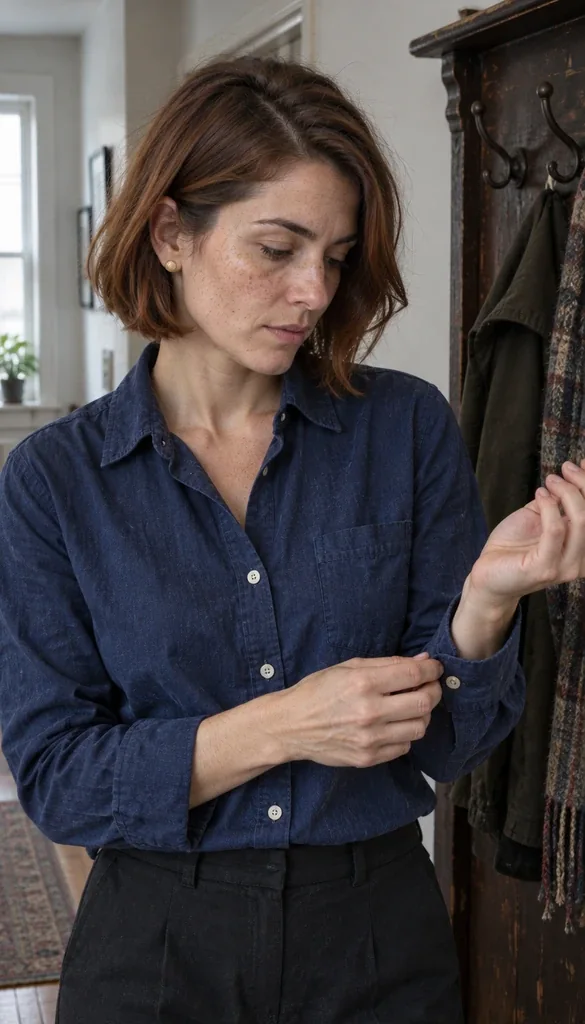
Image prompt
Nora Reed, an original fictional 32-year-old woman with a softly angular face, light olive skin with visible freckles, hazel eyes, a chin-length auburn bob with a side part, and small round brushed-gold earrings. Preserve her adult age, face shape, eye spacing, hairline, complexion and earrings. She makes practical city-style and reading content. Do not imitate Carrie Parker or any real person. A candid waist-up phone photograph in an apartment hallway beside a worn dark wooden coat rack. Wearing an indigo cotton shirt, she fastens the cuff on her left wrist with her right hand, looking down at the cuff, face in three-quarter view. Soft overcast window light from camera left, gentle under-eye detail, natural uneven skin, stray hair and creased cotton. Keep the whole head and both hands visible, coherent fingers and cuff contact. One continuous vertical 9:16 frame, no collage, text, logos, beauty filter or airbrushing.
Use this prompt in Create Photos ↗
Video prompt
Continue from the approved Nora hallway image at real-time speed. She finishes fastening the cuff, checks its fit as her hands release it and turns to leave the hallway. Gaze, hands and weight shift coordinate naturally. Preserve her adult identity, auburn bob, freckles, hazel eyes, gold earrings and indigo shirt construction. The phone stays fixed; window light and shadows respond to her movement. End when the routine is complete rather than adding a posed smile.
2. A street-style episode with the same identity
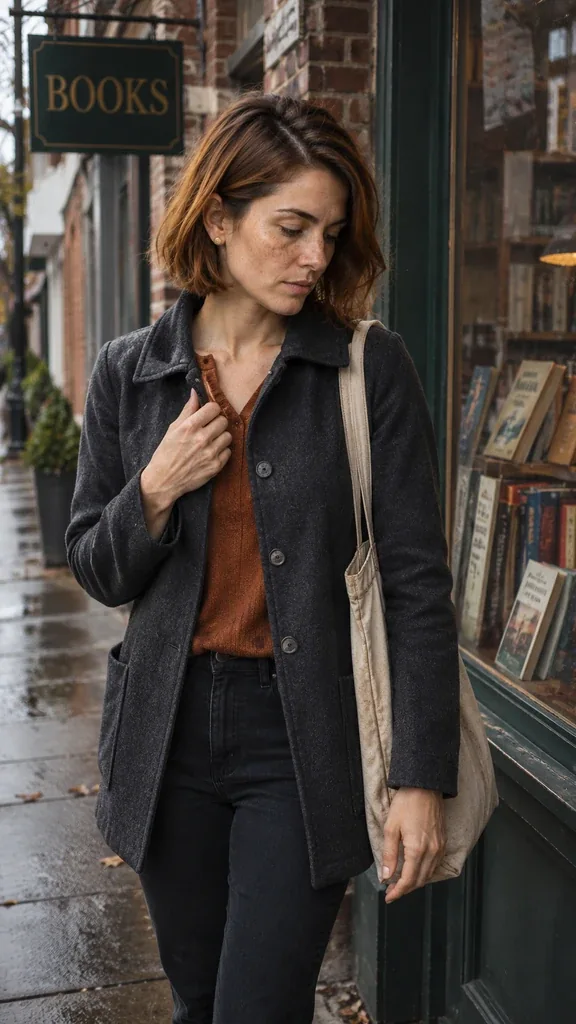
Image prompt
Use the attached approved identity photograph of Nora Reed. Preserve her exact face, adult age, auburn bob, freckles, eye shape and small gold earrings. Candid three-quarter-length phone photo outside a neighborhood bookshop on an overcast afternoon. Charcoal wool jacket over a rust knit top, dark jeans, worn canvas book tote on her left shoulder. Her right hand adjusts the lapel and her left hand rests at her side. Glancing toward the books in the window. Weathered brick, wet pavement, soft daylight. Full head and both hands inside a vertical 9:16 frame. Natural skin, coherent fingers, no logos or new face.
Use this prompt in Create Photos ↗
Video prompt
Continue from the approved Nora street image at normal speed. She frees the jacket lapel caught under the tote strap, adjusts the strap on her shoulder and walks toward the bookshop window to inspect the books. Let grip and posture change with the task. Preserve the adult identity, freckles, auburn bob, earrings, jacket and tote construction. A stationary phone records the activity in the existing overcast light; no outfit change or scene cut.
3. A quiet café moment that can become a series
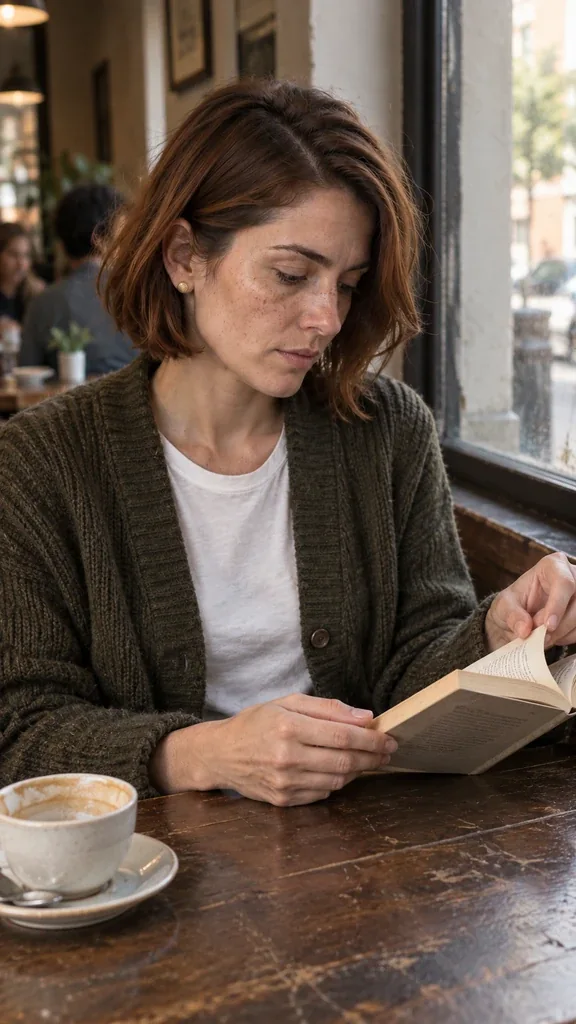
Image prompt
Use the attached approved identity photograph of Nora Reed. Preserve her exact face, adult age, auburn bob, freckles, eye shape and small gold earrings. Candid side-angle phone photo at a worn café window table. Olive knit cardigan over a white cotton crewneck, reading a paperback. Her left hand steadies the book while her right fingertips lift one page. Half-finished coffee on a saucer away from her hands. Warm afternoon window light, textured skin and fabric, scratched table, softly blurred occupied café. Vertical 9:16 frame with full head, book and both hands visible. Coherent page contact, no text overlays or new face.
Use this prompt in Create Photos ↗
Video prompt
Continue from the approved Nora café image at real-time speed. She turns the page to continue reading, follows the lines with her eyes and adjusts the book on the table for a comfortable view. Fingers release the page when it settles; gaze and hand movement overlap. Finish as she resumes reading, not with a look to camera. Preserve adult identity, auburn bob, freckles, earrings, cardigan, book and café layout. Fixed side-angle phone camera and the existing afternoon light.
Publish a series, then measure what happened
Download approved results from the workspace or History. Trim clips, add readable captions and check the vertical crop in your editor. Keep the head, hands and story prop in view. Use an accurate AI disclosure and avoid implying a real customer testimonial, sponsorship or lived experience that never occurred.
Publish through Instagram or your connected publishing workflow where available. Our Publish workspace is feature-gated; check whether it is enabled for your deployment and whether the destination account is connected. Generating a clip does not automatically publish it, and our workflow does not promise automatic comment replies or course sales.
Test a small series before expanding the schedule. Record each post's publication time, views, watch time, saves and link activity where your account analytics makes them available. Compare similar formats over the same observation window. Separate viewer response from registration or purchase attribution, and write down failures as well as successful scenes.
The transferable operating principle is a stable identity with changing situations, supported by a useful explanation and a clear next step. It still takes writing, selection and review. For another character strategy, compare Renji Kuru's everyday visual contrast; for more sourced examples, explore AI Influencer Trends.
Carrie Parker FAQ
Is Carrie Parker a real person or an AI influencer?
The Instagram account @carrieparker.ai identifies Carrie as an AI influencer. Its captions describe the recurring character and scenes as AI-generated.
How does Carrie Parker monetize?
Public captions invite comments such as ACL to receive a course link. The bio links a Stan storefront listing AI education, a prompt bank and a free blueprint. Sales and earnings are not disclosed.
What does faceless AI content mean?
The human operator can make content without appearing on camera while an AI character supplies the on-screen identity. Writing, art direction, generation, editing, disclosure and audience management still require work. Faceless does not mean anonymous, automatic or guaranteed income.
Can I make an original character in this style?
Yes. Create a distinct adult identity in My Influencers, use that saved character or an authorized master reference in Create Photos, then animate approved stills in Create Video. Match available reference modes, duration and credit quote to the selected model. Inspect face consistency, skin texture and physical contact before publishing.
Sources
- Instagram profile
- Pinned skit
- GRWM Reel
- Realism carousel
- Faceless-brand Reel
- Low-light prompt carousel
- Bio-linked Stan storefront
Independent editorial study; no affiliation with Carrie Parker or endorsement of the promoted courses.
Plan Content
Measure Engagement
Build Your Profile
Price Your Work
Write Post Copy
Brand Partnerships