
In this article · jump to a section
Key Takeaways
- Fix physical contradictions before adding texture or grain.
- Describe observable photography choices rather than “perfect” beauty.
- Keep identity fixed; review every frame in the series.
- Photographic realism never changes the need for honest AI disclosure.
Why Do AI Influencer Photos Look Fake?
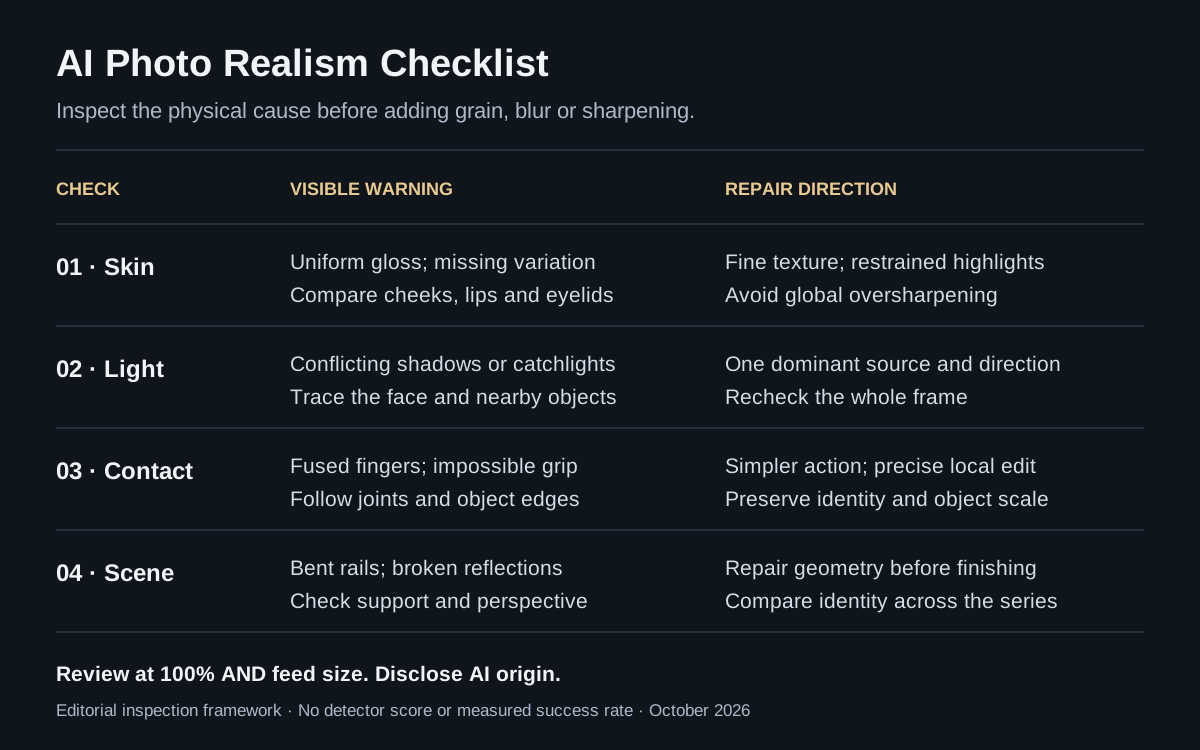
AI photos look fake when texture, anatomy, light or scene geometry contradict each other. A polished face can still sit above an impossible wrist. These are editing diagnostics, not a reliable test of whether an image was AI-generated.
| Common problem | What to look for | First repair |
|---|---|---|
| Plastic skin | Uniform gloss; texture disappears on cheeks | Restore subtle variation; soften processing |
| Perfect symmetry | Eyebrows, hair and pose look mirrored | Preserve natural asymmetry in the reference |
| Stiff expression | Frozen smile; gaze disconnected from action | Give the person an activity and a gaze target |
| Eyes and teeth | Glassy irises; identical catchlights; fused teeth | Check at full size; edit only the faulty region |
| Abnormal fingers | Fused joints or impossible object contact | Simplify the action; specify the grip |
| Inconsistent light | Face and scene imply different light sources | Name one dominant source and shadow direction |
| Background physics | Bent rails, floating cups, broken reflections | Trace edges, contact shadows and mirror geometry |
| Identity drift | Jaw, eye spacing or hairline change across shots | Restore the same approved identity reference |
What does research actually show?
Human inspection has limits. In Nightingale and Farid’s 2022 PNAS study, participants classified real and StyleGAN2-generated faces. The two groups below saw images drawn from the same 800-face set; each participant classified 128 faces.
Human real-versus-synthetic face classification
Accuracy, 0–100%. Dashed line: 50% chance level. Both experiments: 2022.
Limits: selected face images, a specific GAN and a constrained classification task. These results do not measure full-body influencer scenes, current models, our product or our prompts. The original chart above redraws reported means; it does not pool the experiments.
A 2025 Cognitive Research paper also examined real and generated familiar faces. In Experiment 2, 115 participants judged individual images; mean accuracy was 52%, not significantly different from chance. Its face-focused tasks do not establish that every generated lifestyle image is convincing. Practical implication: inspect image quality, but use provenance and disclosure to establish origin.
8 Ways to Make AI Influencer Photos Look More Realistic
Work from structure to surface: identity and physics first, photographic direction second, finishing last. Change one problem at a time so you can see what improved and what drifted.
1. Preserve natural skin variation
Replace “flawless skin” with “fine pores, subtle under-eye texture and natural highlights.” Avoid demanding extreme pores everywhere: texture changes across cheeks, eyelids and lips. To fix plastic AI skin, compare the edited face with the reference; added texture is synthesized detail, not recovered original pores.
2. Choose one believable light source
Specify “soft daylight from a window at camera left.” Check the nose shadow, jaw shadow and nearby objects against that direction. A room can have multiple lights, but one dominant source makes inconsistencies easier to diagnose.
3. Match camera perspective to the shot
Use a wide phone-camera view for an arm’s-length selfie; use a longer portrait perspective from farther away for a headshot. Lens and aperture terms guide the model’s appearance; they are not verified capture settings or real EXIF data.
4. Allow small composition imperfections
Try slightly off-center framing, a loosely cropped sleeve or an ordinary background. Keep important hands and face intact. Deliberate framing is useful; random tilted walls and broken geometry are defects, not authenticity.
5. Give the body one natural action
“Adjusting a tote strap” is clearer than “posing naturally.” Name where the gaze goes and what each visible hand does. For difficult fingers, simplify the grip before adding more anatomy instructions.
6. Build a specific, physically coherent scene
Choose a neighborhood café with an oak table or a brick workshop entrance. Check chairs, railings and contact shadows. Specific everyday objects supply context; excessive background clutter adds more opportunities for errors.
7. Repair a region, then inspect the whole image
Attach the source to an AI photo editor and request a precise correction: “Fix the thumb around the mug handle; preserve face, clothing and lighting.” An edit instruction is not a pixel lock. Check whether the face or product changed elsewhere.
8. Finish with restrained post-processing
Correct exposure and color, then apply modest sharpening at the final size. Avoid heavy clarity, skin smoothing and repeated upscaling. Compare before and after at 100% and at feed size; excessive processing can erase the texture you wanted.
How to Make AI Photos Look Like Real iPhone Photos
Describe a believable phone photograph, including who holds the camera and where they stand. “Shot on iPhone” alone does not define perspective, exposure or body mechanics.
- Ordinary selfie: arm’s length, eye-level phone, relaxed shoulders and a wide view without extreme facial stretching.
- Mirror selfie: show the phone’s rear in the reflection; trace the hand, phone edge and mirror plane.
- Street photo: place a friend a few feet away; use level building lines and a purposeful walking moment.
- Natural light: choose cloudy daylight or a side window; retain ordinary shadows and believable skin highlights.
- Exposure and finish: allow normal background detail, restrained sharpening and subtle grain only when appropriate.
Phone cameras often keep more of a scene recognizable than a dramatic shallow-focus portrait. Match that depth to the scene. Blur and noise are finishing choices; neither can fix a floating cup, a mirrored thumb or a changed face.
Before and After: Realistic AI Influencer Photo Examples
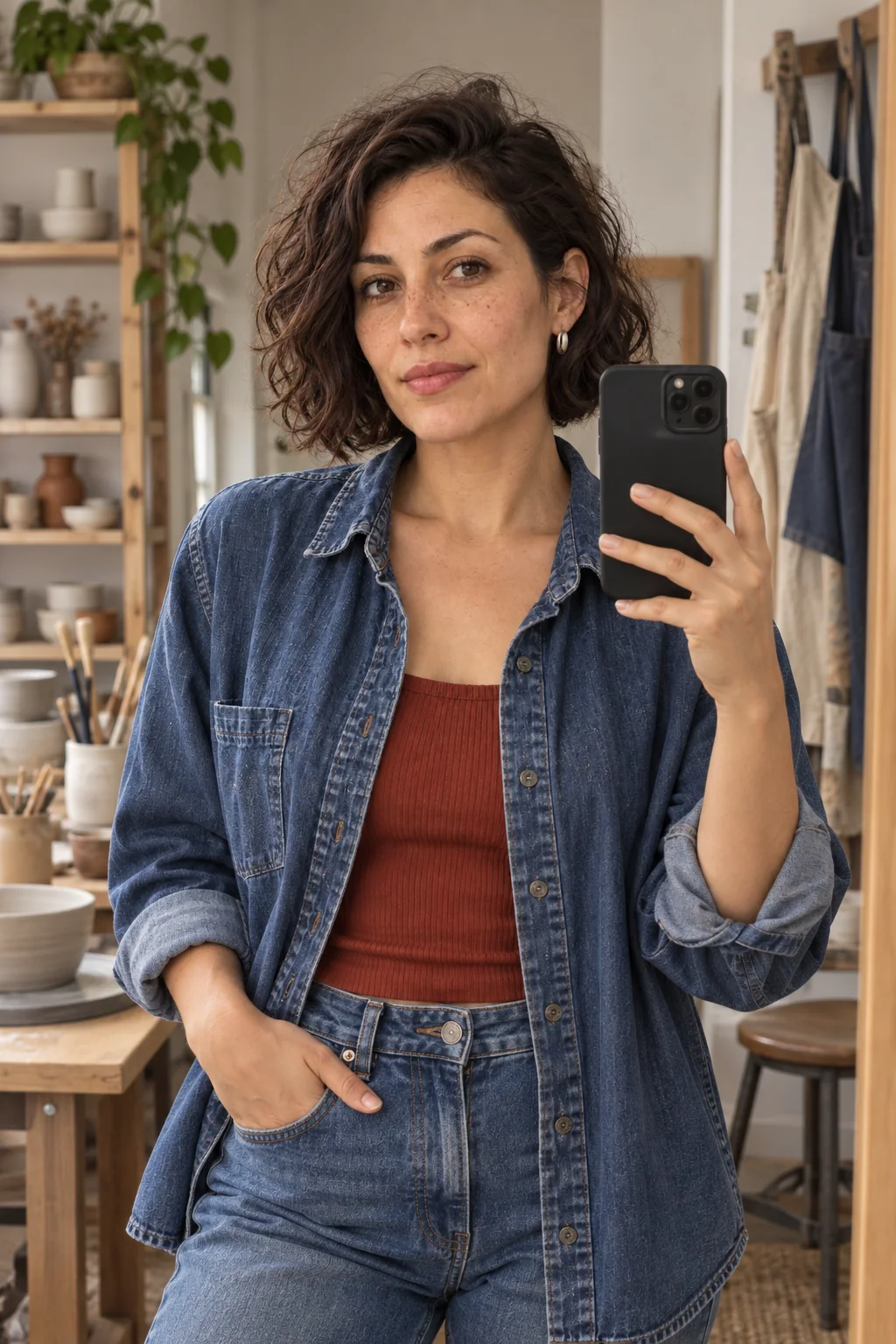
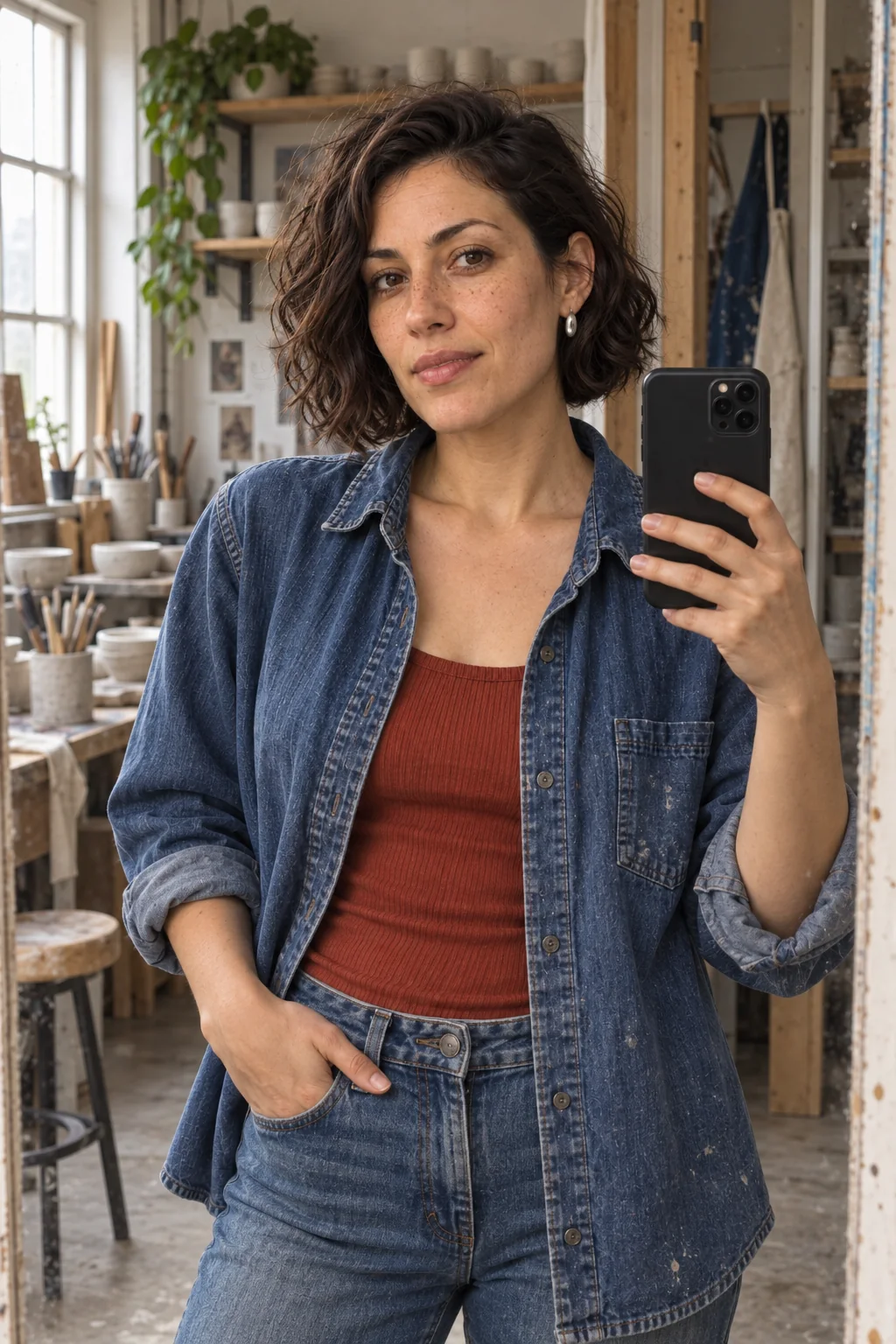
Compare specific photographic choices, not a claimed “realism percentage.” These eight images were actually generated for this guide using the same fictional adult reference and the same built-in image tool. They are not outputs from our product.
Method: four scenes, one baseline and one revised request per scene; the identity instruction, scene and requested 2:3 frame were held fixed within each pair. No seed, exact model version or sampler controls were exposed. The revised prompts change several photography cues together, so this is an exploratory editorial demonstration, not a controlled experiment. Outputs are unretouched apart from encoding and labeled crops. No numerical ratings or success-rate claims are assigned.
Shared identity instruction and complete request record
Use the attached image only as the identity reference for Mara, a fictional 31-year-old adult ceramic artist. Preserve her angular face, warm olive skin, brown eyes, freckles, dark wavy bob, slightly uneven eyebrows and silver oval earrings. No real person.
Each request adds the scene lock, the direction shown below and the same framing/safety wrapper. Download exact prompts, settings, hashes and review notes.
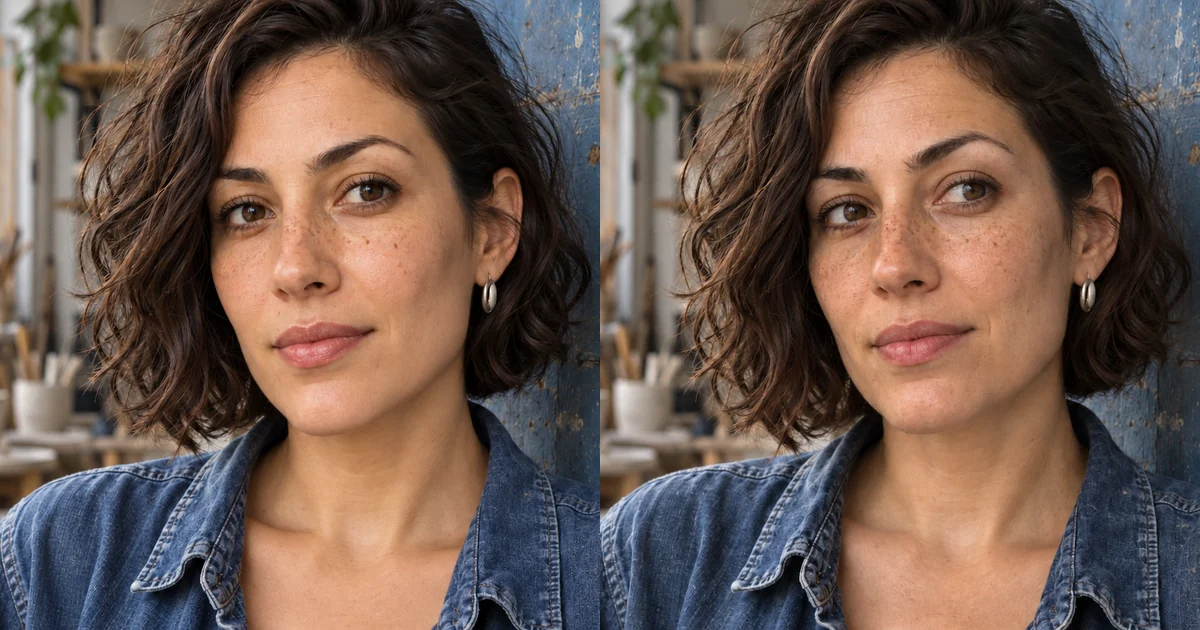
1. Portrait
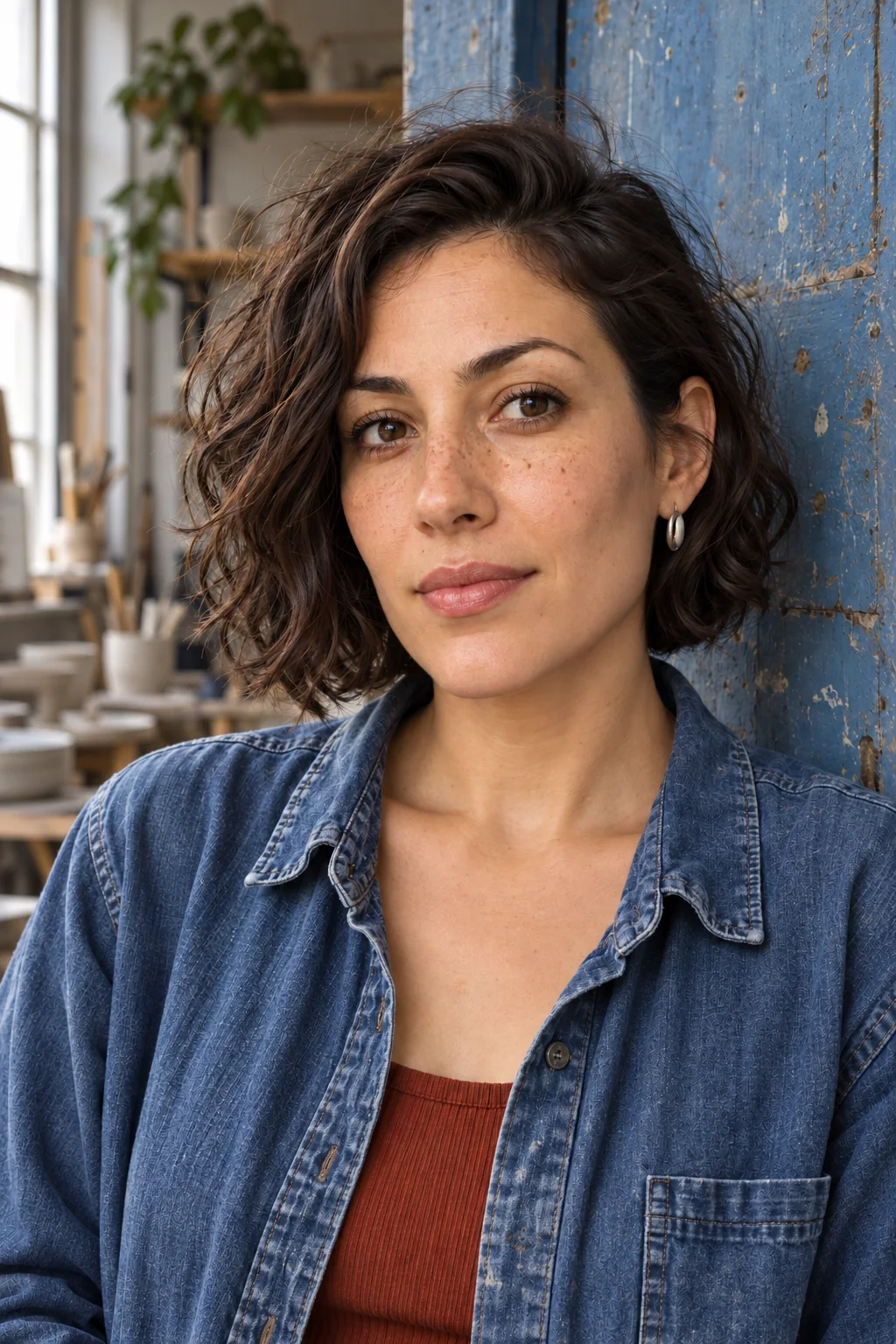
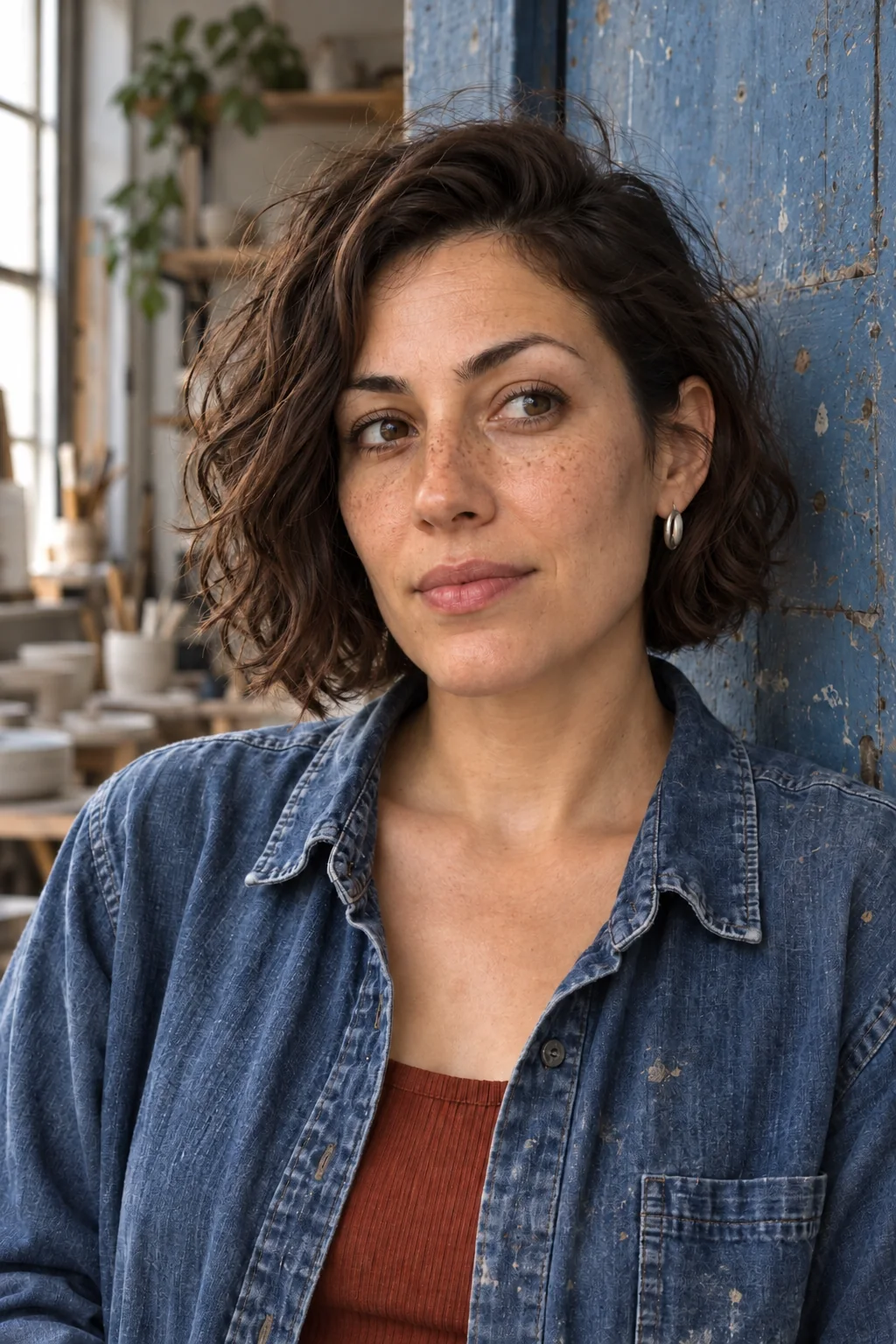
Both portraits already retain freckles and fine texture. The revised version has restrained highlights and less lip gloss, but the change is subtle: this pair does not demonstrate a plastic-skin repair. The shared reference appears to dominate the wording.
Original prompt vs. optimized prompt
Shared scene: Head-and-shoulders portrait leaning by the same worn blue studio door, denim shirt and rust top, looking slightly right, hands outside frame.
Original direction
Beautiful flawless influencer portrait, perfect skin, symmetrical beauty, studio lighting, sharp detail.
Optimized direction
Unretouched phone portrait by a blue workshop door; soft window light from camera left, visible fine pores and uneven freckles, slight under-eye texture, relaxed closed mouth, loose flyaway hair, eye-level 50mm-equivalent perspective from a comfortable distance, natural skin highlights, background gently soft.
2. Mirror Selfie
Both phone grips look plausible; the revised version reveals more workshop texture and side daylight. Framing and finger placement differ. Neither frame clearly bounds the mirror, so this pair cannot verify exact reflection geometry. Inspect rather than assume a repair.
Original prompt vs. optimized prompt
Shared scene: Waist-up mirror selfie in a lived-in pottery studio changing corner, indigo denim shirt and rust top, black smartphone held in left hand at chest height, other hand relaxed near jeans pocket. Phone rear and reflection consistent; no other people.
Original direction
Perfect mirror selfie, flawless skin, beauty lighting, pristine room, fashion influencer.
Optimized direction
Casual waist-up mirror selfie in a scuffed studio mirror; left hand naturally grips one black phone, thumb and fingers wrap around its edges without fusion, other hand rests near jeans pocket, straight doorframe, cloudy daylight from one side window, slightly off-center framing, normal exposure, textured denim, no face filter. Reflected phone is physically consistent.
3. Street Fashion
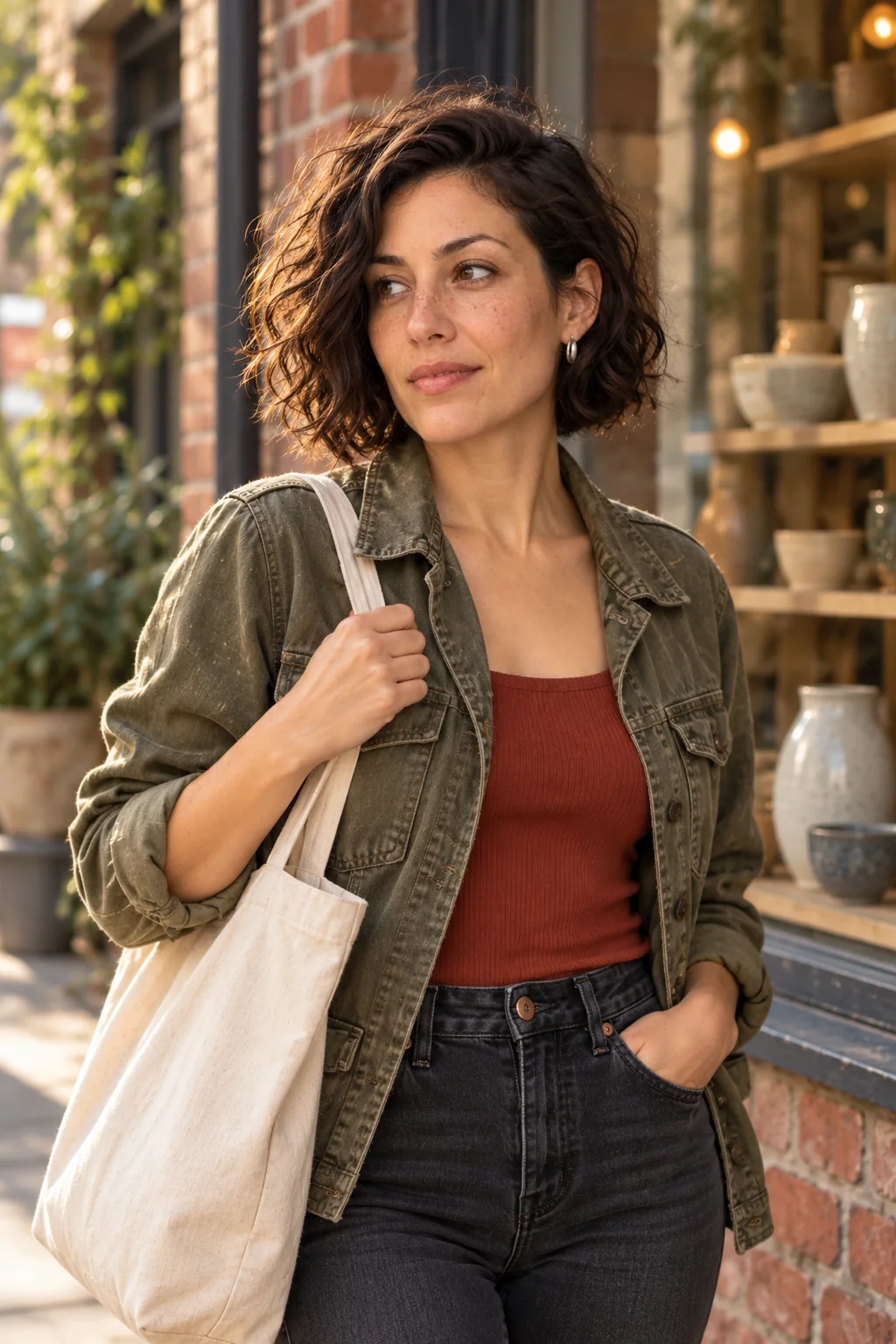
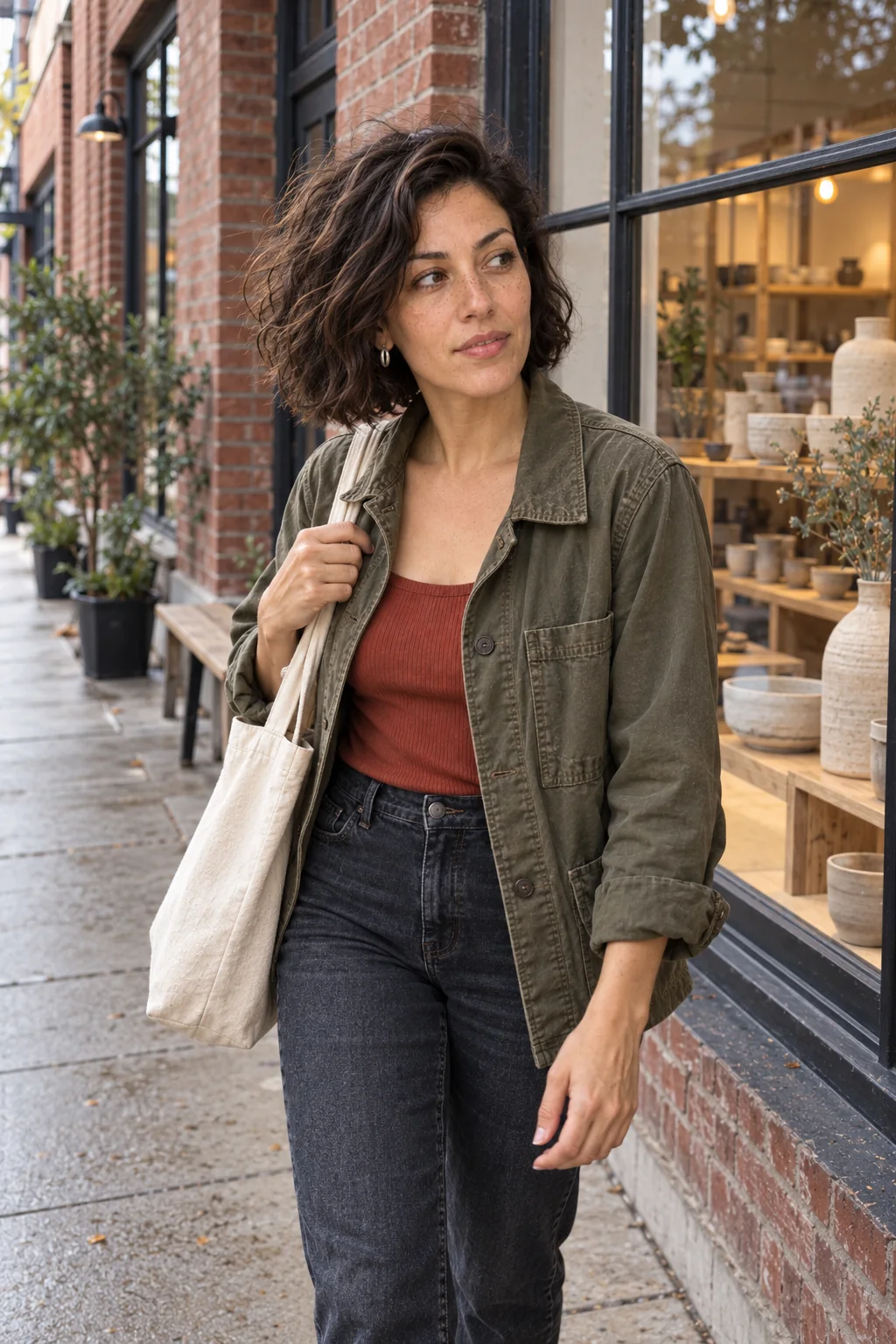
The baseline uses warm edge light and a tighter posed crop. The revision shows softer overcast light, more street context and a relaxed lowered hand. The requested mid-step action remains weak, and shoes are outside the crop: keep that failure in the review.
Original prompt vs. optimized prompt
Shared scene: Three-quarter street-fashion view outside a brick ceramics workshop, faded olive utility jacket over rust top, dark jeans, glancing toward a shop window, one hand casually holds a plain canvas tote strap on shoulder.
Original direction
Perfect street-fashion influencer, flawless skin, glamorous cinematic lighting, ultra sharp, ideal pose.
Optimized direction
Friend-shot phone street photograph outside a brick ceramics workshop; olive jacket and canvas tote, turning toward the shop window mid-step, one hand naturally holding the tote strap, overcast daylight with one coherent soft shadow direction, 28mm-equivalent wide view from several feet away, straight building lines, shoes and ground coherent, slight framing imbalance, skin retains fine texture.
4. Lifestyle Café
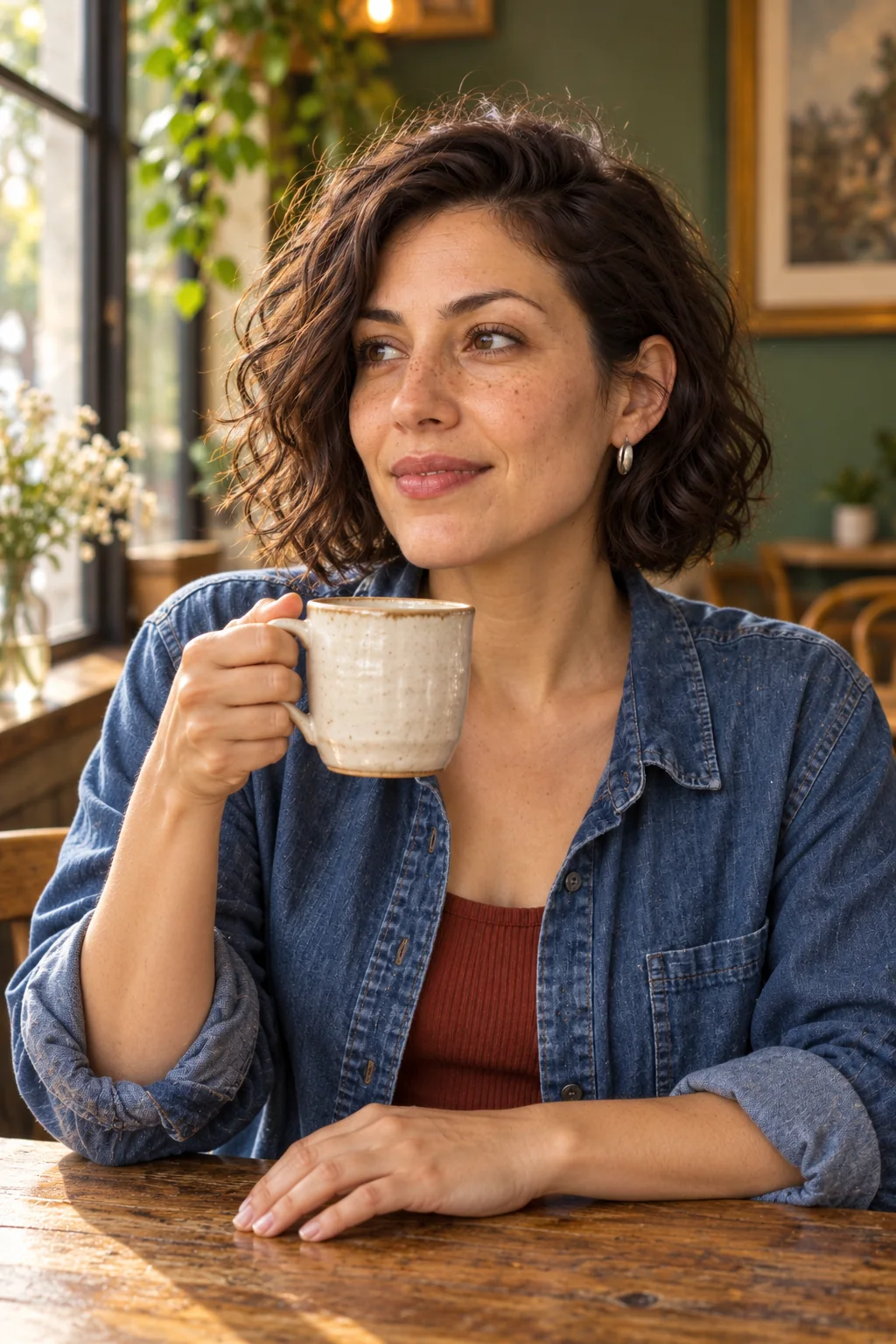
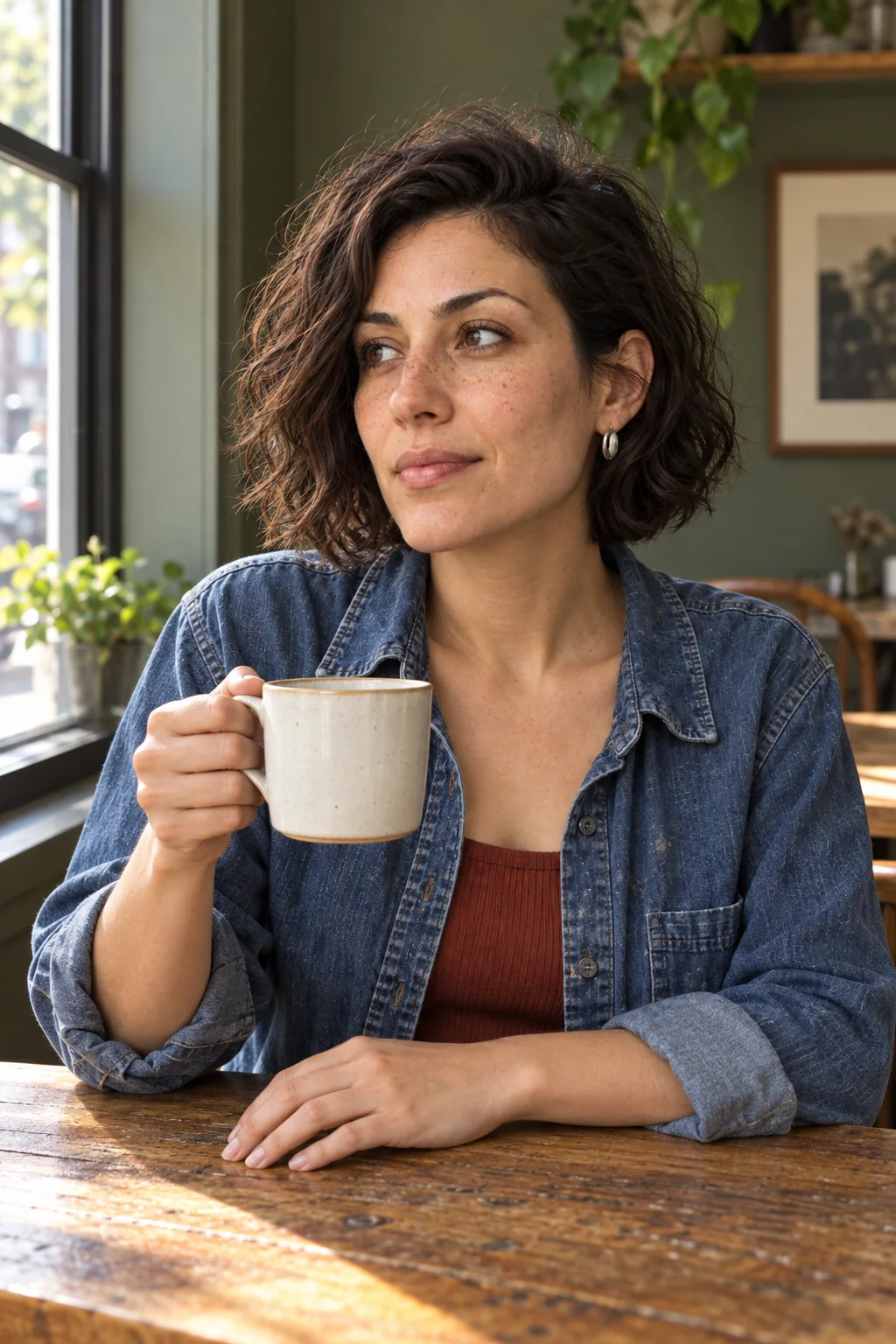
Both images retain plausible mug contact. The revision replaces warm backlight with cooler side daylight and a less glossy finish. It still holds the mug higher than requested, and the mug changes. This illustrates photographic direction, not a proven hand repair.
Original prompt vs. optimized prompt
Shared scene: Seated at an actual worn oak café table, blue denim shirt and rust top, holding a white ceramic mug by its handle with right hand at table height while looking toward side window. Left hand rests flat on table. Green café wall, a chair and window in background.
Original direction
Perfect cozy café influencer photo, smooth skin, beautiful smile, cinematic warm glow, luxurious background.
Optimized direction
Quiet phone photograph at a neighborhood café; right hand holds a white ceramic mug by the handle near the oak table, coherent fingers and handle contact, left hand rests flat, relaxed closed-mouth expression toward side window, one soft daylight source from left, cup shadow follows window direction, recognizable table edge, believable chair geometry, modest phone depth of field, ordinary exposure, visible skin texture and fabric creases.
Look closer: texture and contact
These are crops from the actual portrait and mirror outputs, enlarged for inspection. Read them alongside the full frames above; they are not separate generations.
5 Copy-and-Paste Prompts for Realistic AI Influencer Photos
A useful realism prompt describes identity, action, place, light and camera behavior. Attach your own approved reference; text alone does not bind a character. These are adaptable AI photo realism prompts, not guaranteed fixes.
Keep fixed: face shape, apparent adult age, complexion, eye color, hairline, hairstyle and signature jewelry. Change scene, action and composition deliberately. For clothing continuity, also lock garment details using our same-outfit workflow.
Natural portrait
Use my authorized adult reference. Keep the same face shape, apparent adult age, complexion, eye color, hairline, hairstyle and signature jewelry. Head-and-shoulders portrait beside a north-facing window, relaxed closed mouth, eyes focused just past the camera. Soft daylight from the left, gentle shadow on the far cheek. Fine pores, subtle under-eye texture, natural highlights and a few flyaway hairs. Eye-level 50mm-equivalent perspective from a comfortable distance; simple lived-in background. Unretouched photographic finish.
Everyday phone selfie
Use my authorized adult reference. Keep the same face shape, apparent adult age, complexion, eye color, hairline, hairstyle and signature jewelry. Ordinary handheld phone selfie near an apartment window, arm extended comfortably and shoulders relaxed. Slightly off-center framing, phone at eye level, 28mm-equivalent wide view without extreme close-up distortion. Soft daylight, normally exposed face, background still recognizable. Fine skin texture and restrained processing; no beauty-filter finish.
Street fashion
Use my authorized adult reference. Keep the same face shape, apparent adult age, complexion, eye color, hairline, hairstyle and signature jewelry. Friend-shot phone photo while walking past a neighborhood record shop. Worn navy jacket, straight jeans, one hand adjusting a canvas tote strap, gaze toward the shop window. Overcast afternoon light, consistent ground shadows, natural jacket creases. Full body from several feet away, level architecture, casual framing. Keep skin texture believable at this distance.
Indoor lifestyle
Use my authorized adult reference. Keep the same face shape, apparent adult age, complexion, eye color, hairline, hairstyle and signature jewelry. Seated sideways at a kitchen table, turning a book page with one hand while the other rests on the tabletop. Morning window light from the right, soft shadows, textured cotton shirt, ordinary furniture and a coherent table edge. Phone-camera perspective with modest depth of field and balanced exposure. Quiet expression; keep fingertips and page contact physically plausible.
Brand product interaction
Use my authorized adult reference. Keep the same face shape, apparent adult age, complexion, eye color, hairline, hairstyle and signature jewelry. Use my separate authorized product reference, preserving its real label, shape, cap, color and scale. At a workbench, place the closed product upright on the table and gently rotate it with fingertips at its base. One soft side window, contact shadows under product and hands, natural skin and fabric texture. Show a fictional demonstration, without implying personal testing, a customer testimonial or a proven result. If the label or contact is wrong, reject the frame.
For broader writing patterns, see AI influencer prompts and trending AI photo prompt text. Keep trend language subordinate to the actual scene.
How to Create More Realistic AI Influencer Photos With AI Influencer Generator
Use Create Photos for a new frame and Edit Photo for a specific correction. The workflow below reflects the current workspace controls and route definitions reviewed on October 19, 2026; the editorial images above were generated separately.
- Choose the identity. Open Create Photos, sign in, and choose an existing AI influencer or add an authorized adult reference. The image generator overview explains the entry point.
- Edit the direction. Paste one prompt above. Remove conflicting age, hairstyle or beauty instructions. Keep the reference selected.
- Review settings and generate. Choose an available model, aspect ratio and output count. Read the current credit quote before submitting.
- Inspect the result. Check face, fingers, light and scene geometry at full size. Compare series images against the approved character.
- Request a narrow correction. Open Edit Photo, attach the output and describe the region and desired change. This is instruction-based editing; this guide does not claim a mask brush or guaranteed preservation of untouched pixels.
- Review again. Compare the entire edited output, then inspect the final export at feed size. Keep the earlier frame if the correction introduces identity drift.
Create Realistic AI Influencer Photos
This guide focuses on repairing photographic quality. For choosing a character direction more broadly, read the most realistic AI influencer guide.
Realistic AI Photo Checklist + FAQ
Publish only after the whole frame passes visual review and its AI origin is represented honestly. Check the image at full size and in its final crop; a clean thumbnail can hide serious contact errors.
Why does AI skin look plastic?
Broad beauty instructions, excessive smoothing and overly uniform highlights can remove local variation. Ask for restrained fine texture and plausible side light. If the source face is already heavily smoothed, regenerate or edit that region rather than sharpening the entire image.
What is the best prompt to make AI photos look real?
There is no universal best prompt. Describe an adult subject, one physical action, a specific place, a coherent light source and a plausible camera position. Keep the identity reference fixed, then inspect the actual result rather than trusting realism keywords.
Does adding grain make AI images realistic?
Grain can make a coherent image feel less processed, but it cannot repair anatomy, reflections or identity. Add a small amount only after correcting structure and exposure, and inspect the exported image at its final display size.
How do I make AI images look like iPhone photos?
Describe ordinary handheld framing, a wide phone-camera perspective, natural light, reasonable exposure and restrained processing. Choose front-camera selfie, mirror selfie or a photo taken by a friend explicitly; each has different geometry. An iPhone name alone is insufficient.
Can I fix hands without regenerating the whole photo?
Try a localized edit with the source attached and a precise change request. Whether untouched pixels remain identical depends on the editor. Compare the full output with the original; regenerate with a simpler action if contact or anatomy remains wrong.
How do I keep one AI influencer recognizable across photos?
Reuse the same approved character or authorized reference. Lock apparent adult age, face proportions, complexion, eyes, hairline and signature styling. Compare the series side by side. A shared seed or repeated text alone does not establish identity consistency.
Do realistic AI photos need an AI disclosure?
Photographic realism does not change an image’s synthetic origin. Identify the creator as virtual or AI-generated and follow the platform’s current synthetic-media and advertising rules. Do not present a fictional person as a real customer or attach unsupported product claims.
Plan Content
Measure Engagement
Build Your Profile
Price Your Work
Write Post Copy
Brand Partnerships