
What can you actually transfer?
You can move permitted files and written instructions; a saved character or model ID usually has meaning only inside its original service. Keep exporting an image, importing a reference and transferring trained weights separate in your plan.
| Asset | What you can bring | What does not follow automatically |
|---|---|---|
| Generated images / character references | Download original permitted files; upload a supported reference. | Training rights, exclusive ownership or an identical identity result. |
| Videos | Retain permitted source clips and approved frames. | The source platform’s motion or identity model. From image accepts an image, not a video identity model. |
| Prompts + character notes | Copy text you can reuse; separate identity from scene instructions. | Platform syntax, seeds, tags and saved-reference IDs working elsewhere. |
| Original voice recordings | Keep authorized samples for a separately supported voice workflow. | Consent for cloning or a transferable voice model. |
| Higgsfield Soul ID | Permitted original reference inputs, plus outputs only where the proposed reuse is allowed. | A standalone exported Soul ID file; Higgsfield says this is unavailable. |
| Runway saved References | Permitted image files; Runway documents up to three References per generation in its own workflow. | A portable trained identity model or our importer accepting Runway tags. |
| LoRA / checkpoint | Only an actually downloadable, properly licensed file supported by its destination. | Our From image workflow importing weights. It does not. |
Higgsfield Soul ID: outputs are not the identity model
Higgsfield’s Soul ID documentation says the identity remains in its ecosystem and cannot be exported as a standalone file. Its ownership help page discusses commercial use of outputs. Those are different permissions.
The current terms, updated July 26, 2026, include restrictions on using outputs to develop competing services in section 5.1(iii) and on training, fine-tuning, distillation or otherwise transferring knowledge to AI systems in section 5.2(iv), with stated exceptions. We do not assume reference-based identity recreation is exempt. Use independently authorized original inputs, or seek clarification or written authorization for a restricted output-based workflow. Check the terms applicable to your account and date.
Runway References and voice clones have separate boundaries
Runway’s References guide describes one or multiple reference images, saved references and up to three References per generation. That explains its own image workflow; it is not evidence of an exportable identity model. ElevenLabs says voice clones cannot be exported standalone; API access still uses a voice hosted by ElevenLabs. Neither identifier is imported by our image workflow.
Build your character transfer kit
Keep original permitted reference files, a short identity specification, rights evidence and a repeatable test plan. These assets make your character usable across supported tools without pretending the old model moved with it.
- Export original files. Prefer a clear frontal portrait, three-quarter view, true profile and full-body reference where they exist. Keep native resolution. Avoid screenshots, beauty filters and contradictory faces; do not upscale a blurry face and call it new evidence.
- Record fixed anchors. Describe face landmarks, complexion, hairline, apparent adult age and signature accessories. Record unseen traits as unknown. Keep wardrobe and location separately editable.
- Keep a source and rights log. Note whether each file is your original input or a platform output, source/date, likeness permission, proposed reference use and training restrictions. A checked rights box is your confirmation, not legal clearance from a generator.
- Save a test ledger. Keep every charged attempt, refund, rejected result and repair. Do not delete unsuccessful attempts from the cost record.
Public download, no sign-in. Includes a blank JSON manifest, rights CSV, ledger CSV, README, copyable prompts, the labeled Eli reference and original workflow outputs. No proprietary model weights, voice clone, account access or external-platform assets are included.
Open individual files: manifest · rights worksheet · blank ledger · observed workflow record · instructions and rubric.
How to import references into AI Influencer Generator
Use Studio’s From image path to save an authorized reference as a new character, then select that character for later generation. We checked the following interface and completed a reference save in a signed-in Professional account on October 23, 2026.
1. Open Studio and choose From image
Go to Studio, open Create influencer and choose From image. The direct Character Builder entry opens the same method. Sign in when prompted; the checked import entitlement is Professional or above. Review current plans before starting.
2. Upload the authorized source reference
The checked uploader accepts JPG, PNG or WebP, up to 10 MB. Upload one clear reference and confirm the permission statement only if it is true. The importer saves a main reference image; it does not ingest a Soul ID, LoRA, Runway saved-reference ID or voice-clone file. Keep additional angles in your kit for review or a workflow that explicitly supports them.
3. Complete the visible setup and save
Choose Continue, complete the displayed style, creator direction, intended audience/platform and name fields, then Save reference character. The checked button says Free to save; this means the save has no separate generation debit, not that all plans can import or future media is free. Confirm the source image and name in My Influencers.
4. Create a new photo using the saved reference
Open the character → Create with this character → New pose. Confirm the character selector, model, resolution, ratio and output count. Put the identity anchor plus one scene brief into Direction. Our checks used GPT Image 2.5 Sunburst, 2K, 3:4, one output, quoted at 5 website credits each. Check the live quote: settings and future prices can change.
5. Check the result before continuing to video
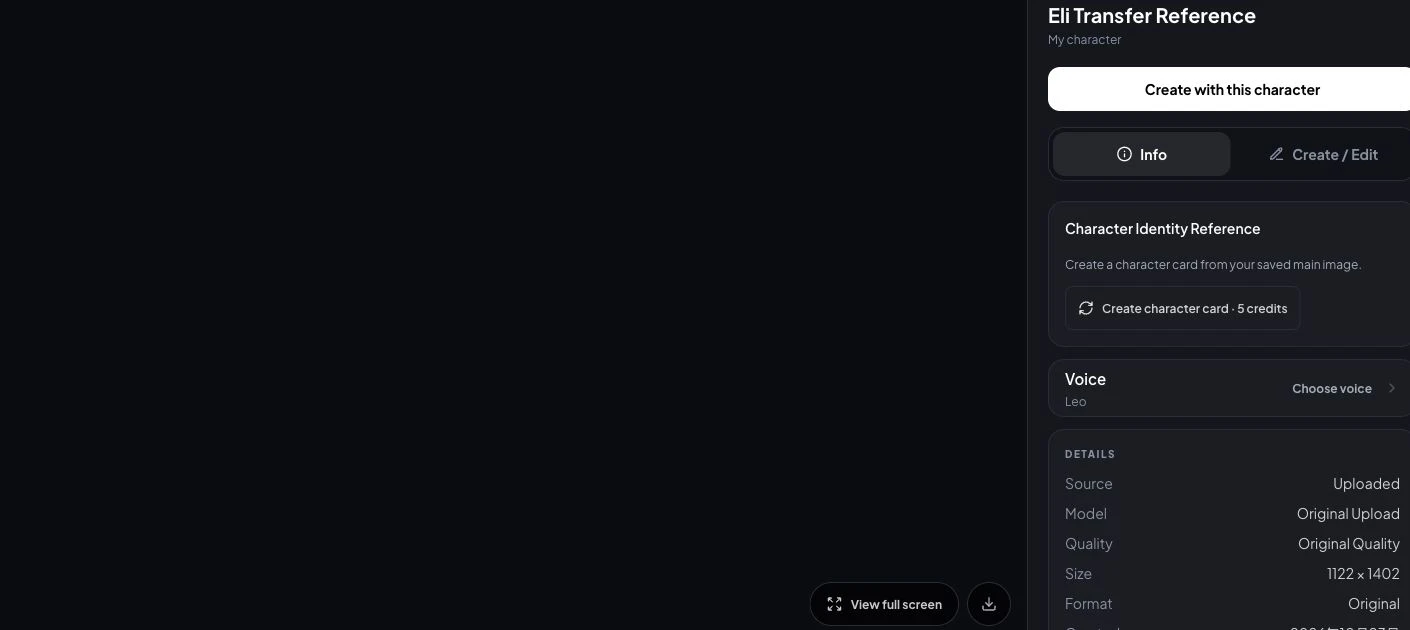
Open History, compare the full-size result with the original and retain the prompt and outcome. Reuse the original saved character for the next scene; do not keep replacing its face with a generated derivative. For video, return to the character’s Create with this character → Animate workflow. Video is separately quoted and was not tested here.
Saving a reference does not require a separately generated character card. The checked card button offered Create character card · 5 credits; we did not use it for these tests. See how credits work for reservation and refund rules.
Three real-world consistency tests: what we actually checked
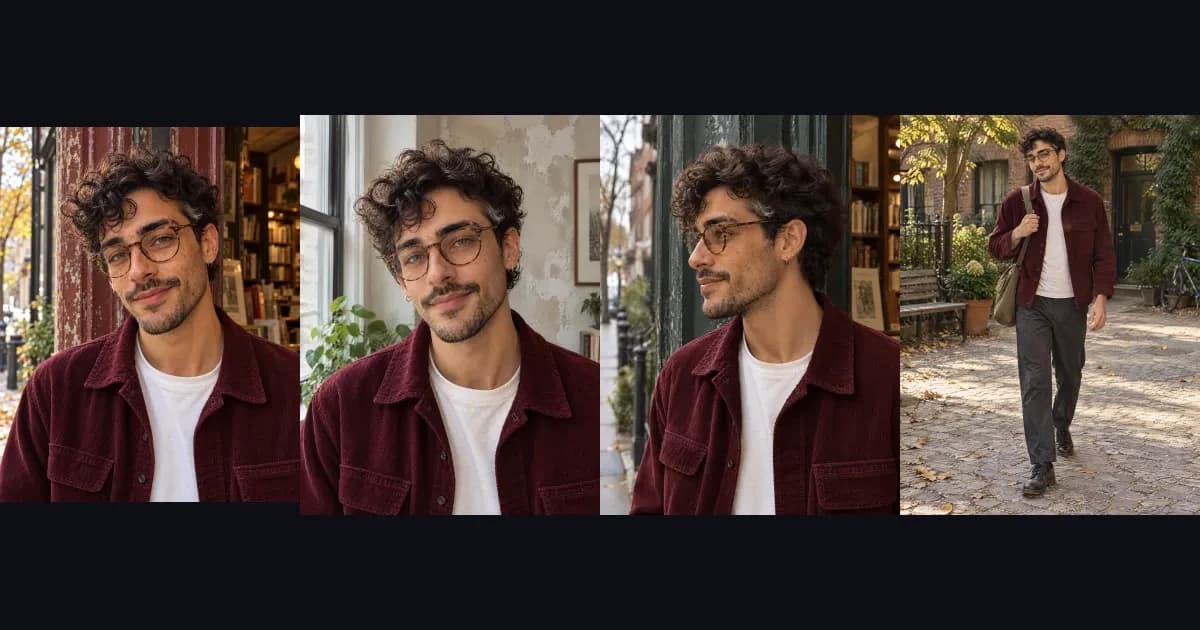
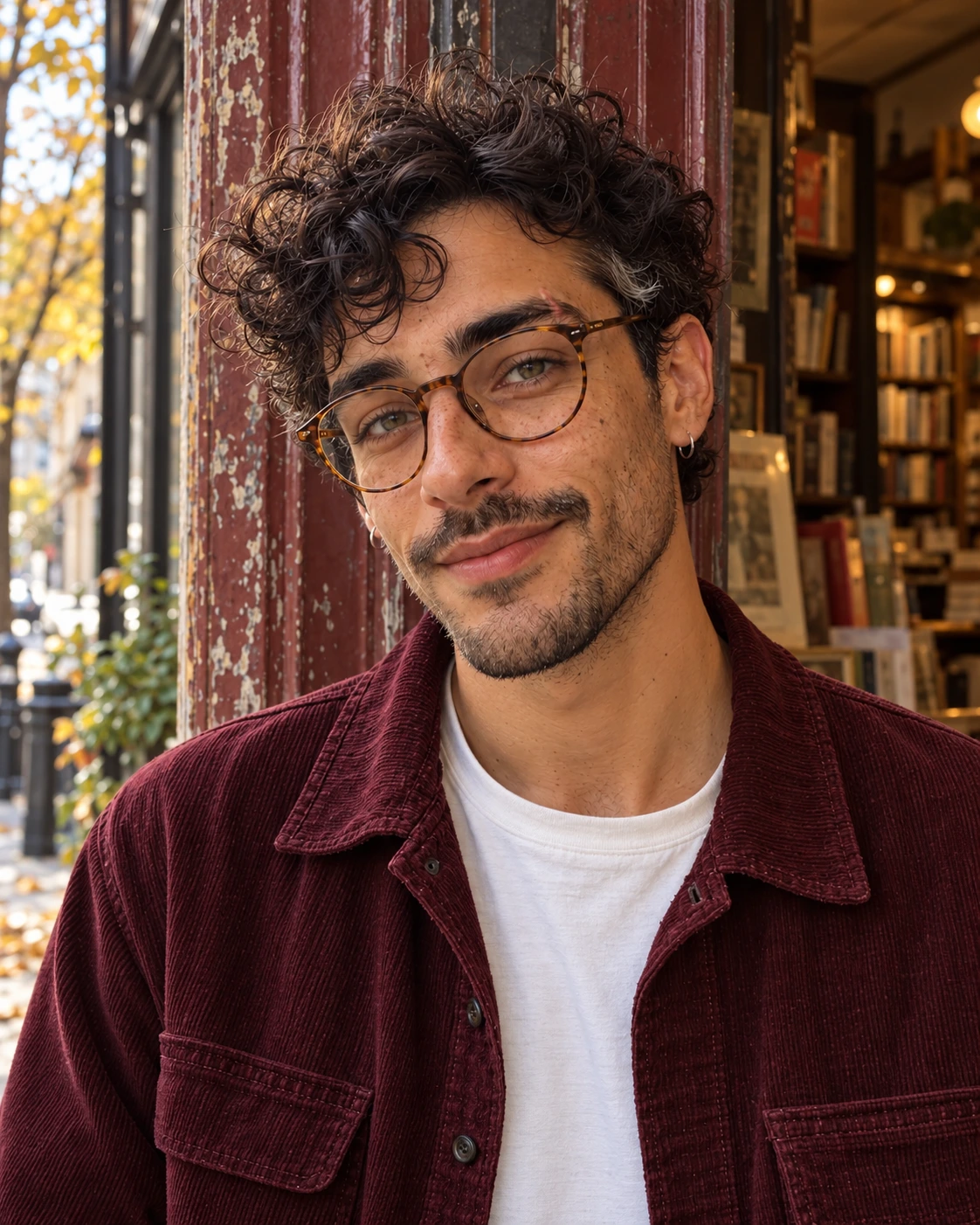
These are three first-party image-reference checks, not a verified transfer from another platform. Eli is an original fictional 29-year-old adult made with this conversation’s image tool. We uploaded its 1122 × 1402 portrait, saved it in our product and independently requested each scene from that same saved reference.
Test date: October 23, 2026. Website model: GPT Image 2.5 Sunburst. Provider: KIE; API ID: gpt-image-2-5-sunburst-image-to-image. Settings: 2K, 3:4, one image per request. Three scene requests, no repair/retry selection. The source tool does not expose its exact model build or seed. No seed was fixed in the website UI.

Compare facial landmarks, complexion and hairline with the original.
Read the exact prompt ↓
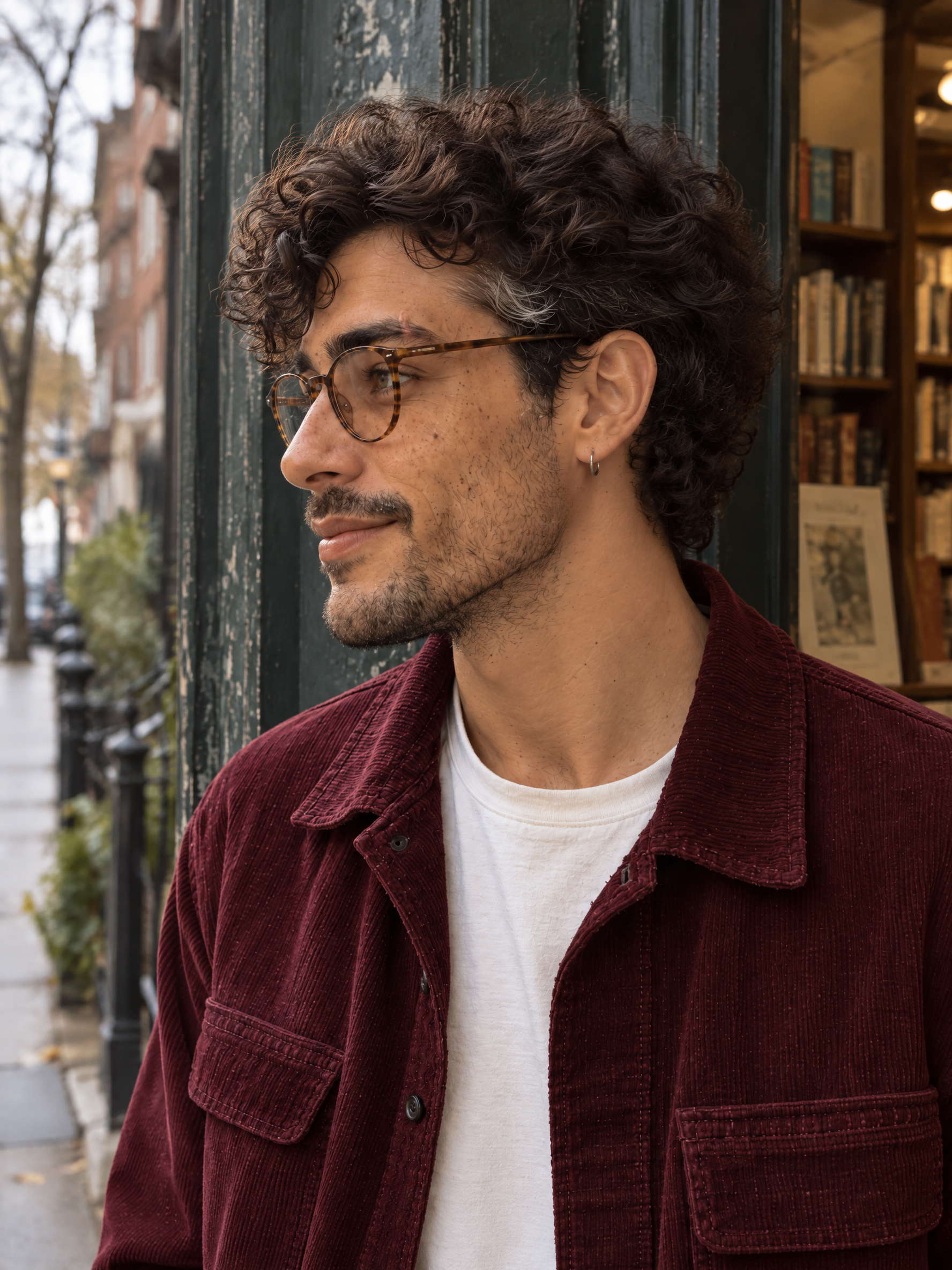
Inspect the nose bridge, chin, ear and jaw at a genuinely different camera angle.
Read the exact prompt ↓
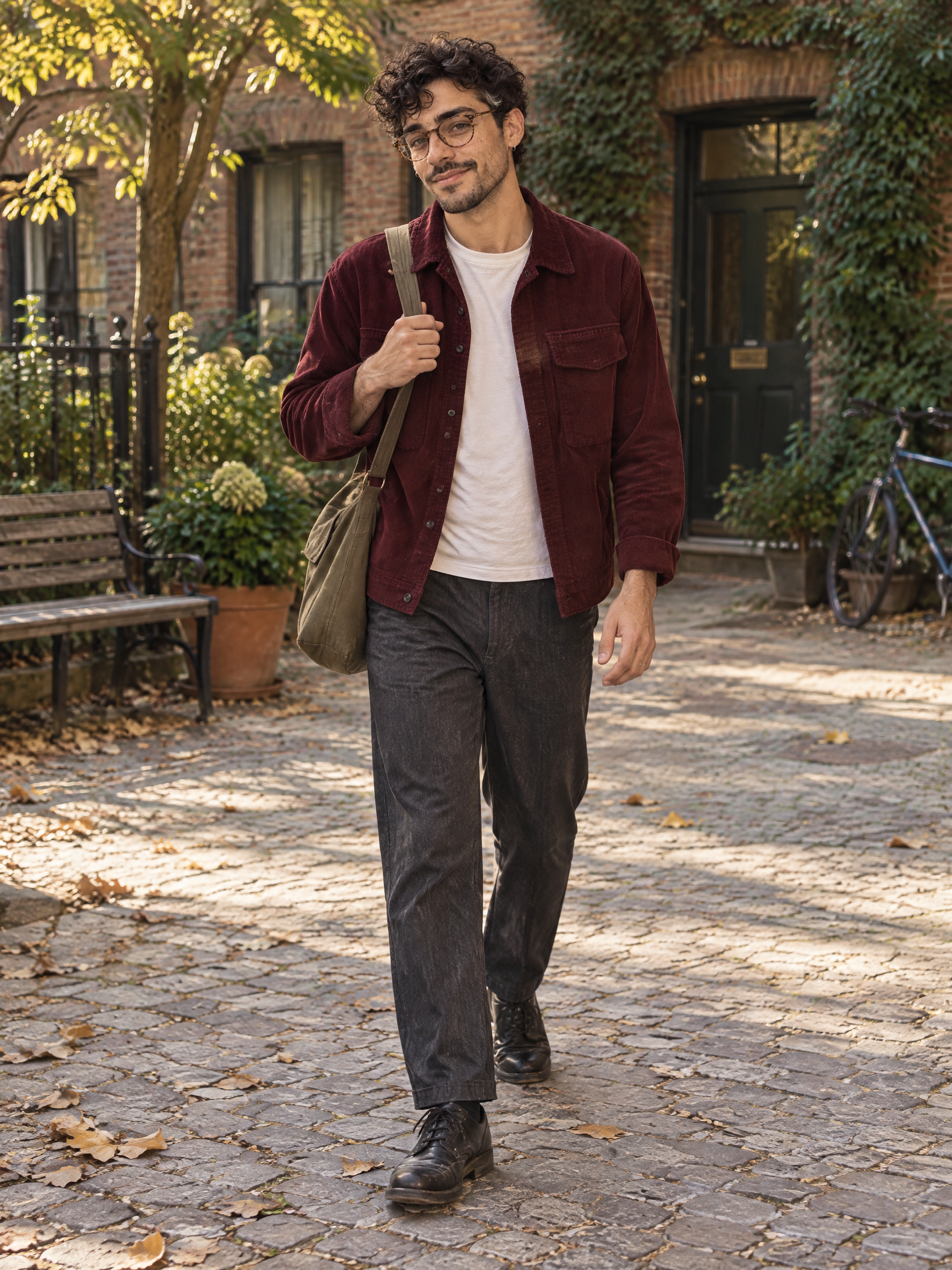
Check face, limbs, body plausibility and full-length framing; the portrait input cannot prove unseen body proportions.
Read the exact prompt ↓
A portrait-only source cannot verify original height, torso or limb proportions, nor establish a true profile. A plausible new body or side view is not recovered ground truth. External-platform migration: not completed. Video migration: not tested.
Compare the original and daylight output
Use the slider or open either full image. Compare eye spacing, nose, lip shape, jaw, curls and glasses; allow differences caused by viewpoint and light. These photographs are not pixel-aligned.

How to read the scorecard
Pass means visible identity anchors and the requested brief hold under editorial review. Partial means recognizable identity with a specific drift or brief miss. Fail means a different person or an unusable result. N/A means the source does not establish the feature. This is one reviewer’s qualitative check, not a biometric match or blinded experiment.
| Check | Observable rule |
|---|---|
| Face landmarks | Compare eye spacing, nose, lips, chin and apparent age against the original, not only another output. |
| Hair & accessories | Keep hairline, curl pattern, glasses and visible signature jewelry; account for occlusion and camera angle. |
| Complexion & texture | Allow plausible light/color changes; reject an unexplained complexion shift or waxy replacement skin. |
| Body & anatomy | Judge visible anatomy and plausibility. Unseen body traits in a portrait-only source are N/A for identity matching. |
| Requested scene | The requested angle, framing and action must appear; a frontal shot does not pass the profile brief. |
| Scene | Face | Hair / details | Complexion | Body identity | Scene brief | Overall |
|---|---|---|---|---|---|---|
| Daylight Portrait | Pass | Pass | Pass | N/A | Partial | Partial |
| Side-Profile Street Photo | Partial | Pass | Pass | N/A | Pass | Partial |
| Full-Body Lifestyle Photo | Pass | Pass | Pass | N/A | Pass | Pass |
Counts describe these three scene checks only, not cross-platform migration success. Body identity is N/A in all three because the source is a portrait. Anatomy is reviewed separately in the notes.
Daylight Portrait: partial
Glasses, eye spacing, nose, moustache and curls remain recognizable. Window light and plaster match the scene, but the head stays tilted like the source instead of a neutral straight-on diagnostic portrait. No full-body identity evidence exists in the input.
Next action: For a stricter face check, request a level head with both eyes and ears equally visible. This repair was not generated or charged.
Side-Profile Street Photo: partial
The left-facing angle, green doorway, curls, glasses, hoop and facial hair follow the brief. The nose and jaw form a plausible new silhouette, but the headshot does not verify that silhouette; the far lens remains visible. We cannot certify original profile identity from a frontal reference.
Next action: Add an authorized genuine profile reference before treating the side silhouette as a locked identity trait. No repair attempt was submitted.
Full-Body Lifestyle Photo: pass
The burgundy jacket, cream tee, charcoal trousers, walking step and strap grip read coherently. Head and both shoes are in frame; visible hands and foot contact are plausible. The face remains recognizable at this smaller scale. Original height, build and limb proportions are unverified because the input is only a portrait.
Next action: Retain as a plausible scene example. Supply a full-body source before claiming body-identity preservation.
Actual credits and attempts
| Scene | Attempts / retries | Charged | Returned | Net | Output |
|---|---|---|---|---|---|
| Daylight Portrait | 1 / 0 | 5 | 0 | 5 | 1776 × 2368 PNG |
| Side-Profile Street Photo | 1 / 0 | 5 | 0 | 5 | 1776 × 2368 PNG |
| Full-Body Lifestyle Photo | 1 / 0 | 5 | 0 | 5 | 1776 × 2368 PNG |
Total net usage: 15 website credits. Each of the 3 requests settled successfully; there were no technical-failure refunds or paid retries. The partially successful scenes remain in the cost record. Saving the uploaded reference incurred no separate generation charge. Subscription payments, time and video are excluded; no dollar conversion is inferred. Read raw records and editorial observations.
A copyable master prompt and three scene briefs
Repeat the same identity anchor for every independent request, then change only the scene brief. Replace Eli’s details with traits your own approved references actually show. A prompt helps guide a model; it does not transfer trained weights or guarantee the face.
Master identity anchor
Use the attached approved character reference as the identity anchor. Preserve this same fictional adult person: face shape, eye spacing, eyebrows, nose, lips, jaw, complexion, hairline and apparent adult age. Preserve recognizable body proportions where the reference actually shows them. Do not invent hidden anatomical details or substitute a new model. For Eli: a 29-year-old man with warm olive freckled skin, short dark loose curls, hazel eyes, amber tortoiseshell round glasses, light moustache and stubble, and a small silver left-ear hoop. Keep natural skin texture. Burgundy corduroy work jacket over a plain cream tee, charcoal trousers. Change only the scene, camera and action specified below. One independent realistic photograph, no collage, watermark, interface or added text.
Daylight Portrait · full prompt
Use the attached approved character reference as the identity anchor. Preserve this same fictional adult person: face shape, eye spacing, eyebrows, nose, lips, jaw, complexion, hairline and apparent adult age. Preserve recognizable body proportions where the reference actually shows them. Do not invent hidden anatomical details or substitute a new model. For Eli: a 29-year-old man with warm olive freckled skin, short dark loose curls, hazel eyes, amber tortoiseshell round glasses, light moustache and stubble, and a small silver left-ear hoop. Keep natural skin texture. Burgundy corduroy work jacket over a plain cream tee, charcoal trousers. Change only the scene, camera and action specified below. One independent realistic photograph, no collage, watermark, interface or added text.

SCENE TEST: Daylight Portrait
A head-and-shoulders frontal portrait of Eli beside a north-facing apartment window. Look naturally toward the camera, relaxed closed mouth, all hair and both ears in frame. Soft neutral daylight, no beauty retouching, textured worn plaster behind him. Hands out of frame. Portrait 3:4, eye-level camera, realistic skin and glasses reflections.
Side-Profile Street Photo · full prompt
Use the attached approved character reference as the identity anchor. Preserve this same fictional adult person: face shape, eye spacing, eyebrows, nose, lips, jaw, complexion, hairline and apparent adult age. Preserve recognizable body proportions where the reference actually shows them. Do not invent hidden anatomical details or substitute a new model. For Eli: a 29-year-old man with warm olive freckled skin, short dark loose curls, hazel eyes, amber tortoiseshell round glasses, light moustache and stubble, and a small silver left-ear hoop. Keep natural skin texture. Burgundy corduroy work jacket over a plain cream tee, charcoal trousers. Change only the scene, camera and action specified below. One independent realistic photograph, no collage, watermark, interface or added text.

SCENE TEST: Side-Profile Street Photo
A true left-facing side-profile street portrait of Eli, head turned about 80 degrees from the camera. He pauses beside a weathered dark-green bookshop doorway on a quiet overcast street. Eye-level medium-close composition; nose bridge, chin, visible ear and jaw silhouette must read clearly. Keep the same glasses, short curls, burgundy jacket and cream tee. One coherent soft daylight direction, hands outside the crop. Portrait 3:4. Do not turn this into a frontal portrait.
Full-Body Lifestyle Photo · full prompt
Use the attached approved character reference as the identity anchor. Preserve this same fictional adult person: face shape, eye spacing, eyebrows, nose, lips, jaw, complexion, hairline and apparent adult age. Preserve recognizable body proportions where the reference actually shows them. Do not invent hidden anatomical details or substitute a new model. For Eli: a 29-year-old man with warm olive freckled skin, short dark loose curls, hazel eyes, amber tortoiseshell round glasses, light moustache and stubble, and a small silver left-ear hoop. Keep natural skin texture. Burgundy corduroy work jacket over a plain cream tee, charcoal trousers. Change only the scene, camera and action specified below. One independent realistic photograph, no collage, watermark, interface or added text.

SCENE TEST: Full-Body Lifestyle Photo
A full-body candid photograph of Eli taking one unhurried step across a worn neighborhood courtyard, adjusting a canvas crossbody bag strap with one hand while the other arm hangs naturally. Same burgundy work jacket, cream tee, charcoal trousers and worn black shoes. Entire head and both feet inside the frame, natural planted-foot contact, believable hands and limb proportions. Soft afternoon daylight with coherent shadows. Eye-level environmental camera, portrait 3:4. Do not crop the shoes or change the person.
Keep clothing fixed during the first test so a wardrobe change does not hide identity drift. Once the face holds, change one variable at a time. Use Consistent Character Generator and the photo tool to explore supported workflows.
Common transfer problems and practical fixes
Fix the missing or conflicting evidence before adding stronger identity words. More emphatic prompts cannot reveal a profile or body shape absent from the original.
| Problem | Likely cause | Next action |
|---|---|---|
| The face changes | The description is too generic or competing references describe different people. | Return to the approved original; remove conflicting face references and describe stable landmarks without beauty-language substitutions. |
| The side profile looks wrong | A frontal reference does not establish the full nose, jaw or ear silhouette. | Add a permitted genuine profile reference. Do not treat a newly imagined side view as recovered ground truth. |
| Body proportions drift | A cropped portrait does not show height, torso or limb proportions. | Add an authorized full-body reference and compare against it. With one headshot, mark unseen body identity as unverified. |
| Hair or skin changes | Color grading, lighting instructions or appearance defaults compete with the source. | Use neutral-light references, retain the actual hairline and complexion, and inspect saved metadata. Do not prescribe a different ethnicity or hair style. |
| The outfit changes unexpectedly | The source outfit and a new wardrobe reference conflict. | State whether clothing should remain fixed. Keep a separate garment reference only when intentionally changing the outfit. |
| A photo works but video drifts | Motion exposes new angles and details that a still never established. | Animate an accepted still with restrained initial motion, then inspect first/middle/last frames. A still pass does not certify video consistency. |
| The old model cannot be imported | A provider identifier is not a portable checkpoint or supported LoRA. | Use permitted original references in From image. This importer does not accept Soul ID files, Runway saved-reference IDs, LoRA weights or voice-clone files. |
For continuing production after import, use how to keep an AI influencer consistent. This article owns the platform-transfer question; that guide covers the ongoing reference and review system. If you are starting a new identity instead, follow the character creation guide.
Review the kit before you generate more
Confirm permissions, evidence and one accepted still before committing to a larger batch. These checkboxes record your review, not automated verification.
Frequently asked questions
Can I move my AI character to another generator without losing the face?
You can reuse permitted reference images, identity notes and prompts in a tool that supports them. A recognizable result is possible, but it must be checked against the original. This does not transfer the old tool’s trained identity model, and no reference-based workflow guarantees an identical face across every angle or video frame.
Can I export a Higgsfield Soul ID?
Higgsfield’s Soul ID help page says its trained identity stays in the Higgsfield ecosystem and cannot be exported as a standalone file. Downloading generated images is a different operation. Check the current terms and your permissions before reusing outputs for identity recreation or training elsewhere; commercial output rights alone do not answer that question.
Can I import a LoRA directly?
The From image workflow documented here accepts an image reference, not LoRA weights or a model checkpoint. A downloadable LoRA is usable elsewhere only when its license permits the intended use and the destination supports the compatible base model and file format. A character name, provider ID or saved reference tag is not a LoRA.
What if I only have one photo?
Start with one clear, authorized reference and test a front portrait before harder scenes. A single portrait does not establish the true side profile, hidden ear or full-body proportions. Add genuine permitted angle and body references when available; label unobserved features as unknown instead of claiming they were preserved.
Can I transfer the character’s voice?
Audio files and a hosted voice clone are different assets. ElevenLabs says clones cannot be downloaded as standalone models; its API can use a clone while it remains hosted there. Keep original samples only when you have permission. This image importer does not transfer voices. A separate supported voice workflow and consent are required.
Do I need to train the character again?
Not for the reference-image import shown here: save the authorized image as a reference character and condition later generations on it. That is not a claim that the old identity model was retrained or imported. Other destinations may offer training with their own requirements and rights restrictions.
Does moving the character preserve commercial rights?
Importing an asset grants no new rights. Check source-platform terms, input and likeness permissions, output restrictions, trademarks and the intended use in the destination. Rights to sell an image do not automatically permit model training or identity recreation. If the source terms restrict that reuse, obtain clarification or written authorization or use your own independently authorized original inputs.
Is importing a reference free?
The checked interface labels saving an uploaded reference as Free to save, while reference import requires Professional or above. This is not an unrestricted free migration offer. Generating new photos, optional character cards and videos are separate quoted operations. Check current plans, available credits and the displayed quote before submitting.
Can I keep creating videos with the imported character?
Open the saved character, choose Create with this character and Animate to enter the supported video workflow. Approve the starting still first and inspect motion across the entire output. The photo checks in this article do not establish video identity fidelity, video pricing or compatibility with the original platform’s identity model.
Continue with your existing character
Bring the permitted reference and identity notes you already have. Save them through From image, approve one new scene and keep a record of what changed. You can retain useful creative assets without pretending a proprietary model has moved.
Plan Content
Measure Engagement
Build Your Profile
Price Your Work
Write Post Copy
Brand Partnerships