
The case: an existing AI interviewer adds a disclosed brand ad
The original example belongs to @joeyonthestreets. It is a new advertising use of an existing AI interview character, rather than the launch of a new persona. Findra’s October 24 report identifies Joey as the Blur Studios AI street interviewer. His current official bio credits “Birthed by @blurstudios.ai” and “Creative collaborator: @wizstar.ai.”
The Halloween post carries Instagram’s Paid partnership label. Its caption says, “What’s your favorite costume? The nun had the best answer,” followed by “Made with @wizstar.ai #ad #WizstarAI #Halloween.” A creator comment also describes Wizstar as a customizable AI avatar studio. Those disclosures substantiate the specific brand integration. They do not disclose the fee, contract, paid distribution, customer acquisition or return on ad spend.
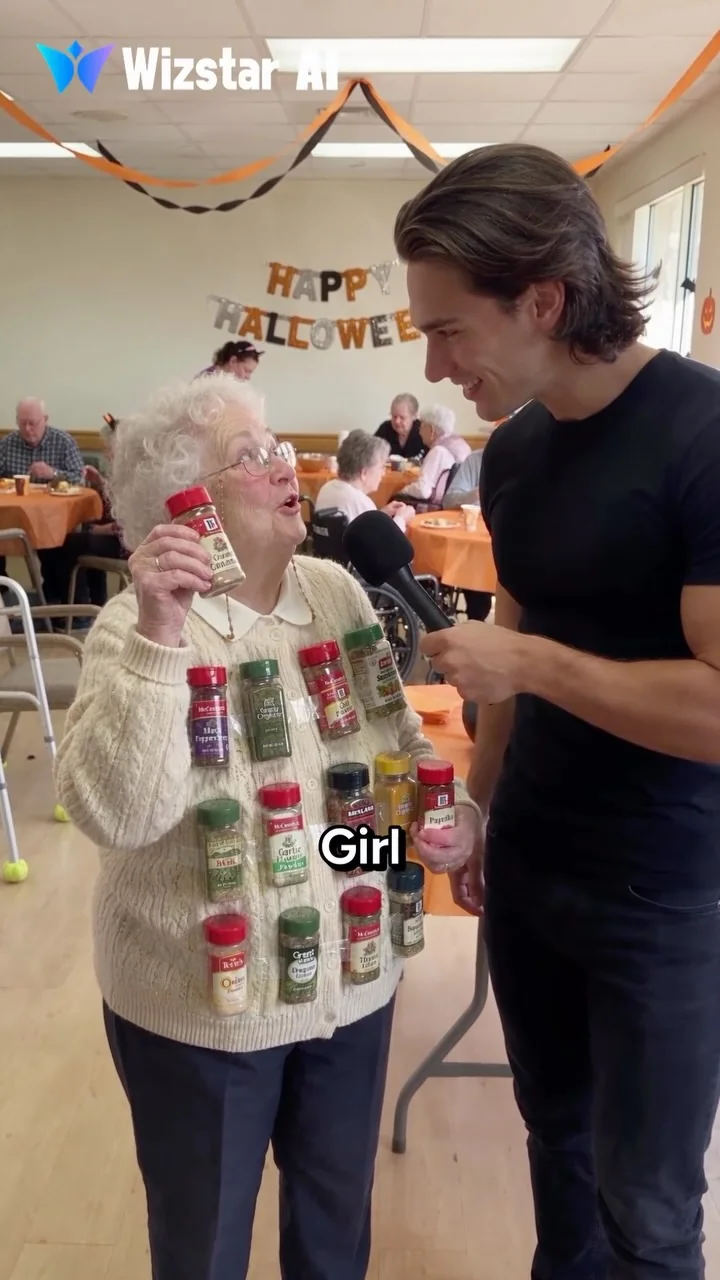
The source footer dates the post to October 22, 2026 at 00:24:38 UTC. We downloaded and checked the complete approximately 15-second official embed copy, then extracted the three source frames below. The interview takes place inside a Halloween gathering. “Street interview” describes its microphone-led, rotating-guest grammar; the selected ad’s visible location is indoors.
| Evidence | Supported reading | Commercial limit |
|---|---|---|
| Paid partnership label and #ad | This particular post publicly discloses advertising. | No fee, campaign spend or advertiser result is disclosed. |
| Made with @wizstar.ai, profile collaborator credit and persistent video logo | Wizstar is both credited in the creative and named in the campaign context. | The exact model, prompts and full production process remain unknown. |
| Three guests, one recurring host and a common party setting | The format can organize several short answer-and-reaction beats. | A public post does not establish how many generations or edits were needed. |
| Costume props with other visible product marks | Those marks are part of the source imagery and jokes. | They do not establish separate sponsorships by the spice or costume-prop brands. |
View the original post and advertising disclosure ↗. Instagram controls playback; the source link remains available if an embed requires consent or sign-in.
Why the interview structure makes the joke easy to enter
A familiar interviewing setup lets an unfamiliar guest become understandable quickly. The microphone explains why one person is speaking. The caption supplies a simple question. A costume or prop establishes a plausible answer, then the wordplay changes what the viewer thought they were seeing.
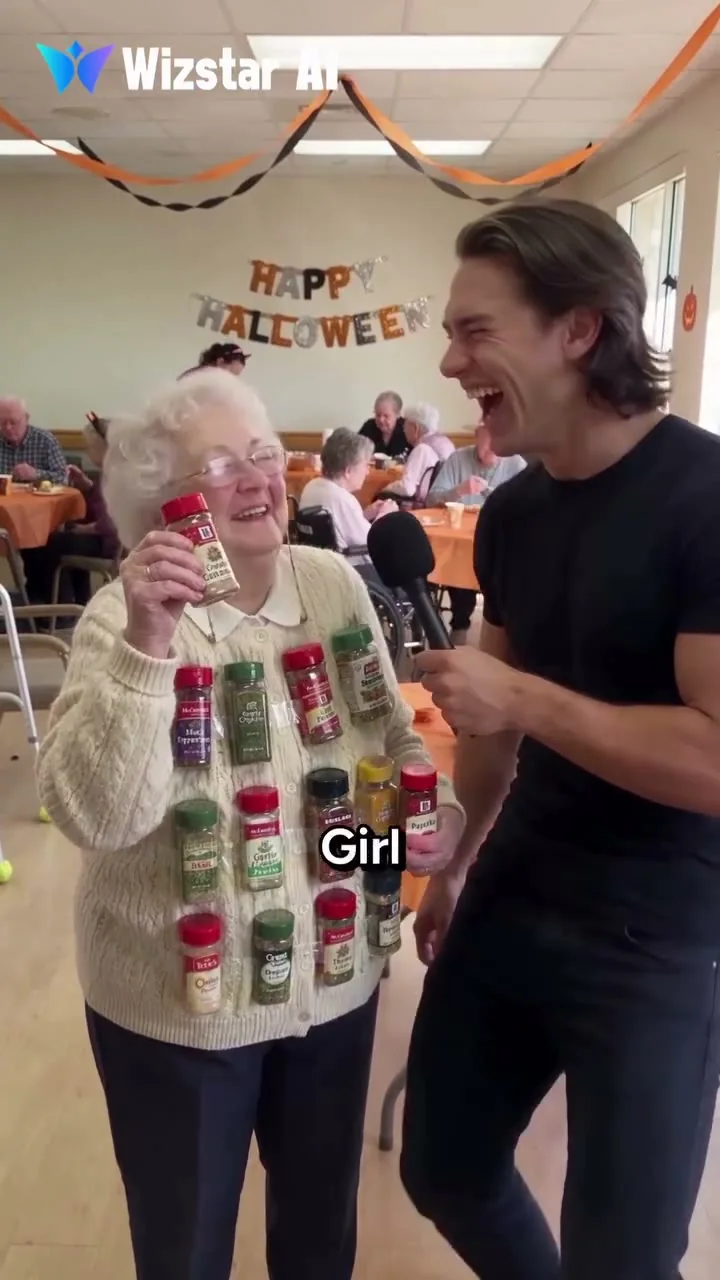
Spice jars turn the “Spice Girl” answer into a visual pun. The host’s reaction completes the beat.
Original ad ↗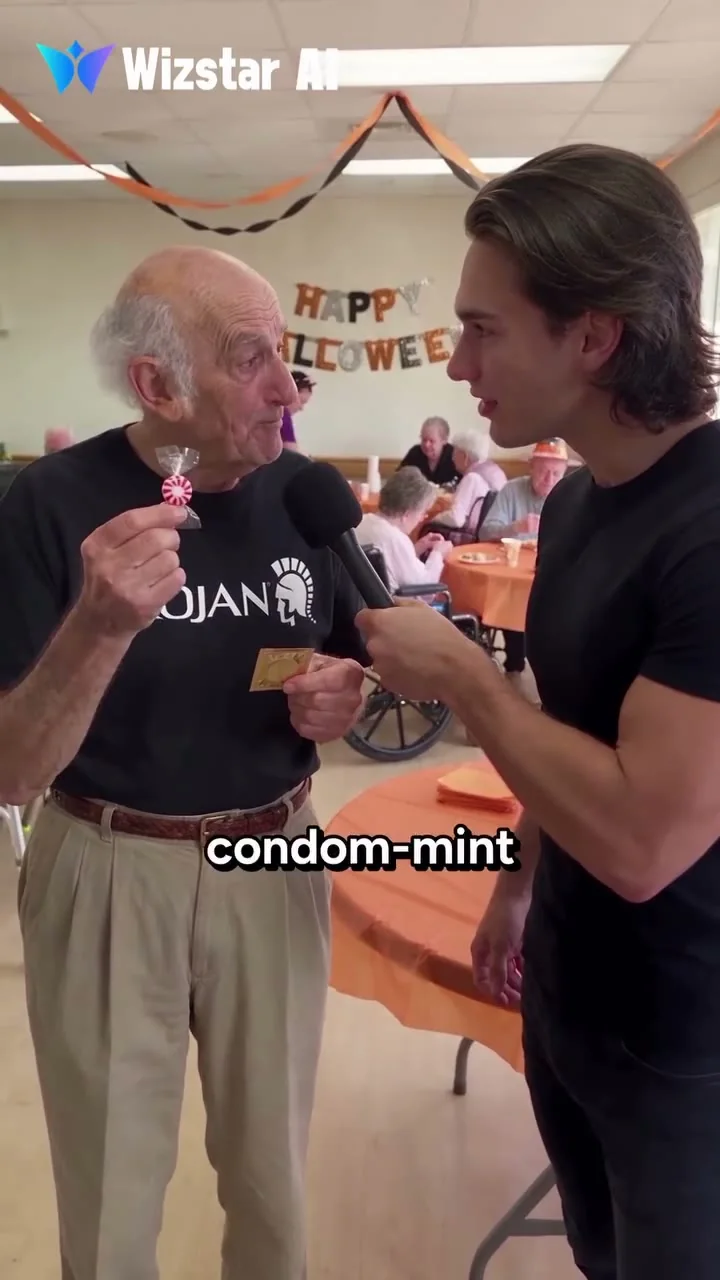
A mint and costume prop set up an adult “condom-mint” wordplay. It is a new answer inside the same interview structure.
Original ad ↗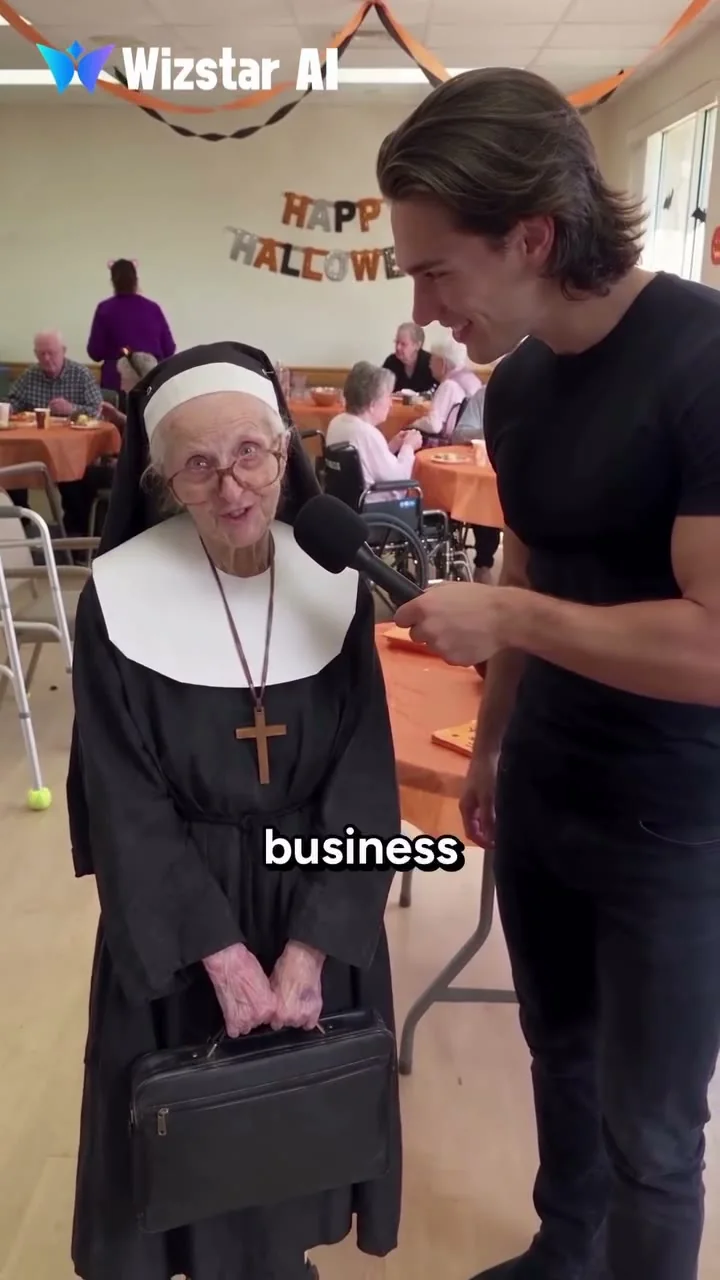
The nun costume and briefcase support the “nun of your business” gag. The caption specifically invites viewers to judge the nun’s answer.
Original ad ↗Complete frames from the downloaded 15.04-second source copy, at 3, 6 and 13.8 seconds. These are inspection points, not claimed cut boundaries. Original Wizstar credit and subtitles are retained; no frame was generated or retouched to imitate evidence.
The opening already contains a visual question
A woman wearing spice jars is an unusual image even before the joke is resolved. The host and microphone make that strangeness part of an interview, rather than a random generated scene. For your own clip, start where the problem is visible: an unexpected prop, a contradictory outfit or an answer already beginning. A long introduction delays the reason to keep watching.
The answer changes the meaning of the prop
“Spice Girl” turns the jars into a literal costume. The mint-and-costume gag uses adult wordplay. The nun’s outfit and briefcase support “nun of your business.” Each beat connects an object or role to the answer. That relationship matters more than adding unusual visual details that have no payoff.
Choose jokes that fit the advertiser and audience. A café, travel brand and creator tool may each want a different tone. The source’s adult pun is an observed creative choice, not a universal advertising recommendation.
The host’s reaction gives the answer a landing
A brief laugh, surprised expression or look toward the camera tells the viewer where the comic beat ends. Preserve that small pause in the edit. If the next guest arrives before the answer can register, the compilation can feel like unrelated footage. If the reaction lasts too long, a short joke loses momentum.
The brand participates in the creative
Wizstar’s visible credit stays on the video while the changing guests demonstrate the kind of character-driven entertainment the advertised tool is associated with. The ad preserves the interview show’s grammar instead of turning into a long software tour. That is an editorial reading of the creative; the public evidence supplies no conversion study that proves this treatment outperformed another ad.
The production shortcut: generate the host, guest and scene together
You do not need to create and save every passerby as a separate AI character. For a one-off answer, describe the guest directly in the same prompt as the interviewer, street, action and dialogue. A prompt-only video can establish all of them in one generation request. The skill is making those instructions readable and compatible with the selected model.
- 1 · PremiseOne question and an answer with a visible reason to be funny.
- 2 · PromptFixed host block + episodic guest + setting + separate dialogue turns.
- 3 · Short testGenerate one scene; inspect identities, words, microphone and timing.
- 4 · Series or adEdit, disclose, publish and use the result to improve the next row.
Suggested workflow for your original production, not the source creator’s disclosed pipeline.
| Role | Practical starting point | Reason to add a reference |
|---|---|---|
| One-off interviewee | Describe an original adult, one distinctive detail and a short answer in the scene prompt. | The guest returns, has a specific approved identity or must match an existing design. |
| Recurring host | Reuse a fixed description, voice direction, outfit, framing and behavior. | Exact face or voice continuity matters across episodes; text alone cannot guarantee it. |
| Partner AI influencer | Agree the question, personality and answer with the operator. | Use authorized identity assets through a model that supports the required reference roles. |
| Product | Write the verified use case; plan an approved product insert if needed. | The physical design, packaging or label must appear accurately inside the generated scene. |
How to make AI street interview videos in AI Influencer Generator
1. Open Advanced Mode and choose a short test
Open Create Video in Advanced Mode. This is the flexible prompt-and-reference workspace. The reviewed interface provides a Direction field, model selection, optional AI Influencer selection, reference controls, generation settings and Generate sound. Start with text input; a separate guest asset is unnecessary for the first prompt-only test.
Choose a model that supports your input and audio needs. In the reviewed interface, Seedance 2 Fast offered text-led setup, Generate sound, a 10-second duration option and 9:16 framing. For the template below, set 10 seconds, 9:16 and Generate sound in the controls. Other models and modes have their own input limits. Review the credit quote before generating; a long prompt does not create extra screen time.
2. Write one host block that can survive a whole series
Define a specific original adult host: face and hair traits, outfit, microphone, voice, screen position and interview manner. Keep this block stable while testing questions. Our example host, Nia, has short copper-brown curls and a dark-green field jacket. She is an original fictional character, not a recreation of Joey or another person.
For stricter recurring identity, use Consistent Character and the character workspace to prepare an approved host reference. Add it through the selected model’s supported identity or starting-image workflow. The guest can still be described in text. The extra reference serves the recurring host rather than forcing a full character-creation pipeline on each new answer.
3. Put the guest and street into the same prompt
Give a guest enough information to make the line believable: an apparent adult age range, clothing, activity, one meaningful prop and a delivery style. A commuter, baker or dog walker should contribute a different point of view. Avoid filling the prompt with a long biography that never becomes visible.
Describe the street as a physical place: a bakery entrance, paved sidewalk, overcast light and distant pedestrian movement. State where each speaker stands and who holds the microphone. A calm two-shot with a simple background is easier to review than a moving crowd, several cuts and a prop changing hands.
4. Assign each line to one speaker
Write the exact question and answer in quotation marks. Name the speaker before each line and specify one voice at a time. Keep a reaction beat at the end. Spoken dialogue, subtitles and camera instructions are separate jobs; add accurate captions in editing rather than relying on generated text inside the scene.
Create a 10-second vertical fictional street-interview comedy, one continuous waist-up two-shot. The scene is outside a neighborhood bakery on a paved sidewalk in soft overcast daylight, with a readable storefront and sparse pedestrians in the distance. No location change. FIXED HOST: Nia, our original fictional adult interviewer in her early thirties, short copper-brown curls, a dark-green field jacket and a small silver hoop in the left ear. She stands on the viewer's right and holds one realistic handheld microphone in her right hand. Keep her face, hair, voice, jacket and microphone consistent throughout this clip. EPISODIC GUEST: one original fictional adult bicycle commuter in his forties, navy rain jacket and scuffed messenger bag, standing on the viewer's left. Generate this one-off guest as part of this scene; he does not need a separate character asset. ACTION AND EXACT DIALOGUE: Nia asks, "What's your morning shortcut?" She then moves the microphone slightly toward the guest. Only the guest answers, "Calling breakfast a meeting." Nia gives one surprised smile and holds the reaction for the final beat. Do not add a second answer, narrator or overlapping speech. CAMERA AND SOUND: restrained handheld phone-video feel at eye level; both faces stay readable and in frame. Match mouth movement to the active speaker. Quiet street ambience underneath the two distinct voices. Hands, microphone and bag remain physically coherent. Keep the frame free of generated captions or logos; subtitles and any approved sponsor graphics will be added in editing.
This template combines both people, the street, the microphone action and a short exchange. It is a proposed prompt, not a verified generation result. Check whether the selected model has sound enabled and whether its available duration can comfortably hold the two lines. Shorten the dialogue before adding more instructions when the clip feels crowded.
Create your first prompt-based interview ↗
5. Review the actual output, then edit the beat
Watch the result once for meaning and once for execution. The question and answer should be audible and assigned to the correct mouths. Nia should retain her identity, the guest should remain separate and the microphone should stay in the correct hand. Look at teeth, hands, prop contact, background motion and whether the reaction appears after the answer.
If an exchange fails, simplify that shot. Fewer words, less movement and a shorter microphone gesture can help. You can also make separate speaking and reaction shots and assemble them in an editor when needed. This is a repair option; the main route remains a single scene prompt for a short interview.
In the edit, remove dead air, preserve the punchline’s pause and add correct subtitles, sound balance and any approved brand graphics. Keep captions away from mouths and platform controls. Review the complete vertical export on a phone-sized screen, including the sponsor disclosure and final destination.
6. Save the reusable parts, then produce the next row
Save the approved prompt, host reference if used, model settings, final media and a note about repairs. Use a simple episode identifier so the question, answer and export stay connected. The current workflow lets you reuse the creative setup and submit reviewed clips individually. Plan a batch of episodes together, then keep the review specific to each output.
For a more visual setup or a reference-limited video model, an optional route is to create one shared starting image in Image Generation and animate it through AI Influencer Video. You can describe the one-off guest in that shared scene too. Our two-character image guide covers identity separation when you need that control.
Turn one interview into a sustainable series
Keep the show recognizable while giving each episode a new reason to exist. The host, microphone, framing and question style can provide continuity. The guest’s point of view, answer and visible situation provide variation. This is a format hypothesis to test with your audience, not a guarantee of viral distribution.
Keep the fixed Nia host block, one-microphone blocking, camera and audio rules unchanged. Replace only the episodic guest, question, answer and matching reaction: A. Guest: an original fictional adult night-shift baker, flour-dusted navy apron and tired but amused expression. Question: "What's your morning shortcut?" Answer: "Starting it yesterday." Reaction: a brief knowing nod. B. Guest: an original fictional adult office worker in a rust cardigan, holding an ordinary takeaway cup. Question: "What's your morning shortcut?" Answer: "Naming my coffee breakfast." Reaction: a small laugh. C. Guest: an original fictional adult dog walker in a faded blue jacket, leash resting naturally in one hand; keep the dog outside the frame to simplify the shot. Question: "What's your morning shortcut?" Answer: "Letting my dog choose the route." Reaction: one raised eyebrow. Generate one selected version per clip. These are invented adult roles, not real interviewees or customer testimonials. No separate guest portrait is required for this prompt-only test.
Start a planning batch with six rows: two questions, each with three materially different guests or answers. Generate one test, review the premise and voices, then continue with the strongest rows. That is more controllable than spending credits on dozens of nearly identical clips before you know whether the joke reads.
| Field | What to record | Why it matters |
|---|---|---|
| Episode and question | A short ID and exact host line. | Keeps the premise easy to compare across variations. |
| Guest and answer | One visible adult role, one short line and any relevant prop. | Gives the new clip a point of view rather than just a different face. |
| Host and production settings | Approved identity asset if used, prompt version, model, duration and ratio. | Helps separate a creative change from a production change. |
| Hook and reaction | What viewers see first, and the pause or expression after the answer. | Makes the opening and payoff intentional. |
| Commercial fields | Sponsor, approved claim, disclosure, usage scope and destination, when applicable. | Prevents a joke draft from silently becoming an unsupported endorsement. |
| Review and outcome | Repairs, final export, publication link and comparable analytics window. | Connects the production process to what you actually learn. |
Design hooks around the contradiction
Try three openings for the same approved premise: show the strange prop, start on the first words of the answer or open on the host’s immediate reaction before revealing its cause. Make the missing information specific enough to resolve inside the clip. Avoid a headline that promises a reveal the video never delivers.
Use comments to write a follow-up
Ask a question the episode has earned: “Which answer would you give?” or “What should Nia ask next?” A relevant answer can become an alternate version or a guest role. If you quote or identify an audience member in a commercial piece, obtain the permissions appropriate to that use. Do not invent audience submissions or present fictional dialogue as a real public survey.
Build a cadence you can maintain
Finish several usable clips before promising a daily show. The 30-day content plan helps place a recurring interview among regular posts. In Publish, eligible connected accounts can prepare supported media, captions and schedules under the applicable plan. Confirm the timezone and actual platform publication after delivery.
Interview another AI influencer instead of inventing every guest
A crossover gives an existing character a new situation and gives the host an answer with an established voice. It is a useful upgrade when the relationship adds something to the premise. Joey’s separate co-authored interview with @grannyspills is a real example: the native author header names both accounts. That post is distinct from the Wizstar Halloween ad.
Agree the question, answer, portrayal, reference assets, voice use, credits and approval deadline with the partner’s operator. Let the guest answer as that character would, rather than treating the likeness as decoration. Use authorized references where the model supports them, or establish an approved shared still before animation if that is the compatible route.
Create one short fictional interview with our original adult host Nia on the viewer's right and the authorized partner character on the left. Preserve Nia's approved host reference and the partner's separately authorized identity reference using the roles supported by the selected model. Keep their faces, proportions, voices, accessories and wardrobes distinct. Use one shared street location and one microphone held only by Nia. Nia asks, "What's one rule you would delete?" The partner answers with one short line approved by that character's operator: [INSERT APPROVED IN-CHARACTER ANSWER]. Nia pauses, looks at the guest and gives one restrained reaction. One voice at a time, stable screen positions, no cuts or additional characters. Do not invent an endorsement or copy a third party's character without permission. If the model accepts only a starting image, establish the authorized pair in that still before animating it.
An accepted Instagram Collab and a caption mention create different publishing relationships. The reviewed Publish workspace does not establish automatic Collab invitations, so arrange shared authorship through Instagram’s native controls when required. The Abu Nutty vs Casper collaboration guide explains accepted co-authorship, overlapping audiences and shared-world planning. Granny Spills’ case study supplies background on the existing character without turning Joey’s paid ad into a claim about Granny’s campaign income.
Make the sponsor useful to the episode
A good integration connects the question to something the brand can truthfully show. A café can belong in a morning question; a travel bag can belong in a packing joke; a creator tool can use the fictional interview itself as a demonstration. Write the entertaining premise first, then choose a concise, approved bridge to the offer.
For a physical product, use approved references when accuracy inside the scene matters. Another practical route is to cut from the fictional interview to a real product shot or demonstration. Add final logos, packaging text, prices and offers from approved assets in editing. A believable prop can support the scene, while a real product insert carries the product proof.
Keep the piece clearly identifiable as a scripted AI ad. Its invented guests are performers in a creative concept, not genuine customers supplying testimonials. Disclose paid relationships and the AI nature of the work as appropriate to the platform, audience and campaign. The source ad’s Paid partnership and #ad markers are part of the evidence, not decoration to crop away.
Three reusable AI street interview ad scripts
The following are original fictional templates, not reconstructions of real brand campaigns or claims about customers. Use each as the dialogue-and-brand layer of the master prompt: retain your fixed host description, camera setup and one-speaker-at-a-time rules. Replace bracketed fields with approved material. Keep the question and answer short, and give the sponsor one clear action rather than several competing offers.
AD SCRIPT 1 · ORIGINAL TEMPLATE
Coffee or café · make the product belong to the question
- Host
- “What's carrying you this morning?”
- Guest
- “This cup. Emotionally and physically.”
- Visual beat
- The fictional guest lifts an ordinary coffee cup; the host glances at it and smiles. Add an approved café logo or actual product shot in editing.
- Brand bridge
- Presented by [Brand]. [Approved menu item or offer].
- CTA
- See today's menu at [approved destination].
Scripted AI street-interview ad for a café. Use our fixed original adult host Nia and one generated original adult commuter on a neighborhood sidewalk. Nia asks, "What's carrying you this morning?" The commuter holds a physically believable takeaway coffee cup and says, "This cup. Emotionally and physically." Nia glances at the cup and smiles. One short two-shot, one voice at a time, natural hands and cup contact. Keep packaging free of invented brand text. In editing, add the actual approved café logo or product photo, the disclosure "Ad · fictional AI interview", and only the brand's approved menu item, offer and destination. The character is performing a joke, not reporting a real customer experience.
AD SCRIPT 2 · ORIGINAL TEMPLATE
Travel bag · sell the use case before the feature
- Host
- “How long are you away?”
- Guest
- “Two days. Twelve possible personalities.”
- Visual beat
- A fictional guest stands beside a believable packed bag. Cut after the joke to the brand's real approved bag demonstration.
- Brand bridge
- [Brand]: [one verified design feature shown in the demonstration].
- CTA
- Explore the bag at [approved product page].
Scripted AI interview ad for a travel bag. Our fixed original adult host Nia interviews one original fictional adult traveler beside a station entrance. Nia asks, "How long are you away?" The traveler answers, "Two days. Twelve possible personalities." Hold a brief reaction. Keep the shot simple; a bag stays on the ground beside the guest, with coherent scale and contact. Do not invent a branded package, capacity claim, durability result or user testimonial. In editing, cut to an actual approved product demonstration and add the brand's verified feature, "Ad · fictional AI interview", and approved product-page CTA. If the bag must appear accurately inside the generated shot, supply the approved product reference using a compatible workflow.
AD SCRIPT 3 · ORIGINAL TEMPLATE
AI creator tool · let the format demonstrate the offer
- Host
- “Where did you find this interviewee?”
- Guest
- “In the second paragraph.”
- Visual beat
- The fictional host turns toward the camera after the answer. A real editor/workspace recording can explain the prompt-based process after the joke.
- Brand bridge
- Made with [tool], using [the workflow actually used].
- CTA
- Create your own original host and first interview at [approved workspace].
A clearly fictional AI street-interview ad for a creator tool. Use original adult host Nia and one original fictional adult guest on a neighborhood sidewalk, in a continuous two-shot. Nia asks, "Where did you find this interviewee?" The guest answers, "In the second paragraph." Nia looks briefly at the camera, then smiles. Separate the two voices and keep one microphone in Nia's hand. Add no generated dashboard, customer result, fabricated before/after or app logo. In editing, add "Ad · fictional AI interview", the accurate tool credit, a real workspace capture if available, and the actual destination. This demonstrates the workflow used to make the ad; it does not claim a client result or that the software guarantees viral reach.
Build an original interview ad in Advanced Mode ↗
Package the work as a repeatable commercial offer
Sell defined creative work and usage rights, then measure the result you can actually observe. Three potential offers fit this format: an integration posted on your creator account, a commissioned UGC-style asset delivered to a brand, or a set of hook and answer variations licensed for paid use. A recognizably fictional presenter can carry each offer without pretending the footage records spontaneous customer interviews.
| Offer | Define in the brief | Keep separate |
|---|---|---|
| Creator-posted integration | Deliverable, post location, disclosure, approval, publication window and any exclusivity. | A production fee, placement value and usage rights are different parts of a deal. |
| Commissioned UGC-style ad | Script, factual claims, brand assets, revisions, exports and destination. | Fictional performance is not customer testimony or a verified product result. |
| Creative variations for paid media | Number of approved hooks, answers and exports; license term and permitted platforms. | Making variations does not establish their advertising performance. |
A sample production brief might request four short vertical edits and two approved opening variations. Those are illustrative deliverables, not the terms of the source campaign. Quote against the actual script, generation and repair work, editing, revisions and agreed rights. Keep an approved master so later variations change the intended line or hook rather than accidentally changing the host.
Measure attention, production quality and commercial response separately
The source’s visible likes and comments establish public engagement snapshots. They do not identify unique viewers, paid versus organic exposure, incremental followers, purchases or software registrations. No verified ad-effectiveness or growth figure is published in the reviewed material.
| Question | Use when available | Interpretation |
|---|---|---|
| Does the opening communicate the premise? | Early retention or skip data across comparable videos. | Length, topic, audience and distribution can change the comparison. |
| Does the answer earn the reaction? | Watch time, completion, rewatch indicators and relevant viewer replies. | A loop or confusing line can also change viewing behavior. |
| Do people recognize and follow the show? | Profile visits, available post-attributed follows and returning-viewer indicators. | Net follower change also includes other content and external exposure. |
| Can you produce it sustainably? | Usable clips per attempt, dialogue errors, identity repairs and time per approved edit. | A cheap generation is not necessarily a cheap finished episode. |
| Does the ad move the agreed next step? | Tagged visits and actual registrations or purchases reported by the authorized campaign owner. | Clicks, conversions and revenue have different definitions; public likes cannot substitute for them. |
For a small test, keep a question, duration and publication context reasonably comparable while changing one hook or answer. Record what changed and use the same reporting window. The useful operating asset is the repeatable combination of host, question-writing, guest variation and review—not a borrowed promise that one prompt will make every episode viral.
AI street interview videos: frequently asked questions
What is an AI street interview generator?
It is a workflow that generates an interview-style video from a scene, host, guest, question, answer and reaction. You can use a text-to-video model with dialogue support, then edit and publish the approved clip. A dedicated avatar for every passerby is optional, not a requirement.
How do I make AI street interview videos without creating every guest separately?
In Create Video, open Advanced Mode, choose a text-capable model, and describe the host and one-off adult guest in the same Direction prompt. Set the supported length, ratio and sound options. Keep a fixed host block while varying the guest description and answer. Generate and review a short test before producing the next row of your content plan.
Will the same text prompt preserve my host’s exact face across episodes?
It can guide continuity but cannot guarantee an identical face or voice. If exact recurring identity matters, add your approved host reference or saved character through a compatible model. One-off guests can remain prompt-described. Create a separate guest reference when that guest becomes recurring or when an authorized crossover requires it.
Who published the Wizstar Halloween interview example?
The original example is by @joeyonthestreets. It carries Instagram’s Paid partnership label and a caption saying Made with @wizstar.ai with #ad. Joey’s profile credits Blur Studios and names Wizstar as creative collaborator. Findra identifies Joey as an existing AI street-interviewer character.
Was this example filmed on a street?
The selected ad uses a street-interview format inside a Halloween gathering: a recurring microphone-holding host, different guests, a simple question and punchline answers. The indoor setting is visible in the original video. You can adapt the same format to an outdoor fictional street scene.
Can AI interview videos include two speaking characters?
You can direct a short question and answer in a sound-capable video model. Label each speaker, keep the lines short and specify one voice at a time. Inspect the actual output for missing words, speaker swaps and lip movement. If a shot fails, simplify that exchange or edit separate speaking and reaction shots rather than claiming every model handles dialogue perfectly.
How can I monetize AI street interview ads?
Possible offers include creator-posted brand integrations, commissioned UGC-style assets and licensed ad variations. Agree the deliverables, claims, disclosures, usage rights and revision limits. These are business models, not verified income figures for this case. The public sources do not disclose the campaign’s fee, spend, conversions or return on ad spend.
Can the host interview another AI influencer?
Yes, with permission to use the partner character’s identity and voice. Agree an in-character answer and use the references supported by the selected model. Joey’s separate co-authored post with @grannyspills is a real crossover example; it is distinct from the Wizstar Halloween ad.
Sources, asset provenance and scope
- Original Wizstar Halloween ad: account, caption, advertising label, video, visible credit and publication timestamp reviewed directly.
- Joey’s official profile: Blur Studios and Wizstar credits. This tutorial focuses on the operating format rather than constructing a growth history from a follower snapshot.
- Findra, October 24, 2026: identifies the existing AI interviewer and reports the disclosed ad. Its historical counters remain separate from current observations.
- Joey × Granny Spills interview: both accounts appear in the co-author header; it is a separate example of character collaboration.
- Sounds familiar interview: another original work showing the account’s continuing interview format.
Source media belongs to its respective rights holders and appears here for attributed editorial analysis. Full source video is retained for research; the public article uses complete source stills and Instagram’s official player. The workflow diagram, prompts, Nia character and three ad scripts are our original recommendations. We did not verify that the source creator used our platform, these prompts or a particular model. No campaign fee, production budget, growth attribution, install count, sales result or return on ad spend is invented.
See Joey’s ad and representative works in AI Influencer Trends · Explore the existing Granny Spills profile.
Plan Content
Measure Engagement
Build Your Profile
Price Your Work
Write Post Copy
Brand Partnerships