



- Thirty days of progress does not mean thirty Feed posts.
- Use the free calendar’s complete briefs, captions and prompts; edit them for your niche.
- Measure equal-age posts within each platform. Industry medians are context, not targets.
- Review character continuity, rights and disclosure before publishing.
- Week 1 · Days 1–7Introduce your AI influencer
Establish identity, niche and a repeatable visual world.
- Week 2 · Days 8–14Build pillars & consistency
Turn three useful themes into recognizable series.
- Week 3 · Days 15–21Test formats & engagement
Compare one creative variable and listen to replies.
- Week 4 · Days 22–30Optimize & repurpose
Review comparable posts and draft a transparent offer.
What Should You Decide Before Day 1?
Choose a specific audience and a manageable publishing promise before generating a month of assets. “Lifestyle” is too broad to guide a brief. “Small city rituals and practical style for busy young adults” gives each scene a purpose.
Eli, our fictional adult city explorer, has three main pillars: everyday rituals, practical style breakdowns and city stories. Glasses, curls and burgundy/indigo clothing anchor his identity; supporting tasks add interaction and commercial exploration.
| Decision | Example |
|---|---|
| Niche / audience | City rituals and practical style / time-poor adult creators |
| Primary platform | Instagram; selected video adaptations for TikTok and YouTube Shorts |
| Cadence | 18 primary posts across all destinations, not 18 per platform |
| Capacity | Two production blocks weekly; pause when review or budget falls behind |
| Identity rules | Saved face reference, stable accessories, a clear fictional-creator bio |
Start with one main platform. X can support conversations. Use our AI influencer content strategy guide for positioning; this article owns daily execution.
Your 30-Day AI Influencer Content Plan: What Happens Each Day?
Open each day for its actionable brief, caption and prompt. There are 18 primary posts and 12 supporting days. “Reel” means short vertical video here, including TikTok videos and YouTube Shorts.
Start on any date. Attach the actual character through reference controls; a copied name or @ string does not bind identity. Check model settings and credit costs separately.
Free editorial example · 30 daily tasks · 18 primary posts total across platforms. CSV and Copy Template include every day, regardless of filters. Day 1 is your chosen start date.
30 of 30 days shown. Open a day for its complete brief.
Week 1 · Days 1–7: Introduce your AI influencer
Establish identity, niche and a repeatable visual world.
Day 1Lock Eli’s identityBehind the scenesInstagramWorkshopContent Production
Do this: Save approved portrait/full-body references and three stable identity rules.
CTA: Save the identity sheet · Goal: Continuity · KPI: Approved identity references
Day 2Meet the city explorerStorytellingInstagramPhotoPost
Do this: Publish a portrait; pin an explicit virtual-creator introduction.
Hook: A fictional face. A very specific city obsession.
Meet Eli, a fictional AI city explorer. Coffee corners or secondhand finds—which series first?
Eli’s saved identity, burgundy jacket outside a worn bookshop; candid half-body portrait, afternoon light.
CTA: Choose the first series · Goal: Introduce the niche · KPI: Profile visits
Day 3Morning routine in three shotsLifestyleTikTokReelPost
Do this: Edit curtain, cup and jacket shots into a labeled vertical sequence.
Hook: Three frames to establish a morning.
Eli’s imagined morning: curtains, cup, jacket. AI-created scenes, not a real daily diary.
Animate Eli opening a kitchen curtain, indigo tee; dawn light, restrained camera, stable face and hands.
CTA: Pick the next routine · Goal: Opening clarity · KPI: Average watch time
Day 4Coffee or outfit?InteractiveInstagramStoryStory
Do this: Add a native poll to two previews; record actual responses.
Hook: You choose tomorrow’s scene.
Choose Eli’s next fictional AI scene: coffee corner or street outfit?
Eli at a cafe doorway, burgundy jacket; leave upper space for a native poll.
CTA: Vote in the poll · Goal: Learn preferences · KPI: Poll responses
Day 5Coffee selfie with a questionLifestyleInstagramPhotoPost
Do this: Publish a new cafe angle with one easy question.
Hook: The smallest detail makes the scene.
Rain-cleared window, tiny cup. This AI scene needs a soundtrack: jazz or city noise?
Eli street-cafe selfie, placing espresso on a scuffed table; burgundy jacket, uneven daylight.
CTA: Choose a soundtrack · Goal: Start conversation · KPI: Relevant comments
Day 6OOTD: one jacket, three detailsEducationalInstagramCarouselPost
Do this: Make outfit, cuff and shoe slides with consistent clothing.
Hook: An outfit is a sequence, not one pose.
Jacket, cuff, shoes. Swipe Eli’s fictional AI styling study; save the shot list.
Same Eli/burgundy jacket; full outfit, cuff, shoes. Shop-window reflection, overcast street, coherent garments.
CTA: Save the shot list · Goal: Useful styling reference · KPI: Saves per reach
Day 7Read the first repliesInteractiveInstagramRepliesEngagement
Do this: Reply to genuine comments; log three questions if available.
CTA: Record the next useful topic · Goal: Audience listening · KPI: Questions logged
Week 2 · Days 8–14: Build pillars & consistency
Turn three useful themes into recognizable series.
Day 8GRWM without identity driftLifestyleYouTube ShortsReelPost
Do this: Sequence glasses, earring and jacket shots; inspect face continuity.
Hook: Three details, one recognizable character.
Glasses, hoop, jacket: one recognizable Eli across three AI-created get-ready shots.
Animate Eli adjusting his silver hoop in a green-tiled bathroom; indigo shirt, coherent reflection.
CTA: Suggest the final detail · Goal: Continuity in motion · KPI: Average percentage viewed
Day 9Batch the next six briefsBehind the scenesInstagramWorkshopContent Production
Do this: Group Days10–16 by setup; approve stills before commissioning video.
CTA: Approve six briefs · Goal: Reduce rework · KPI: Reviewed briefs ready
Day 10A day in Eli’s cityStorytellingTikTokReelPost
Do this: Join three scenes with a clear beginning and payoff.
Hook: One small errand becomes a story.
Bookshop, market, harbor. Eli’s fictional AI city vignette—not a destination review.
Eli fastening a canvas bag beside a market bicycle; gentle motion, stable surroundings, natural hands.
CTA: Choose the next stop · Goal: Narrative retention · KPI: Completion rate if available
Day 11Three framing fixesEducationalInstagramCarouselPost
Do this: Explain wide, medium and detail framing in one scene.
Hook: Stop making every frame a selfie.
Wide: context. Medium: action. Detail: payoff. Save this recipe for your next AI scene.
Same Eli/indigo overshirt at harbor; wide context, medium map interaction, close bag detail.
CTA: Save the framing recipe · Goal: Teach a reusable method · KPI: Saves per reach
Day 12Ask for scene questionsInteractiveInstagramStoryStory
Do this: Use a question sticker; label fallback questions editorial.
Hook: What would you change in this scene?
Ask about Eli’s fictional styling or our AI workflow. Real questions shape future breakdowns.
Eli’s bookshop-window side profile, indigo jacket; leave upper space for a native question sticker.
CTA: Submit a question · Goal: Collect topic signals · KPI: Genuine questions received
Day 13A simple dance experimentTrendingTikTokReelPost
Do this: Transfer a permitted dance reference; inspect face and feet.
Hook: Can the same character keep the rhythm?
Eli’s fictional motion-transfer experiment, using a permitted reference. Which movement feels natural?
Bind permitted dance reference in Motion Transfer; preserve Eli, burgundy tee, studio; grounded feet, full-body framing.
CTA: Comment on the movement · Goal: Test a relevant trend · KPI: Watch time and shares
Day 14Take the first comparable snapshotBehind the scenesInstagramReviewAnalytics
Do this: Record same-age native metrics; separate views from unique reach.
CTA: Choose one test variable · Goal: Create a fair baseline · KPI: Posts with comparable observations
Week 3 · Days 15–21: Test formats & engagement
Compare one creative variable and listen to replies.
Day 15Coffee hook, version BLifestyleInstagramPhotoPost
Do this: Keep Day5’s format; test a new opening cautiously.
Hook: Find the detail that gives this cafe a story.
Chipped cup, imperfect pose. What detail would you keep in this fictional AI cafe scene?
Eli/burgundy jacket, chipped cup and rain-speckled window; new cafe angle, natural hands and skin.
CTA: Name one detail · Goal: Explore a new hook · KPI: Comments per reach
Day 16Weekend rail-trip carouselStorytellingInstagramCarouselPost
Do this: Sequence an imagined journey with consistent clothing, bag and weather.
Hook: Tell a trip in three frames.
Arrive, explore, pause. Eli’s AI-created travel fiction—not a real visit. Pick the cover.
Same Eli/indigo outfit and canvas bag; harbor wide, map medium, wall detail; consistent afternoon light.
CTA: Pick the cover · Goal: Sequence engagement · KPI: Shares per reach
Day 17Answer without manufacturing fansInteractiveXRepliesEngagement
Do this: Answer real questions; never attribute invented quotes to followers.
CTA: Offer one concrete answer · Goal: Build trust · KPI: Substantive conversations
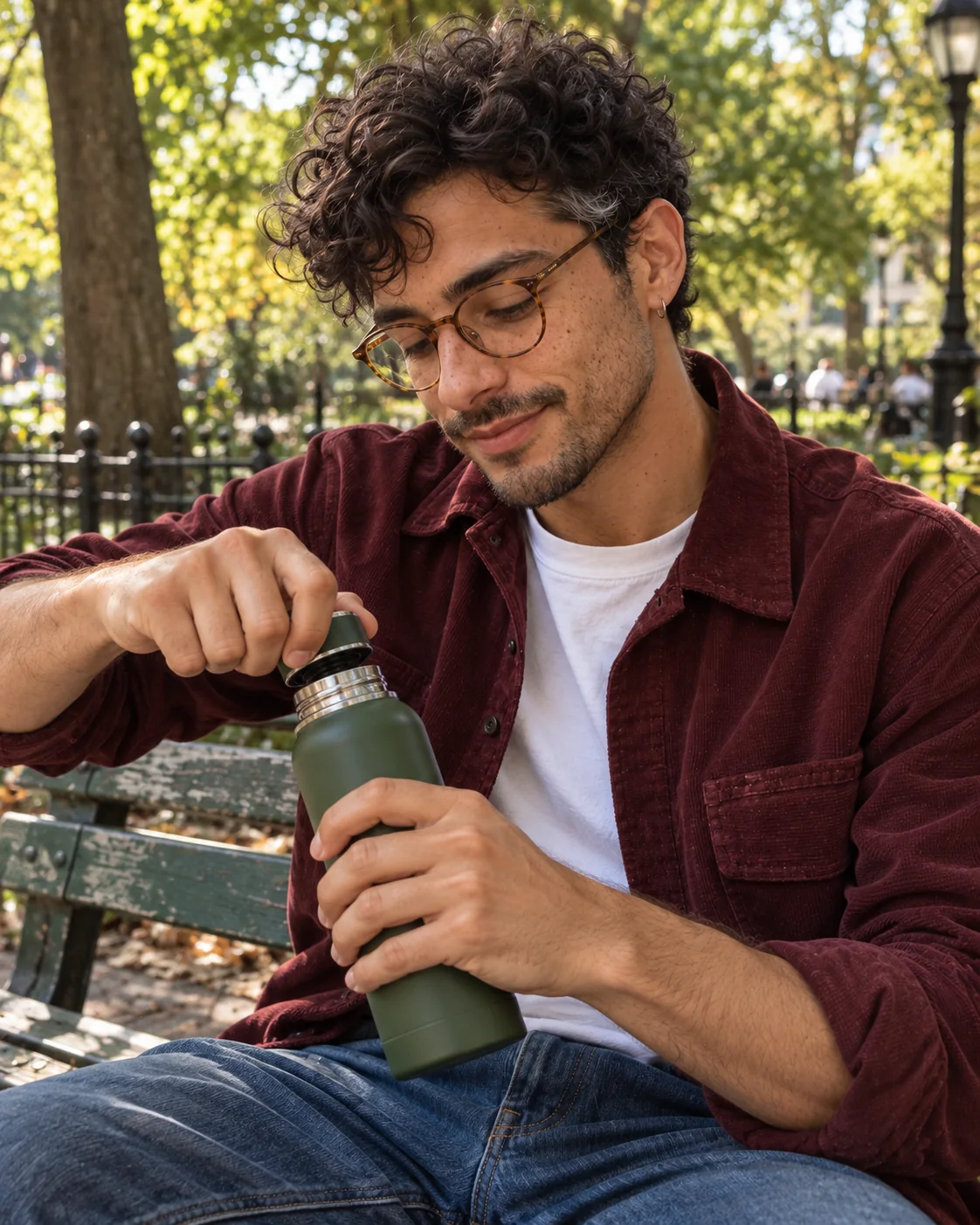
Day 18One action product conceptProduct / UGCInstagramUGCPost
Do this: Show coherent bottle/cap contact; label the concept unsponsored.
Hook: Make the action understandable without sound.
Unsponsored fictional AI bottle concept: one object, one clear action. No product-testing claims.
Eli opening green stainless bottle at park bench; burgundy shirt, coherent threading and grip, dappled light.
CTA: Discuss the clarity of the shot · Goal: Demonstrate creative range · KPI: Saves and profile visits
Day 19Make a platform-specific editBehind the scenesYouTube ShortsWorkshopContent Production
Do this: Adapt Day10’s opening for Shorts; verify destination-specific music rights.
CTA: Review the edit · Goal: Efficient repurposing · KPI: One reviewed adaptation
Day 20City story: the Shorts editStorytellingYouTube ShortsReelPost
Do this: Publish Day19’s reviewed edit with a clear payoff title.
Hook: A bookshop errand with a harbor ending.
A bookshop errand with a harbor ending. Fictional AI scenes recut for Shorts.
Reuse reviewed Day19 edit; retain Eli’s identity, vertical text safe areas and destination-cleared audio.
CTA: Suggest another story ending · Goal: Test destination fit · KPI: Average percentage viewed
Day 21Follower Q&A or editorial FAQEducationalInstagramCarouselPost
Do this: Answer a genuine question, or label all questions editorial.
Hook: How do we keep Eli recognizable?
Editorial FAQ: references, stable identity details, human review. Save Eli’s AI continuity checklist.
Eli portrait/outfit detail, indigo shirt, neutral daylight; add accurate editorial answers as editable overlays.
CTA: Save the continuity checklist · Goal: Explain the process · KPI: Saves per reach
Week 4 · Days 22–30: Optimize & repurpose
Review comparable posts and draft a transparent offer.
Day 22Two ways to style one jacketEducationalInstagramCarouselPost
Do this: Compare two jacket treatments with practical styling annotations.
Hook: Same jacket, two different moods.
Same fictional AI creator, two jacket treatments. Which look suits your weekend?
Same Eli/burgundy jacket; open over stripes versus buttoned, distinct full-body poses, visible shoes, overcast light.
CTA: Choose a look · Goal: Develop a repeatable series · KPI: Saves and relevant replies
Day 23Vote on next month’s seriesInteractiveInstagramStoryStory
Do this: Poll two feasible series; treat small samples as directional.
Hook: More city stories or more shot breakdowns?
Choose Eli’s next fictional AI series: small city stories or practical scene breakdowns?
Use two approved Eli thumbnails; add the native poll in-platform, never generate fake poll UI.
CTA: Vote · Goal: Directional planning signal · KPI: Poll votes with response count
Day 24Behind the AI sceneBehind the scenesTikTokReelPost
Do this: Pair a sanitized real planning screenshot with an approved scene.
Hook: The useful part happens before Generate.
Define the action before Generate. A real planning step behind Eli’s fictional AI world.
Actual sanitized planning capture plus approved Eli scene; no generated UI or invented task results.
CTA: Try a one-action brief · Goal: Process transparency · KPI: Shares and watch time
Day 25Build a small concept portfolioProduct / UGCInstagramWorkshopContent Production
Do this: Select three assets; draft scope, revisions and usage rights.
CTA: Write a clear scope · Goal: Prepare an honest offer · KPI: Three reviewed portfolio assets
Day 26What the concept includesProduct / UGCInstagramUGCPost
Do this: Share deliverables with an optional inquiry CTA; avoid results claims.
Hook: A creative concept has a clear deliverable.
Fictional AI presenter, unsponsored concept: brief, reviewed visual, proposed edit. No product-use claims.
Approved bottle scene plus editable scope breakdown; preserve geometry, remove unsupported claims.
CTA: Ask about creative scope · Goal: Explore qualified interest · KPI: Genuine scope inquiries
Day 27Follow up on useful conversationsInteractiveXRepliesEngagement
Do this: Clarify genuine scope questions; keep follow-up relevant and respectful.
CTA: Clarify one uncertainty · Goal: Understand offer friction · KPI: Questions resolved
Day 28Revisit a useful seriesEducationalInstagramCarouselPost
Do this: Revisit a supported series, changing setting rather than structure.
Hook: A familiar recipe, a different scene.
Context, action, detail. Save the structure of Eli’s AI-created market story.
Eli/indigo layers at covered market; wide environment, medium flower selection, close wrapping detail, consistent light.
CTA: Save the three-frame structure · Goal: Test repeatability · KPI: Saves per reach versus comparable posts
Day 29One month of fictional scenesStorytellingYouTube ShortsReelPost
Do this: Recut approved scenes; explain creative lessons without growth claims.
Hook: What changed when the character stayed the same?
One AI identity, different stories. Next experiment: fewer scenes, clearer openings. Choose a direction.
Recut approved morning, cafe, outfit and harbor clips; coherent transitions, no fabricated analytics.
CTA: Choose the next experiment · Goal: Close the narrative arc · KPI: Watch time and returning viewers if available
Day 30Review and plan the next cycleBehind the scenesInstagramReviewAnalytics
Do this: Review equal-age metrics; document one keep/change/stop decision.
CTA: Write next month’s hypothesis · Goal: A defensible next step · KPI: One documented test plan
How Often Should You Post, and Which Formats Should You Use?
Use photos for recognition, carousels for useful sequences and video for movement. Stories collect feedback. UGC is a creative treatment; those briefs can become photos or videos.
Instagram Engagement by Content Format
Median engagement as a percentage of reach · 2025 data reported in 2026 · scale 0–8%
Interaction rate does not measure every video benefit. Choose formats for their purpose, then compare your own outcomes; these medians do not predict growth.
TikTok Engagement by Format
Median engagement rate · 2025 data reported in 2026 · scale 0–4%
Buffer’s Instagram benchmarks, updated October 11, 2026, show a mean 18 posts/month: 27M+ posts, 273K active accounts, no fixed collection window stated. This differs from engagement medians.
Buffer recommends 3–5 Feed posts weekly from 2M+ posts/100K+ accounts, excluding Stories. This is observational advice, not a platform rule. Our 18 posts span destinations; they do not meet that Instagram-only cadence automatically.
Example 30-Day Content Breakdown
Primary task per day · editorial recommendation · scale 0–20 days
How Can You Batch Create a Month Without Repeating the Same Scene?
Batch by setup; publish by purpose. One cafe session can supply a selfie, carousel and video opening, each with a distinct payoff.
1. Save identity before expanding the scene list
Create an original adult in Characters. Save face, hair and accessory references. Reject drift before animation; video cannot reliably repair it.


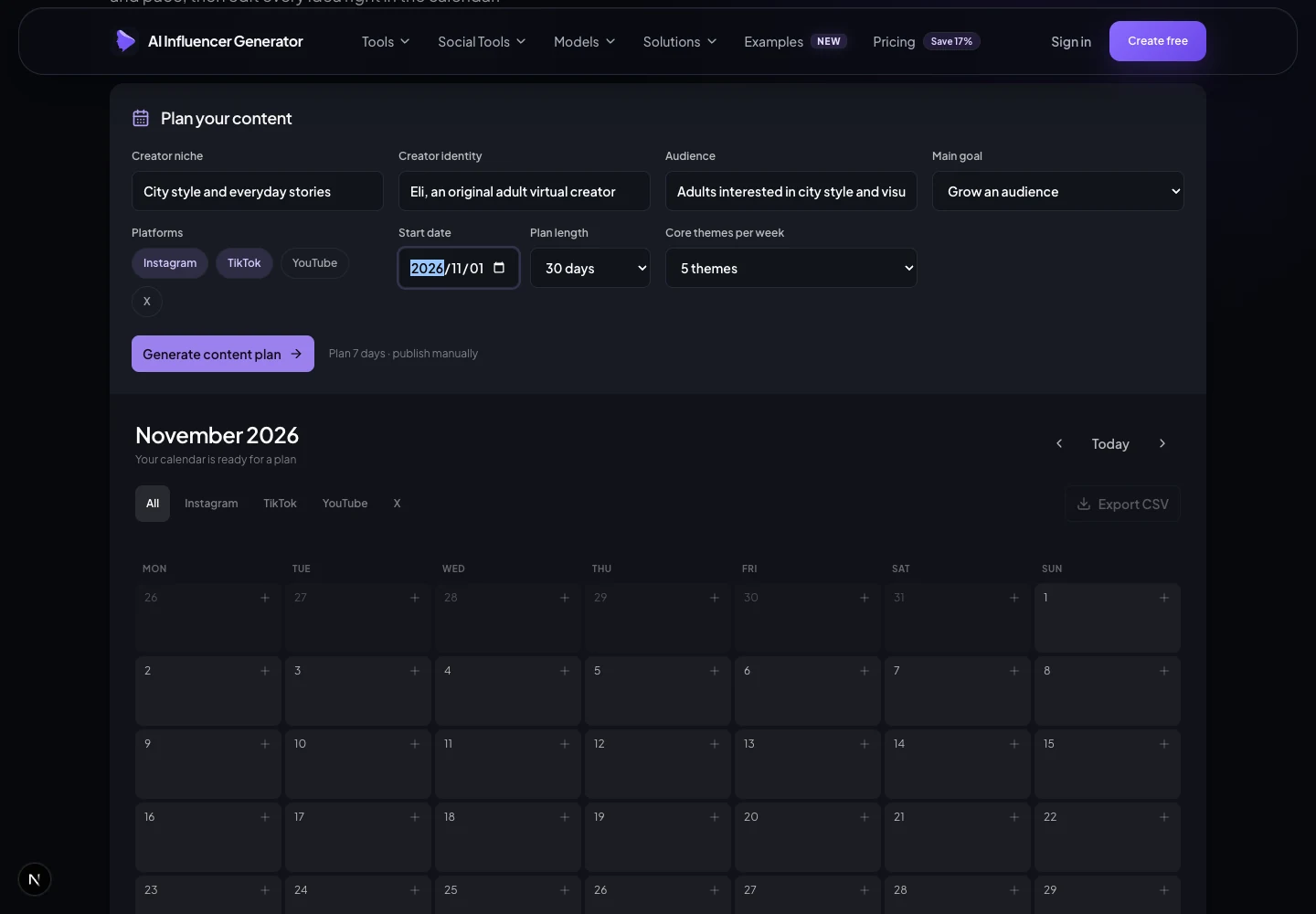
2. Turn the briefs into an editable calendar
Open Content → Calendar to organize dates and topics with existing CSV export. This article’s download adds editorial captions and prompts; it is a worksheet, not a Studio import.
3. Produce and review stills in small batches
Use Generate Influencer Photo for one clear action per frame. Review a small batch first. Preserve outfits, objects and light across carousel frames.


4. Animate only the scenes that need movement
Use Generate Influencer Video for scene clips, or Motion Transfer with a permitted dance reference. Check access, duration and credit quote. Review faces, hands, grounded feet and background stability before export.
5. Finish captions, rights and platform adaptations
Draft copy in Content using a hook, payoff and CTA. Check facts, rights and disclosure. Export reviewed assets and publish through the destination or your approved scheduler. Planning dates do not prove scheduled publishing.
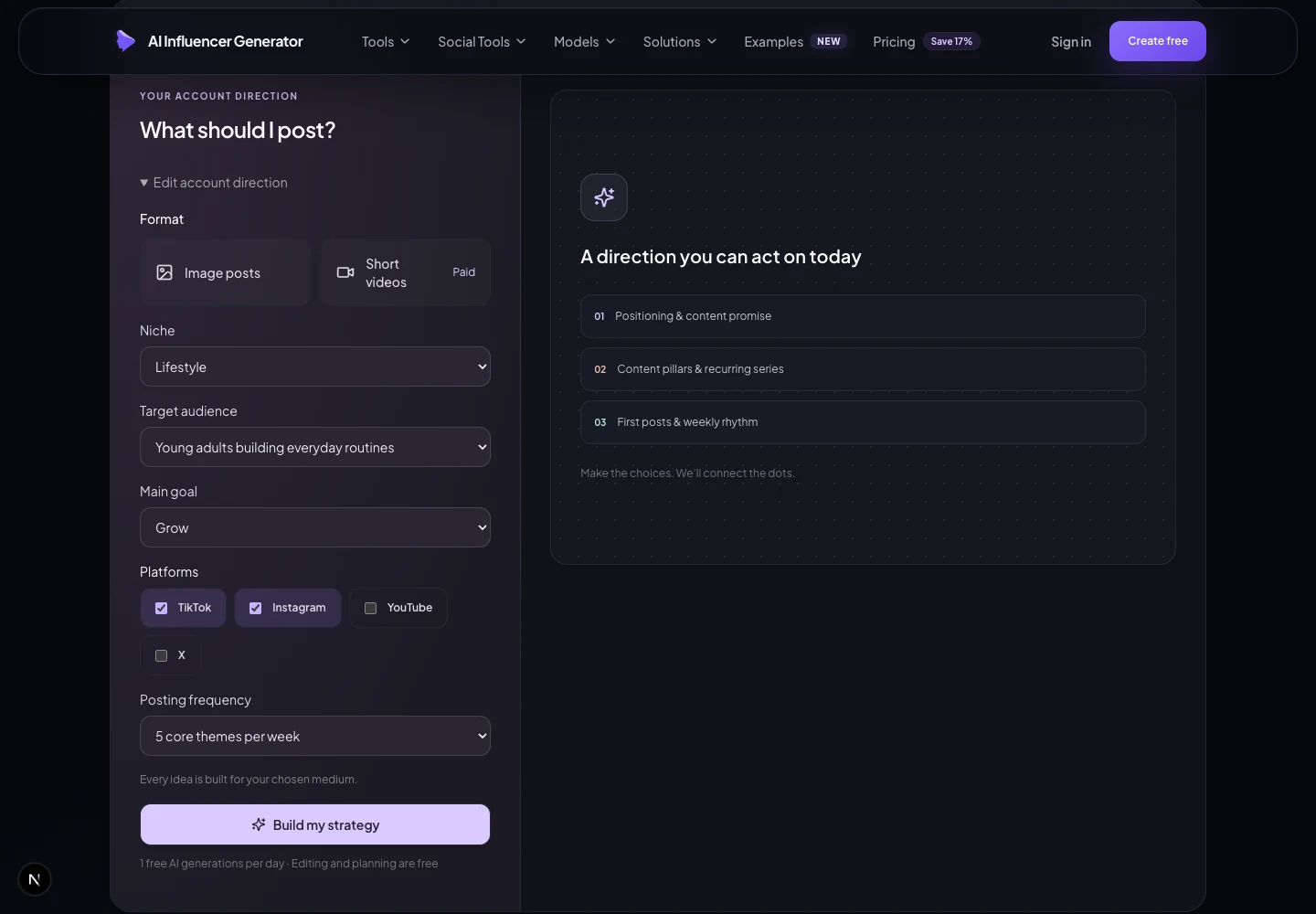
Use the existing planner, then review the workload before production.
How Should You Measure Results After 30 Days?
Compare posts at equal age within each platform. Record early results on Day30, then revisit late posts after the same observation window.
| Metric | Definition / record | Next decision |
|---|---|---|
| Views | Platform-reported plays/views; repeats may count. Record the platform’s definition. | Does the opening earn attention? |
| Reach | Unique accounts reached per post, where available. Do not sum post reach as unique monthly people. | Is discovery expanding within the same destination? |
| Saves / shares | Raw counts; optional rate = saves or shares ÷ that post’s reach ×100. | Which useful series deserves another installment? |
| Engagement | Record components. For Instagram review: (likes + comments + saves + shares) ÷ reach ×100. | Compare like formats at equal age; undefined when reach is zero/missing. |
| Follower growth | Net followers = ending − starting count; rate = net ÷ starting count ×100. Rate undefined when starting at zero. | Which topics also lead to profile interest? |
| Production cost | Actual credits, edit time and retries per reviewed asset. | Can the series continue within budget? |
Record post ID, platform, format, publication/observation times and native counts. Missing is unknown, not zero. Show denominators; small samples do not establish winners.
Next-month hypothesis: “The framing series earned more saves on comparable posts; test another setting.” Change one major variable. See Instagram growth diagnosis for broader analysis.
Which Mistakes Make a 30-Day Plan Hard to Sustain?
Avoid purposeless volume and premature income claims. Vary action and setting while preserving identity. Reduce cadence when review becomes rushed.
Keep commercial concepts honest
A virtual character cannot truthfully say “I tested this for a month” without a real, accurately attributed human test. Start with a clearly labeled concept portfolio and a concrete production scope. Inquiries, platform eligibility and revenue remain unproven until observed.
Day26 explores an offer; it does not promise income. Keep audience value central and use commercial posts only when the concept fits the account.
Identify the fictional creator clearly. Follow TikTok’s AI-content rules, YouTube’s realistic synthetic-content disclosure requirements and the current labeling controls on each platform. Review audio, likeness and asset rights for each destination. For U.S.-facing commercial work, follow the FTC’s material-relationship disclosure guidance; advertising disclosure and AI labeling serve different purposes.
Frequently Asked Questions
Do I have to post every day during a 30-day AI influencer challenge?
No. There are 18 primary posts and supporting tasks. Reduce the workload to fit your budget; daily progress need not mean daily Feed publishing.
Can I use this as an AI influencer Instagram content calendar?
Yes. Adapt video briefs for Reels, checking audio rights and safe areas. The 18 posts are a total across destinations, not a per-platform requirement.
Is the calendar and CSV template free?
Yes, including copy controls. Studio generation has separate access rules and credit costs; check the quote before generating.
Can AI Influencer Generator publish these posts automatically?
This guide covers planning, creation and export. Review and publish through your chosen platform or approved scheduler; automatic publishing is not promised.
How can I keep the character consistent across 30 days?
Use saved references and stable identity details. Review faces, accessories, bodies and clothing before animation. Regenerate drifting images.
Must I disclose AI content and brand relationships?
Identify the fictional creator and follow platform synthetic-media rules. Material brand relationships require separate advertising disclosure. Avoid invented personal product-use claims.
Should I monetize during the first month?
Prepare a labeled concept portfolio and test genuine interest. Neither payout eligibility nor clients, revenue or follower growth are guaranteed.
Start with reviewed stills, then use AI Video only when motion adds value. Need broader inspiration? Browse what an AI influencer should post.
Sources and Editorial Method
Checked October 18, 2026. The calendar, prompts and task allocation are editorial recommendations. Images depict an original fictional adult. No operational experiment, audience response, earnings or growth result is invented.
- Buffer: State of Social Media Engagement 2026, March 5, 2026. Report spans 52M+ posts across 10 platforms and multiple studies. Format comparisons use medians; 2025 baseline through December 3, with stated exceptions. Minimum baseline activity: 10 posts across at least 4 weeks. Buffer-published content is not the whole platform.
- Buffer: Instagram Benchmarks, updated October 11, 2026. All-account mean 18 posts/month; aggregated 27M+ posts/273K active accounts. Dynamic benchmark, distinct from the report’s format sample.
- Buffer: How Often Should You Post on Instagram?, published August 13, 2025, current 2026 title. 2M+ Feed posts/100K+ accounts; 3–5 weekly recommendation excludes Stories. The public article does not specify a precise collection window.
- Official TikTok, YouTube and FTC disclosure guidance. Review current upload controls and applicable rules before release.
Plan Content
Measure Engagement
Build Your Profile
Price Your Work
Write Post Copy
Brand Partnerships