
Quick answer: AI influencer generators work by combining a reusable character identity with AI image, video, and audio generation. A user first creates a fictional adult character or provides an authorized reference image. The system then uses that saved identity as guidance while generating new photos, outfits, poses, scenes, or motion. Separate tools can turn an approved still into video, generate speech, and synchronize lip movement. Each stage creates a new result rather than a guaranteed copy, so a person must review identity, anatomy, movement, rights, claims, and disclosure before downloading and publishing the content.
What is an AI influencer generator?
A general image generator can turn a prompt into a new image, but it may reinterpret the person every time. An AI influencer generator is organized around a reusable creator identity. The simplified difference is prompt → one image versus character identity + creative direction → new content featuring the same intended person.
The identity can begin as an original fictional adult assembled from visible traits, a saved character already in the product, or an authorized image reference. The output may include creator photos, short motion clips, or talking content. The operator still owns the creative decisions and approval process.
How do AI influencer generators work?
The exact models and controls vary by product, but a complete creator workflow has eight distinct stages. Not every project needs every stage: a photo post can stop after image review, while a talking Reel continues through voice, lip sync, editing, and a second review.
| Stage | What happens |
|---|---|
| 1. Character creation | Create a fictional adult character or begin with an image you are authorized to use. |
| 2. Identity preservation | Save the approved character or reference so later tools start from the same identity anchor. |
| 3. Image generation | Direct new outfits, poses, scenes, expressions, framing, and lighting around that identity. |
| 4. Video generation | Use an approved still or saved character as the starting point for motion. |
| 5. Voice generation | Create speech from text or provide audio you own or have permission to use. |
| 6. Lip sync | Match visible mouth movement to the authorized speech track. |
| 7. Editing | Prepare captions, timing, aspect ratio, sound, transitions, and disclosure. |
| 8. Human review | Inspect identity, anatomy, motion, claims, rights, and disclosure before manual publishing. |
This order matters because later stages inherit problems from earlier ones. If the identity is weak before motion begins, a video tool has no stable approved source to preserve. If the still contains malformed hands or implausible product contact, animation may make those problems more visible.
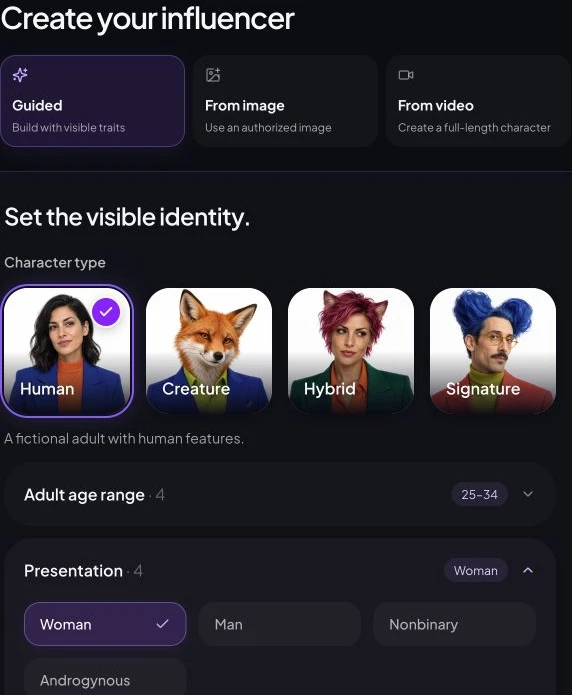
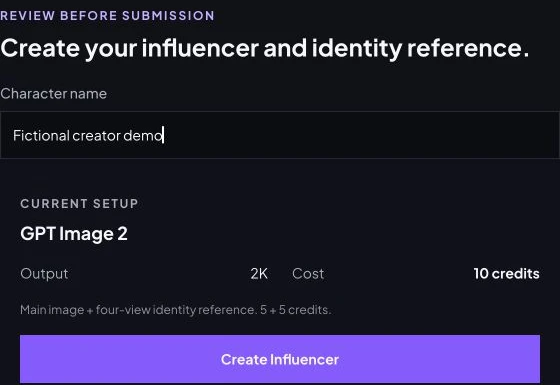
How do AI influencer generators keep the same person consistent?
Consistency comes from carrying identity information forward instead of asking a text prompt to invent the person again. Products describe this in different ways: saved characters, identity anchors, reference images, trained identities, or model-specific adapters. These terms are not interchangeable, and a public marketing page rarely reveals the full implementation.
At an industry level, image-reference adapters can extract features from an input image and use them as additional generation guidance. LoRA is different: it is a lightweight training technique that adds and trains a smaller set of weights. Both approaches may be used in image-generation systems, but their existence does not prove that a particular product uses them.
The practical review is visual. Keep the approved face shape, complexion, apparent adult age, hair, proportions, and signature details nearby. Then compare each new result while varying the outfit, action, setting, expression, camera position, or lighting. Recognition across useful variation is the goal—not a duplicated portrait.
How photos become motion and talking content
Image, motion, voice, and lip sync are connected but separate transformations. A saved identity can guide a new photo. A reviewed photo can become an input for image-to-video. A portrait or existing video can be paired with generated speech or audio the user is allowed to use. Lip sync then aligns visible mouth movement with the track.
Still-image path
Saved character → photo brief → generated image → face, anatomy, contact, and claim review
Motion path
Approved image → motion brief → generated clip → full-timeline identity and movement review
Talking-photo path
Authorized portrait → text or authorized audio → speech and mouth movement → review
Existing-video path
Authorized video → authorized replacement audio → lip sync → review of timing, identity, and rights
Current October 9 UI demonstration: Wan 2.6, 720p, five seconds, 9:16 and a 27-site-credit quote. No input was uploaded or task submitted. These controls illustrate the motion stage, not an underlying model architecture.
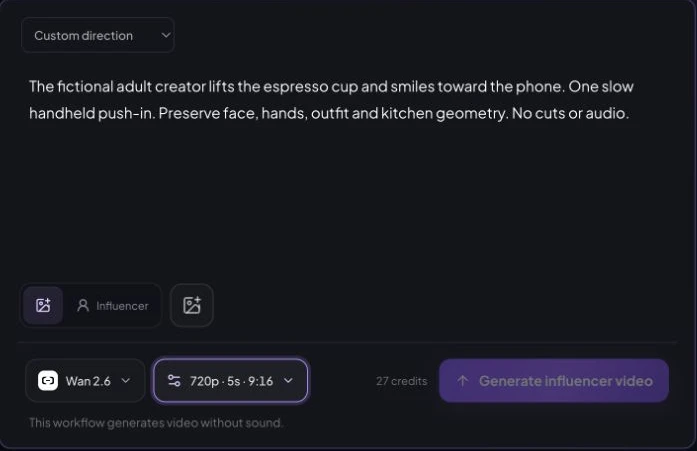
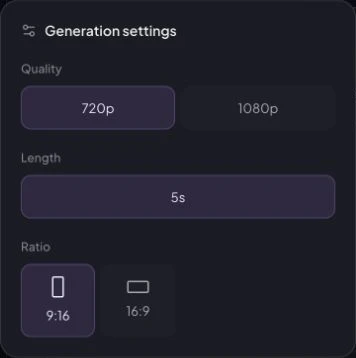
A poster image cannot prove video consistency. Review the full clip through head turns, expressions, hands crossing the face, object interaction, fast motion, and changes in lighting. Also check whether voice and mouth movement feel coherent without implying that the fictional character had a real experience.
Where AI influencer generators can fail
Identity guidance reduces randomness; it does not remove it. Extreme angles, heavy occlusion, unusual lighting, large age changes, expressive motion, or switching generation methods can change facial structure. Other common problems include malformed hands or teeth, synthetic hair edges, floating objects, poor contact, unstable reflections, and product labels that change between frames.
- Identity review: compare the full face, apparent age, hairline, ears, jewelry, and body proportions.
- Physical review: inspect hands, teeth, anatomy, object contact, perspective, shadows, and reflections.
- Motion review: watch the entire clip rather than approving its poster or first frame.
- Rights review: confirm permission for every likeness, reference, video, product asset, and audio source.
- Publishing review: verify claims, platform rules, synthetic-media disclosure, captions, and final crop.

What the current product workflow covers
AI Influencer Generator separates character creation, photos, creator video, Animate Photo, Talking Photo, and lip-sync work into explicit paths. That separation makes the input and review job clearer at each stage. It does not automatically publish content or remove the need to approve the result.
Create an original fictional adult characterFor hands-on instructions, use the step-by-step creation tutorial. For the concept and business role, read what an artificial intelligence influencer is. For tool selection and cross-format identity evidence, see the consistent virtual influencer answer.
Continue with the consistent character generator, AI influencer image generator, AI influencer video generator, Animate Photo, or Talking Photo. Review the AI disclosure guide before publishing.
Sources and verification boundary
Public workflow descriptions were checked September 13, 2026. They are first-party descriptions, not an independent benchmark. They informed the stage vocabulary but do not establish how AI Influencer Generator is implemented.
- Higgsfield pipeline
- Pixla product explanation and limits
- makeidol workflow
- Hugging Face LoRA documentation
- Hugging Face IP-Adapter documentation
Frequently asked questions
What is an AI influencer generator?
An AI influencer generator is a content system that creates or accepts a character identity and reuses it as guidance for new creator photos or videos. Unlike a one-off image prompt, the useful unit is a saved, reviewable persona rather than a single random portrait.
Do AI influencer generators need reference images?
Not always. Some products can create an original fictional character from selected traits or a description. A reference image can provide stronger visual guidance when the user owns it or has permission to use it, but it does not guarantee an exact match.
Do I need to train a LoRA for an AI influencer?
Not for every workflow. LoRA is a lightweight training method used by some image-generation systems, but other systems use saved characters, image-reference adapters, or product-specific identity controls. AI Influencer Generator does not claim that its saved-character workflow requires LoRA training.
How does an AI influencer photo become a video?
An image-to-video workflow uses an approved still as visual input and adds requested subject or camera motion. The generated clip is a new output, so the full timeline must be checked for facial drift, anatomy errors, occlusion, and implausible movement.
How do AI influencers talk?
A talking workflow combines a portrait or video with generated speech or authorized audio, then synchronizes visible mouth movement to that track. Voice generation and lip sync are separate stages, and both the audio rights and the finished motion need review.
Can an AI influencer generator guarantee the same face every time?
No. A saved character or reference can improve continuity, but extreme angles, heavy occlusion, unusual lighting, expressions, motion, and model changes can cause identity drift. Compare every result with the approved identity and reject meaningful changes.
Why is human review still required?
Generation systems can produce identity drift, malformed hands or teeth, weak object contact, misleading product scenes, or unstable motion. A person must also confirm likeness and audio rights, factual claims, platform rules, and appropriate AI disclosure before publishing.
Plan Content
Measure Engagement
Build Your Profile
Price Your Work
Write Post Copy
Brand Partnerships