
Who is digitalbyhart, or Lacy Hart AI?
The account's pinned introduction calls Lacy an “AI girl” and introduces a boyfriend and friendship circle. It describes AI-created characters and adventures alongside an offer to help beginners create content and market digital products.
Lacy's visual presentation uses long blonde hair, a recognizable face and a contemporary lifestyle wardrobe. The examples move between a selfie, restaurant dialogue, a fairground outing and promotional covers. Her face supplies continuity, while clothing and location change with the scene.
| Character | Role in the story | Source basis |
|---|---|---|
| Lacy | The central AI persona and first-person narrator | The pinned introduction calls her an ‘AI girl’ and connects the fictional adventures to AI-content and digital-marketing education. |
| Daniel | Lacy’s boyfriend in the fictional story | The pinned introduction names him as her boyfriend; the anniversary and fairground captions name Lacy and Daniel together. |
| Rosie | Lacy’s best friend and partner in mischief | The pinned introduction states this relationship. The PASSION WARS posts also link @rosieposies_aiworld as a participating creator. |
| Andy | A protective best friend | The pinned introduction describes him as protective. A separate caption says he asks whether Lacy has left her past behind; no specific past event is established here. |
That introduction helps a new visitor understand who matters without watching dozens of installments first. The separate Andy conversation caption reinforces his protective-friend role and leaves a question about Lacy's past open.
View the pinned introduction on Instagram
Three representative works: from a relationship moment to a shared event
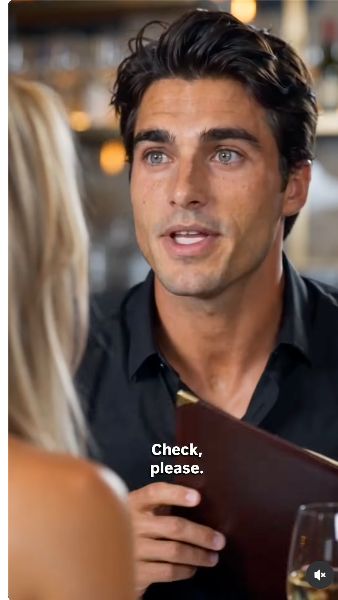
Part 50 — the one-month anniversary dinner
What the sources show: The supplied grid labels the dinner scene Part 50. Its close framing shows Lacy in pink facing Daniel; reviewed live frames include Daniel holding a menu and the couple at a restaurant doorway. The caption explicitly calls this their one-month anniversary dinner.
View the original Instagram Reel
Our analysis: The milestone gives a short scene accumulated history. A close exchange and a reaction can carry the episode without explaining the entire relationship. The familiar faces and part number tell returning viewers where this moment belongs.
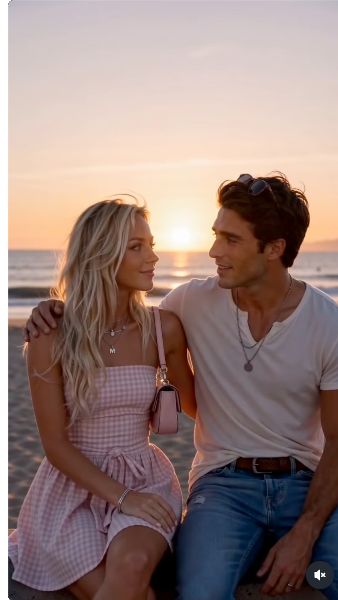
Part 52 — Lacy and Daniel’s fairground date
What the sources show: The supplied cover labels this Part 52 and presents Lacy and Daniel in selfie-style framing at a fairground. Reviewed live frames show the pair with pink candyfloss and subtitles, and later beside the sea at sunset—the moment captured below. The caption names the couple and describes a playful date night.
View the original Instagram Reel
Our analysis: The shared outing changes location while retaining the relationship. Handheld-style close framing and a small shared activity make it feel like a couple’s social update. The numbered label links the new setting to an existing series rather than a random AI travel clip.
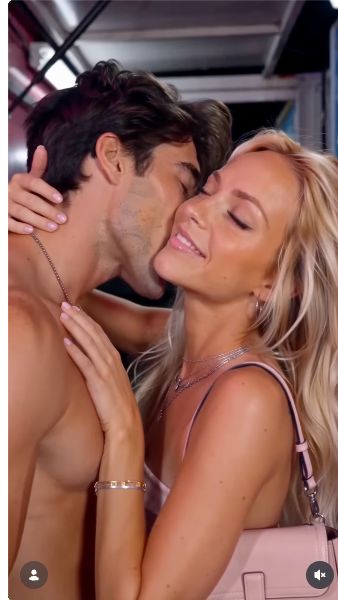
PASSION WARS — a cross-account AI-couple challenge
What the sources show: The supplied grid uses a shared PASSION WARS title treatment across three couple covers, with different colors and pairings. The digitalbyhart original is captioned ‘Passion wars Part 2’ and points viewers to @therealravenai and @rosieposies_aiworld for the competition.
View the original Instagram Reel
Our analysis: A recognizable title and parallel covers give separate creators’ posts a shared event identity. The explicit invitation to compare other accounts creates a route through several fictional worlds. It is collaboration and cross-linking, not evidence that one operator owns every character.
The Raven-origin Reel and Rosie's caption present PASSION WARS as a challenge between three different fictional couples.
Why this AI influencer series feels like something to return to
A realistic avatar can attract attention once; an ongoing relationship gives that attention somewhere to go. In Part 50, “one month together” is a small milestone with implied history. In Part 52, the same couple takes the story outside. A protective friend introduces a different emotional perspective. The cast gives the creator several kinds of scene without replacing the central persona.
Episode numbers make continuity visible. A Part 52 label signals earlier installments and tells a returning viewer that the story has moved forward. A short recap and a clear current scene can also help a new viewer join in.
Dialogue gives identity a purpose. A restaurant exchange or a friend's question creates a reason for a close-up and a reaction shot. The interest is in what the characters want and how they respond, rather than a face simply turning toward the camera.
Covers can organize more than one storyline. The PASSION WARS lettering, paired characters and parallel fairground imagery announce a shared event. Different color treatments help distinguish the participants, while “Who did it best?” gives viewers a clear invitation to compare.
The practical lesson is to keep three things distinct: who the character is, what happened this episode and what remains open for the next one. Consistency includes relationships, motives and scene continuity as well as a face. Our AI character-consistency guide covers the visual part.
How the profile connects AI storytelling to digital-marketing offers
- Story Reel
- Pinned introduction
- Bio and highlights
- Comment invitation or link
- Educational offer
The pinned introduction explains both sides of the account: the fictional world and the teaching offer. It separates invitations such as BESTIE for learning AI-avatar content and START for beginner digital marketing. The sampled anniversary and fairground captions use similar invitations. This gives viewers with different interests a stated next action, rather than assuming every story viewer wants the same product.
The bio addresses beginners who want to turn content into buyers using AI and simple systems. Highlights such as COTE CHIC and This is me! direct visitors toward offers and the character's introduction.
The bio-linked Stan Store lists free guides, AI-avatar training and affiliate-style links. Some people follow the cast; others want to learn how to make content and market a product. The story demonstrates a format, while the pinned post and bio explain the offer.
How to Create Your Own AI Story Series
The following is our proposed production plan using AI Influencer Generator's current tools. It is not digitalbyhart's disclosed recipe or a tested reproduction of its output. Start with a distinct adult cast and a small scene; keep identity review, animation, dialogue and final editing as separate decisions.
1. Define a small original cast, then save each person separately
Open guided character creation for each adult character. Use the available appearance choices and keep separate identity notes. If you have an approved original master image, save it through Character from Image. Do not upload Lacy, her supporting cast or another creator's face as a cloning reference.
Our example is a neighborhood-radio comedy with two adult friends, Mara and Jules. Use this cast prompt as a design brief and generate the single-person portraits separately in Create Photos; a cast paragraph is not a promise that the guided form creates several people at once.
Design an original adult AI story cast for a neighborhood radio-station comedy, separate from any existing influencer. Lead: Mara Vale, 32, olive-brown complexion with natural skin detail, dark-brown eyes, short wavy black bob, a small gap between her upper front teeth, square silver earrings; observant and quietly amused. Supporting lead: Jules Reed, 35, deep-brown complexion, long narrow face, close-cropped curls, a neat short beard and round amber glasses; careful and earnest. They are adult friends and co-hosts, not a romantic couple. Create each character as a separate single-person master portrait, never a merged face or a cast collage. Neutral three-quarter view beside the radio studio’s worn blue doorway, soft window light, one clearly visible face. Give Mara a rust overshirt over a navy T-shirt and Jules a forest-green knit polo. Keep separate names, references and identity notes for every later shot. No celebrity or existing virtual-creator likeness.
Create the first character in your original series ↗
2. Keep identity references separate and make a two-person establishing shot
Use Group Photo for a scene containing both leads. Its current controls provide Face 1, Face 2 and an optional Location Image. Select the saved adult character or authorized reference for each face, then describe their positions, action and relationship. This is a two-person input workflow, not an automatic cast manager for a whole series.
For solo dialogue and reaction shots, use Create Photos with that character's approved reference. Keep a simple continuity sheet outside the generator: reference, name, wardrobe for this scene, location, light direction, screen position and what the person knows. More than two speaking characters can be covered with separate shots rather than an unsupported promise of a single multi-person render.
Use the approved original adult references: Mara Vale, 32, olive-brown skin, short wavy black bob, dark-brown eyes, small upper-front-tooth gap and square silver earrings, rust overshirt over a navy T-shirt; Jules Reed, 35, deep-brown skin, long narrow face, close-cropped curls, short beard, amber round glasses and forest-green knit polo. Keep the two faces, hair, accessories and outfits distinct. They are friends and radio co-hosts. A vertical two-person still inside a small neighborhood radio studio. Mara stands on the left holding an empty labeled paper sleeve while Jules sits on the right beside a closed laptop, pointing toward the sleeve with one relaxed hand. She looks puzzled; he looks as if he has an explanation. A foam-covered microphone, scratched mixing desk and noticeboard in the background. Eye-level medium two-shot, soft afternoon window light, coherent object contact. Leave a safe lower area for subtitles added later in an editor. Do not generate readable dialogue or cover text.
Create a two-character scene with saved references ↗
3. Generate dialogue coverage and a reaction image
The three scene prompts describe one original story beat: a recording has gone missing. The first establishes both people; the second isolates the explanation; the third leaves a small question for the next episode. Use the wardrobe and room notes from the approved first shot. An over-the-shoulder composition does not require two animated mouths.
Use the approved original adult references: Mara Vale, 32, olive-brown skin, short wavy black bob, dark-brown eyes, small upper-front-tooth gap and square silver earrings, rust overshirt over a navy T-shirt; Jules Reed, 35, deep-brown skin, long narrow face, close-cropped curls, short beard, amber round glasses and forest-green knit polo. Keep the two faces, hair, accessories and outfits distinct. They are friends and radio co-hosts. A vertical over-the-shoulder still in the same radio studio, minutes later. Jules is the only clearly visible face, slightly right of center; Mara’s rust-clad shoulder is blurred at the left edge, without a second visible face. Jules pauses before answering, hands resting naturally on the table beside a paper notebook. Match the room, daylight direction and clothing from the approved establishing shot. Preserve his exact adult face, beard and amber glasses. One emotional beat: he knows where the recording went. Add dialogue and subtitles separately.
Use the approved original adult references: Mara Vale, 32, olive-brown skin, short wavy black bob, dark-brown eyes, small upper-front-tooth gap and square silver earrings, rust overshirt over a navy T-shirt; Jules Reed, 35, deep-brown skin, long narrow face, close-cropped curls, short beard, amber round glasses and forest-green knit polo. Keep the two faces, hair, accessories and outfits distinct. They are friends and radio co-hosts. A vertical reaction still at the same studio doorway. Mara is the only clearly visible face in a medium close-up; she holds the empty paper sleeve at waist height and looks past the lens toward Jules, whose green shoulder is out of focus at the right edge. Her expression shifts from confusion to amused suspicion. Keep the same daylight, earrings, hair, navy T-shirt and rust overshirt. Worn blue door paint and a practical studio lamp provide continuity. Leave room above her head for an episode number added in an editor; no generated title or dialogue text.
Compare every visible face with its own master. Check hairline, eye spacing, glasses, earrings and facial proportions; then inspect fingers, object contact and background geometry. Reject swapped or blended identities. A continuous story cannot repair a face that changes halfway through a conversation. For clothing changes between episodes, use Change Outfit and preserve the original identity reference.
4. Animate approved frames and add speech only where needed
In Create Video, Advanced Mode, choose a supported model exposing Start / End Frames and use the approved still as the start frame. Choose a supported duration and ratio and review the displayed credit quote. Give each shot a meaningful exchange: one person offers the paper sleeve and the other accepts it, reacting while the first releases their grip. Gaze, hands and body can overlap at normal speed. Review the first, middle and final frames for drift.
When the character needs to speak, Talking Video accepts a portrait or saved character with a script and supported voice, or authorized speech audio. For an existing clip, Lip Sync Video provides the source-video-and-audio route. Follow the current input and consent requirements and quote shown in Studio. Generate one visible speaker at a time and edit the exchange afterward; do not assume automatic multi-speaker dialogue, voice assignment or perfect mouth synchronization in a two-person shot.
Animate your first story scene ↗
5. Assemble the episode in an external editor
Arrange the establishing shot, explanation and reaction in a video editor. Add the actual dialogue track, subtitles, episode number, recap and cover title there. Match audio levels, room tone and eyelines; leave subtitles clear of faces and platform controls. These editing and series-management steps are outside the generation workflow.
Give each installment a small payoff and a precise unresolved question. Number the episodes consistently, keep an accessible starting point pinned and use original or licensed audio. A transparent AI label and any sponsorship disclosure should remain understandable. Publish through the platform's composer; this plan does not claim automatic serial-drama assembly or Instagram distribution.
Continue with the photo-to-Reel guide, consistent character tool, AI disclosure guidance and current pricing. The Kylie Doll case provides a useful comparison: fashion variations and creator education can share a funnel, while Lacy's continuing cast makes relationships the main content unit.
digitalbyhart and AI storytelling FAQ
Who is digitalbyhart, also known as Lacy Hart?
digitalbyhart is an Instagram AI-storytelling and digital-marketing account presented as Lacy Hart. Its profile carries an AI-generated-profile label, and its pinned introduction describes Lacy, boyfriend Daniel and friends Rosie and Andy as part of an AI-created story world. This does not identify the human operator behind it.
How many followers does digitalbyhart have?
The live Instagram profile displayed 7,853 followers and 399 posts during our October 24, 2026 UTC review. The supplied screenshot shows 7,843 followers but has no verified capture date, so we do not use the difference to calculate growth. Followers are not Reel views, product sales or a unique cross-platform audience.
What are Part 50 and Part 52 about?
The supplied grid labels the matching Reels Part 50 and Part 52. The original Part 50 caption describes Lacy and Daniel’s one-month anniversary dinner; the Part 52 caption describes their fairground date. These are fictional story events, not evidence of a real couple’s private life.
Is every PASSION WARS cover Lacy Hart?
No. The reviewed posts form a cross-account AI-couple challenge involving digitalbyhart, therealravenai and rosieposies_aiworld. Parallel cover designs connect different couples. They do not prove that all the faces are Lacy or that one operator created every participating character.
How does Lacy Hart monetize the content?
The visible funnel connects story Reels, comment invitations such as BESTIE or START, a bio link and a Stan Store listing free guides, training and affiliate-style product links. These are public offers; sales and earnings are not disclosed.
Which AI models does digitalbyhart use?
The reviewed materials describe AI avatars, AI video creation and experimentation. The fairground caption says it started with one image and one prompt. Those statements do not verify the exact model, all editing steps or the tool used for every episode. Product names in a storefront are offers, not production provenance.
How can I make my own AI influencer series?
Save a separate original adult character reference for each cast member. Use Create Photos for solo shots or Group Photo’s Face 1 and Face 2 inputs for a two-person still, review identity and wardrobe, then animate approved frames. Create dialogue shots separately with Talking Video or Lip Sync when needed. Edit episode numbers, subtitles, audio and continuity in an external editor.
Sources
- digitalbyhart Instagram profile and pinned introduction
- Part 50 — the one-month anniversary dinner
- Part 52 — Lacy and Daniel’s fairground date
- PASSION WARS — a cross-account AI-couple challenge
- Raven-origin PASSION WARS collaboration and Rosie's challenge description
- Bio-linked Lacy Hart Stan Store
Independent editorial analysis. The attributed Instagram frames illustrate the case; the tutorial describes an original proposed workflow.
Plan Content
Measure Engagement
Build Your Profile
Price Your Work
Write Post Copy
Brand Partnerships