
Quick answer
Which tools keep the same AI character consistent?
Use AI Influencer Generator for a saved social-creator workflow; Ideogram, Runway, Midjourney, or Leonardo AI for reference-led image creation; Gemini for conversational edits; Adobe Firefly for trained, governed team assets; and the FLUX ecosystem for configurable developer pipelines. No tool removes identity drift, so compare full-size outputs with one fixed reference.
Disclosure: AI Influencer Generator is our product. Only its archived production outputs were reviewed by us. Competitor descriptions are an official capability review, not an eight-tool benchmark. Official sources were reviewed on September 13, 2026; Ideogram, Runway, Midjourney, and Leonardo AI could not be retrieved during the implementation check, so their evidence cells retain that limitation. Where a reviewed source did not confirm a detail, the table says so.
How do the character-consistency mechanisms compare?
| Tool | Identity mechanism | Independent images | Pose / outfit changes | Video | Training | Best fit | Evidence |
|---|---|---|---|---|---|---|---|
| AI Influencer Generator product page | A saved character reference reused in the same-character photo workflow | Yes | Designed for scene, pose, outfit, and lighting changes with the identity held as the reference | Yes, through the Studio workflow | No | AI influencers and recurring social content | First-party production evidence |
| Ideogram official source | Character Reference | Yes, according to the official Character feature page | Official feature page describes reusing a character in new images | Not confirmed in the reviewed official source | No training requirement confirmed in the reviewed feature description | Reference-led image creation | Official source identified; live access not confirmed on September 13, 2026 |
| Runway official source | Gen-4 Image References | Yes, through reference images | Official reference workflow covers character changes across generated images | Runway offers video tools; this review does not treat image references as proof of temporal identity consistency | No training requirement stated for the reviewed References workflow | Reference images inside a broader image-and-video workflow | Official source identified; live access not confirmed on September 13, 2026 |
| Midjourney official source | Omni Reference and the Edit Model | Yes, by attaching a reference to new generations | Reference strength and prompts guide new poses, outfits, and scenes | Not confirmed in the reviewed official source | No model training required for Omni Reference | Art-directed image variations from a reference | Official source identified; live access not confirmed on September 13, 2026 |
| Leonardo AI official source | Image Guidance and character-reference controls | Yes, when the reference control is available in the selected workflow | Prompt plus reference controls support variation; results still need review | Not confirmed in the reviewed official source | Not required for the reviewed Image Guidance workflow | Creators who want adjustable image-reference controls | Official source identified; live access not confirmed on September 13, 2026 |
| Adobe Firefly official source | Firefly Custom Models trained on an approved image set | Yes, after the custom model is prepared | Intended to preserve a subject or style while generating new content | Not confirmed in the reviewed official source | Yes for the reviewed Custom Models workflow | Teams with governed training assets and Creative Cloud workflows | Official capability review |
| Gemini official source | Conversational image editing with uploaded-image context | The reviewed official announcement describes maintaining likeness through edits | Supports changing outfits, backgrounds, and settings in iterative edits | Not confirmed in the reviewed official source | No custom training described for the reviewed editing workflow | Conversational edits that preserve a subject across revisions | Official capability review |
| FLUX ecosystem official source | Reference-image editing; exact controls depend on the product using FLUX | Supported by FLUX.2 character-consistency workflows | Black Forest Labs documents maintaining face, clothing, proportions, and style across generations | Not confirmed in the reviewed official source | Not required for the reviewed reference-editing workflow | Developers and products building a configurable image pipeline | Official capability review |
How does official capability review differ from first-party evidence?
Official capability review records what each competitor's official source says its mechanism can do. It does not establish our own success rate, price, speed, or output quality for that product. First-party production evidence means we inspected our own archived inputs and outputs against a stated rubric.
How did we review our character-consistency sample?
We compared two July 30 archived GPT Image 2 outputs with their selected original fictional-adult NYC reference. Face shape, freckles, eye color, hairline and apparent age remain recognizable in the espresso and street scenes. This is a small selected production sample, not a controlled cross-tool benchmark or a measured success rate. Hands, accessories and background still need individual inspection.
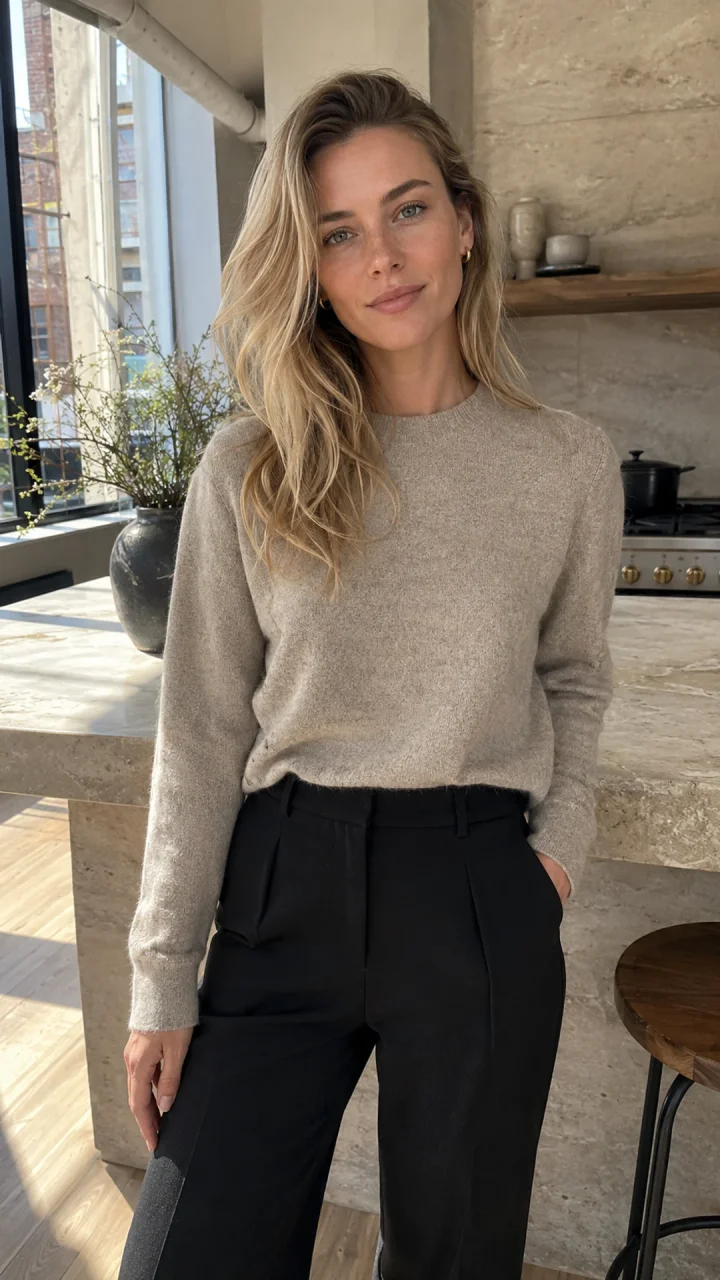
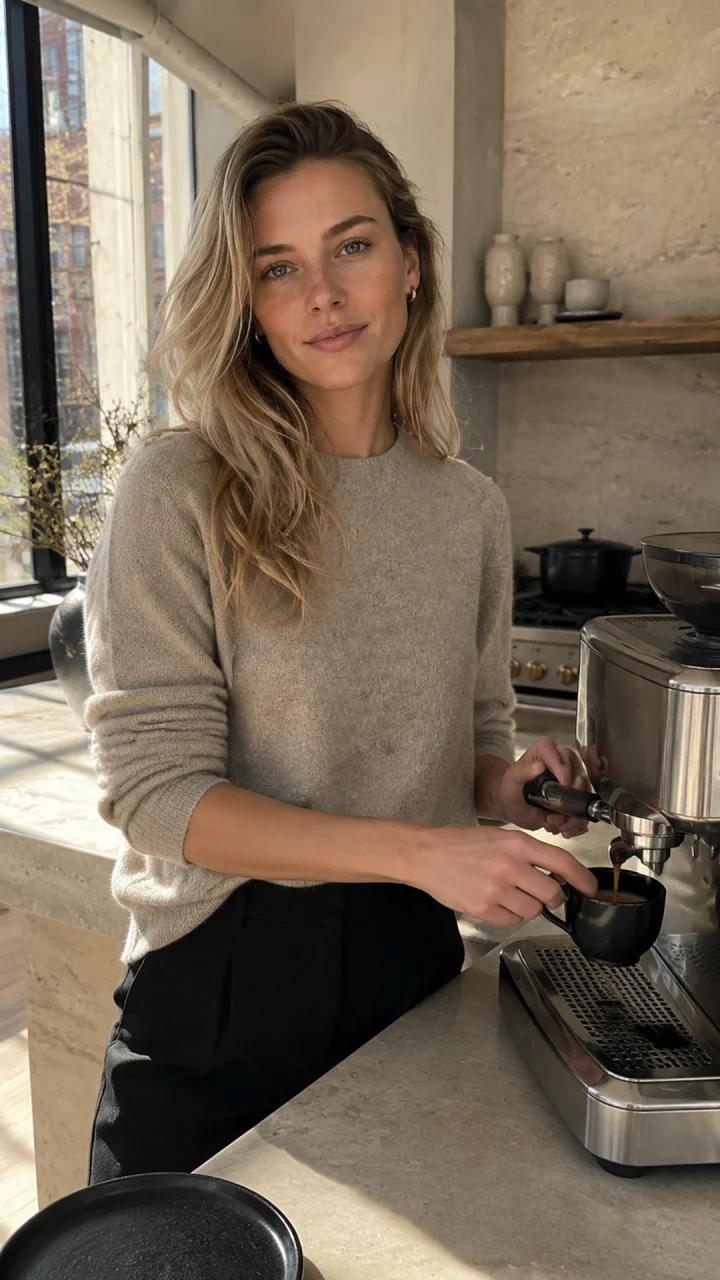
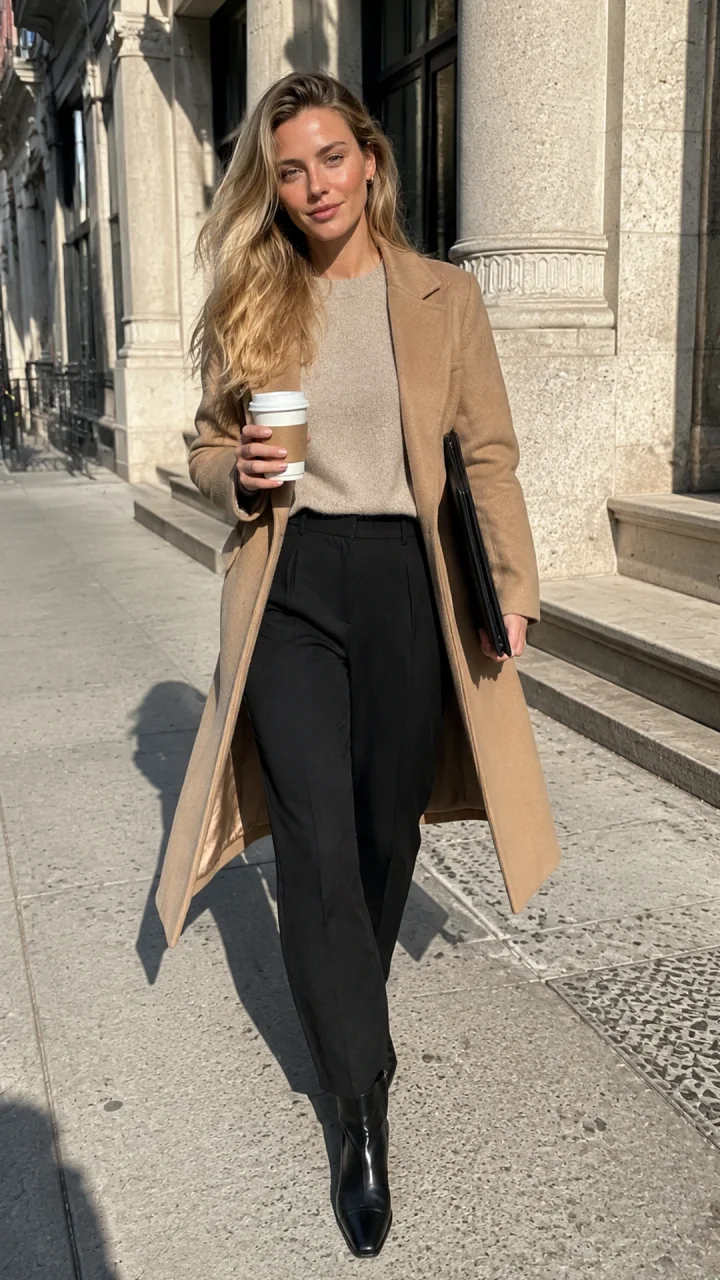
Original espresso-scene prompt
Fictional adult woman, age 29, who must not resemble a real person or public figure. Identity lock: softly angular oval face, fair neutral skin with faint natural freckles, gray-green almond eyes, straight delicate nose, natural full lips, defined light brows, long champagne-blonde hair in loose layered waves with darker natural roots, slim athletic proportions. Natural pores, subtle under-eye texture, realistic hands, no beauty filter, no cosmetic perfection. Preserve the exact face, freckles, eye color, hairline, hair color, age, and proportions from the reference. In the same sunlit Tribeca loft kitchen, she makes espresso at a stone counter while glancing toward the phone camera, oatmeal knit with sleeves casually pushed up, candid waist-up composition, realistic working hands, warm natural window light, authentic phone photo with slight grain. Vertical 9:16. No text, logo, watermark, branded objects, extra fingers, or plastic skin.
Espresso: 67 seconds and 65 provider credits. SoHo: 72 seconds and 60 provider credits. Both used the same reference and an auto image ratio with vertical framing in the prompt; explicit resolution is unknown. Customer charges, failed attempts and retry counts are unknown. The creation tutorial documents the complete source chain.
Check the current reference workflow
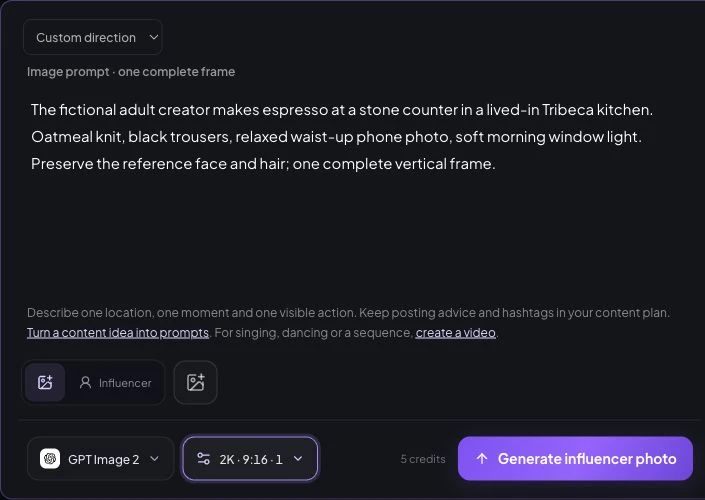
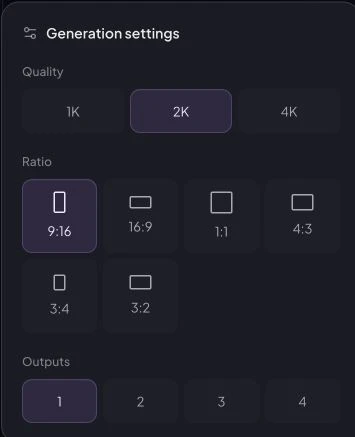
In Create Photos, choose the saved character or provide the approved reference, then add the scene in Direction. See consistent AI influencer photo examples before choosing your next scene. The October 9 unsubmitted demonstration uses GPT Image 2, 2K, 9:16 and one output, displaying a five-site-credit quote. It is a current control example, not the archived task. Inspect one result before scaling.
What is each tool best suited to?
AI Influencer Generator
A saved character reference reused in the same-character photo workflow. Best fit: AI influencers and recurring social content. Evidence: First-party production evidence. AI Influencer Generator product page
Ideogram
Character Reference. Best fit: Reference-led image creation. Evidence: Official source identified; live access not confirmed on September 13, 2026. Ideogram official source
Runway
Gen-4 Image References. Best fit: Reference images inside a broader image-and-video workflow. Evidence: Official source identified; live access not confirmed on September 13, 2026. Runway official source
Midjourney
Omni Reference and the Edit Model. Best fit: Art-directed image variations from a reference. Evidence: Official source identified; live access not confirmed on September 13, 2026. Midjourney official source
Leonardo AI
Image Guidance and character-reference controls. Best fit: Creators who want adjustable image-reference controls. Evidence: Official source identified; live access not confirmed on September 13, 2026. Leonardo AI official source
Adobe Firefly
Firefly Custom Models trained on an approved image set. Best fit: Teams with governed training assets and Creative Cloud workflows. Evidence: Official capability review. Adobe Firefly official source
Gemini
Conversational image editing with uploaded-image context. Best fit: Conversational edits that preserve a subject across revisions. Evidence: Official capability review. Gemini official source
FLUX ecosystem
Reference-image editing; exact controls depend on the product using FLUX. Best fit: Developers and products building a configurable image pipeline. Evidence: Official capability review. FLUX ecosystem official source
Which tool is best for AI influencers?
For recurring AI influencer content, prioritize a saved identity, repeatable photo creation, a connected image-to-video path, and history you can review. Our consistent character generator and Studio workflow are built around that sequence. See the separate consistent virtual influencer solution for the end-to-end use case.
Which tool handles outfit changes?
Reference-led tools can change clothing, but outfit, hair, pose, and camera changes made at once increase drift risk. Gemini's official editing announcement explicitly discusses outfit and setting edits; FLUX.2 documents maintaining clothing as part of character consistency. Regardless of tool, inspect identity separately from garment accuracy.
Which tool handles different poses?
AI Influencer Generator, reference-led image tools, and reference-editing workflows can all create pose variation. The useful test is not whether a new pose is possible, but whether profile views, occlusion, expression, and body angle preserve recognizability.
Which tool supports image-to-video?
AI Influencer Generator connects saved-character images to Studio video tasks, and Runway has a broader video platform. This page does not infer temporal consistency from an image-reference feature or a poster frame. Verify the character across the full clip before publishing.
Character reference vs. style reference: what is the difference?
A character reference anchors identity: face shape, features, hair, age, and recognizability. A style reference anchors presentation: palette, texture, lighting, composition, or illustration language. A visually cohesive set may still contain identity drift.
How should you test character consistency?
Choose one approved reference. Generate a small matrix that changes scene, pose, clothing, and lighting. Review every output at full size against the same five identity dimensions, then label it Pass, Minor drift, or Fail. Exclude failed jobs and unreviewed outputs from any rate.
How do you keep one AI character consistent?
Save one clean identity reference, keep defining traits stable, change a limited number of variables per generation, and reject drift before it enters the content library. For a broader category comparison—not this page's keyword target—see our AI influencer generator comparison.
Frequently asked questions
What tools can keep the same AI character consistent across multiple images?
AI Influencer Generator, Ideogram, Runway, Midjourney, Leonardo AI, Adobe Firefly, Gemini, and products built on the FLUX ecosystem all offer a reference or training mechanism relevant to character reuse. The best choice depends on whether you need social-content workflow, art direction, conversational editing, team governance, or a developer pipeline.
Which AI tool is best for keeping an influencer consistent?
For an AI influencer workflow, choose a tool that saves a character and reuses that identity across photos and video tasks. AI Influencer Generator is designed for that workflow. Other tools may be better when your priority is illustration, conversational editing, enterprise asset governance, or API-level control.
Can a character reference change clothes and poses?
Yes, but identity drift becomes more likely as pose, expression, camera angle, hairstyle, outfit, and lighting change together. Change a few variables at a time, keep the same approved reference, and review every full-size output before publishing.
Is a style reference the same as a character reference?
No. A character reference anchors who appears in the image, while a style reference anchors how the image looks. A matching color palette or illustration style does not prove that facial identity stayed consistent.
How should I test AI character consistency?
Use one approved reference, then create a small matrix that changes scene, pose, outfit, and lighting. Review face shape, features, hair, apparent age, and recognizability at full size. Label each output Pass, Minor drift, or Fail, and do not count unreviewed outputs.
Build a reusable character workflow
Start with one approved fictional adult, save the identity, and review each full-size result before turning it into recurring social content.
Create consistent character photos
Plan Content
Measure Engagement
Build Your Profile
Price Your Work
Write Post Copy
Brand Partnerships