
How Pinterest affiliate marketing works with an AI influencer
Affiliate marketing means you may earn a commission when a tracked referral meets an affiliate program’s terms. A Pinterest Pin introduces a useful idea; a destination helps a reader inspect the item or complete the tutorial; the affiliate provider records qualifying actions. A click is not the same as an order, and commissions can be reversed or delayed under program terms.
- 01 · Character + ideaCreate an original identity and choose one useful clothing question.
- 02 · Helpful PinShow a truthful look or instructional checklist with clear disclosure.
- 03 · Relevant destinationSend the reader to the matching product or a complete guide.
- 04 · AttributionCompare Pinterest outbound clicks with the affiliate program’s actual results.
Fashion is a good fit for visual discovery: a single jacket can anchor an outfit, a pair of jeans can support a three-look tutorial, and a capsule list can help a reader organize multiple pieces. Your fictional creator supplies continuity, but must not invent a real-life wear test, purchase, fit experience or brand endorsement. For other monetization paths, see how AI influencers make money.
As of October 28, 2026, Pinterest’s affiliate guidelines ask for original, value-adding content, transparent links and moderate use. They also say affiliates should generally operate one authentic Pinterest account. Avoid repetitive bulk Pins and attempts to manipulate saves or traffic.
1. Choose an affiliate program and a product that fits the Pin
Start with the reader’s outfit problem, then confirm that the merchant and affiliate program permit your chosen Pinterest workflow. A relevant product is easier to explain accurately than a high-commission item that does not match the image.
- Pick a narrow intent, such as “how to style a charcoal jacket,” instead of an unrelated collection of links.
- Read the program’s rules for Pinterest as a traffic source, direct linking, use of your own website, creative rights, disclosures and commission attribution. Approval, eligibility and terms vary.
- Review the actual product detail page: availability, target market, color, size range, materials and visible construction. Record only facts the merchant supports.
- Obtain an image you are authorized to use for AI transformation and commercial content. Being able to see or promote a product does not automatically grant the right to alter its photos.
- Create the tracked link using your approved provider. Test that it opens the correct destination, without completing a purchase or violating the program’s test rules.
Pinterest’s affiliate link tutorial describes adding a provider-generated link that goes directly to a shop’s product detail page. For a Pin that first leads to your own article, verify that your program permits that method; the article should contain the promised useful content and clearly disclosed eligible links.
Look for a clear visual match and a useful destination before considering commission. Avoid fake urgency, fabricated discounts, vague “best ever” claims and images that change the product’s material or shape.
2. Create an original AI fashion influencer and keep the outfit consistent
Save one fictional adult character, then use a separate authorized garment reference whenever the fashion workflow offers it. The identity image guides who appears; the garment image guides what they wear. Neither guarantees an exact result.
- Open the guided character builder. Choose a distinctive adult appearance and creator direction, then review the displayed access and generation quote. Save the character after the task completes.
- Open Fashion Model Photo from Studio and select the saved character. The workflow offers an optional owned garment image; upload a reference you have permission to use.
- Describe the clothing’s visible color, cut, texture, lapels, closures and pockets. State the scene and action separately. Choose the available portrait ratio closest to the intended vertical Pin.
- Generate a small batch. Compare every candidate with both references, including face, hair, fabric, seams, buttons and the final crop. Reject a changed garment rather than treating it as a product match.
- Prepare the final 1000 × 1500 image in an editor if needed. Add any necessary on-image disclosure and check text at phone size. Do not present the character as someone who actually wore or reviewed the item.
Learn more about keeping the same outfit across AI photos and checking product details and contact. Use a real, authorized product reference before implying that an image represents something for sale.
Build a reusable character before planning your first Pin.
Create Your Fashion Influencer3. Three visual Pin examples, from references to finished concepts
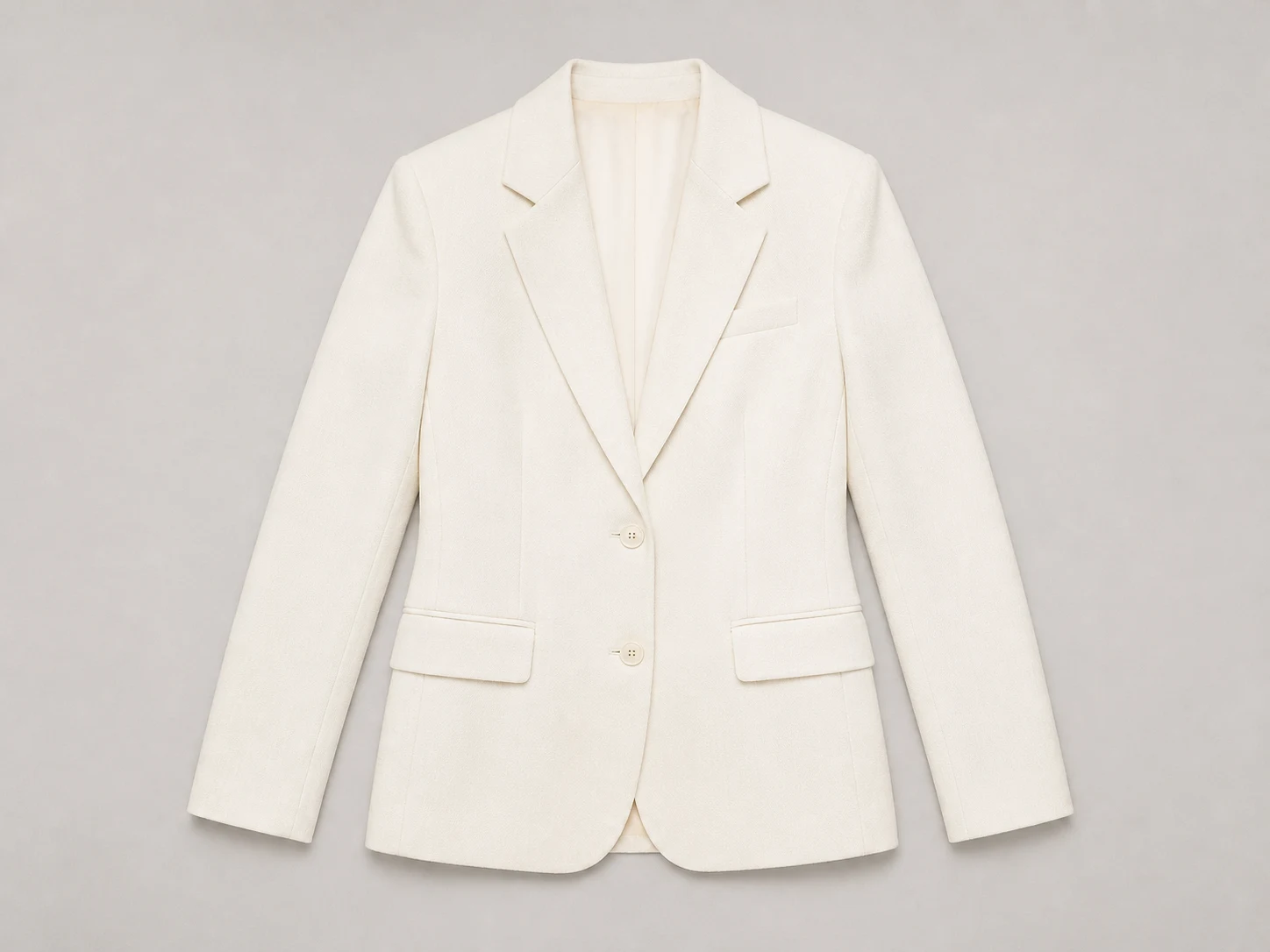
These are original educational demonstrations, not live Pins, real product listings, customer results or affiliate partnerships. We used the same existing fictional adult identity for all three. Example A uses a real CC0-licensed jacket photograph; B and C use an owned fictional ivory blazer reference. The jacket photograph is not a current retail listing. No verified retailer or authorized affiliate link was supplied, so the destinations below are descriptions of the right destination type—not working sales links.
These images were generated with this conversation’s image-generation tool. Example A used the displayed character and real jacket references for the first pass, then the first pass and jacket reference for a repair; B and C used the displayed character and fictional blazer references. They were not generated in Studio, and they do not prove how closely Studio would reproduce a real product. The complete prompts below are the actual prompts used. We exported each full image at 1000 × 1500 pixels; Pinterest’s Pin guidance recommends a 2:3 image ratio.
Before affiliate use, replace these concepts with a real product and reference you are authorized to use, verify every product detail and destination, and add a conspicuous commission disclosure on the image as well as in the description. Check your program’s terms and Pinterest’s current upload requirements.
Example A: Product Outfit Pin
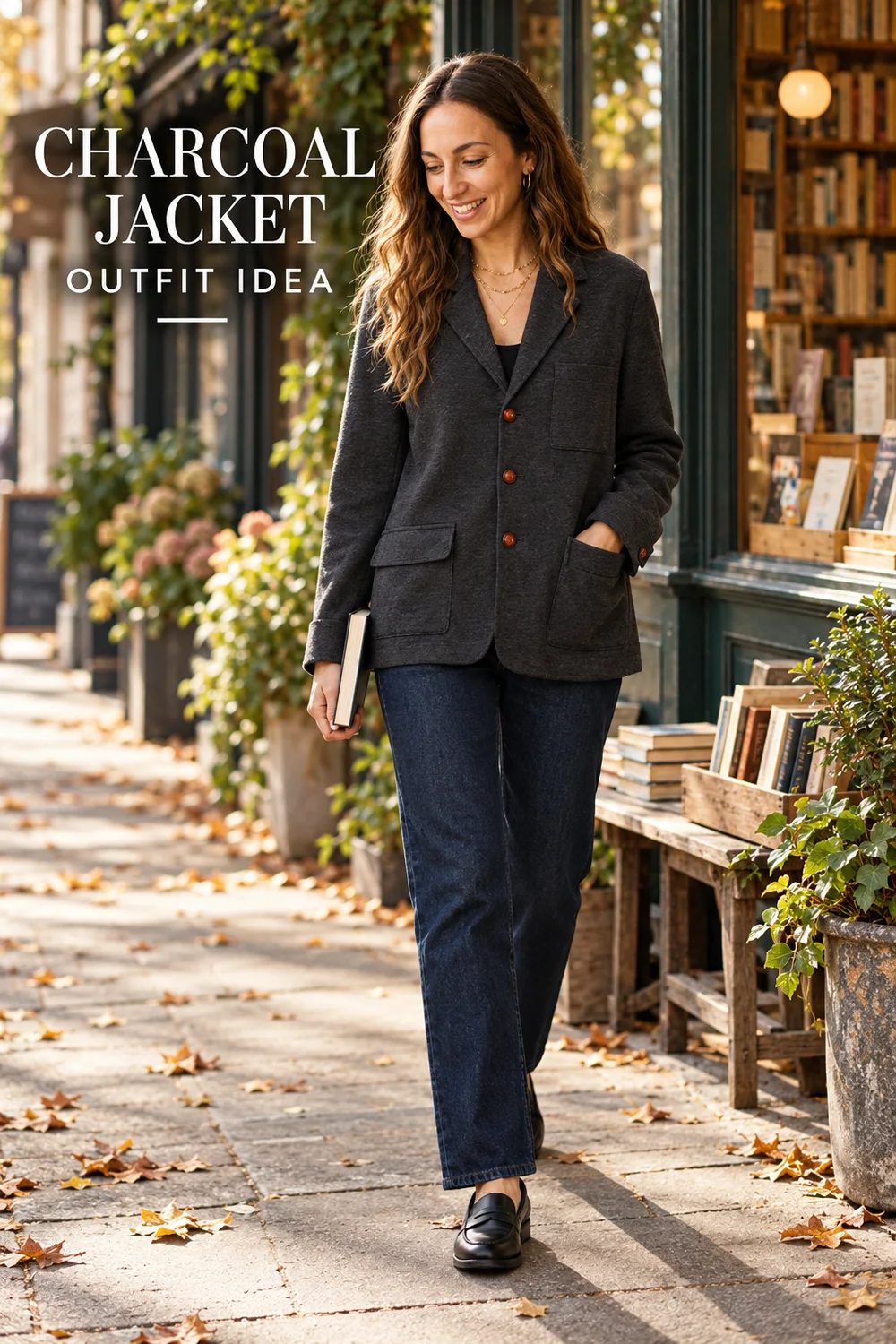
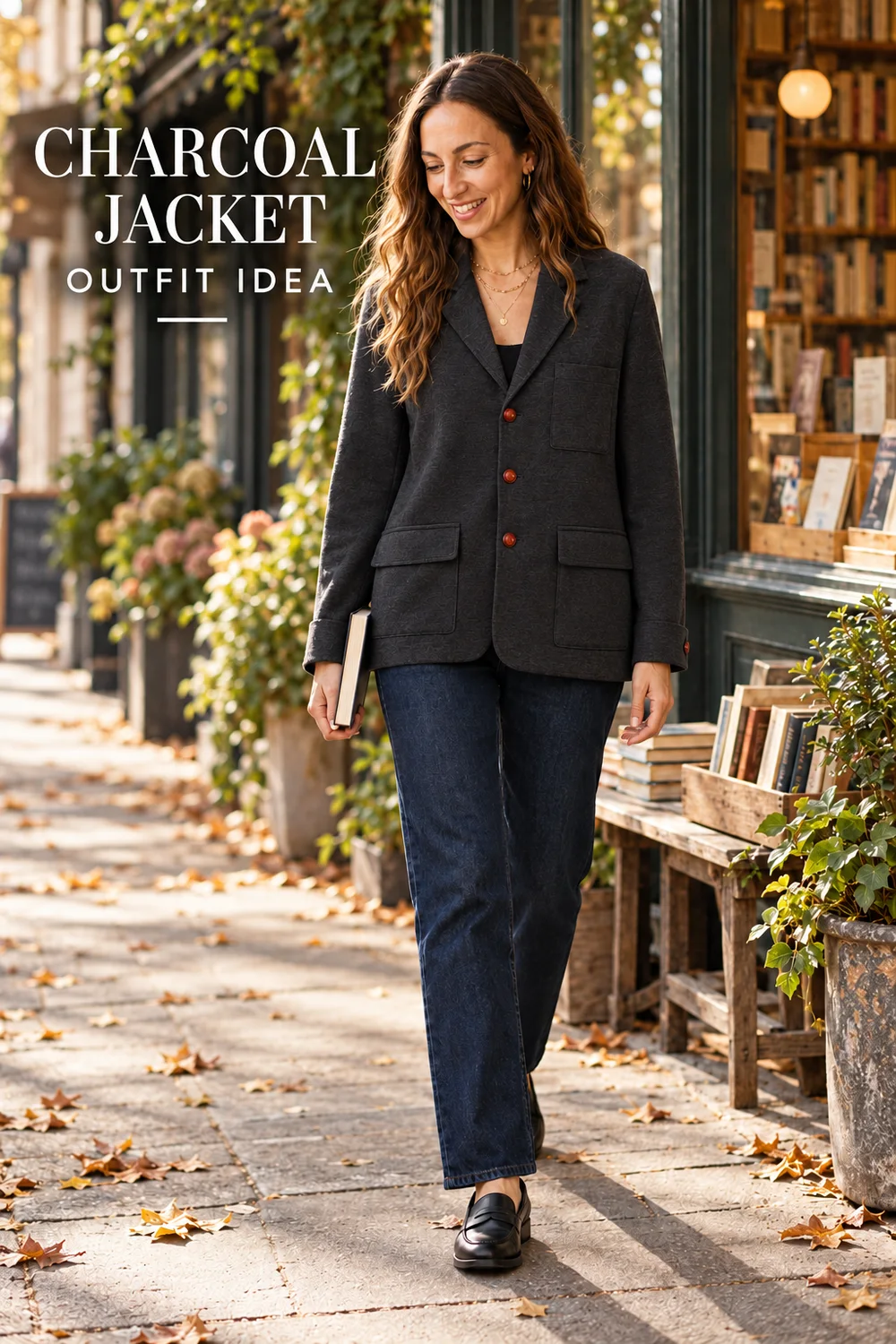
One full-look photo and a short headline lead the eye to a real garment reference. The first output changed a pocket; the repair moved the hand and restored two visible flap pockets.
Actual inputs
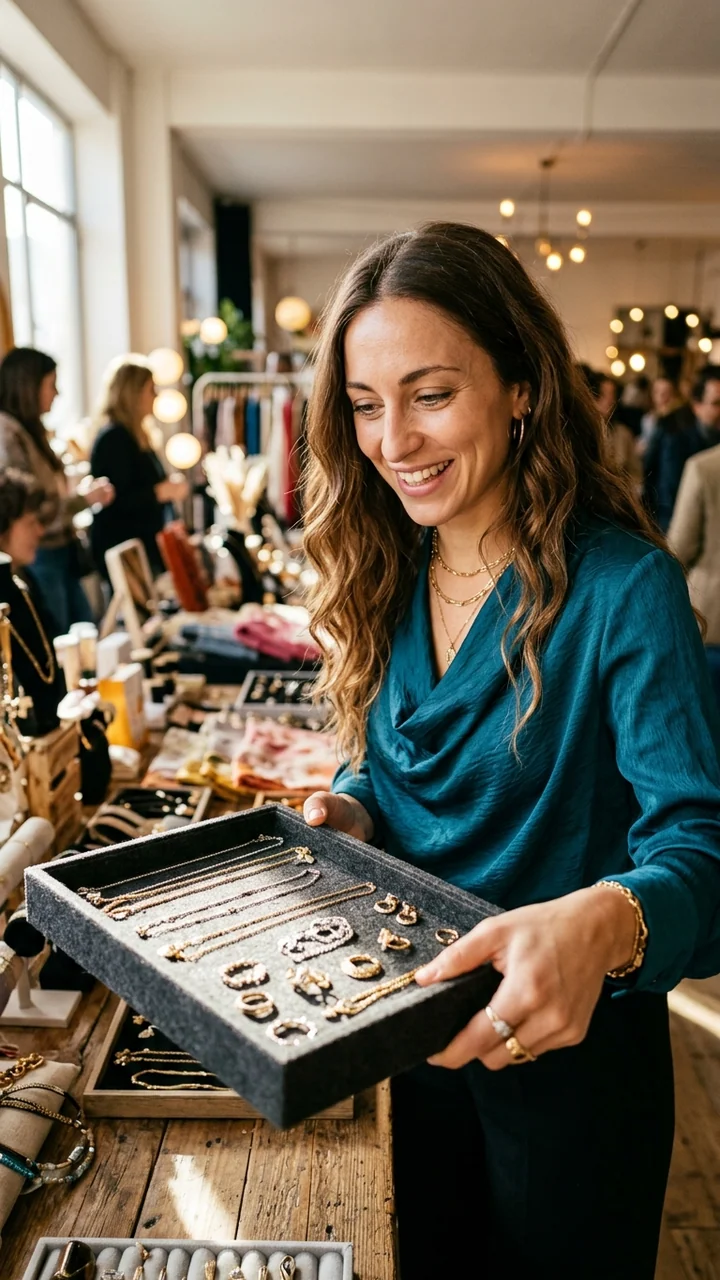
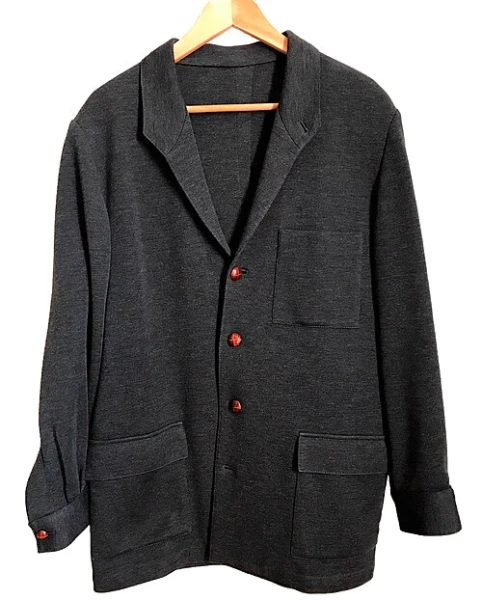
- Attach both references and the prompt below.
- Generate the complete Pin concept.
- Compare the first output with the real jacket. Its right pocket changed, so use the repair prompt and review again.
Real jacket reference: Barbudo Barbudo / Wikimedia Commons, CC0 1.0; local WebP is an encoded browser capture. The photo does not establish a current retail listing.
- Pinterest title
- Charcoal Jacket Outfit Idea for Everyday Layering
- Description · copy template
- Affiliate disclosure: If you buy through my link, I may earn a commission. A charcoal jacket, dark tee and jeans make a simple outfit idea. See the piece and check its details on the product page.
- Board name
- Wearable Outfit Ideas
- Destination type
- A matching merchant product detail page, through a program-approved affiliate link. One featured garment has one clear destination. The real reference photo documents a jacket, but does not identify a current retail listing. Use a real product link only after checking the actual color, shape, buttons and pockets against the image.
- Affiliate disclosure
- Affiliate disclosure: If you buy through my link, I may earn a commission.
- Image alt
- Fictional adult fashion character holding a book outside a bookshop in a charcoal jacket, with the words Charcoal Jacket Outfit Idea.
- Keyword focus
- charcoal jacket outfit idea; supporting phrase: how to style a charcoal jacket.
View and copy the complete English image prompt
Create a complete 2:3 vertical Pinterest fashion Pin, intended for 1000 by 1500 pixels. The first attached image is the identity reference: preserve the same fictional clearly adult woman, long oval face, olive complexion with real skin texture, dark eyes, long center-parted dark-brown waves with lighter ends, small gold hoops and delicate gold necklace. The second image is a photograph of a real charcoal-grey Teba jacket by Barbudo Barbudo, CC0. Dress her in that exact jacket: keep its dark charcoal textured fabric, soft narrow notched collar, unstructured straight hip-length shape, three visible reddish-brown front buttons in one row, one rectangular chest patch pocket on the viewer's right, two large lower patch pockets with flaps, long sleeves and cuff buttons. Do not change the jacket to a generic suit or add a belt, brand, crest, label or trim. She walks slowly past a leafy neighborhood bookshop holding a slim closed book low at her side, leaving the full front of the jacket unobscured for garment review. Dark indigo straight jeans and plain black loafers, natural realistic hands, soft autumn daylight and lived-in street texture; documentary fashion photograph, not a stock-studio portrait. Include short legible editorial headline exactly ‘CHARCOAL JACKET’ and ‘OUTFIT IDEA’. No prices, logos, product packaging, app interface, sponsored claim, testimonials, or invented text. This is an educational illustration; the photographed garment is a real historical reference, not a verified current product listing, retailer, or partnership.
View and copy the pocket repair prompt
Edit the first image using the second as the garment reference. Keep the same fictional adult woman, face, brown waves, bookshop scene, photographic style, dark jeans, shoes, and exact on-image words ‘CHARCOAL JACKET’ and ‘OUTFIT IDEA’. The hand on the viewer's right is currently inside a changed pocket. Move that arm naturally down beside her body so neither hand covers the jacket front. Reconstruct the viewer-right lower pocket to match the real jacket in reference image 2: a large rectangular patch pocket with a horizontal flap across its top, at the same height as the viewer-left lower patch pocket. Both lower pockets must have clearly visible horizontal flaps. Preserve the one rectangular chest patch pocket, the original narrow collar, charcoal fabric, relaxed cut, and the three reddish-brown front buttons. Keep natural hands and keep the book low in the other hand. Do not add a brand, logo, price, or product claim. Return the complete 2:3 vertical image.
Repair inputs: the first generated Pin and the same real jacket reference shown above. The final image matches the reference’s visible front details more closely; hidden sides and fit remain unverified.
The sample destination is a type, not a live link. The description is a draft for use only after you have a real permitted relationship, an accurate product match and a verified destination. These educational images do not contain a commission disclosure; add a clear, conspicuous disclosure to the Pin itself before any affiliate use.
Example B: Step-by-Step Styling Pin
Three numbered columns make the sequence readable at a glance; the same jeans connect different tops and settings. The jeans are illustrative, not a verified retail item.
Actual inputs
- Attach both references and the prompt below.
- Generate the complete Pin concept.
- Inspect the face, garment, hands and text; verify any real destination before use.
The inputs above were attached to this example’s image-generation request. The garment is an owned fictional reference, not a photographed retail listing.
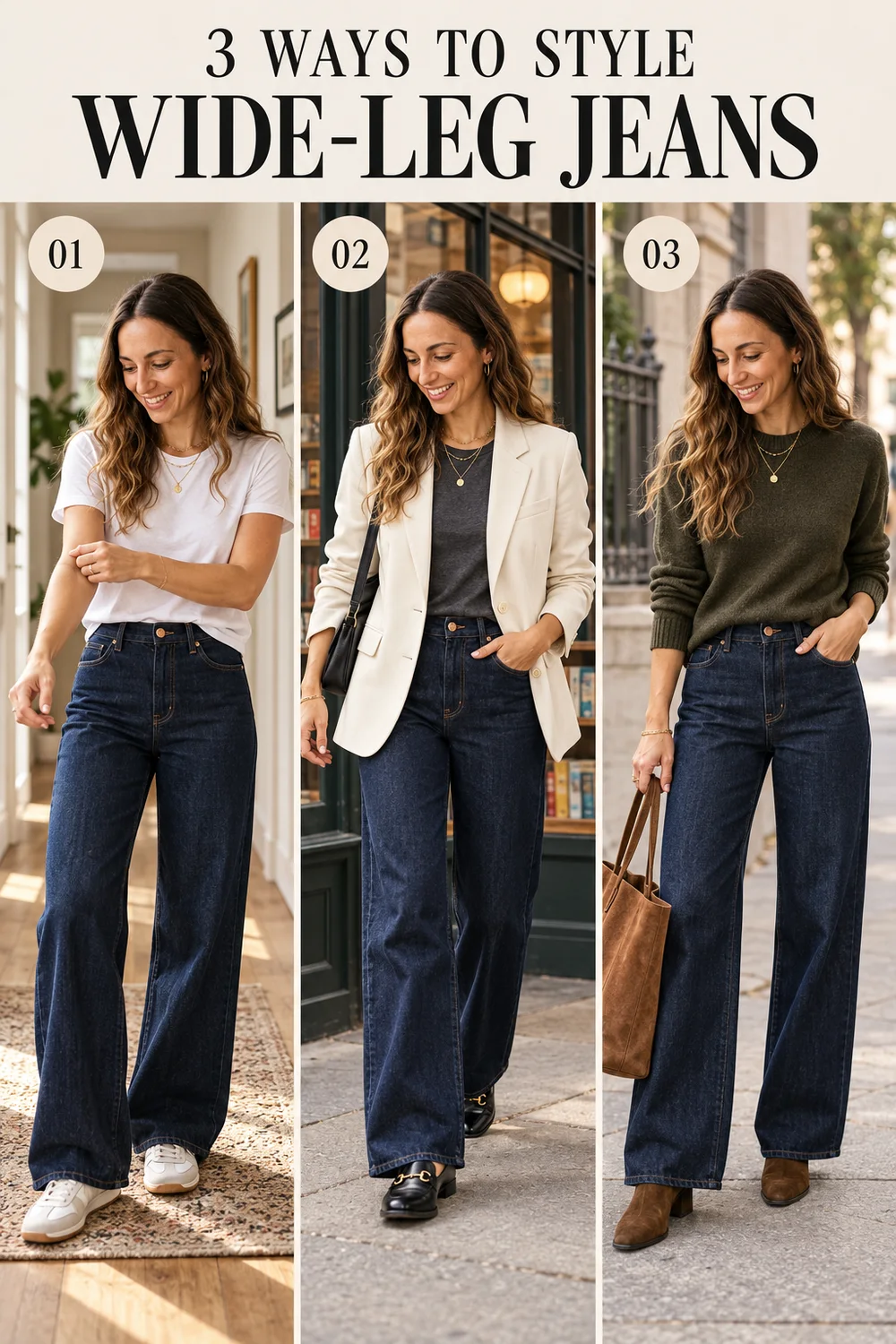
- White tee and sneakers.
- Ivory blazer, dark tee and loafers.
- Olive knit, ankle boots and a tote.
- Pinterest title
- 3 Ways to Style Wide-Leg Jeans for Everyday Outfits
- Description · copy template
- Affiliate disclosure: If you buy through my link, I may earn a commission. Explore three ways to style wide-leg jeans: a white tee, an ivory blazer and an olive knit. Open the guide for outfit details and available links.
- Board name
- Wide-Leg Jeans Outfits
- Destination type
- A detailed styling article on your own site with the three looks and relevant product recommendations. A tutorial deserves a destination that completes the lesson. If the article contains affiliate links, follow the program’s rules and disclose each relationship clearly on that page as well.
- Affiliate disclosure
- Affiliate disclosure: If you buy through my link, I may earn a commission.
- Image alt
- Three numbered looks of the same fictional adult character wearing dark wide-leg jeans with a white tee, an ivory blazer and an olive knit.
- Keyword focus
- ways to style wide-leg jeans; supporting phrase: wide-leg jeans outfit ideas.
View and copy the complete English image prompt
Use the first attached image only to preserve the same fictional visibly adult woman's identity in every panel: olive complexion with natural skin texture, long center-parted dark-brown waves with lighter ends, long oval face, dark eyes, small gold hoops and a delicate gold necklace. She is not a real person or customer. Image 2 is the sole unbranded illustrative ivory blazer garment reference: copy the notched lapels, long sleeves, single-breasted two light buttons, welt chest pocket and two flap pockets, fabric color and silhouette where visible. Do not invent a brand or a price. Natural fabric, realistic hands and body; no fake product packaging, phone or app screenshots. High-end but lived-in editorial photography, human scale, natural texture, authentic gesture, 2:3 portrait image intended for a 1000x1500 Pinterest Pin. This is educational mock content with no real sale, retailer, partnership or product test. Create a complete readable tutorial Pin as three distinct vertical full-body candid editorial fashion shots of the SAME woman in a simple side-by-side series, each wearing the SAME specific dark indigo high-waist wide-leg jeans with copper button and contrast stitching. Look 1: white tee and sneakers in a home hallway, adjusting her sleeve. Look 2: ivory reference blazer, charcoal tee and loafers beside a bookstore window, walking. Look 3: dark olive knit and ankle boots on a city sidewalk, holding a tote naturally. Same face/hair across all three, varied pose and setting, garments fully visible and physically plausible. Design it as an editorial Pinterest tutorial: at top legibly render exactly ‘3 WAYS TO STYLE’ and ‘WIDE-LEG JEANS’; label the three images exactly ‘01’, ‘02’, ‘03’. No other text, no brand, no product packaging. Make panels wide enough to read.
The sample destination is a type, not a live link. The description is a draft for use only after you have a real permitted relationship, an accurate product match and a verified destination. These educational images do not contain a commission disclosure; add a clear, conspicuous disclosure to the Pin itself before any affiliate use.
Example C: Capsule Wardrobe Checklist Pin
A wardrobe scene and an ordered seven-item list make the checklist useful without a click. The listed objects are illustrative concepts, not seven verified products.
Actual inputs
- Attach both references and the prompt below.
- Generate the complete Pin concept.
- Inspect the face, garment, hands and text; verify any real destination before use.
The inputs above were attached to this example’s image-generation request. The garment is an owned fictional reference, not a photographed retail listing.
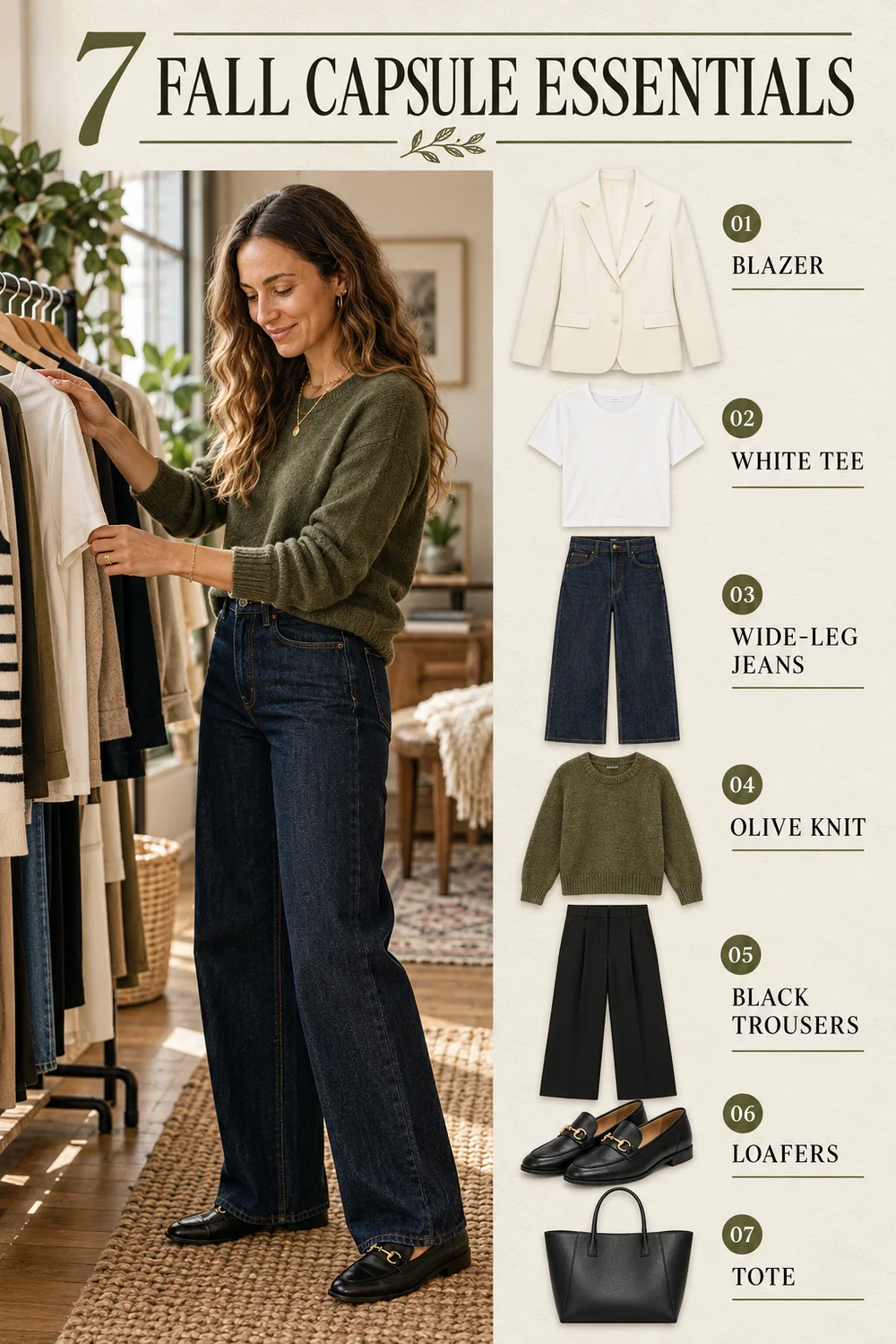
- Ivory blazer
- White tee
- Wide-leg jeans
- Olive knit
- Black trousers
- Loafers
- Tote
- Pinterest title
- 7 Fall Capsule Wardrobe Essentials to Plan Your Outfits
- Description · copy template
- Affiliate disclosure: If you buy through my link, I may earn a commission. Plan a fall capsule wardrobe with seven versatile clothing and accessory categories. See the checklist and find relevant options on the linked page.
- Board name
- Fall Capsule Wardrobe Ideas
- Destination type
- A Shop the Look or capsule-wardrobe page with the seven item categories and clearly disclosed product links. A checklist covers several item types. A useful landing page lets readers inspect the relevant options instead of sending them to one unrelated item.
- Affiliate disclosure
- Affiliate disclosure: If you buy through my link, I may earn a commission.
- Image alt
- Fictional adult character choosing a white tee beside an illustrated seven-item fall capsule wardrobe checklist.
- Keyword focus
- fall capsule wardrobe essentials; supporting phrase: fall capsule wardrobe checklist.
View and copy the complete English image prompt
Create a complete 2:3 vertical editorial Pinterest infographic, intended for 1000x1500. Use the first reference to preserve the same clearly adult fictional woman: olive complexion with visible natural skin texture, long center-parted dark-brown waves with lighter ends, long oval face, dark eyes, small gold hoops and a delicate gold necklace. Show her mid-action in a lived-in apartment wardrobe, in three-quarter profile, a thoughtful relaxed expression with lips closed, reaching for an off-white tee on a clothing rack with one natural hand; wearing an olive knit and dark-indigo wide-leg jeans, no blazer worn. Natural window light, realistic hands and fabrics, no brand marks, no fake UI. She is not a real person or customer. Layout: full-height person on left and seven distinct realistic garment cutouts with a short aligned checklist on right. Garments exactly once: ivory blazer, white tee, dark jeans, olive knit, black trousers, black loafers, structured tote. The blazer cutout should match the second reference image's notched lapels, single-breasted two light buttons, welt chest pocket and two flap pockets. At the top render exactly ‘7 FALL CAPSULE ESSENTIALS’. Next to each item, correctly spell precisely these seven labels: ‘01 BLAZER’, ‘02 WHITE TEE’, ‘03 WIDE-LEG JEANS’, ‘04 OLIVE KNIT’, ‘05 BLACK TROUSERS’, ‘06 LOAFERS’, ‘07 TOTE’. Restrained dark ink on softly textured ivory paper with olive accents; keep all labels clear and fully within frame. No logo, fake partnership, price, performance claim or product test.
The sample destination is a type, not a live link. The description is a draft for use only after you have a real permitted relationship, an accurate product match and a verified destination. These educational images do not contain a commission disclosure; add a clear, conspicuous disclosure to the Pin itself before any affiliate use.
Use your own approved character and product reference to create the next fashion image.
Open Studio4. Add the title, description, Board and destination
Complete the Pin so the image, title and landing page answer the same question. If the image promises three jeans outfits, the destination should show those outfits—not an unrelated home page or a single accessory.
- Sign in to Pinterest. In the current Create Pin flow, upload your approved vertical image. Check the accepted format in the uploader.
- Enter a clear title. Put the useful topic near the beginning because displays vary by device.
- Write a natural description that answers the search intent. Put a plain commission disclosure at the beginning, before any collapsed text, and add a visible disclosure in the Pin creative so it is seen with the recommendation.
- Select a relevant Board. Enter the approved destination link and open it on mobile to verify the right item, page, price and availability. Avoid unsupported shorteners.
- Provide descriptive alt text using the options available in your current publishing flow. Select the AI-modified or AI-generated-person controls where available and applicable. Check the current platform instructions.
- Preview the complete Pin, disclose any additional paid partnership when applicable, and publish through Pinterest or a supported publisher. Reopen the published Pin to verify the link and record its URL.
Example disclosure: “Affiliate disclosure: If you buy through my link, I may earn a commission.” Adapt it to your actual relationship and use the language of the content. The FTC’s Endorsement Guides FAQ explains that a disclosure must be clear and conspicuous; a vague “affiliate link” label or a platform tool alone may not communicate enough.
The Affiliate Content Generator can help draft a caption and disclosure from facts you supply. Review every claim and the placement yourself; it does not verify a product, grant image rights, create an affiliate link or publish the Pin.
5. Research Pinterest keywords and improve the content
Choose one specific reader question per Pin, then use its natural language in the title, description and the destination. Keywords help describe the idea; repeated phrases cannot rescue a misleading image or irrelevant page.
- Search Pinterest for a broad topic such as “wide-leg jeans outfits.” Note relevant autocomplete suggestions and the words used in results. These are ideas, not verified search-volume estimates.
- Use Pinterest Trends when available to explore regional and seasonal interest. Compare terms over the same period; avoid treating a trend index as guaranteed traffic.
- Choose one focus: “charcoal jacket outfit,” “three ways to style wide-leg jeans” or “fall capsule wardrobe essentials.” Match each to a useful Pin and an appropriate destination.
- Describe the visible image honestly in alt text; do not stuff it with a list of keywords. Put a readable headline on tutorial or checklist Pins when it clarifies the value.
- Review search results and actual analytics over time. Update unavailable products and improve a destination that fails to answer the Pin’s promise. Do not create near-duplicate Pins in bulk.
Google’s people-first content guidance is also useful for your destination page: add original information, disclose relevant experience and avoid claiming tests you did not perform. Search ranking, traffic and AI citations are not guaranteed.
6. Track clicks, orders and commission with the free template
Record Pinterest visibility and outbound clicks alongside the affiliate program’s attributed orders and commission. The systems measure different events, use different attribution windows and may update at different times.
The blank file contains a formula in the first data row. Open it in a spreadsheet, format Outbound CTR as a percentage and copy the formula down for new rows. The example file contains formulas and the hypothetical values shown below. Replace its example.invalid URLs and all sample data before real use; they do not represent active destinations or performance.
| Date | Pin Type | Board | Destination URL | Impressions | Saves | Pin Clicks | Outbound Clicks | Outbound CTR | Affiliate Orders | Commission |
|---|---|---|---|---|---|---|---|---|---|---|
| 2026-10-01 | Product Outfit | Wearable Outfit Ideas | example.invalid/demo-product | 1,000 | 80 | 120 | 50 | 5% | 3 | $24.00 |
| 2026-10-02 | Styling Tutorial | Wide-Leg Jeans Outfits | example.invalid/demo-guide | 800 | 64 | 95 | 24 | 3% | 1 | $8.00 |
| 2026-10-03 | Capsule Checklist | Fall Capsule Wardrobe | example.invalid/demo-look | 1,200 | 96 | 150 | 60 | 5% | 2 | $16.00 |
What each metric means
- Impressions: times the Pin appeared on screen; not unique people.
- Saves: times people saved the Pin to a Board.
- Pin Clicks: clicks that open the Pin in close-up on Pinterest.
- Outbound Clicks: actions leading to a destination outside Pinterest. Pinterest measures these from the date the link is added.
- Outbound CTR: outbound clicks ÷ impressions. The row-two spreadsheet formula is
=IF(E2=0,"",H2/E2); it returns a blank when impressions are zero. For the first hypothetical row, 50 ÷ 1,000 = 5%. - Affiliate Orders and Commission: use the provider’s attributed order count and commission for the same period; note pending, approved or reversed status separately when relevant.
Pinterest Analytics requires a business account and describes real-time figures as estimates that can change. Compare the same dates and time zones when possible. Outbound clicks can differ from affiliate clicks, and affiliate orders can reflect attribution rules, returns or later adjustments.
For your own landing page, use meaningful campaign parameters only when your destination and affiliate program permit them. If linking directly to a merchant, do not modify the provider’s tracking URL unless its terms allow it. For affiliate links on your website, Google explains how to qualify paid outbound links.
7. AI labels, affiliate disclosure and common mistakes
An AI label explains how an image was made; an affiliate disclosure explains a financial relationship. Neither substitutes for product accuracy or permission to use the reference.
Pinterest says its systems may add Gen AI labels based on metadata, classifiers or creator-provided information. Its current Create Pin help also describes controls for AI-modified content and an AI-generated person. Check the actual controls and current policy each time; do not assume a label will always appear.
| Common mistake | Better check |
|---|---|
| A generated jacket differs from the linked item | Compare the permitted product reference and destination listing: color, shape, material, closures and visible details. Revise or reject a mismatch. |
| A virtual creator says ‘I wore this for months’ | Describe supported product facts or the styling idea. Do not invent personal experience, performance or reviews. |
| The only disclosure is #affiliate at the end | Use clear commission language prominently with the recommendation and link, including in the Pin creative when it can stand alone. |
| A checklist links to an unrelated product | Provide a useful page that fulfills the checklist and contains only relevant, permitted links. |
| Bulk near-identical Pins or copied images | Make original, useful content in moderation. Secure permission for references and respect program and platform rules. |
| Treating an outbound click as a sale | Use the affiliate dashboard for attributed orders and commission; reconcile reporting periods and reversals. |
Frequently asked questions
Can I use an AI influencer for Pinterest affiliate marketing?
Yes, an original virtual creator can appear in affiliate content if the content is useful, the link and commercial relationship are transparent, the destination matches the Pin, and you follow Pinterest, FTC and your affiliate program’s current rules. Do not claim the virtual character personally bought or tested a product.
Can I put an affiliate link directly on a Pinterest Pin?
Pinterest’s affiliate-link guide describes adding a provider-generated link that leads directly to the relevant shop product detail page. Confirm that your particular network and merchant allow Pinterest as a traffic source, the destination matches the Pin, and the disclosure is clear. Some link shorteners are blocked.
Do I need a website for Pinterest affiliate marketing?
Not for every program: Pinterest describes direct affiliate links to a shop’s product page. A website can provide a fuller tutorial or multi-item checklist, but it is optional for that direct-link workflow. Check each program’s terms before linking from a Pin or an article.
Should I disclose that my Pin was made with AI?
Use the AI-modified controls available in the current Pin creation flow and check Pinterest’s current rules. Pinterest may also apply labels based on metadata, classifiers or creator information. A synthetic-media label does not disclose that you may earn an affiliate commission; explain that separately.
How can I keep the same AI influencer and clothing across Pins?
Save a fictional adult character, use the same approved identity reference for each generation, and attach an authorized garment reference where the workflow supports it. Compare face, hair, color, cut, closures and pockets with the originals. Review every result; a reference does not guarantee an exact match.
What is the difference between Pin clicks and outbound clicks?
A Pin click opens the Pin in close-up on Pinterest. An outbound click is an action that takes someone to a destination outside Pinterest. Neither metric proves a purchase; compare destination clicks with attributed orders and commission in your affiliate dashboard.
Can I use a merchant’s product photos to make AI images?
Only when your license, the merchant’s terms and any relevant permissions allow that particular use, including AI transformation and commercial distribution. An affiliate agreement or a publicly visible image does not automatically grant every reuse right. When permission is unclear, get an authorized reference or choose another product.
Sources and policy notes
Official sources checked October 28, 2026. Platform interfaces, program terms and eligibility can change; check them again before publishing.
- Pinterest commercial and affiliate guidelines and affiliate link basics: original content, disclosure, permitted destinations and link behavior.
- Pinterest Create a Pin and Gen AI labels: creation fields and synthetic-media labeling.
- FTC Endorsement Guides FAQ: truthful endorsements and clear material-connection disclosures.
- Pinterest Analytics and Pinterest Trends: metric definitions, estimation and regional trend research.
- Google people-first content and outbound link guidance: useful destination content and link attributes.
Create your first useful affiliate Pin
Choose one audience question, one original character and one item you can represent accurately. Create the visual, review it against your authorized reference, add a clear disclosure and send readers to a destination that delivers on the Pin’s promise. Record the outcome with actual data when it exists.
Start with a recognizable character you can reuse across your fashion content.
Create Your AI Influencer
Plan Content
Measure Engagement
Build Your Profile
Price Your Work
Write Post Copy
Brand Partnerships