
The top features to look for in an AI influencer generator are the ones that help you produce a recognizable creator repeatedly: reliable reference handling, useful creative controls, reviewable photo and video outputs, and costs you can understand before committing. A strong demo image is a starting point. A dependable weekly workflow is the real goal.
This guide is for individual creators and small teams choosing software for recurring social content. It explains what to test, what can go wrong, and where a separate tool may still be necessary. It is a feature assessment, not a ranking of vendors or a claim that one generator can run an influencer account automatically.
Open Characters in StudioA quick checklist before you choose
Write down your main output first: still photos, short motion clips, speaking videos, or product campaigns. Treat the capabilities required for that output as essentials. Advanced options only add value when they solve a real production problem. Use the following checks to turn broad AI influencer generator features into observable behavior.
| Feature | What to test | Warning sign |
|---|---|---|
| 1. Character consistency across angles, scenes, and expressions | Compare a portrait, profile, and full-body image. | A familiar hairstyle hides a changing face. |
| 2. Saved characters and reusable reference materials | Return later and locate the same approved reference. | Every new session starts from an empty prompt. |
| 3. Useful control over scenes, outfits, poses, and composition | Change one element while keeping the brief stable. | A small revision replaces the entire visual direction. |
| 4. Product references that survive real interactions | Inspect shape, grip, contact, and any visible label. | The object looks plausible but is the wrong product. |
| 5. Photo quality, aspect ratios, and practical exports | Download a result and inspect the actual file. | A polished thumbnail conceals artifacts or a poor crop. |
| 6. Video continuity, believable motion, and audio fit | Watch the whole clip, including transitions and sound. | The opening frame is strong but motion breaks identity. |
| 7. A revision process that keeps the reviewer in control | Identify a defect and attempt one deliberate correction. | Fixing one detail creates several unrelated changes. |
| 8. History and organization for repeatable work | Find an earlier task and recover its useful context. | You can see a result but cannot retrace its setup. |
| 9. Transparent credits, waiting time, and cost per usable asset | Record attempts, adopted outputs, cost, and review time. | The advertised price excludes your normal retries. |
| 10. Clear commercial terms, privacy, and disclosure responsibilities | Read the terms for your actual inputs and distribution. | “Commercial use” is treated as permission for everything. |
- 1. Character consistency across angles, scenes, and expressions
- Test: Compare a portrait, profile, and full-body image.
- Watch for: A familiar hairstyle hides a changing face.
- 2. Saved characters and reusable reference materials
- Test: Return later and locate the same approved reference.
- Watch for: Every new session starts from an empty prompt.
- 3. Useful control over scenes, outfits, poses, and composition
- Test: Change one element while keeping the brief stable.
- Watch for: A small revision replaces the entire visual direction.
- 4. Product references that survive real interactions
- Test: Inspect shape, grip, contact, and any visible label.
- Watch for: The object looks plausible but is the wrong product.
- 5. Photo quality, aspect ratios, and practical exports
- Test: Download a result and inspect the actual file.
- Watch for: A polished thumbnail conceals artifacts or a poor crop.
- 6. Video continuity, believable motion, and audio fit
- Test: Watch the whole clip, including transitions and sound.
- Watch for: The opening frame is strong but motion breaks identity.
- 7. A revision process that keeps the reviewer in control
- Test: Identify a defect and attempt one deliberate correction.
- Watch for: Fixing one detail creates several unrelated changes.
- 8. History and organization for repeatable work
- Test: Find an earlier task and recover its useful context.
- Watch for: You can see a result but cannot retrace its setup.
- 9. Transparent credits, waiting time, and cost per usable asset
- Test: Record attempts, adopted outputs, cost, and review time.
- Watch for: The advertised price excludes your normal retries.
- 10. Clear commercial terms, privacy, and disclosure responsibilities
- Test: Read the terms for your actual inputs and distribution.
- Watch for: “Commercial use” is treated as permission for everything.
01Character consistency across angles, scenes, and expressions
The first feature to evaluate is whether a character remains recognizable when the photograph changes. A convincing portrait proves little about the next scene. Face shape, eye spacing, complexion, apparent age, and body proportions all contribute to identity. Clothing and hair help recognition, but they should not be the only things connecting the images. A creator who looks consistent only in one camera angle will limit your content ideas.
Test the character under different lighting and with a modest change in expression. Compare the results beside the approved reference at a similar face size. Then inspect a full-body frame: a stable face attached to substantially different proportions can still break the illusion of one recurring creator. Judge natural texture and anatomy separately from resemblance; an image can succeed at one and fail at the other.
Look for a workflow that makes references easy to reuse and review. Be cautious about absolute consistency promises. Saved identity guidance reduces repeated setup, but generation can still drift. The useful buying question is whether the tool produces enough acceptable variations for your actual publishing needs, with a manageable amount of correction.
02Saved characters and reusable reference materials
A reusable character should save more than a name. You need a reliable way to return to the identity image and distinguish it from scene inspiration, product photography, or a discarded draft. Otherwise, a small team gradually feeds different references into different tasks and wonders why its creator changes. Clear source selection is often more valuable than a large collection of decorative presets.
Evaluate the ordinary handoff: close the task, open another workflow, and try to locate the reference again. Can you tell which character is selected before generating? Can you inspect the source at a useful size? If your workflow supports several references, establish what each image is meant to control. Do not assume every uploaded picture receives the same interpretation or priority.
Keep an independent copy of approved assets and a short written identity brief. A built-in character library can help you start, but selecting a preset is different from owning an exclusive identity. Check any relevant usage terms. For a small team, consistent file naming and a shared review checklist can provide a workable handoff even when the generator has no dedicated collaboration features.
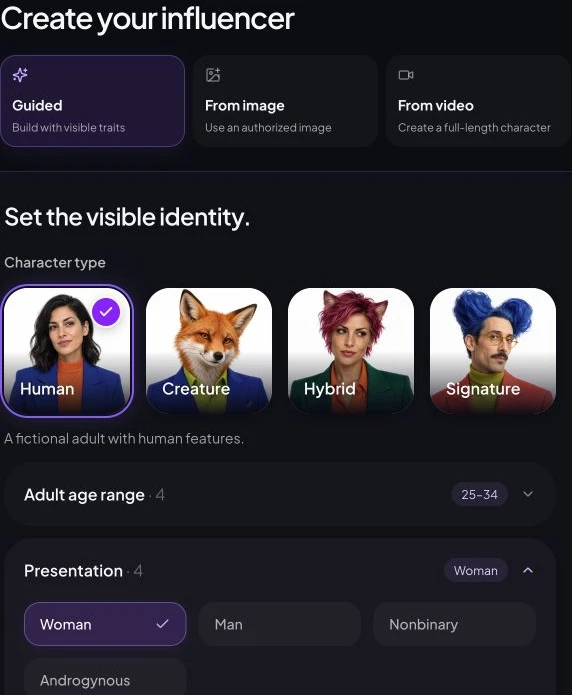
03Useful control over scenes, outfits, poses, and composition
Creative control means being able to express the change you need without rebuilding the character. Look for a clear way to describe location, wardrobe, action, camera distance, and framing. Some tools expose separate controls; others rely primarily on prompts and references. Neither interface is automatically better. What matters is whether the control is understandable and produces changes you can evaluate.
Try an ordinary assignment, such as moving a lifestyle creator from a kitchen to an outdoor café while keeping the outfit. Next, change only the jacket. These are more informative tests than asking for a dramatic fantasy scene, where almost any striking result might feel successful. Keep the requests specific enough that another reviewer could identify whether the intended change happened.
Watch for unwanted changes to age, body shape, accessories, or expression. Also distinguish reference-guided generation from precise editing. A new generation may reinterpret the whole image rather than preserve every untouched pixel. If you need an exact logo placement, a locked layout, or a local correction to a tiny detail, assess the generator alongside a suitable finishing editor instead of expecting one prompt to behave like a layer mask.
04Product references that survive real interactions
Product content introduces a second identity problem: both the creator and the object must stay recognizable. A reference upload is a useful starting point, but its presence does not prove accurate packaging, proportions, or use. For a product demo, the cap, handle, buttons, material, and relationship between the hands and object may matter as much as the face.
Use an authorized photograph of a simple object and request a physically clear interaction, such as carrying a tote or placing a mug on a table. Inspect where fingers touch the surface, whether weight and scale make sense, and whether shadows connect the object to the scene. If text is essential, read it at the intended output size; attractive unreadable lettering is still a failed commercial asset.
Separate an illustrated campaign concept from evidence of actual product use. A virtual creator cannot supply a genuine customer experience, and an invented application result should not become an advertising claim. Reject a workflow that requires you to overlook a materially changed product. When exact fidelity is mandatory, consider compositing approved product photography or using real demonstration footage as part of the production process.
05Photo quality, aspect ratios, and practical exports
Resolution is only one part of image quality. A large file with waxy skin, uneven eyes, broken jewelry, or implausible hands is not ready for a campaign. Check texture, lighting, anatomy, and background geometry at full size, then view the same image at the scale your audience will see. Oversharpening and tiny detail failures can look different in those two views.
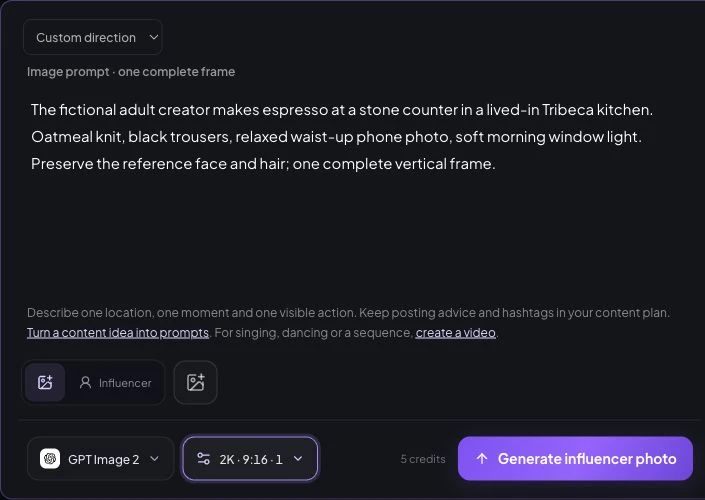
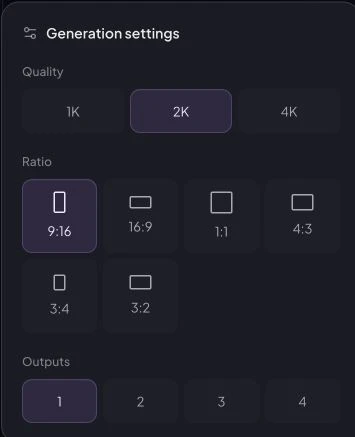
Choose the intended aspect ratio before testing. A portrait that works as a square post may not leave enough room for a vertical crop or a wide banner. Ask whether the generator creates a new composition for each format or whether you must crop the original afterward. Leave room for platform controls and any text you will add in a separate design tool.
Download a sample rather than relying exclusively on the preview. Verify dimensions, file type, visible watermarks, and whether the image opens correctly in your editor. Read the plan's export restrictions before paying. Higher resolution may increase cost without fixing identity or anatomy, so approve the composition and recognizable details first, then choose the quality level the final placement actually requires.
06Video continuity, believable motion, and audio fit
Video support deserves its own evaluation. A photo generator can preserve a face in a still image yet struggle when the subject turns, moves a hand, or interacts with a product. Check temporal continuity: facial details, clothing, background objects, and body proportions should not change unpredictably between frames. Watch at normal speed and pause around the most demanding movement.
Start with a short, modest action that fits your intended content. A shoulder turn, a small step, or placing an object on a surface reveals more about everyday usefulness than an elaborate cinematic request. Look for a clear choice of supported duration, framing, and quality. If your campaign needs speech, verify that the specific workflow supports it; image-to-video, talking-avatar, voiceover, and lip-sync tools are not interchangeable.
Listen for pronunciation, timing, unwanted sound, and abrupt endings when audio is present. Check language and caption support directly rather than assuming it follows from a video label. Budget for external editing when you need subtitles, music clearance, several shots, or platform-specific finishing. A usable short clip is one production asset, not necessarily a complete publishable advertisement.
07A revision process that keeps the reviewer in control
Most creative work includes revisions, so evaluate the second attempt as carefully as the first. Can you understand the current inputs and make one controlled change? Does the workflow make it easy to compare the new output with the version you preferred? Without that context, iteration becomes a sequence of guesses, and reviewers lose track of which changes actually helped.
Distinguish editing an existing asset from generating another interpretation. An edit request may still alter details outside the area you intended to change. For exact corrections, you may need a separate editor. Do not describe a tool as having a local editing control unless that control is actually available, and do not assume a retry is free just because the earlier output disappointed you.
Before using a generator repeatedly, decide what makes an asset acceptable: recognizable identity, correct product, plausible anatomy, suitable framing, and supportable claims. Keep the rejected version until you understand the failure pattern. If a small correction repeatedly introduces new defects, changing the source or simplifying the scene may be more efficient than adding another paragraph of contradictory instructions.
08History and organization for repeatable work
A generator becomes part of a working routine when you can return to yesterday's decisions. History should help you identify completed work, distinguish it from unfinished or failed tasks, and find the output you meant to keep. For a recurring character, organization prevents accidental reuse of an old identity reference or a draft with an obvious defect.
Test retrieval instead of just counting gallery cards. Locate a specific image after several tasks, inspect any available prompt and settings, and check the download path. If reuse controls exist, verify what they restore. Reusing a setup should not be confused with reproducing identical pixels; the generation process can still yield a different result even when the brief looks unchanged.
For a small team, ask how an approved file moves to the person who publishes it. A history screen is not automatically a review queue, a shared asset library, or an audit trail. You can combine a simple generator with external folders and approvals, provided responsibilities are clear. Export important finished assets and retain the source permissions needed to use them.
09Transparent credits, waiting time, and cost per usable asset
A subscription price does not tell you what a finished post costs. Credits may vary with image quality, video length, output count, or workflow. Look for an understandable quote before submission, clear credit-expiry rules, and an explanation of how failed jobs and refunds are handled. Compare the plan you would actually use, including the quality level your audience needs.
Measure waiting time alongside your own review and finishing time. A fast generation that needs repeated corrections may delay delivery more than a slower, usable result. Test near the kind of deadline you normally face, but do not treat one session as a reliable service-level guarantee. Queue conditions, provider availability, and task complexity can change performance.
Track cost per adopted asset rather than cost per attempt. Include generation, paid retries, and any finishing expense you decide to count; record labor separately or value it consistently. A cheaper plan may suit occasional experimentation, while a more expensive workflow can be worthwhile if it reduces avoidable rework. The right comparison uses the same content brief and acceptance criteria for every candidate.
10Clear commercial terms, privacy, and disclosure responsibilities
Commercial permission from a tool is not the same as clearance for every element in an image. You still need appropriate rights to references, recognizable likenesses, logos, music, and other protected material. Also separate permission to use an output from whether that output receives copyright protection. Those questions depend on facts and jurisdiction, not simply the presence of a paid subscription.
Check what happens to uploaded references and generated assets: who can access them, whether they are public by default, what deletion options exist, and what the provider says about training use. Do not infer privacy from an interface that merely looks private. For confidential client products or likenesses, compare the actual policy with the agreement you have made to the client.
Finally, assess whether your publishing process can label synthetic content and commercial relationships clearly. A generator's content checks do not replace campaign review or platform disclosure. Keep virtual personas from claiming experiences they never had. For a small team, the essential feature is a transparent, workable boundary between what the software does and what you remain responsible for checking before publication.
The FTC's endorsement guidance explains material-relationship disclosures. The U.S. Copyright Office's AI reports distinguish digital replicas and output copyrightability. For distribution, YouTube's official AI disclosure guidance describes which realistic synthetic or meaningfully altered content requires disclosure. Apply each source to its own jurisdiction or platform.
Run a small trial before committing to a routine
Use one authorized adult reference and a short identity brief. Choose a scene family relevant to your niche, such as a travel creator preparing for a city walk. Keep the test manageable enough to review every output carefully. The following is a suggested evaluation exercise, not a report of results measured on AI Influencer Generator.
- Start with a front-facing portrait. Establish what you will compare: facial structure, complexion, hair, and distinguishing details. Save the approved reference separately from generated attempts.
- Request a profile and a full-body frame. Check whether the identity survives a new viewpoint and whether proportions remain plausible. Do not accept a familiar outfit as sufficient evidence of the same person.
- Change the outfit, then the setting. Make separate requests so the reviewer can identify the source of any drift. Keep the other instructions stable rather than introducing several new demands at once.
- Create one short motion test if video matters. Ask for a simple turn or step. Watch the face, hands, clothing, and background through the entire clip; listen to audio if the chosen workflow includes it.
- Reopen the tasks and export adopted work. Check whether you can recover the useful context, understand the costs, and pass the files into your normal finishing or publishing workflow.
Use the same criteria for every candidate: usable without correction, usable after a defined correction, or rejected. Record why each output falls into its category. This is more informative than a vague quality score because it exposes the type of labor the tool creates. A product-focused team may reject an inaccurate label that would not matter in a creator-only portrait.
Do not turn a tiny sample into a success-rate guarantee. The exercise identifies obvious workflow problems and questions for a larger trial. If two products look similar, compare how easily you understand a failure and recover from it. That experience often determines whether a tool remains useful once the novelty wears off.
Open Characters in StudioCompare the cost of work you actually keep
Use a consistent accounting boundary: generation charges plus paid retries and finishing expenses, divided by the number of adopted assets. Include the rejected attempts in the numerator. Keep photo and video calculations separate when their costs and acceptance standards differ substantially.
A hypothetical example, not platform pricing
A creator spends $24 on generation and retries, then $12 on finishing, and adopts six photos. The direct production cost is ($24 + $12) ÷ 6 = $6 per adopted photo. Dividing by twelve attempts instead would produce $3 per attempt, which answers a different question. These invented amounts demonstrate the calculation only.
If the work also took two hours of review, record that time explicitly. You can assign it an internal hourly rate, but use the same treatment for every tool. For a fixed subscription shared across projects, state how you allocate its cost. There is no universal cheapest generator without knowing output requirements, utilization, rejection patterns, and the value of your time.
Apply the checklist in AI Influencer Generator
Begin in Characters with an authorized reference or the available character-creation path. Inspect the source before reusing it. Write a compact identity brief, then use the consistent character workflow to explore one scene at a time. Our AI influencer prompt guide explains how to separate identity instructions from changing scene details.
Review the available ratio, quality, and credit quote in the selected photo workflow. If motion is part of your plan, evaluate the video workflow separately. Return to History to inspect task state and available outputs. Saved references and previous setups help with continuity; every result still needs identity, anatomy, and content review.
Check current pricing, commercial-use guidance, and AI disclosure guidance before planning a campaign. This workflow covers creation and review; do not assume automatic scheduling, audience analytics, or a shared approval system. For product comparisons, continue to our AI influencer generator comparison. For assembling several tools, use the platform workflow guide.
Questions creators ask before choosing
What is the most important AI influencer generator feature?
For a recurring virtual creator, start with recognizable identity across different scenes. Evaluate it together with output quality and the effort needed to produce acceptable variations. A single attractive portrait cannot establish repeatability.
Do I need photo and video generation in the same tool?
Only if that combination improves your actual workflow. An integrated tool can reduce handoffs, but you should test still images and moving footage separately. A separate video editor or generator may be appropriate when its capabilities better match the project.
Can a reference image guarantee the same face every time?
No. References provide identity guidance, but changes in angle, lighting, expression, and motion can introduce drift. Compare each output with the approved source and reject variations that no longer represent the intended character.
How should I compare subscription and credit prices?
Use the same brief, quality settings, and acceptance criteria. Record the total cost of attempts and corrections, then divide by the number of assets you actually adopt. Check expiry, watermark, export, and failed-task policies as well.
Does a paid plan make every generated asset commercially safe?
No. Tool permission does not clear third-party likenesses, trademarks, music, or source images, and it does not automatically establish copyright protection. Review the applicable terms, your input permissions, advertising claims, and publication requirements.
Research notes and sources
This guide draws on current category discussions and first-party product inspection. The vendor articles from RYLA, Synthetic Actor, and Pixara informed the questions covered here. Their product claims and preferences are not independent benchmarks or results of our own testing.
Interface images show first-party controls, not comparative performance. The trial and cost example are educational methods. Features, policies, and plans can change, so inspect the current workflow and terms before buying. Choose the tool that lets you produce, review, and recover work reliably for your particular content plan.
Open Characters in Studio
Plan Content
Measure Engagement
Build Your Profile
Price Your Work
Write Post Copy
Brand Partnerships