
To become a Fanvue AI creator, choose a content niche, build a recognizable fictional adult character, prepare a small library of original media, verify your real identity with Fanvue, disclose the AI content, and give followers a clear reason to subscribe. You can keep your own face out of public posts. You still need to operate a real, verified account and do the work of production, promotion and subscriber care.
This beginner guide follows that process using AI Influencer Generator. We operate the tool. The visual walkthrough reuses an existing first-party character archive: three selected photos and one short video. We made zero new generation requests for this article. The ten-piece launch batch below is a production plan, not ten completed outputs. Fanvue registration, verification, publication and earnings were not tested.
What Is a Fanvue AI Creator?
A Fanvue AI creator runs an account whose photos, videos or other content are generated with AI. A human operator chooses the character, reviews the work, manages the page and handles the business. The persona can be entirely fictional; it is not an autonomous person with a real life behind the images.
Fanvue distinguishes AI creators from AI-enhanced creators. A fictional virtual character belongs to the first category. A real person using AI to help with images or interactions is AI-enhanced. Using someone’s real body with a generated face is a different workflow with consent and verification requirements; it is not a shortcut to an original fictional character.
For this guide, the brief is a wholly fictional, visibly adult, non-explicit lifestyle creator. No celebrity or private person’s likeness is used. The value is styling ideas and a coherent visual story, rather than claims that the character personally visited a place, tested a product or achieved a fitness result.
Can You Make Money as a Fanvue AI Creator?
Fanvue permits AI creators and supports subscriptions, tips, pay-per-view messages, bundles and custom content. That gives you ways to charge; it does not establish demand. The official earnings policy sets the standard creator share at 80%, with 20% retained by Fanvue, unless otherwise agreed. Introductory promotions may change and should not be treated as the permanent rate.
| Route | What the buyer gets | Beginner decision |
|---|---|---|
| Subscription | Access to an explicitly described recurring content library. | Start with one monthly offer and a cadence you can sustain. |
| Tips | Optional support from a fan. | Treat tips as variable income, not the budget for promised production. |
| Pay-per-view or bundles | A separately priced collection or message attachment. | Explain what is included and whether it is outside the subscription. |
| Custom content | An agreed deliverable within your actual capabilities and platform rules. | Define scope and delivery terms before taking an order. Do not promise guaranteed likeness or unsupported scenes. |
For illustration only, 20 subscribers at $9.99 would produce $199.80 gross monthly subscription revenue, or $159.84 after the standard 20% platform share. This is arithmetic, not an observed result. Production, editing, promotion, taxes, payout charges and any refunds or chargebacks come afterward. With no subscribers, you can incur production costs and earn nothing.
How long until you earn? There is no defensible universal answer. Someone with an interested audience may sell earlier than a beginner starting without traffic. A 30-day plan is a way to learn whether the offer works, not a promise of first-month income. Measure purchases and renewals; views alone cannot pay production costs.
Step 1: Choose Your AI Influencer Niche
Choose a recurring reason to follow, then a deeper reason to pay. “Fashion” becomes “weekday outfit stories for people who like a small, repeatable wardrobe.” “Lifestyle” becomes “a fictional city creator’s coffee-and-commute visual diary.” A clear constraint gives you distinct posts instead of endless portraits.
| Direction | A useful recurring format | What needs evidence |
|---|---|---|
| Fashion | One outfit concept across three settings, with styling notes. | Generated clothes do not prove real fit, fabric quality or wear testing. |
| Lifestyle | Disclosed fictional visual diaries, themed photo stories and short motion clips. | Do not present fictional visits, purchases or experiences as real. |
| Fitness | A virtual host presenting sourced general information. | The synthetic body is not proof of training results; avoid invented transformations or personal health advice. |
Our working direction is non-explicit city lifestyle with office-to-weekend styling. The existing kitchen and street scenes fit that visual world. We do not turn the archive’s internal “NYC Finance Creator” label into a claim of financial expertise. For a deeper selection worksheet, see how to choose an AI influencer niche.
Step 2: Create a Consistent AI Character
Separate stable identity from changeable scenes. Face shape, hairline, complexion, apparent adult age and a signature accessory should remain recognizable. Location, crop, outfit, action and expression should vary. A repeated face is necessary for continuity; a repeated photograph is not a content series.
For the planning example, call the persona Mara Vale, a fictional 29-year-old city lifestyle character. The name, voice and subscriber offer are editorial proposals for this guide, not metadata saved in the historical account. The archive’s actual prompt specified age 29, champagne-blonde hair with darker roots, gray-green eyes, faint freckles and understated gold earrings. Her proposed voice is observant, dryly funny and interested in practical outfit choices.
- Open Characters and choose an original-character creation method. Write visible traits, a niche and clear content boundaries.
- Review the quote and create an identity reference when you are ready to spend credits. Choose one reference that looks clearly adult and does not resemble a real person.
- Save the approved identity and reference. For each scene, select or supply that character where the chosen workflow supports it, then inspect the result for drift.
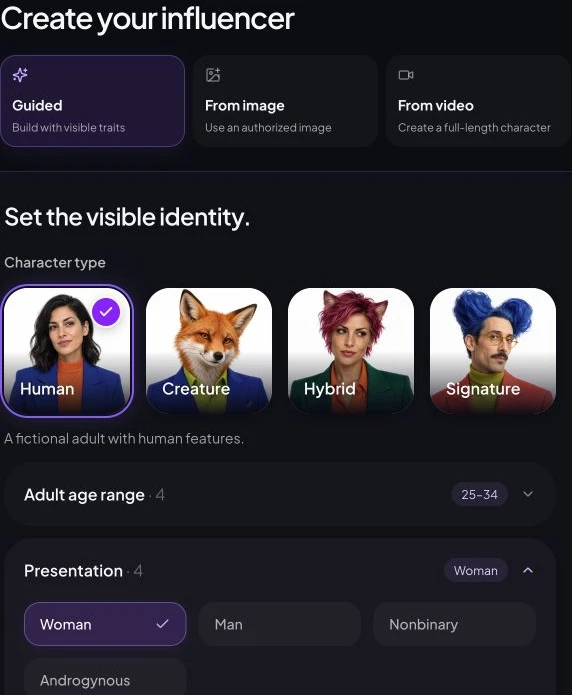
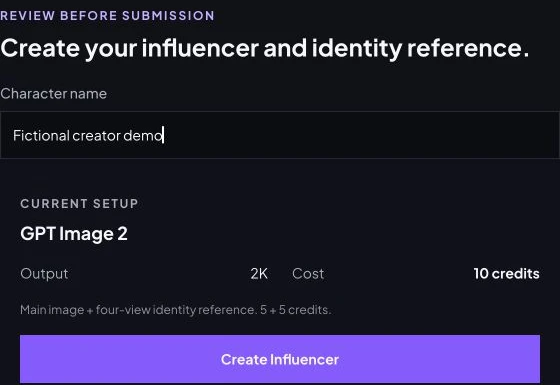
The real input screenshots above demonstrate the current builder and review controls. They were not submitted for this article. The archived media below was produced through first-party provider jobs using an image reference; it does not prove that a named Studio character was saved and reused end to end.
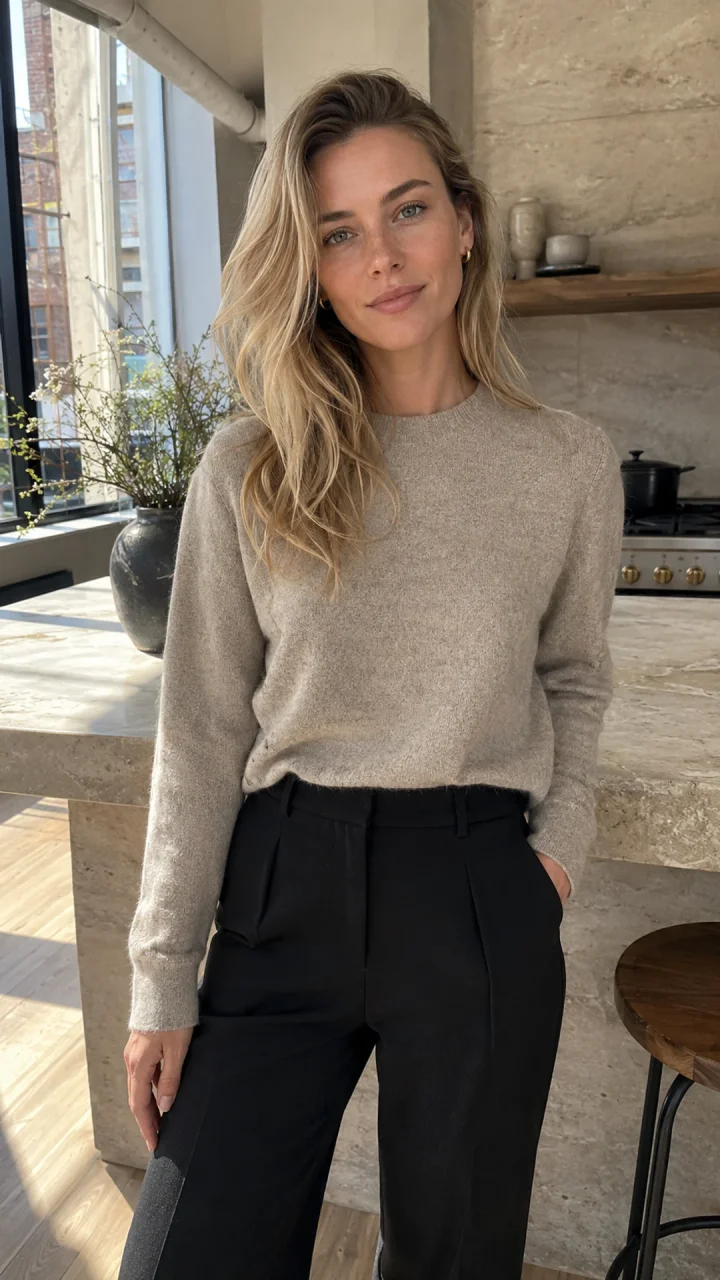
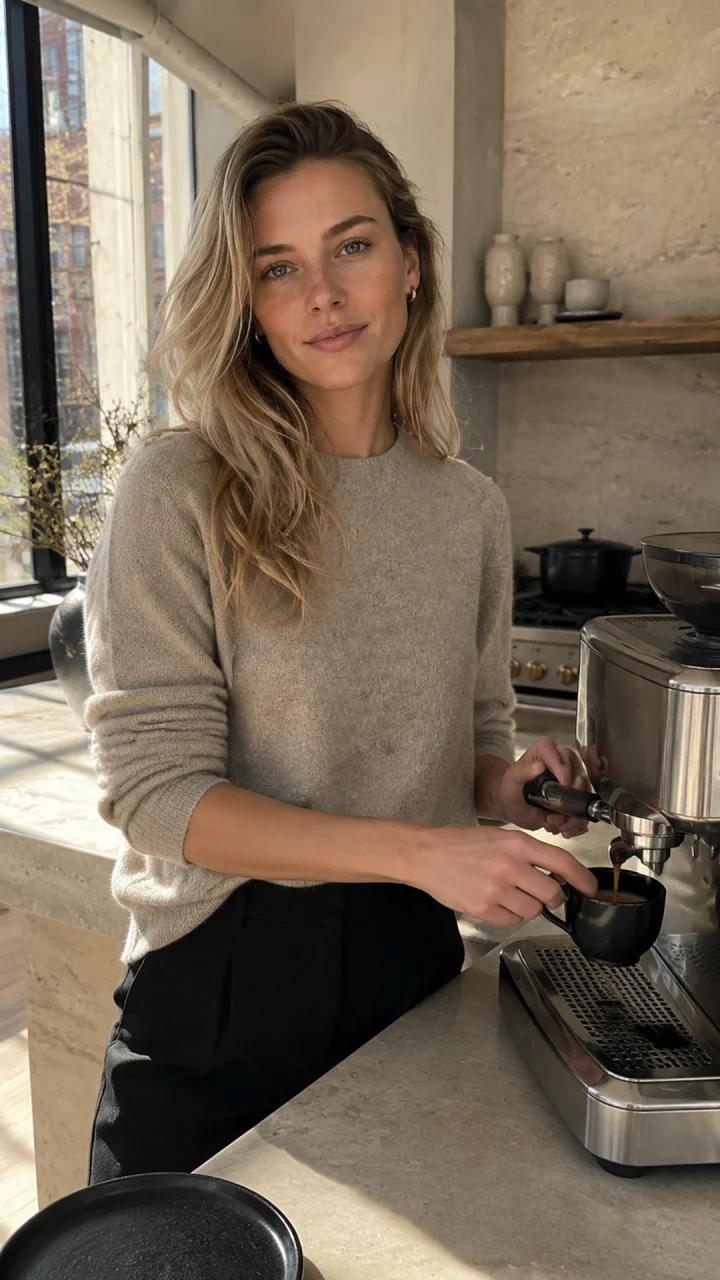
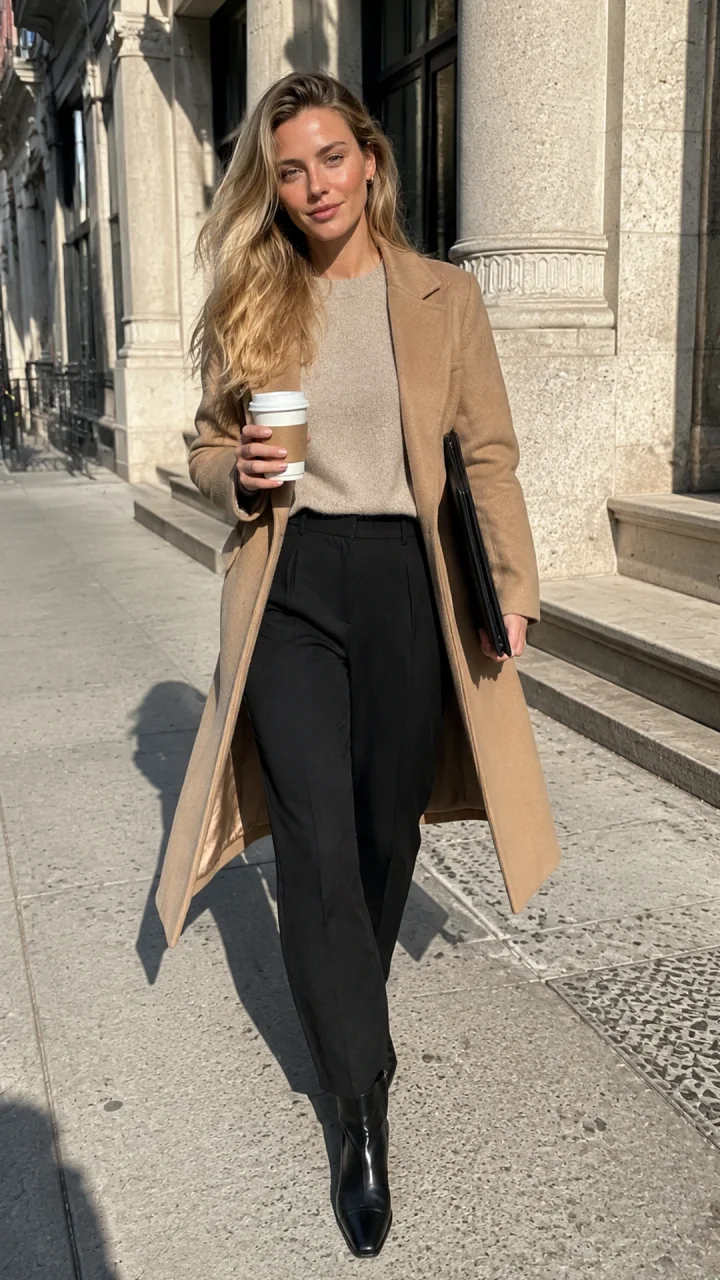
The selected portrait, espresso scene and street scene share the same intended identity. Review the face, eyes, hair and jewelry across the full images before adopting a set. The portrait’s job is an identity reference; the other scenes supply a content moment. Do not fill a grid with unrelated faces just to reach a quota.
Step 3: Generate Your First 10 Photos and Videos
Use ten pieces as a small planning target, not a Fanvue requirement. One sensible mix is eight photos and two short clips. Give every piece a job: profile identity, public introduction, subscriber story or motion teaser. A single photo cropped three ways is still one generated source, not three new results.
| Piece | Content and intended use | Evidence status |
|---|---|---|
| 1. Identity portrait | Avatar source and character reference. | Existing archived photo; final avatar crop still needs review. |
| 2. Espresso photo | Public introduction to the fictional morning diary. | Existing archived photo. |
| 3. Street photo | A styling preview and visual change of setting. | Existing archived photo. |
| 4. Kitchen motion | Short public teaser from the espresso image. | Existing archived five-second silent clip. |
| 5. Outfit detail | Subscriber styling note: texture, layers and accessories. | Planned; not generated. |
| 6. Weekend scene | A second setting within the same lifestyle niche. | Planned; not generated. |
| 7. Evening look | A contrasting light and outfit, with a recognizable face. | Planned; not generated. |
| 8. Outfit comparison | Another original still for a wardrobe story. | Planned; not generated. |
| 9. Reader-choice photo | A new look paired with a subscriber poll. | Planned; not generated. |
| 10. Street motion | Second short clip with one natural action. | Planned; not generated. |
From identity reference to photo
In Create Photos, supply the approved reference, describe one action in one environment, choose ratio and output count, and check the displayed quote. The historical espresso request preserved the reference face and changed the behavior to making coffee at a stone counter. It used GPT Image 2 image-to-image with one reference URL and an automatic ratio; the prompt requested a vertical frame. No explicit resolution choice was retained in that request.
Open the actual archived espresso-photo prompt
Fictional adult woman, age 29, who must not resemble a real person or public figure. Identity lock: softly angular oval face, fair neutral skin with faint natural freckles, gray-green almond eyes, straight delicate nose, natural full lips, defined light brows, long champagne-blonde hair in loose layered waves with darker natural roots, slim athletic proportions. Natural pores, subtle under-eye texture, realistic hands, no beauty filter, no cosmetic perfection. Preserve the exact face, freckles, eye color, hairline, hair color, age, and proportions from the reference. In the same sunlit Tribeca loft kitchen, she makes espresso at a stone counter while glancing toward the phone camera, oatmeal knit with sleeves casually pushed up, candid waist-up composition, realistic working hands, warm natural window light, authentic phone photo with slight grain. Vertical 9:16. No text, logo, watermark, branded objects, extra fingers, or plastic skin.
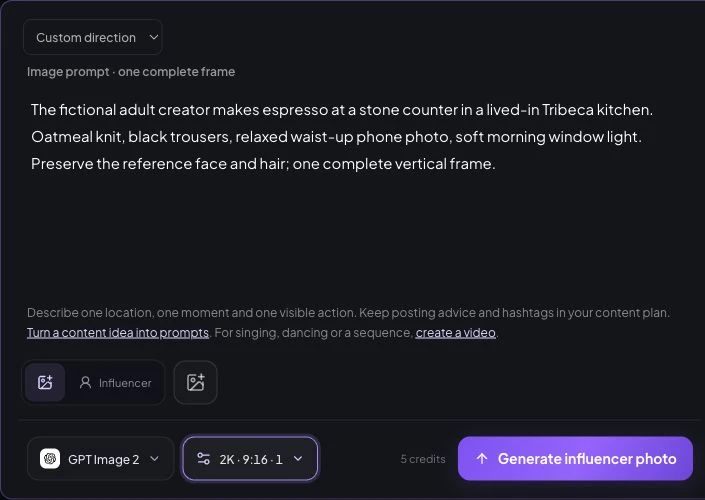
The captured Studio example shows GPT Image 2, 2K, 9:16, one output and a five-credit quote. It is a dated, unsubmitted form example, not the historical task’s charge or a guaranteed future price. Add your reference and recheck the quote; models, settings and plans can change.
From approved photo to motion
Use an approved still as the starting image in Create Video. Request one physical action and simple camera behavior. The retained Seedance 2 request used the espresso image as its first frame, requested five seconds at 720p and 9:16, and disabled generated audio. A silent motion clip is not a speaking introduction.
Open the actual archived motion prompt
The same fictional blonde adult woman completes one natural action: she lifts the espresso cup from the counter and gives a small confident smile toward the phone. One slow handheld push-in only. Preserve her exact face, freckles, hair, natural skin texture, hands, outfit, apartment geometry, and morning light. No cuts, no extra people, no morphing, no text, no logo, no watermark, no audio.
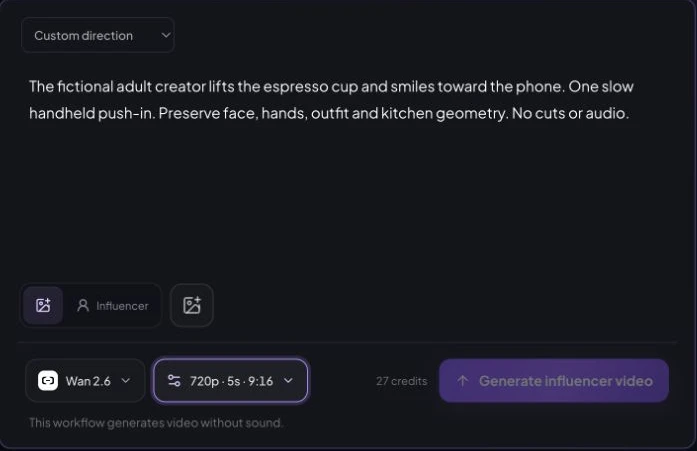
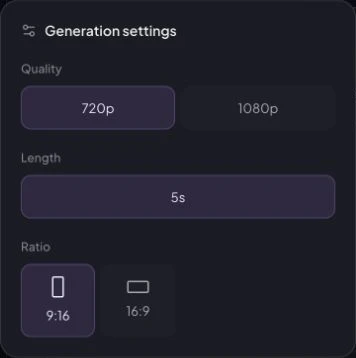
The captured current form uses a different model, Wan 2.6, and shows a 27-credit quote for that silent-video configuration. Do not use it as the charge for the archived Seedance job. Review the live quote after selecting your model and inputs. Talking video requires a separate speech workflow; see the video creation guide.
What the existing production record actually proves
The retained July 30, 2026 record contains five submitted jobs for this character: two identity candidates, two reference-led scene photos and one video. All five returned success. Candidate A was selected; candidate B was an alternative, not a failed retry. The four selected source deliverables are three photos and one video.
| Recorded job | Observed request-to-completion interval | Result |
|---|---|---|
| Identity candidate A | 92 seconds | Returned; selected. |
| Identity candidate B | 105 seconds | Returned; alternative not selected. |
| Espresso scene | 67 seconds | Returned; reference-based photo. |
| Street scene | 72 seconds | Returned; same identity reference. |
| Kitchen video | 104 seconds | Returned; five-second silent clip. |
The recorded intervals total 440 seconds (7 minutes 20 seconds). They measure elapsed request-to-observed-completion time, including polling, rather than pure model compute. The first request and last completion span about 16 minutes 17 seconds, with other work between them. Neither number includes a measured allowance for planning, review, editing, Fanvue approval or promotion.
Cost and failures: zero new generations and zero new generation-credit spend for this article. Historical credit spend is not verified: the retained values cannot be reconciled against a billing record, so we do not report them as charged credits. The five retained jobs show zero API failures, but that is not an overall failure-rate benchmark. Original asset review flags remain pending; a successful response is not Fanvue approval or a guarantee of publishable quality.
Before posting, inspect hands and object contact, facial consistency, eyes, hair edges and background geometry. Watch the full clip for morphing or unstable cup movement. Review desktop and phone crops. Keep a ledger with request count, start and completion times, quoted versus charged credits, returned files, rejection reasons and accepted source count. Reject weak material even when it used paid credits.
Step 4: Create and Verify Your Fanvue Account
You can create public content without your real face, but you cannot use the fictional character to pass KYC. Fanvue’s AI creator verification guide requires a valid government-issued international ID or passport and a matching selfie from the real operator. Fanvue says that information is not shared on the public profile.
- Go to Fanvue, create your account and start the Become a Creator onboarding process. Check eligibility and the current terms yourself.
- Complete the identity check using your real documents and selfie. Wait for a decision; a generated avatar cannot substitute for your identity.
- Identify the account as an AI creator during the available onboarding or profile flow. Check the final public bio for the AI tag Fanvue documents. If it is absent or the control is unclear, ask Fanvue support before selling access.
- Add a clear written disclosure and check payout availability and requirements for your country before planning around withdrawals.
The AI content rules require prominent disclosure and prohibit underage-looking characters; writing “29” in a prompt does not prove that the image looks adult. Real-person face swaps and real bodies require additional verification and consent. These steps are grounded in official guidance, not screenshots of a Fanvue account we created or verified.
Step 5: Set Up Your Fanvue Profile
The page should answer three questions before someone pays: Who is this fictional creator? What do I get? How often does it arrive? Choose a recognizable avatar, a banner that conveys the visual world, and an honest description of the subscription.
Fanvue recommends a 1080 × 1080 profile image and a 1192 × 335 banner, with no nudity in those visuals. Its intro-video advice suggests staying under 30 seconds. Our archived portrait has not been cropped into those final assets, and the five-second silent clip would need context or editing to explain the offer.
Example bio, not a live account: Mara Vale is a fictional, AI-generated adult lifestyle character. Explore city outfit stories and coffee-to-commute visual diaries. Members get two themed photo stories and one short motion post each week, plus a vote on the next look. Content is produced and managed by a human operator.
Use that cadence only if you can deliver it. Start with the avatar, a public introduction and a sample story, then prepare the first member-only collection before inviting subscriptions. Show a preview that explains the paid difference. Public content can introduce the character; paid content can add a complete themed set, styling commentary and participation in future themes.
Fanvue’s guide documents monthly subscription prices from $3.99 to $100, set through Settings → Creator Settings → Subscription. A proposed $9.99 launch price is an experiment, not a recommended optimum or this example’s actual price. Check current controls and renewal consequences before changing a live price. For more detail, read Fanvue AI policy, fees and payouts.
Step 6: Promote Your AI Influencer
Start with one channel and one repeatable format. Instagram can host outfit carousels and short motion previews; TikTok can test a short visual story; X can pair a scene with a character observation. These are format ideas, not a claim that every account, post or Fanvue link is eligible on every platform.
Before posting, check each platform’s synthetic-media labels, content restrictions and outbound-link rules. TikTok’s official AI content guidance requires labels for realistic AI-generated media. Keep our example non-explicit, disclose the fictional creator and do not disguise a prohibited promotion through a redirect.
For a first test, publish three public posts that reveal different parts of the same niche: a styling concept, the coffee scene, and a short diary clip. Use one clear invitation: “See the complete fictional city diary and next-theme poll on Fanvue.” Make the destination and AI nature clear. Keep dates and channel-specific link tags so you can distinguish clicks from guesses about where visitors came from.
Track relevant profile visits and outbound clicks alongside views. If a clip gets views but few profile visits, revise the audience promise or invitation before increasing production. For setup details, see the AI influencer Instagram guide. Do not send unsolicited mass messages or pretend the fictional character has a real relationship with a viewer.
Step 7: Turn Followers into Paying Subscribers
Once your character and account are ready, use our Fanvue AI influencer monetization guide for a detailed plan covering the first paying fan, subscription and PPV pricing, renewals and operating costs.
A follower enjoys a sample. A subscriber needs a specific continuing benefit. Offer a complete series, a dependable publishing schedule and a clear way to participate. Avoid selling vague “exclusive content” when the visitor cannot tell how it differs from the public feed.
| Public preview | Included in the proposed subscription | Separate paid offer, if introduced |
|---|---|---|
| One street-look image and a styling idea. | The complete themed photo story with commentary. | A clearly described additional collection, not silently removed from the base promise. |
| Short silent motion teaser. | The weekly motion post and its creative context. | A custom scene only when feasible and agreed in advance. |
| A sample next-theme question. | Member voting on the next outfit or setting. | No paid promise of guaranteed growth, returns or a real-person relationship. |
Welcome new subscribers with an accurate guide to what is available and when the next set arrives. Explain any separate pay-per-view charge before purchase. If messaging is AI-assisted or operator-managed, do not imply that a fictional person is personally chatting in real time. Keep any response-time promise within your capacity.
Review the funnel by stage: qualified visitors → profile views → subscriptions → renewals. Where the relevant counts are actually available, calculate subscription conversion as new paid subscribers divided by profile visitors for the same period, and retention as renewals divided by subscribers eligible to renew. Keep unknown attribution unknown. If visitors arrive but do not subscribe, examine offer clarity, samples and price. If subscribers leave, examine whether delivery matched the promise before buying more traffic.
Your First 30-Day Action Plan
This is a proposed learning schedule, not the history of Mara’s account. Use it to make one small offer reviewable and test demand without assuming revenue. Slow down if identity review or verification takes longer.
| Days | Actions | Checkpoint before continuing |
|---|---|---|
| 1–3 | Read rules; choose one niche; define the adult identity, voice, disclosure and content boundaries. | One clear public promise and one plausible paid benefit. |
| 4–7 | Prepare and review a reference, draft the ten-piece batch and track every production attempt. | A coherent character and honest cost ledger; reject drift. |
| 8–10 | Complete operator verification; confirm the AI label, payout eligibility and profile offer. | Approval and disclosure confirmed by Fanvue; no invented status. |
| 11–14 | Finish avatar and banner crops, public samples and the first member collection. | The promised content exists before you sell it. |
| 15–21 | Test one promotion channel and a sustainable posting cadence; record clicks and subscriptions. | Evidence of visitor interest, or a specific reason to revise the hook. |
| 22–30 | Deliver the next set, review subscriber feedback and costs, adjust one part of the offer. | Continue, revise or pause based on demand and production capacity. |
On day 30, distinguish learning from profit. You may have verified the account and established a workable production process without making a sale. Do not scale a library simply to make the profile look busy. Keep producing when you can deliver a recognizable series and see evidence that the offer is useful to the intended audience.
Frequently Asked Questions
Can I become a Fanvue AI creator without showing my face?
Yes. Your public content can feature a wholly fictional adult character. Fanvue still requires the real operator to complete identity verification with a valid government-issued ID or passport and a matching selfie. A generated character image cannot replace that verification.
What tools do I need to start a Fanvue AI creator account?
Start with a character and reference-based photo tool, an image-to-video tool if you need motion, an editor for crops and captions, a content ledger, and your verified Fanvue account. AI Influencer Generator supports character, photo and video workflows; Fanvue handles account approval, subscriptions and payments separately.
How long does it take to make money as a Fanvue AI creator?
There is no reliable universal timeline. A first sale depends on qualified traffic, a clear offer and subscriber interest, and some accounts never earn enough to cover their costs. Use the first 30 days to test production and audience response rather than assuming a payday.
Does Fanvue require AI disclosure?
Yes. Fanvue requires clear, prominent disclosure of AI-generated media and documents an AI tag in AI creator profile bios. Make the fictional nature clear before purchase, check that the profile label appears, and keep captions transparent.
Do I need adult content to become a Fanvue AI creator?
No. A disclosed fictional adult character can offer non-explicit fashion, lifestyle or creative content. This guide uses a non-explicit example. Follow Fanvue and each promotion platform's rules for the specific content and links you use.
How much does Fanvue take from creator earnings?
Fanvue's standard creator share is 80% of qualifying paid-service revenue, with 20% retained as platform fees unless otherwise agreed. Promotional rates are temporary and eligibility-dependent. Production costs, taxes, payout or processing charges, refunds and chargebacks can reduce what you keep.
Sources and Evidence
Official Fanvue guidance checked October 9, 2026: AI content rules, AI and AI-enhanced creator labels, operator verification, profile and subscription setup, and creator earnings and payouts. Rules, quotes and feature availability can change; check the live source before acting.
The first-party media record is dated July 30, 2026. Studio input screenshots are retained October 2026 demonstrations, not submitted jobs or Fanvue screens. The named persona, ten-piece plan, profile copy and 30-day schedule are our editorial additions. No Fanvue account, approval, subscriber behavior, revenue or return on investment was observed. This guide is an independent production walkthrough; AI Influencer Generator does not register, verify or publish a Fanvue account for you.
Plan Content
Measure Engagement
Build Your Profile
Price Your Work
Write Post Copy
Brand Partnerships