
The easiest AI influencer generator for beginners depends on what you want to skip. If you want a ready-made character, shortlist AI Influencer Generator or Lovino. If you prefer guided appearance controls, investigate RYLA; if you want preset styles with optional prompt controls, look at APOB. Influencer Studio and Higgsfield describe broader video workflows worth checking when you need more control. These are conditional starting points based on official descriptions and our public entry checks—not a six-product generation test or a universal winner. Choose the route whose setup and trial cost you understand before generating.
This article is maintained by AI Influencer Generator, one of the products compared. We have a commercial interest in our product. Sources checked on ; no competitor subscriptions were purchased and no paid generations were added.
Choose by your starting point
- I do not want to invent a face: inspect an existing character before committing. A preset count alone does not measure quality or ease.
- I do not know prompt syntax: look for a preset scene or simple style controls. You still need a useful content idea.
- I want an original identity: check reference requirements, editing controls and any training cost before choosing.
- I mainly want videos: verify the specific motion, speech or lip-sync path and its quote. An image trial may not include video.
For broader capability selection, use our general AI influencer generator comparison. For the complete creative process, read how to create an AI influencer from scratch.
When you are ready to test a commercial route, use the AI influencer money and tools guide to separate revenue, cost and profit.
How we compare ease of use
We compare registration, presets, prompt decisions, training requirements, identity reuse, media types and visible spending information. “Official description” means the vendor states it, not that we independently proved it. “Locally verified” covers our public template list, character details and sign-in handoff. Product documentation describes later steps; we did not sign in, generate or download a new result for this article. “Unconfirmed” means the reviewed evidence does not settle the question.
There are no numerical ease scores, quality rankings or measured completion times. A saved identity is a workflow feature, not a measured consistency rate. We do not repeat vendor promises of virality, revenue or perfect likeness as findings.
Six-product beginner comparison
Scroll the table horizontally on a small screen. Every row links to its reviewed source; all checks use the date above.
| Product / evidence | Templates and prompts | Training and identity | Images and video | Trial and price visibility |
|---|---|---|---|---|
| AI Influencer Generator Locally verified: public entry; product documentation for later steps | 50 starters: 35 human, 15 fantasy. Choose a character, then describe a scene. | Reusable starter references; no separate training step in the starter path. | Image and video workflows documented; no generation performed for this comparison. | Login offers 30 free credits. Check the current quote and pricing before generation. |
| RYLA Official description | Tutorial describes template selection, appearance controls and saving a named character. | Saved reference identity described. Training requirements not confirmed from the reviewed tutorial. | Image workflow documented in the tutorial; video workflow not verified here. | Tutorial advertises monthly free credits without a card. Current allowance and paid price unconfirmed; pricing fetch failed. |
| Lovino Official description | Five preset Lens IDs or a custom character; describe a scene, outfit or pose. | Saved reference set; explicitly says no custom model, LoRA or training run. | Photos and short motion videos; explicitly excludes speech and lip sync on this page. | Page lists 3 credits/photo and 5 credits to save a custom character. Daily credits advertised; cash plan and video allowance unconfirmed. |
| Influencer Studio Official description | Pre-set avatars and customization advertised; own-reference training also offered. | Reusable identity claimed. Training is described for own photos; whether every preset needs training is unconfirmed. | Images, video, storyboards and talking heads advertised. | Trial allowance, per-job cost and current paid plan unconfirmed in this review. |
| Higgsfield Official description | Design a character, then turn the character and script into video. Preset count and prompt effort unconfirmed. | Consistent character creation advertised; exact training and reuse requirements unconfirmed. | Image-based character design and video generation advertised. | Trial entitlement and complete workflow cost unconfirmed from this page. |
| APOB Official description | Create Portrait Model from a reference or generated portrait. Complete set styles, Build Your Own and Expert modes described. | Named portrait model described; technical training requirements unconfirmed. | Images and videos advertised. | Free start with no card advertised; current credits, video eligibility and paid cost unconfirmed. |
What to prepare for each product
AI Influencer Generator
Consider it when: You want to browse an existing character before signing in.
Prepare: Choose a fictional adult identity and one scene. Sign in to continue with the selected starter.
Not verified: Authenticated import, final quote, generation, consistency and download were not exercised in this review.
Reviewed source: AI Influencer Generator · Locally verified: public entry; product documentation for later steps · 2026-09-13
RYLA
Consider it when: You prefer a tutorial-led character setup with appearance controls.
Prepare: Create an account, select a template, adjust the character and save it before making scenes.
Not verified: Current in-app template count, training requirements, video access and the paid checkout were not verified.
Reviewed source: RYLA · Official description · 2026-09-13
Lovino
Consider it when: You want a small preset cast and a photo-first workflow without a training run.
Prepare: Pick a preset or create a Lens ID, describe a scene and inspect the cost before animating a photo.
Not verified: We did not reproduce its displayed examples, test identity retention or confirm account-specific daily credits.
Reviewed source: Lovino · Official description · 2026-09-13
Influencer Studio
Consider it when: You want to investigate a broader character, storyboard and talking-head workflow.
Prepare: Choose the preset or authorized-reference route, then check the training and script requirements for that route.
Not verified: We did not test setup complexity, voice consistency, training duration or any advertised quality comparison.
Reviewed source: Influencer Studio · Official description · 2026-09-13
Higgsfield
Consider it when: You want to investigate a video-oriented character workflow and are willing to check its setup requirements.
Prepare: Prepare a character concept and a short script; confirm the required references and available controls in the app.
Not verified: We did not verify a beginner preset path, generation quality, time to completion or plan eligibility.
Reviewed source: Higgsfield · Official description · 2026-09-13
APOB
Consider it when: You prefer style selections first, with optional prompt controls later.
Prepare: Use an authorized reference or create a portrait, name the model, then choose a style or prompt mode.
Not verified: We did not verify the account flow, current style catalog, free output limits or cross-scene consistency.
Reviewed source: APOB · Official description · 2026-09-13
Our three-stage starter path
These are stages, not three clicks. Our library currently contains 50 entries: 35 human and 15 fantasy characters. The public interface exposed all 50 during this check. We opened Maya Chen and confirmed that “Use this starter” opens sign-in while retaining her selection.
- Choose a character. Open the character template library, inspect the profile and select a starter. Sign in to continue. The entry check does not prove a completed authenticated import.
- Set the scene and review the quote. After sign-in, use the photo workflow to specify action, setting and output options. Review the displayed cost before submitting. The character help page and current pricing explain the product path; we did not inspect an authenticated quote in this review.
- Generate, review and download. Allow the job to complete, then inspect identity, hands, scene and framing. Reject drift before using an image as a video reference. Generation and download remain untested in this comparison; this is the documented next stage.
For a first scene, try: “The selected character is opening a notebook at a window-side café table, wearing a denim jacket, candid phone-photo framing, vertical composition.” This is a suggested prompt, not a generated result. Registration, waiting, failures and revisions can add steps.
October 9 first-party input and quote check
The current Guided flow shows visible traits and a review quote for a main image plus identity reference. The captures below were not submitted. This updates the first-party UI evidence; the competitor descriptions above retain their September 13 source date. No competitor setup or consistency test is implied.
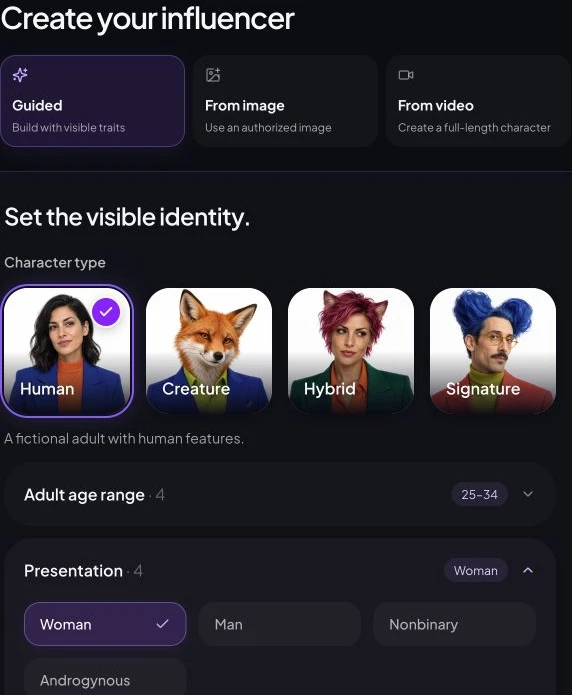
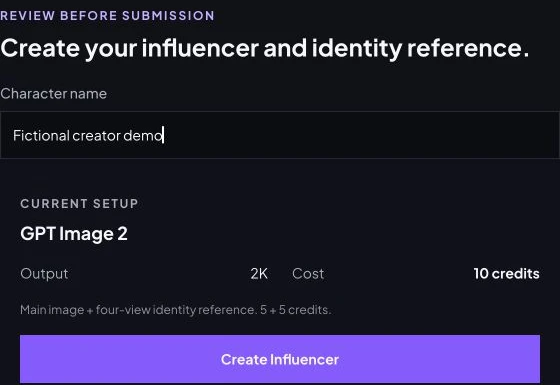
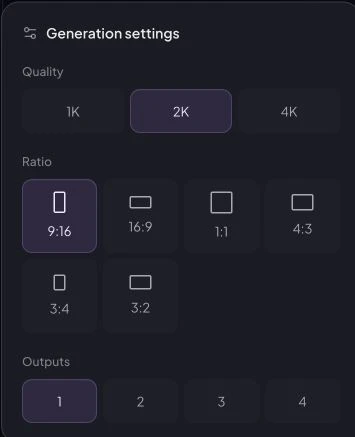
For a first photo, choose an approved identity, describe one action in Direction, then use GPT Image 2, 2K, 9:16 and one output. The current quote is five credits. Check the attached identity before generating; inspect the result in History before Download. The focused settings crop is readable on a phone.
Check the trial budget before you generate
Our checked sign-in message offers 30 free credits. That is an entry offer, not proof that every workflow fits the allowance or that a new account received it during this review. Check the live quote against your available balance. Do not compare providers by raw credit count: a credit buys different work in each system.
Write down the image quantity, video duration, resolution, any character setup charge and room for retries. Check whether credits expire and whether a plan renews automatically. RYLA’s pricing page failed to load during research, so this article does not quote a paid price. Other unconfirmed trial and pricing details are left explicit in the table.
Budget separately for publishing preparation: captions, editing, licensed music and human review. Check our credits and failed-job guidance before assuming a retry is free. No historical spend, first-image success or quality result is claimed here.
Beginner questions
Can I start an AI influencer for free?
Some products advertise a free start, but the allowance is limited. Our checked login offers 30 free credits; RYLA and APOB also advertise free entry, and Lovino describes daily credits. Confirm the current allowance and the specific image or video cost before spending. Free entry is not unlimited production.
Do beginners need to write prompts?
Usually you still need to choose or describe the scene. A starter character reduces identity setup; it does not decide the action, outfit, framing or caption. Begin with one clear action in one location, then add detail only when needed.
Do I need to train a LoRA?
No, not for every workflow. Lovino explicitly describes reference-based generation without LoRA, and our starter path has no separate training step. Other products or custom-reference routes may differ; an unconfirmed training requirement is not proof that training is unnecessary.
Can I use a ready-made character?
Yes. Our public library currently exposes 50 starters: 35 human and 15 fantasy characters. Lovino describes five presets, while RYLA and Influencer Studio also describe preset routes. These are starting identities, not finished social accounts or exclusive ownership guarantees.
Will the character look identical in every image?
Do not assume so. Saved references support identity reuse, but each result still needs review for face shape, age, hair and distinctive features. This comparison did not run a shared generation experiment and cannot establish which product preserves identity best.
Can beginners make AI influencer videos?
Yes, where the chosen workflow and plan support video. Start with an approved image and one simple movement. Motion video, speech and lip sync are different capabilities; Lovino explicitly describes motion without speech or lip sync on its reviewed page.
What should I prepare before my first generation?
Prepare an account, an adult fictional character or authorized reference, one scene, an aspect ratio and a spending limit. Check the quote and output settings before submitting. Allow for waiting, failed jobs and rejected results rather than assuming the first attempt is publishable.
What extra costs should I check?
Check character creation, image count, video length and resolution, voice, editing, credit expiry and subscription renewal. A technically successful result that you dislike may still consume credits. Check each product's refund rules; do not assume every retry is free.
Can I use the results on TikTok and Instagram?
You can prepare content for those channels, subject to the product's license, rights to inputs and current platform rules. Review AI and advertising disclosure, music rights and framing before publishing. Creating or downloading media does not automatically publish it or qualify an account for monetization.
Browse starter characters or open guided character creation. Choose one route, inspect the quote and review one result before planning a larger batch.
Plan Content
Measure Engagement
Build Your Profile
Price Your Work
Write Post Copy
Brand Partnerships