
What is Sloosh AI Influencer?
Sloosh AI Influencer is the character-creation feature inside ShopOS’s AI creative platform. It sits alongside Studio, saved reference Elements, ready-made Spaces and Spacelab. ShopOS announced Sloosh’s global launch on October 22, 2026, according to its Business Wire announcement and Inc42’s launch coverage.
For an ongoing virtual creator, the selection question is how you want to work: reusable creative automation across many jobs, or a character-led workspace for the next photo, product scene, video and post. Both approaches can reuse character references.
Choosing a tool now? Read the full Sloosh AI alternatives comparison.
How Sloosh’s features fit together
AI Influencer + Elements
Create a character, then reuse its references. Sloosh’s guide says AI Influencer characters appear in Elements; saved character, pose or background Elements can be tagged in Studio prompts.
Spaces
Run a ready-made workflow with your own inputs. The catalog includes product-in-hand UGC, multi-angle product imagery, ad grids, storyboards and product-placement video. Using an existing Space does not require building nodes.
Spacelab
Build a custom graph from image inputs, separate prompts and model nodes. Test it, inspect the run quote, then publish it as a reusable Space with a simpler form. A custom workflow can include an upscaler.
MCP
Eligible Pro/Max workspaces can connect a compatible assistant to Sloosh. Agent actions consume workspace credits; the docs require a daily spend limit and describe quote and confirmation controls.
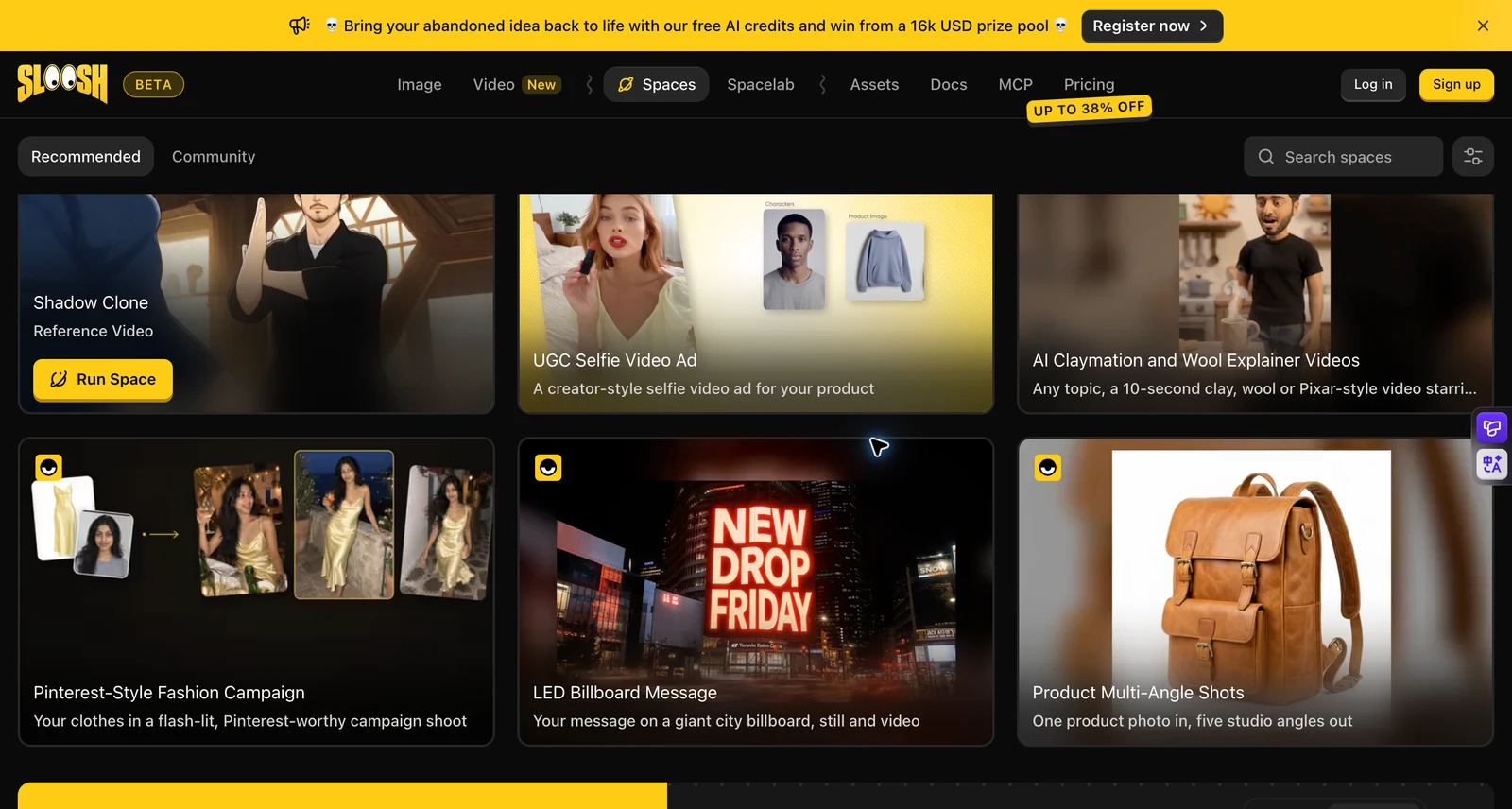
Its Elements guide describes typing an @tag to attach a saved reference in Studio. The underlying model still determines reference limits. This is a documented reuse mechanism, not an independent consistency benchmark.
How a Sloosh character-and-product workflow works
- Choose the output job. For a product image, start with an appropriate existing Space. For a reusable custom recipe, open Spacelab.
- Prepare authorized inputs. Use your product photography and an original or licensed character. Save recurring identity references as Elements rather than redescribing a new face each time.
- Connect only the needed steps. The official image guide uses an Image Input node and a separate Prompt node connected to an Image Model. Reference tags can also be used in prompt nodes.
- Test before reusing. Inspect the quote, generate a result and check identity, packaging and contact. A workflow makes the recipe repeatable; it does not make every output correct.
- Publish the recipe as a Space. A reusable form can stay workspace-only or be made public. “Publish” here refers to a workflow, not delivery of a social post.
That structure is useful when the same input-to-output process must run repeatedly across products or teams. We did not execute this Sloosh workflow; the steps summarize its official documentation.
A character-first alternative: build your own ongoing creator
AI Influencer Generator puts the saved influencer at the center of the core creation routes. You choose the person first, then a scene, product or motion task. This is a workflow preference, not a claim that Sloosh lacks characters or templates.
1. Create and save an original adult character
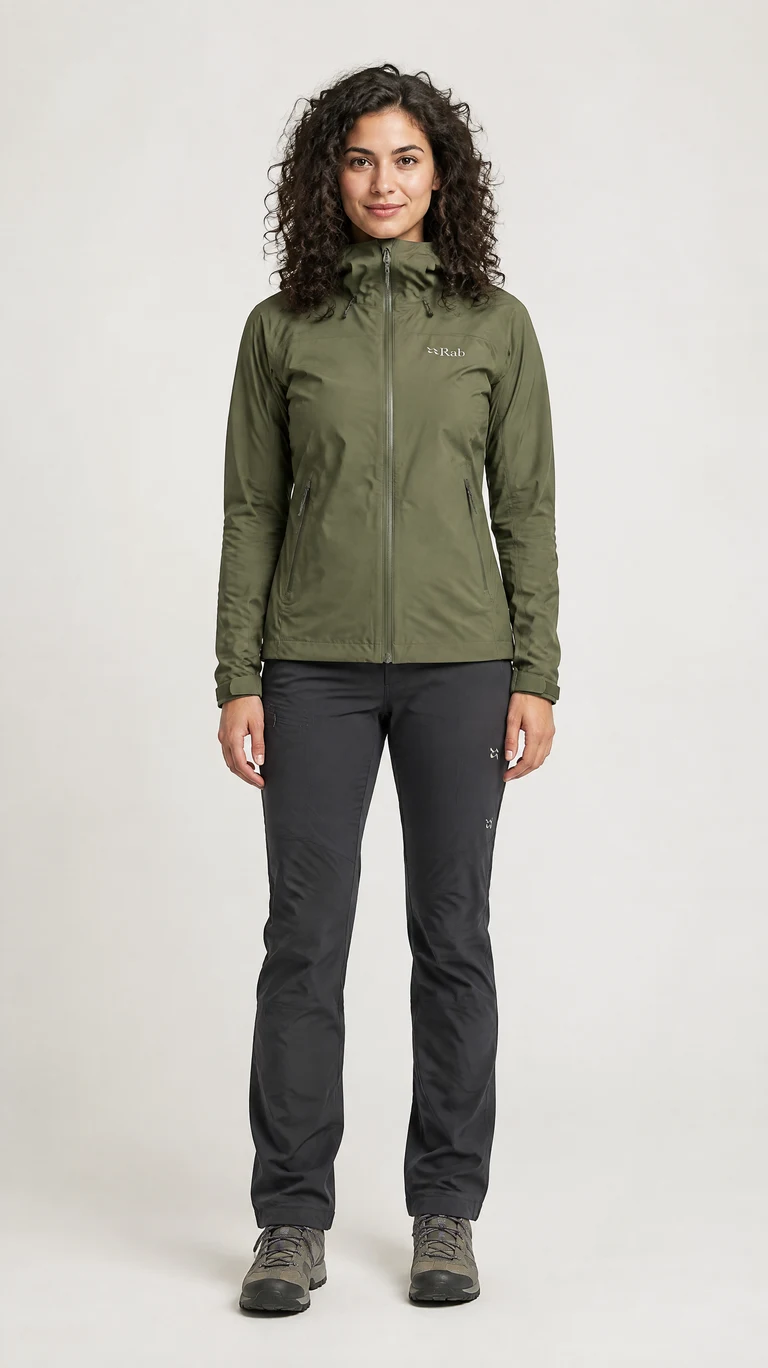
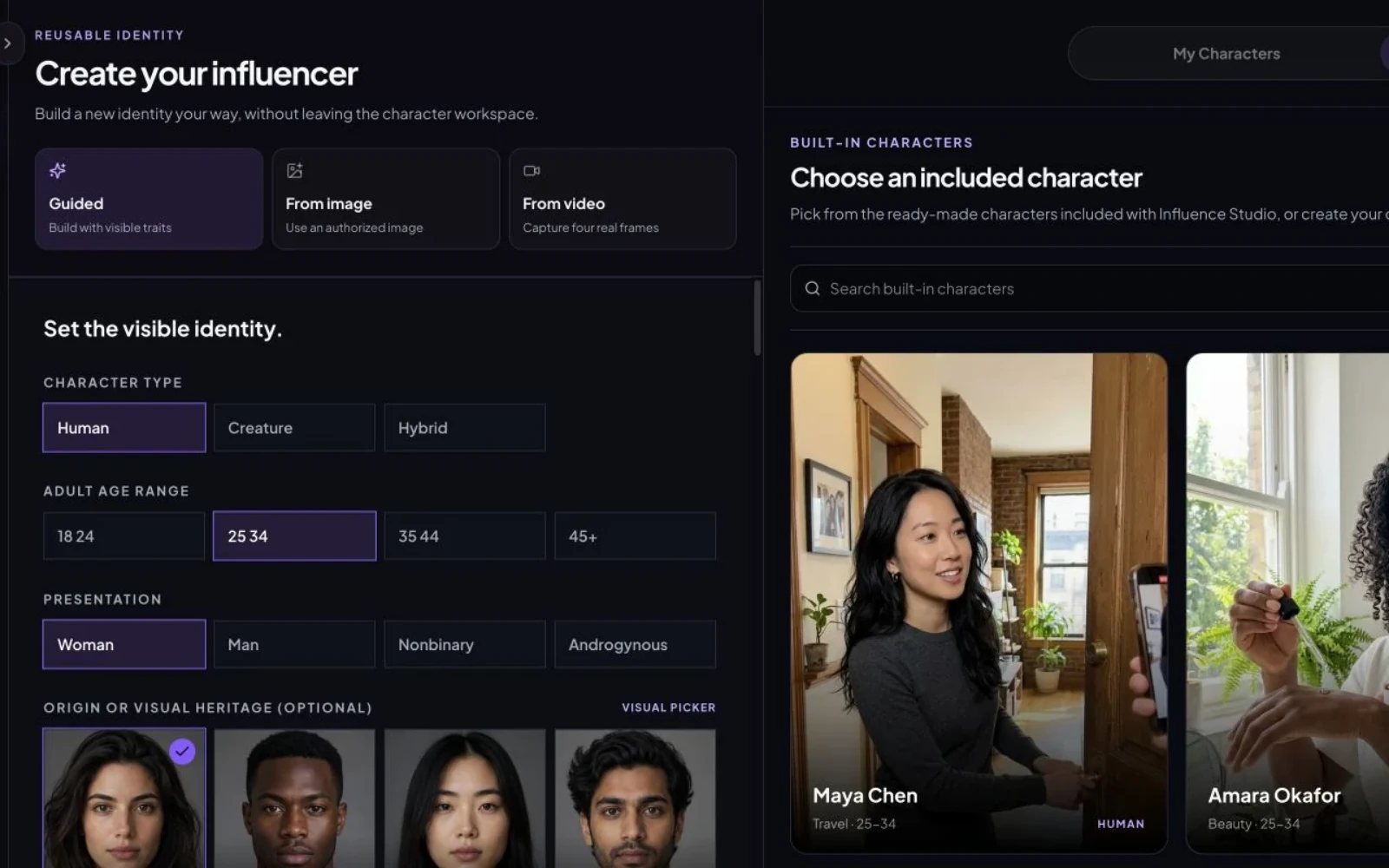
Open Create influencer, choose the guided method and define appearance, style and creator direction. We created Mara Vale with dark curly hair, a warm medium complexion, an outdoor technical style and a UGC & Shopping direction. The workspace quoted 10 credits for the character portrait and identity sheet; this is one observed configuration, not a fixed price promise.
Start with your own original character
2. Review the identity before making a series
Check the portrait and identity reference at full size. Compare face shape, eye spacing, complexion, hairline and accessories. Reject a reference with waxy skin, broken fingers or conflicting views; a flawed source can carry the mistake into every scene.
3. Select the same character for each new task
In Create Photos, enter a scene direction and select the saved influencer through AI Influencer. Keep identity instructions stable; change the wardrobe, location and action. Choose a model, ratio and output count, inspect the current quote and generate. Our scenes used GPT Image 2.5 Flare at 1K and 9:16, one image per task, quoted at 3 credits each. The first skincare and drink attempts kept the reference’s white background, so we rejected them and explicitly requested a replacement environment in two new tasks. Five scene submissions cost 15 credits in total; the three selected outputs are shown below.
This is three individually submitted tasks. It is not a claim of automatic multi-product batching. For a real product campaign, use Product Photos with authorized product assets, then review the packaging against those references.
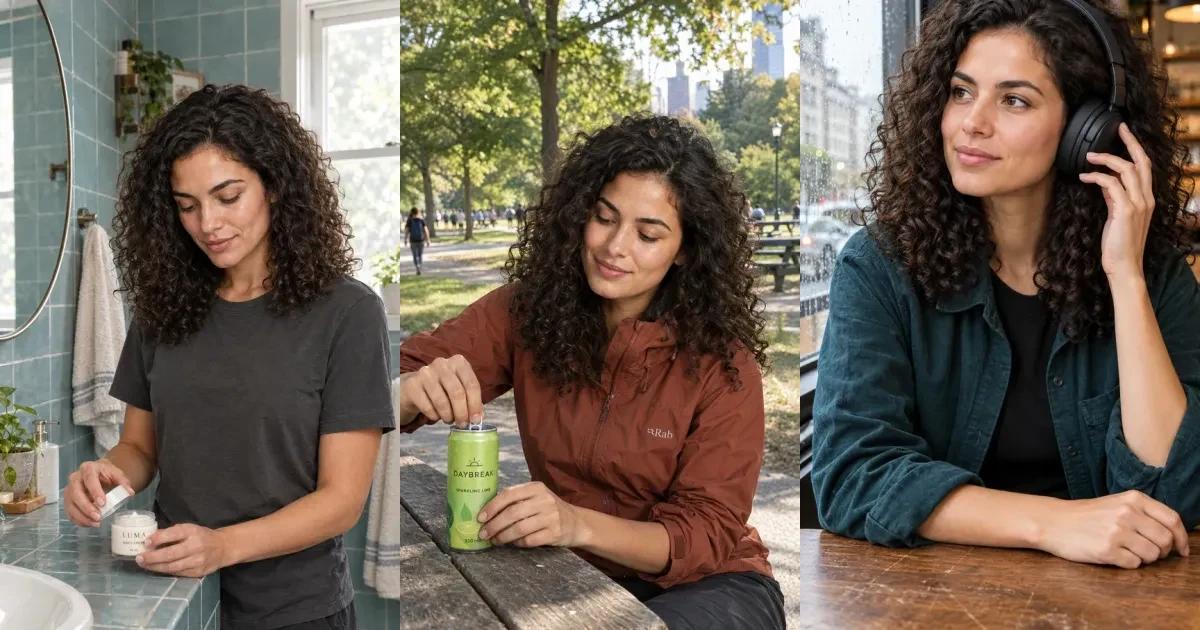
One saved character, three product concepts
Mara Vale is an original fictional adult creator made for this review. We reused her saved identity in separate generation tasks, then changed the setting, wardrobe and purposeful action. These are AI Influencer Generator outputs, not Sloosh outputs, customer campaigns or evidence of ad performance.
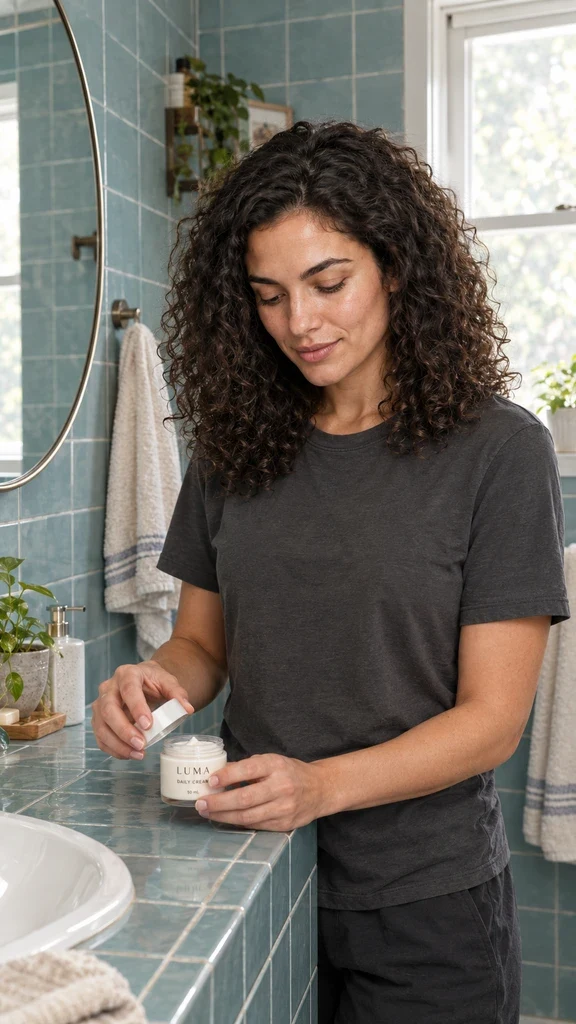
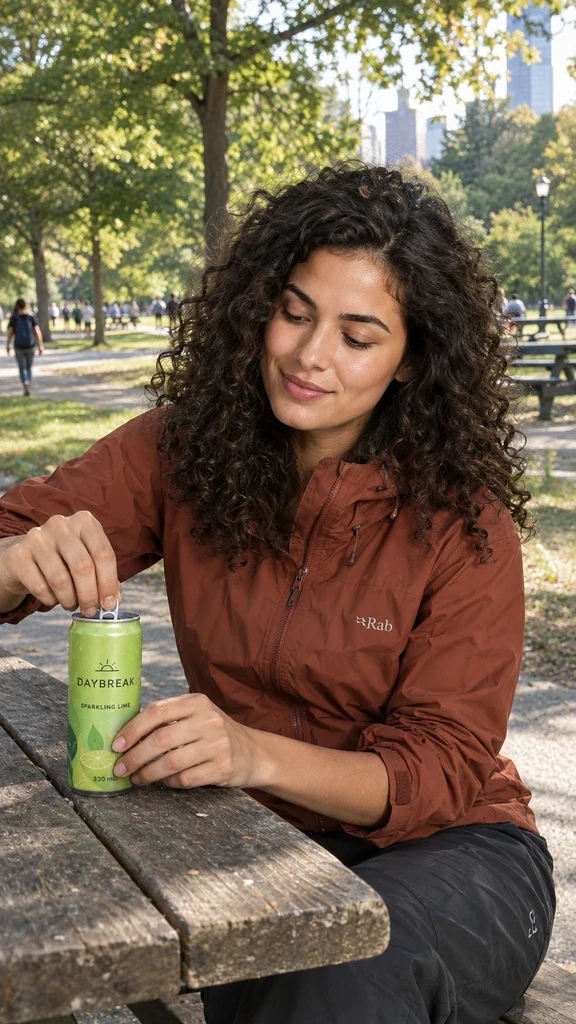
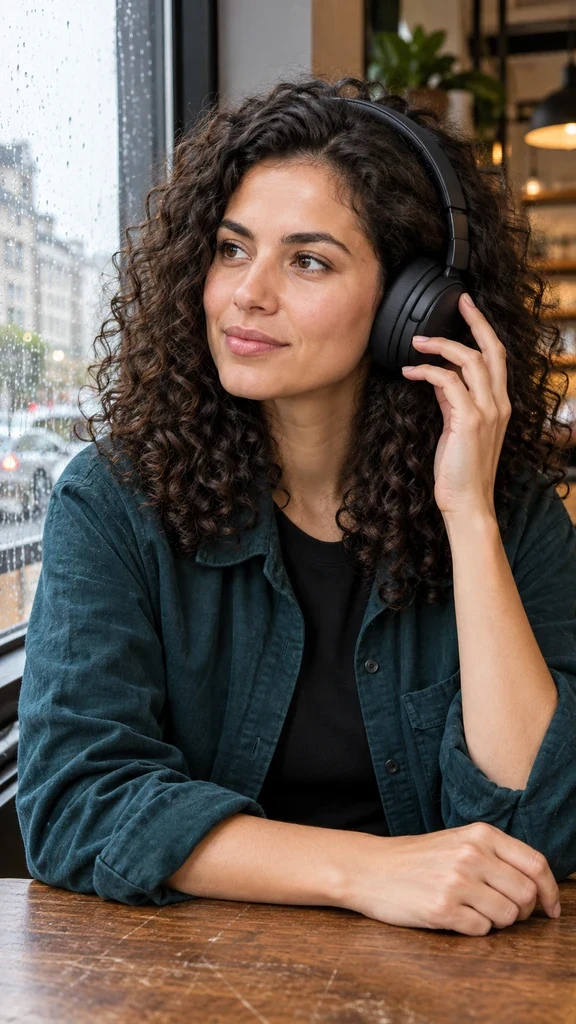
The useful change is the action: opening cream, opening a drink, adjusting headphones. It gives hands a job and makes the product belong to a scene. A generated label is not a proof of exact real-world SKU preservation. For a real campaign, supply authorized product references and check every letter, cap, seam, scale and contact point.
Use the selected saved adult AI influencer [YOUR CHARACTER], preserving the approved face, complexion, eyes and hair. Candid phone-photo at a lived-in tiled bathroom counter, wearing a charcoal cotton tee. She twists the lid off a small cylindrical skincare jar on the counter with one hand while the other steadies the jar. Readable fictional label: LUMA / DAILY CREAM / 50 mL. Natural skin texture, morning side light, practical surroundings, physically coherent fingers and contact. Medium shot, full head and both hands visible, vertical 9:16. Demonstration concept, no testimonial, no skin before-after, no overlay text.
Use the selected saved adult AI influencer [YOUR CHARACTER]. Preserve the approved face, complexion, eyes and hair. Candid outdoor phone photo at a park picnic table after a walk. Rust technical windbreaker. She pulls the tab of a chilled slim lime-green can resting flat on the table, other hand stabilizing its lower half. Readable fictional label DAYBREAK / SPARKLING LIME / 330 mL. Condensation, realistic metal rim, coherent grip and separate fingers, dappled daylight. Three-quarter medium shot, full head and both hands visible, vertical 9:16. No testimonial or overlay text.
Use the selected saved adult AI influencer [YOUR CHARACTER]. Preserve the approved face, complexion, eyes and hair. Candid phone photo at a rain-speckled city café window. Dark teal overshirt over a black tee. Gently adjust the left earcup of matte black over-ear headphones already worn on the head; other forearm rests on a scratched wooden table. Believable headband and earcup geometry, relaxed fingers, natural hair compression. Thoughtful expression looking out the window, cool overcast light and warm café background. Medium close shot, full head and adjusting hand visible, vertical 9:16. No logos, testimonial or text overlay.
Turn a reviewed scene into a short video
Open Create Videos, use the approved still as the image reference and specify one small action. Set duration, model, aspect ratio and resolution before reading the quote. Paid-plan and model restrictions can apply. A still image cannot prove the motion will remain coherent.
Animate the approved image of [YOUR CHARACTER] beside the café window. Keep the same face, curly hair, clothing, headphones and camera position. She makes one small adjustment to the left earcup, lowers her hand naturally and looks out at the rain. Gentle breathing and a brief blink. No camera orbit, no new objects, no dialogue, no product claims. Review fingers, earcup contact and identity throughout the clip.
Watch the full output before using it. Look for changing earcups, drifting faces, hand jumps and background warping. See our AI UGC Video Generator for the product-ad route, and the existing motion example below for reference-led movement.
Use motion inspiration without copying a creator
Motion Transfer combines a character image with a reference video to guide movement. Begin with footage you filmed or have permission to adapt. Keep the motion idea while changing the character, setting and creative direction; separately check music, footage and likeness rights.
Use a clear body view and a compatible action. Review the face, limb continuity, foot contact and background throughout playback. Trend-inspired describes a creative format; it does not establish reach or permission. This feature does not automatically find popular videos or operate a whole content calendar.
Beyond generation: plan, write and publish
A recurring influencer needs an identity, editorial point of view and a review queue. Use Content for supported planning and copy tasks, then decide which scenes actually belong in the feed. Keep a record of the approved identity, prompt, product reference, task result and disclosure for each post.
Publish supports eligible connected accounts on Instagram Business, TikTok, YouTube, Facebook Pages, X, LinkedIn, Threads and Pinterest. It is a paid-plan feature. Account type, connection permissions, media format and platform requirements apply; do not assume every file can be sent to every destination.
Current allowances are 30 posts per UTC calendar month on Starter, 100 on Professional and 300 on Advanced; Starter allows one platform and one account. We checked the enabled feature and implementation, but did not submit a social post for this article. Generation, review, scheduling and successful platform delivery remain separate events.
Publishing a Sloosh Space means sharing a reusable creative workflow. That should not be read as an Instagram publishing claim. We did not verify Sloosh social scheduling.
Pricing: compare the billing period, then the task
Credit counts measure different products, so 300 credits on one platform cannot be treated as more output than 195 on another. Compare your actual scene, model, duration, resolution and retry allowance.
| Platform / plan | Monthly billing | Annual billing | Included credits |
|---|---|---|---|
| Sloosh Creator | Check live monthly checkout | $204/year ($17/month equivalent) | 195/month |
| Sloosh Pro / Max | Check live monthly checkout | $528 / $1,068 per seat/year ($44 / $89 equivalent) | 535 / 1,135 per month |
| AI Influencer Generator Starter | $19/month | $190/year | 300/month or 3,600 annual pool |
| Professional / Advanced | $39 / $79 per month | $390 / $790 per year | 800 / 2,000 monthly; 9,600 / 24,000 annual pool |
Sloosh’s annual view was the verifiable live price in this review. Inc42 reported launch plans starting at $19/month; we do not substitute that dated figure for an unverified current monthly checkout. Sloosh lists 20 free credits, monthly plan-credit resets without rollover, and paid-plan top-ups valid for 12 months.
Our signup includes 30 credits. Starter includes custom character creation; character creation from an authorized image or video requires Professional or higher. Free settings and paid features differ. Our annual credits are issued upfront and expire at term end. Monthly rollover rules differ by plan; purchased packs do not expire. See current pricing and credit rules before choosing.
Which workflow should you try first?
Try Sloosh when your priority is a reusable production recipe, its ready-made product Spaces, custom Spacelab graphs or assistant-driven automation. Try AI Influencer Generator when the immediate job is to establish one creator identity, make the next scene and manage recurring social content in a creator-oriented workspace.
For deeper guidance, read Consistent Character, browse ready-to-use templates, or compare Sloosh alternatives by production job.
Don’t just generate AI content. Build and grow your own AI influencer.
Start with one recognizable identity and three useful posts. Growth depends on the audience, creative quality and distribution; the tool supplies the production workflow.
Questions creators ask
What is Sloosh AI Influencer?
Sloosh AI Influencer is the character-creation feature in ShopOS’s Sloosh creative platform. Sloosh also offers Studio, saved Elements, ready-made Spaces and the Spacelab workflow editor. ShopOS announced the global launch on October 22, 2026.
Do I need to build nodes to use Sloosh?
No. Existing Spaces are ready-made workflows. Spacelab is for building and publishing custom workflows; a published Space can expose a simpler input form. Character references can also be reused through Elements in Studio.
Can I keep the same AI influencer across different products?
Both platforms document reusable character references. In AI Influencer Generator, save an original character, select it for each product scene and review the face, hands and product details after generation. This does not guarantee exact identity or packaging in every output.
Is AI Influencer Generator a free Sloosh alternative?
It offers 30 signup credits for trying supported tasks. Sloosh’s FAQ lists 20 new-account credits. These are trial balances, not equivalent image or video counts; each task has its own quote and eligibility limits.
Can Motion Transfer make a viral video?
Motion Transfer can use a reference video to guide movement with your character image. Use footage you own or have permission to use. It does not guarantee reach, reproduce a creator’s identity, or make someone else’s footage yours.
Does AI Influencer Generator publish to social platforms?
The product has paid-plan publishing for eligible connected accounts on Instagram Business, TikTok, YouTube, Facebook Pages, X, LinkedIn, Threads and Pinterest. Platform connection, permissions, media compatibility and plan limits apply. This editorial review did not submit a live social post.
Plan Content
Measure Engagement
Build Your Profile
Price Your Work
Write Post Copy
Brand Partnerships