
1. One login, multiple AI influencers: what stays separate?
A login is your access to a creation tool; an AI influencer is an identity; a social account is a distribution destination; a client project is an ownership and approval boundary. Confusing these four layers is how the wrong face, voice or brand ends up in a post.
You can manage multiple AI characters with the same production tools while giving each one a different audience, personality and publishing plan. AI influencer portfolio management means coordinating those identities as a roster: deciding what each publishes, who approves it, where it goes and how much time it deserves.
| Layer | Example | Share or separate? |
|---|---|---|
| Creation login | Your AI Influencer Generator account | Share the production tool across your own saved characters. Team access and client permissions require separate verification. |
| Character identity | FASH01 / Chloe | Separate face references, identity rules, voice and content promise. |
| Social account | Chloe’s Instagram; Diego’s TikTok | Separate handles, credentials, publishing settings and performance records. |
| Client project | Client A / spring campaign | Separate confidential assets, rights, approval owners and access. A character folder is not an access-control boundary. |
Planning method · production tools · review checklist
- Identity + reference set
- Own prompts + assets
- Own social accounts
- Review → publish → learn
- Identity + reference set
- Own prompts + assets
- Own social accounts
- Review → publish → learn
- Identity + reference set
- Own prompts + assets
- Own social accounts
- Review → publish → learn
Share blank brief templates, editing methods and a quality checklist. Keep character-specific reference photos, voice instructions, captions and licensed brand assets in the correct lane. A shared tool subscription does not give you permission to reuse one client’s assets for another.
In AI Influencer Generator, My Influencers is the entry for saved Characters. Studio is the production workspace. Saving several characters does not create social profiles or guarantee unlimited generations; inspect the current plan and displayed quote.
Start with the characters you already have. Choose one identity for your next content batch.
Open Studio2. Create separate character profiles and identity sheets
Each character needs one source of truth: a saved profile plus a short, versioned identity sheet. The profile helps select the right character; the sheet tells you what must remain stable when the scene changes.
Create or select a character in the current workspace
- Open My Influencers. Select an existing character, or open the Guided character builder for a new identity.
- Choose a distinct name and adult appearance. Set the creator direction, audience and platform choices presented by the builder. If importing a reference instead, use an image you are authorized to use.
- Review the displayed generation quote and access requirements. After creation completes, inspect the reference before producing other content.
- On the saved character, use Create Content to continue with that identity. View Strategy and View Creator Kit lead to the character’s strategy and profile-asset workflows when available.
- Keep the operating sheet below in your own document or asset system. These are recommended fields, not a claim that the builder has a dedicated field for every rule.
| Field | What to record | Why it matters |
|---|---|---|
| Identity + owner | Character ID, display name, client/project and person responsible | A stable ID survives a display-name change. |
| Approved references | Reference filenames, version and usage rights; additional angles when supported | A prompt description alone is too ambiguous to anchor a face. |
| Must keep | Facial proportions, complexion, apparent adult age, hair and distinguishing details | Prevents identity drift across lighting, scenes and models. |
| Can vary | Outfit, activity, location, expression and camera angle within the style direction | Prevents consistency from becoming the same picture repeatedly. |
| Editorial identity | Audience, niche, three pillars, tone and sample captions | Keeps personalities as distinct as their faces. |
| Must avoid | Out-of-scope topics, unsupported claims, borrowed likenesses and client conflicts | Keeps the character inside an honest, agreed role. |
| Distribution map | Platform, exact handle or channel URL, owner, time zone and approval rule | Connects the correct identity to the correct destination. |
Keep the identity prompt separate from the scene prompt
For Chloe, a fixed block might read: “Use the attached FASH01 approved reference. Preserve the adult character’s facial proportions, complexion and long dark-blonde layers. Styling: playful thrifted pieces. Voice: practical and observant.” A scene block adds: “Choose a cardigan from a clothing rack in a sunlit apartment; one purposeful hand action.”
Reuse the structure for Diego; replace the references and identity block completely. Do not turn Chloe into Diego by swapping a name while leaving her visual traits or caption tone in the prompt. For deeper face checks, use the AI character consistency guide.
3. Prevent character, prompt and asset mix-ups
Use a unique character ID everywhere, then verify the image itself. Names and folders help route work; they cannot prove that the selected face, reference attachment or brand package is correct.
Use a filename you can verify at a glance
Use this pattern: CLIENT_CHARACTER_CAMPAIGN_ASSET_VERSION_STATUS.ext. For your own roster, OWN can replace the client code. For example:
OWN_FASH01_fall-layers_ref-front_v01_APPROVED.webpOWN_FIT02_trail-prep_video-01_v03_REVIEW.mp4ACME_TECH03_desk-setup_product-ref_v01_APPROVED.webp
The last example is a fictional client code. A product reference belongs to both a client/campaign and a permitted character use. A file named APPROVED is only a label: record the reviewer and approval date in the asset register too.
Inside each character folder, use 01-identity/, 02-briefs/, 03-working/, 04-review/, 05-approved/ and 06-published/. Keep a separate rejected area so a failed image cannot be mistaken for an export. This is your own folder convention; Studio does not automatically create this directory tree.
Check at three handoff points
| Handoff | Check | If it fails |
|---|---|---|
| Before generation | Selected character ID, visible face, attached identity references, identity prompt, voice and any campaign/product reference | Stop. Remove the wrong reference and reselect the intended character before submitting. |
| Before approval | Compare face, hair and body with the approved reference; check hands, product contact, labels, caption voice and client permissions | Keep in review or reject. Return to the approved identity reference rather than chaining drifted outputs. |
| Before publishing | Approved export version + caption + disclosure + exact platform/handle + time zone | Pause the post. Reopen the destination profile and resolve the mismatch. |
Work in batches by character. When switching from fashion to fitness, close the previous brief, clear irrelevant attachments and read the next identity sheet. Check each video’s opening, middle and closing frames, plus the audio and subtitles; a correct thumbnail cannot establish consistency throughout the clip.
Use History to reopen tasks and inspect results. Use the asset and reference controls in the active workflow to reuse inputs. Keep your approved exports and client archive in your own controlled library, and record the task ID with each export.
Give your second character a separate saved identity and reference before starting its first batch.
Create Your Next AI Influencer4. Organize multiple social accounts without posting to the wrong one
Keep a character-to-account register, and check the exact destination before every post. A creation login is not an Instagram login. One character may use Instagram, TikTok and YouTube, but each destination still needs its own verified record.
For distinct audiences, separate accounts usually make the content promise clearer. An ensemble account can work when the cast itself is the concept; label the characters and explain that format. Do not launch three profiles simply because the generator can produce three faces.
Maintain an account register and a publishing calendar
For every account, record the character ID, platform, exact handle and profile URL, account owner, approved operators, recovery contact, connection status and time zone. Keep passwords and recovery codes in a password manager—not in the editorial spreadsheet. Use platform-supported delegated access where available.
Your calendar needs a post ID, character ID, destination, asset version, caption, disclosure, scheduled date/time with zone, reviewer and status. Use Brief → Working → Review → Approved → Scheduled → Published. These are operating labels you maintain; do not assume a creation tool supplies all of them.
Use a final destination check
- Open the intended profile or connected-account details. Match the handle and profile image to the register.
- Select only that account for this character’s post. Recheck selections after duplicating a draft.
- Preview the final crop, video, caption, links, accessibility text and required disclosures.
- Confirm the time zone. After posting, open the live post and save its permalink in the same calendar row.
If Publish is available in your workspace, associate each connected account with the correct AI influencer and check the calendar. Availability depends on your workspace, plan and supported connections. Otherwise, download approved media and use the platform’s native publisher or a supported scheduler. Confirm the connection and delivery status for your own accounts before relying on a scheduled post.
Review each platform’s current synthetic-media requirements. TikTok documents AI-generated content labels; YouTube explains altered or synthetic content disclosure. For U.S. promotional work, follow the FTC’s material-connection disclosure guidance. AI disclosure and sponsorship disclosure answer different questions; assess both.
5. Build a repeatable AI influencer content management workflow
Run one complete loop per character: select, brief, generate, review, archive, publish and learn. Batch similar production tasks when useful, while keeping every output attached to its identity and intended destination.
- Select the identity. Open the saved character, compare the visible reference and confirm its ID. Output: the correct character and current identity sheet.
- Write a one-post brief. Choose one audience question, pillar, format and destination. Include the hook, scene, claim sources, reviewer and deadline. Output: a brief that another operator can execute.
- Generate a small batch. Use the selected character or the approved reference input for the workflow. Check model settings and the displayed cost before submission. Record the prompt, reference version and task ID.
- Review before expanding. Check identity, physical plausibility, voice, supported claims, rights and the final mobile crop. Output: an approved version or a specific rejection reason. Do not upscale or animate a face you already know is wrong.
- Archive the approved delivery. Save the final file, caption, alt text, disclosure, reviewer and usage notes under the character/campaign. Use History for the task record; keep the delivery archive under your own retention and access rules.
- Publish to the mapped destination. Match the register and calendar, preview the post, submit through an available publisher and verify the live permalink. “Scheduled” and “Published” are different outcomes.
- Review results by character. Log actual platform results over comparable periods, plus usable-output rate, rework and time. Choose one next action for that character’s content plan.
For a solo creator, the same person can produce and approve, but perform the checks in separate passes. A team can assign producer, identity reviewer and publisher roles. In an AI influencer agency workflow, add client approval before anything leaves the approved-delivery folder. Version the brief again if that approval changes the content.
6. Example: manage three AI influencers in fashion, fitness and tech
This is a simulated operating plan, not a real client portfolio or a growth case study. Chloe, Diego and Alex are existing fictional adult reference characters. Their niches below are editorial assignments for this example. All handles are placeholders, not reserved or verified accounts; the deliverables are proposed work.

- 01 / BRIEF
Show three ways to layer one thrifted cardigan. Keep the character reference fixed; change the styling and scene.
- 02 / CREATE
Three separate 4:5 photos + one caption
- 03 / REVIEW
Same facial proportions; coherent garment texture; no invented purchase or brand partnership.
- 04 / DELIVER
Approved export →
chloe_style_demo→ confirm live post.

- 01 / BRIEF
Plan a short pre-run preparation scene. Have a qualified reviewer check any exercise instruction before it is used.
- 02 / CREATE
One 9:16 short video + caption
- 03 / REVIEW
Face and body proportions stay stable; plausible motion; no medical advice or fabricated transformation.
- 04 / DELIVER
Approved export →
diego_move_demo→ confirm live post.
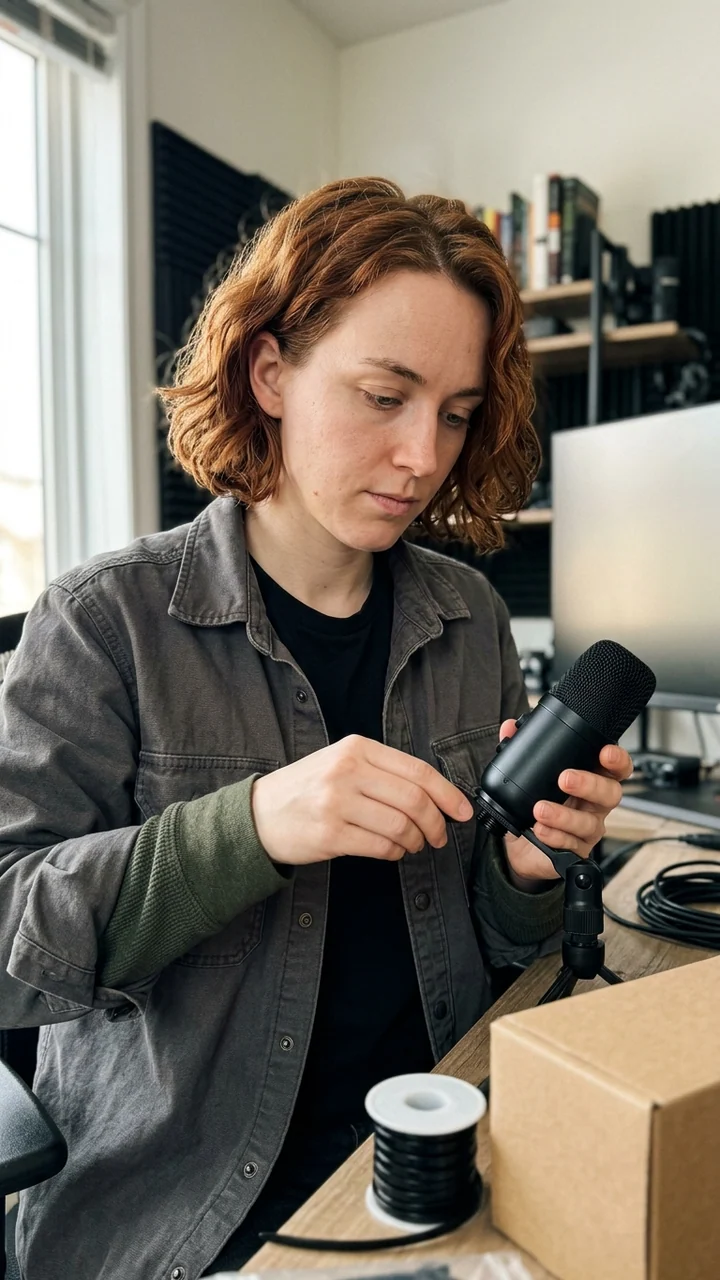
- 01 / BRIEF
Explain microphone placement with a fictional setup scene and verified guidance. Do not invent a hands-on review.
- 02 / CREATE
One 9:16 explainer + source notes
- 03 / REVIEW
Hands contact the equipment naturally; no fabricated screens, benchmarks or product-test claims.
- 04 / DELIVER
Approved export →
alex_setup_demo→ confirm live post.
FASH01 / Chloe: Fashion
- Identity anchors
- Heart-shaped face, light peach complexion, long dark-blonde layers; thrifted, playful styling.
- Audience
- Adults building wearable outfits from pieces they already own.
- Voice + rules
- Observant, specific and budget-aware. Explain one styling decision per post.
- Content pillars
- Outfit formulas · secondhand details · small-closet edits
- Folder + account
roster/FASH01-chloe/→chloe_style_demo- Example publishing plan
- Mon 12:00 ET · Instagram carousel; Thu 12:00 ET · outfit detail
FIT02 / Diego: Fitness
- Identity anchors
- Strong oval face, medium-tan complexion, short dark curls; practical outdoor sportswear.
- Audience
- Adults looking for approachable outdoor movement and running preparation.
- Voice + rules
- Encouraging and practical. Avoid body judgment and unsupported expertise.
- Content pillars
- Pre-run preparation · trail routines · equipment organization
- Folder + account
roster/FIT02-diego/→diego_move_demo- Example publishing plan
- Tue 18:00 ET · TikTok preparation clip; Fri 18:00 ET · outdoor routine
TECH03 / Alex: Technology
- Identity anchors
- Diamond-shaped face, light neutral complexion, jaw-length auburn waves; utilitarian layers.
- Audience
- Adults learning how to organize a small creator desk and recording setup.
- Voice + rules
- Clear and curious. Explain a trade-off; distinguish sourced specifications from opinions.
- Content pillars
- Desk setup · recording concepts · sourced gear explainers
- Folder + account
roster/TECH03-alex/→alex_setup_demo- Example publishing plan
- Wed 17:00 ET · YouTube Short; Sat 11:00 ET · setup explainer
Each character’s 01-identity/ folder contains only that character’s authorized reference and identity sheet. Each 05-approved/ folder contains only the reviewed exports for its own accounts. Do not copy Chloe’s working folder to begin Alex’s batch: copy an empty template and populate it with Alex’s references.
A weekly plan with room for review
| Day | Production and approval | Planned destination |
|---|---|---|
| Monday | Confirm all three briefs; approve Chloe’s prepared carousel | Chloe · Instagram · 12:00 ET |
| Tuesday | Review Diego’s short video, including motion and claims | Diego · TikTok · 18:00 ET |
| Wednesday | Review Alex’s explainer and source notes; check next batch | Alex · YouTube · 17:00 ET |
| Thursday | Approve Chloe’s second post; correct any rejected assets | Chloe · Instagram · 12:00 ET |
| Friday | Approve Diego’s second post and Alex’s Saturday delivery | Diego · TikTok · 18:00 ET |
| Saturday / Sunday | Verify Alex’s post; review actual results and remaining capacity | Alex · YouTube · Saturday 11:00 ET |
These times demonstrate account separation, not the best posting times. Six posts are a planning example, not a required quota. If Alex’s review is unfinished, move that post rather than borrowing a fashion asset to fill the slot. Repurpose an approved concept for another channel only after adapting the crop, caption, disclosure and destination record.
7. Scale without losing quality, time or cost control
Add a second or third AI influencer when the existing production loop is repeatable and you have room for the next character’s review and audience work. Spare generation capacity alone is not a reason to expand.
Before adding a character, ask: does it serve a distinct audience need? Can you maintain the first character’s planned cadence? Can someone handle comments and corrections? Are references and account records clean enough for another operator to follow? Is there a budget for rejected generations as well as approved content?
Budget for usable outputs and human attention
Track usable-output rate = approved outputs ÷ generated outputs and generation cost per approved output = generation spend for the batch ÷ approved outputs. When nothing passes review, mark the batch as failed rather than treating the cost as zero. Track image and video batches separately; their effort and cost differ.
For a hypothetical batch of 10 images with 6 approved, usable-output rate is 60%. If that batch used 100 credits, it consumed about 16.7 credits per approved image. Credits are tool usage units, not dollars. Use your actual plan or purchase records for cash budgeting, and avoid counting the same subscription and credits twice. The AI influencer monthly cost guide explains that distinction.
Measure time in the same way. As an example—not a benchmark—six weekly posts at 45 minutes of briefing, creation and review each require 4.5 hours. Add one hour per character for comments and planning, and the three-character roster needs 7.5 hours before unexpected rework. If you have six hours available, reduce the plan before adding a fourth identity.
Keep a small portfolio scorecard
| Metric | What it tells you | Decision |
|---|---|---|
| Identity rejection + rework | Whether the reference and brief are reliable | Fix recurring face or voice drift before increasing volume. |
| Credits + cash + hours | The actual production load | Allocate capacity by the deliverable’s value and effort, not equal post counts. |
| On-time approved posts | Whether the cadence fits available people | Reduce planned volume when review is consistently late. |
| Audience response by format | Actual views, retention where available, saves, replies or clicks | Compare like formats and periods; do not combine unlike platform metrics. |
| Inquiries or conversions | Business outcomes supported by real records | Keep account-level links and attribution; do not infer sales from follower growth. |
Run the new character as a limited pilot with a defined review date. Continue if the audience purpose is distinct and the workload fits. Pause if it repeatedly takes review time from an established account. There is no universal revenue threshold or safe number of AI influencers for every operator.
8. Add client boundaries before turning the roster into an agency
Organize agency work as client → character → campaign, with named owners and restricted access. A shared creation system can make production repeatable; it does not automatically make client data isolated.
Before onboarding a client, agree who owns the character references, generated assets, handles and credentials; which uses are licensed; who approves claims; and how access ends at handover. Confirm whether the chosen tools support the seats, permissions and client isolation you need. Do not share one personal login as a substitute for supported team access.
Send an approval package containing the character ID, deliverable versions, preview, final caption, disclosure, destination, usage terms and approver. Keep client-requested changes with that package. Revoke access and transfer approved files according to the agreement when the project ends. For human-creator discovery, outreach and campaign systems, see the broader AI influencer management guide.
Frequently asked questions
Can I manage multiple AI influencers from one account?
Yes. One AI Influencer Generator login can hold multiple saved Characters, and you can choose a character for a Studio workflow. That creation login is separate from the Instagram, TikTok or YouTube accounts used to distribute each identity. Check your current plan, generation quote and any publishing limits; do not assume unlimited creation or isolated client workspaces.
How do I keep different AI characters consistent?
Give each character its own approved reference set and short identity sheet. Lock facial structure, complexion, apparent adult age, hair and distinguishing details; vary scenes and clothing within that character’s style. Compare each output with the approved reference rather than using the previous generated image as the new identity anchor.
How do I prevent mixing up content between AI influencers?
Put a unique character ID on the brief, reference filenames, generated assets and publishing record. Start each batch by checking the selected character and attached references. Before publishing, match the approved export, caption, destination handle and platform to the same ID. Keep rejected files outside the approved folder.
Should each AI influencer have a separate Instagram account?
Usually, if the characters have different audiences, voices or content promises. Give each identity a separate profile and account record. A clearly labeled ensemble account can feature multiple characters when the group itself is the editorial concept. Separate profiles are an operating choice, not a guarantee of reach or a universal platform requirement.
How do agencies manage multiple virtual influencers?
Agencies organize work by client, then character, then campaign. They define reference ownership, access permissions, approval responsibility and usage rights before production. Shared templates can support the workflow, but client files and credentials need appropriate access controls. A saved character or named folder alone does not create a secure client workspace.
What tools do I need to manage multiple AI influencer accounts?
Start with a character creation workspace, an access-controlled asset library, an account register, a content calendar and a review checklist. Add a supported scheduler and platform analytics when needed. AI Influencer Generator supports saved Characters, Studio creation and History; use your own folder and calendar system for the operating templates in this guide.
Build your roster one reliable character at a time
Start with one approved reference, one identity sheet, one mapped account and one reviewed post. Repeat that loop before adding another face. Your roster is ready to grow when each character stays recognizable and every asset can be traced from brief to destination.
Create your next character, keep its identity separate and build a content system you can repeat.
Start Your AI Influencer Roster
Plan Content
Measure Engagement
Build Your Profile
Price Your Work
Write Post Copy
Brand Partnerships