

Is Charles Robinson real?
The character is synthetic. Instagram labels the profile as AI-generated. The profile names Higgsfield Creative Partner, and several captions say “Made with @higgsfield.ai.”
The persona appears as an older man, often with a gray beard and worn gray clothing. Reels place that visual identity around vehicles, entrances and other luxury-coded scenes. They are synthetic entertainment; the wardrobe should not be treated as proof of a real person’s wealth, housing situation or life story.
When did the account reach one million followers?
The account celebrated one million followers in an October 27, 2026 Reel. The video places the recognizable character in a group dance and a new setting. Explore the Charles Robinson Trends profile for more examples.
What might explain the appeal? Four Reels beyond the celebration
The recurring visual idea is easy to describe: the same older character in ordinary clothing appears in status-coded surroundings. Each new scene gives that contrast a different action or reaction.
1. A plain entrance becomes a character test
Visible scene: In “Stay Humble”, the gray-clad character appears at a building entrance.
Why it might attract attention: the look invites viewers to interpret how an apparently ordinary person belongs in the setting.
Try the method: give an original character an identifiable silhouette, then place that character at the threshold of a setting that creates a question. Let the scene answer the question; do not portray clothing as proof of someone’s social status.
View the official Instagram embed
Instagram may block this preview or require sign-in. If it stays blank, use the original-post link above.
2. Worn clothing beside a black SUV
Visible scene: The “Always remember where you came from” Reel places Charles in worn gray clothing beside a black SUV. The caption credits Higgsfield; the post is shared with @vladbykovbrand.
Why it might attract attention: a modest outfit and a luxury-coded vehicle communicate an expectation gap without a long explanation.
Try the method: make the contrast visible in a single composition. Give your character one simple action and make the setting understandable without needing a spoken introduction. Use a location you have the right to depict or make an obviously fictional one.
View the official Instagram embed
Instagram may block this preview or require sign-in. If it stays blank, use the original-post link above.
3. Change the cast while preserving the identity
Visible scene: In “The ladies love me”, the character appears outside with two women.
Why it might attract attention: a recurring character provides continuity while other people’s reactions create a new social situation.
Try the method: keep the identity reference fixed but change the surrounding situation and supporting cast. Verify that every person or source performance you use is authorized, and avoid implying a real sponsorship or testimonial.
View the official Instagram embed
Instagram may block this preview or require sign-in. If it stays blank, use the original-post link above.
4. A reaction changes the episode
Visible scene: In “Keeping it humble”, a woman reacts near a black vehicle; another moment shows Charles beside a man in a white jersey near a red-carpet setting. The caption credits Higgsfield.
Why it might attract attention: another person’s reaction provides a fresh beat inside a familiar visual format.
Try the method: repeat a format only when the new post has its own action or reaction. A recognizable look is the anchor; an episode still needs a reason to exist.
Open with a clear visual question
For your own series, try showing the character and the unexpected setting immediately. A simple action or reaction gives the scene a direction without needing a long explanation.
Turn the observations into a repeatable format
| Observed detail | Possible appeal, not a proven cause | Exercise |
|---|---|---|
| Consistent older face and gray clothing | Recognition across different posts | Choose a distinct adult character and preserve a small set of visible identity anchors. |
| Plain outfit next to status-coded places | An expectation gap that can be understood visually | Place your character in a contrasting situation with an understandable, respectful story. |
| Entrances, vehicles and other people’s reactions | A simple question or social beat | Plan one action and one response before generating a scene. |
| The celebration adds a group dance | A familiar character in a new collective moment | Use an authorized movement reference or animate a new action; do not copy a signature performance. |
| Comments ask whether it is AI or discuss status | Viewers can bring their own interpretations | Disclose the synthetic identity and invite a genuine question without pretending it is a real life. |
A practical test is one character + one expectation gap + one action + one change per episode. Measure your own retention and outcomes if the platform provides them. This is a creative experiment, not a claim about the account’s private analytics.
How to create an original AI influencer with a repeatable visual story
Build a different identity first, then create and animate a scene around it. The steps below describe AI Influencer Generator’s current local interface and available workflows. They are a reconstruction for an original character, not Charles Robinson’s disclosed production process.
- Design the character. Open the guided character builder, select an adult appearance, wardrobe and creator direction, and name the character. Use the identity prompt below as a creative brief; choose matching fields and add only needed extra details in the available advanced field.
- Save and reuse the identity. Review the displayed cost and create the character when signed in. Select it again in My Influencers. A stable reference helps, but you must inspect every output for drift.
- Create a contrasting scene. In Create Photos, choose the saved character and enter the scene prompt. Use a vertical aspect ratio when supported. Inspect the face, clothing, hands, text and background before proceeding.
- Add motion. Use Image to Video for a written action, or Motion & Dance with a saved character or authorized adult image and an authorized 3–30 second reference video. The current local interface also shows a Motion Library. Check the available model, quote, reference constraints and rights before submission.
- Review and export. Inspect the whole clip, especially the face, feet and transitions. Download an approved result from its result workspace or History, then add captions and synthetic-media disclosures as required by the destination.
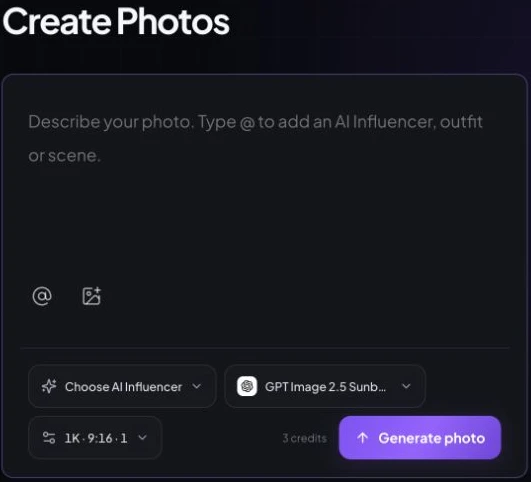
The following English prompts describe Nora Vale, a fictional older transit mechanic with a different face, wardrobe and story. They are a creative starting point, not a tested recreation of the Charles account or a promise of a particular output.
Create an original fictional adult character named Nora Vale, a retired transit mechanic in her late 60s. Warm medium-brown complexion with natural facial lines, short silver curls, rounded amber glasses and a small brass star earring. She wears a cobalt work jacket with a subtle repaired elbow and a striped scarf. Her defining habit is curiosity about how places work. Keep her age, face shape, curls, glasses and earring stable. Do not resemble Charles Robinson or any real person; do not imply she has a real biography.
Use my selected Nora Vale identity as the reference. Nora pauses with a folded transit map outside an elegant concert hall with warm stone walls and a long red carpet. Her cobalt work jacket and striped scarf contrast with the formal setting. One hand holds the map; the other rests at her side. Candid full-body vertical 9:16 composition, soft late-afternoon light, believable reflections and natural clothing texture. No logos, counterfeit tickets, invented signs or claim that the event actually occurred.
Animate the approved Nora Vale image in a single short vertical shot. She looks up from the map, takes two relaxed steps, then does one small joyful shoulder-and-foot rhythm. Preserve her face, silver curls, amber glasses, work jacket and scarf. Keep the map in one hand, feet grounded and the background stable. No morphing, extra limbs, camera cuts, invented speech or imitation of Charles Robinson’s face, voice or exact performance.
For reference-motion transfer, choose an original or licensed movement clip you are allowed to use. The motion prompt is an instruction to adapt where the selected workflow accepts text; it is not a substitute for the reference video. Do not upload Charles’s face or a third-party dance clip without the necessary rights.
Start with an original character. Review the generation cost before submitting.
AI Influencer Generator vs. Higgsfield: which workflow fits?
Our site is a practical fit when you want separate character, photo, image-to-video, motion and History steps with a reviewable credit workflow. Higgsfield’s public AI Influencer page presents a compact character → motion → video flow, including a motion library and uploads. Both support reusable identities and reference-led motion; neither public page proves a guaranteed match or a particular growth result.
| Decision | AI Influencer Generator | Higgsfield AI Influencer |
|---|---|---|
| From character to clip | Guided character → Create Photos → Image to Video or Motion & Dance → History/download. Useful when you want to inspect each stage. | Public page describes creating an influencer, choosing/uploading motion and generating a video; it emphasizes a compact motion-led flow. |
| Reuse and templates | Saved characters can be selected again; local Motion & Dance UI showed a Motion Library with 30 templates at our check. | Public page describes repeatable character imagery and a selection of trending motions. Actual catalog and permissions may change. |
| Cost visibility | Our builder and workflow show a cost or quote before submission when available; inspect it for the selected model and account. | Its AI Influencer FAQ says each video shows its cost before generation. |
| Best fit | Creators who want to review a saved identity and scene before choosing how to animate it. | Creators who prioritize its public character-plus-trend workflow and existing motion ecosystem. |
Credit systems differ. Check AI Influencer Generator pricing, Higgsfield pricing and the quote for your chosen settings.
Frequently asked questions
Is Charles Robinson a real person?
The @charles.robinson62 profile identifies the character as AI-generated.
When did Charles Robinson reach one million followers?
The account celebrated one million in a Reel published October 27, 2026.
Was Charles Robinson made with Higgsfield?
The bio identifies a Higgsfield Creative Partner, and several captions credit Higgsfield.
Can I copy this strategy and reach one million followers?
You can test an original character, a clear visual contrast and a repeatable scene structure. No workflow guarantees followers or views.
Sources
- Official Instagram profile and the five original Reels linked above: AI label, captions, visible scenes, sampled comments and rounded counts.
- JARRUS, October 11, 2026: historical reporting on the profile, follower count and partner context.
- Higgsfield AI Influencer and pricing: vendor-stated workflow and public plan/model estimates.
- AI Influencer Generator pricing and the current local workspace/configuration: our plan and workflow information.
Create a character people can recognize
Start with an original visual identity, then build a repeatable situation that has room for change. Review each image and motion result, keep your sources authorized, and learn from your own audience rather than copying someone else’s face.
Start with an original character. Review the generation cost before submitting.
Plan Content
Measure Engagement
Build Your Profile
Price Your Work
Write Post Copy
Brand Partnerships