

AIInfluencerGenerator.ai helps creators move from “What should my AI influencer post next?” to clear, platform-ready short-form concepts. Use this AI video idea generator workflow to shape TikToks, Instagram Reels, and YouTube Shorts around a consistent virtual persona, visual style, and content plan—then take the approved concept into the right production tool.
Idea
One clear viewer promise
Direction
Hook, beats, camera, pace
Production
A separate reviewed workflow
Turn a blank page into a visual short-form concept
An AI video idea generator should turn a character, niche, trend angle, or campaign goal into a concept you can actually stage. For an AI influencer, an idea must do more than sound interesting. It needs enough detail about look, movement, setting, voice, and format to become a script and a usable generation prompt.
With the right video idea generator AI process, a beauty avatar’s morning routine can become a hook, shot sequence, caption plan, and vertical format. The same process can shape a futuristic fitness challenge, a luxury travel reel, or a gaming persona’s reaction clip. Creative direction comes before generation.
Build five repeatable video idea lanes
A successful AI influencer needs recognizable habits, visuals, and opinions. If every post feels unrelated, the feed feels random. Define a small set of recurring lanes around the influencer’s niche, style, and audience expectation:
01
Daily-life mini vlogs
A morning reset, café visit, packing routine, desk day, or trend reaction makes the character's habits visible.
02
Transformation clips
Outfit changes, room makeovers, beauty looks, or cinematic before-and-after scenes provide an immediate visual payoff.
03
POV storytelling
Put the audience inside a specific moment, such as a virtual travel bestie booking a last-minute weekend in Tokyo.
04
Educational micro-content
Give a fashion stylist, productivity avatar, wellness guide, or finance-inspired character one useful idea to explain.
05
Trend remixes
Adapt a recognizable audio structure, challenge, or reaction cut to the influencer's identity instead of copying it unchanged.
These are repeatable video engines, not isolated topics. Once the format is recognizable, you can create fresh AI video ideas without reinventing the character every time.
Five AI video generator prompt ideas you can adapt
These are untested multi-shot editorial concepts. Their 10–35-second lengths describe an assembled edit, not one five-second generation. Produce simple shots separately; transitions, captions and music belong in an editor. Use the concepts as starting points, not promises of a perfect one-pass result. Each pairs a hook with scene direction, movement, visual style, and publishing format so the planning process leads cleanly into production.
01 / Wellness mini vlog
“I asked my AI self to design the perfect 6 a.m. reset.”
Prompt: “Create a 9:16 vertical video of an adult fictional wellness influencer beginning a calm morning routine in a sunlit apartment. Show soft linen bedding, warm tea, journaling, skincare, and a final mirror shot. Use golden-hour light, gentle handheld movement, slow push-ins, and natural lifestyle styling.”
Best format: Reels or TikTok · 20–30 seconds. Open on the mirror shot, cut backward through the routine, and caption each step.
02 / Fashion transformation
“My AI influencer picked five outfits for five different versions of me.”
Prompt: “Create an adult fictional fashion creator in a simple studio. Build rapid transitions between cyber streetwear, quiet luxury, beach resort, night-out tailoring, and a futuristic office look. Keep her face and signature jewelry consistent. Use whip pans, flash cuts, full-body framing, and editorial light.”
Best format: TikTok or Shorts · 15–25 seconds. Use one beat per outfit and end by asking which look should return.
03 / Travel story
“If my AI influencer could teleport anywhere, this is where she'd go first.”
Prompt: “Create a vertical travel reel featuring an adult fictional creator walking through a coastal city at sunset. Show narrow streets, an ocean overlook, a rooftop meal, and a final moment beside the water. Use a wide establishing shot, steady tracking movement, warm lens flare, and soft pastel color.”
Best format: Reels or Shorts · 25–35 seconds. Structure four beats: arrival, discovery, atmosphere, and postcard ending.
04 / Personality reaction
“My AI bestie heard my dating story and immediately had thoughts.”
Prompt: “Create an expressive adult fictional creator seated in a lived-in, neon-lit bedroom. Show playful disbelief, side-eye, laughter, and a lean toward the camera. Use close framing, two purposeful punch-ins, clean jump cuts, and space for readable captions.”
Best format: TikTok · 10–18 seconds. Let one reaction carry each cut and finish with the shortest punchline.
05 / Educational micro-tip
“Three styling mistakes that make a travel outfit harder to rewear.”
Prompt: “Create a 9:16 talking-style video with an adult fictional travel-fashion creator beside an open suitcase. Give her one natural task: fold and compare three outfits while explaining one mistake per beat. Use eye-level smartphone framing, soft window light, deliberate hand contact, and a clean end card area.”
Best format: Reels, TikTok, or Shorts · 20–30 seconds. Put the promise on screen immediately and number the three beats.
A six-step prompt workflow from idea to production
Random inspiration can help, but a system keeps an AI influencer active. Give every idea a purpose: attract a new viewer, reveal personality, teach one useful point, show a transformation, or invite a specific response.
- 01
Choose the platform and goal
Pick TikTok, Instagram Reels, or YouTube Shorts, then decide whether the video should earn attention, explain an idea, reveal personality, or invite a response.
- 02
Define the viewer reaction
Name the response you want: curiosity, recognition, surprise, a save, a share, or a useful comment.
- 03
Lock the influencer identity
Keep the fictional adult character, niche, voice, signature styling, and recognizable behavior stable before changing the scene.
- 04
Write the hook and beat sequence
Open with a clear promise or tension, then arrange a short sequence of visual beats that pays it off.
- 05
Add production direction
Specify the action, environment, framing, camera movement, lighting, pacing, audio direction, captions, and aspect ratio.
- 06
Generate, review, and refine
Use the script and video tools as separate stages, inspect every output, and simplify the prompt when identity, motion, anatomy, or continuity drifts.
A strong prompt names one subject, one purposeful action, and a scene that supports it. Add camera behavior only when it clarifies the moment. A three-quarter handheld shot and a slow push-in describe understandable choices; “cinematic, viral, beautiful, ultra-quality” does not.
If you need a broader character and video prompting foundation, read the AI influencer prompts guide. When the concept is approved, follow the step-by-step video generation guide. For identity drift, use the character consistency guide.
Use the real script workflow before generating video
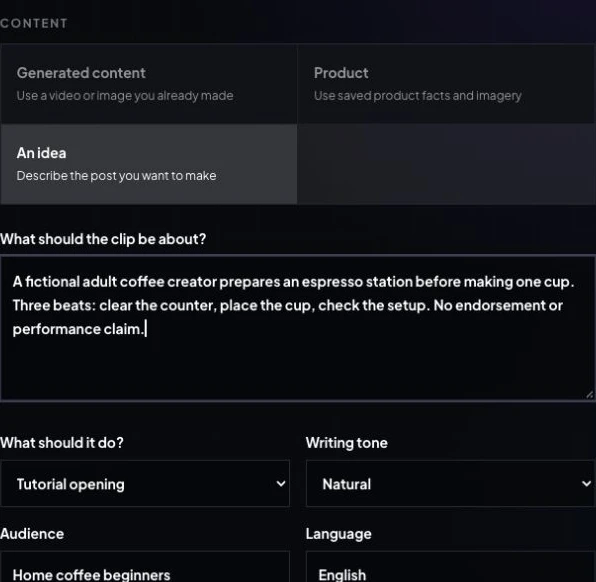
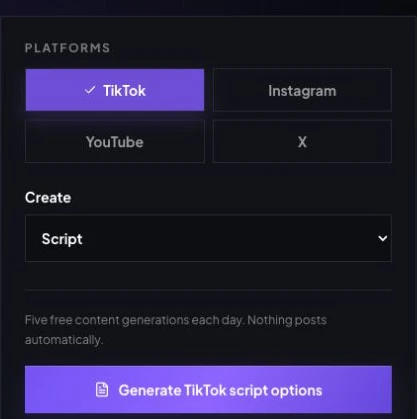
Open Create Content with Script selected. Choose An idea, fill What should the clip be about?, then set What should it do? to Tutorial opening, Writing tone to Natural, Audience to Home coffee beginners, and Language to English. Select TikTok and Script. Keep approved facts in Facts the script may say; do not invent product findings.
Exact unsubmitted creative brief
A fictional adult coffee creator prepares an espresso station before making one cup. Three beats: clear the counter, place the cup, check the setup. No endorsement or performance claim.
October 9 captured UI displayed five free content generations each day and Generate TikTok script options. We did not press it, so returned scripts, processing time and quota consumption were not verified. Script output is separate from paid video generation, publishing and performance.
Stage 1: decide the story
Use the script generator to compare hooks, beats, and CTAs. Human review owns facts, voice, and platform fit.
Stage 2: produce the clip
Take the approved direction into text-to-video, influencer video, photo animation, or motion transfer as appropriate.
Make one reviewed shot before the full edit
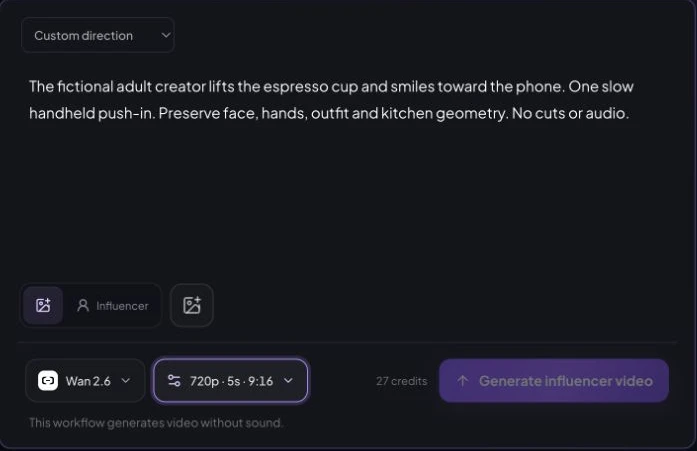
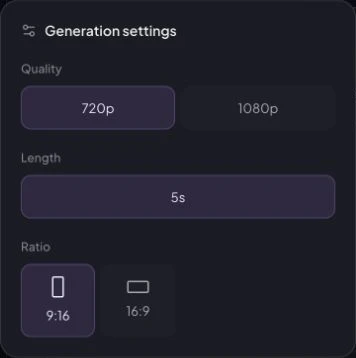
For a silent draft, the current form demonstration uses Wan 2.6, 720p, five seconds, 9:16 and a 27-site-credit quote. No task was submitted. The separate July 30 espresso archive below used its approved kitchen still in Seedance 2, 720p, 9:16, five seconds and generated audio off. Its record lists 104 seconds and 100 provider credits; site charges and retries are unknown. This single shot does not demonstrate the complete three-beat script above.
Original archived shot prompt
The same fictional blonde adult woman completes one natural action: she lifts the espresso cup from the counter and gives a small confident smile toward the phone. One slow handheld push-in only. Preserve her exact face, freckles, hair, natural skin texture, hands, outfit, apartment geometry, and morning light. No cuts, no extra people, no morphing, no text, no logo, no watermark, no audio.
Adapt the idea for TikTok, Reels, and Shorts
| Platform | Creative emphasis | Useful ending |
|---|---|---|
| TikTok | Fast context, personality, reaction, conversational captions | A specific comment prompt or punchline |
| Instagram Reels | Polished lifestyle sequence, visual transformation, saveable tip | A reveal, checklist, or save prompt |
| YouTube Shorts | Clear mini-story, countdown, explanation, repeatable series | A payoff that leads to the next episode |
Platform patterns change. Use current official guidance from TikTok, YouTube, and Meta when labeling realistic synthetic media. For distribution and measurement after publishing, use the separate social media engagement guide.
Review the concept, claims, and disclosure
Before publishing, review identity consistency, face and hand anatomy, object contact, background geometry, spoken claims, captions, music rights, and whether the character could be mistaken for a real person. Do not imitate a private person or celebrity, and do not invent testimonials, customer results, partnerships, or product experience.
Paid, gifted, or affiliate relationships need clear disclosure. The FTC’s influencer disclosure guidance explains that material connections should be hard to miss. Platform labels and legal duties can differ by content and location, so check current rules before publication.
Build the creative skills behind better ideas
The strongest results come from skills around the tool: hook writing for curiosity or contrast; visual direction that controls angle, pacing, wardrobe, and color; short-form editing that makes every cut purposeful; and content planning that turns isolated posts into weekly themes and recurring series.
These skills make an AI video idea generator workflow sharper because you are not waiting for software to invent the brand. You are directing it. AIInfluencerGenerator.ai can help plan scripts and create media, but the creator remains responsible for strategy, accuracy, review, publishing, disclosure, and performance decisions.
Frequently asked questions
What does an AI video idea generator do?
It helps turn a niche, character, campaign goal, or trend angle into a usable short-form concept. A useful result includes a hook, scene sequence, visual direction, and format—not only a topic.
Does AIInfluencerGenerator.ai generate the finished video from an idea?
The TikTok Script Generator can produce three script directions with hooks, speaking beats, and calls to action from your brief. Finished media is a separate step in the text-to-video, image animation, influencer video, or motion-transfer workflow.
How detailed should an AI video prompt be?
Give the model enough direction to stage the shot: character, action, setting, framing, movement, light, pace, audio or caption intent, duration, and aspect ratio. Avoid stacking contradictory styles or too many actions into one clip.
Can I use these ideas for TikTok, Reels, and YouTube Shorts?
Yes, but adapt the opening pace, duration, captions, audio, and ending to the platform and audience. Check each platform's current synthetic-media and branded-content rules before publishing.
How do I keep the same AI influencer across several videos?
Start from one saved fictional adult identity or one approved source image, hold signature traits steady, and vary one major creative element at a time. Review every frame because generative outputs can still drift.
Plan Content
Measure Engagement
Build Your Profile
Price Your Work
Write Post Copy
Brand Partnerships