
Contents & templates
AI UGC vs. Human UGC: Which Should You Use?
Use synthetic content for a controllable presentation; use actual people or product footage when the evidence depends on real experience. “AI influencer” describes a recurring identity. “UGC-style video” describes a format. A virtual character can appear in many formats, and a human can make creator-style content without becoming an influencer.
In this guide, AI UGC means AI-generated creator-style content. It does not mean an independent customer discovered, purchased or reviewed the product. Paid human creator work is also different from unsolicited customer content, even when both use casual phone-camera framing.
| Approach | Experience & product evidence | Control & revisions | Rights & best use |
|---|---|---|---|
| Real customer, unsolicited | A genuine person's experience; verify context and permission. One account is not general proof of performance. | Limited production control; request permission, not a fabricated rewrite of their experience. | Clear reuse and paid-ad permission. Useful when the actual experience is central. |
| Paid human creator | Can demonstrate real use and handling; payment does not prove the claim is true. | Brief, filming and reshoots. Physical demonstrations remain observable. | Talent, footage, music and ad rights; disclose material connections. Good for fit, taste and hands-on evaluation. |
| Human filming + AI-assisted editing | Original filming can retain the evidence; alterations must not change its meaning. | AI can assist editing, cleanup or localization. Review every changed frame and spoken claim. | Clear source footage, likeness, voice and editing permissions. Useful for adapting a genuine demonstration. |
| Virtual character, generated UGC style | A staged synthetic illustration, not lived experience or a physical product test. | Reference-led generation and regeneration, followed by human review; exact details can drift. | Clear reference, character, voice and media permissions. Useful for presentation concepts and controlled creative variants. |
A brand buying files for its own channels does not need you to have followers. A contract that also buys exposure on your account does need relevant audience evidence. Neither arrangement makes AI automatically cheaper, more trustworthy or higher converting. Compare the actual scope and evidence requirements.
Choose human filming or authorized real-product B-roll for a fastening mechanism, pouring behavior, skin result, battery test, taste reaction or other claim that depends on the physical world. A generated hand movement may illustrate an action; it cannot verify that the real product performs it.
What Can You Create?
Start with one communication job, one visible action and one verifiable fact. These six formats share the same headphone reference and fictional presenter where footage exists. Proposed extensions are labeled as plans, not completed ads.
Product demonstration
Make one visible action understandable.

“What does a desk reset look like?”
Production challenge: Maintain fingertip contact and earcup geometry. Film real hardware operation if fit or function must be proven.
Unboxing-style presentation
Explain the package and what is included.
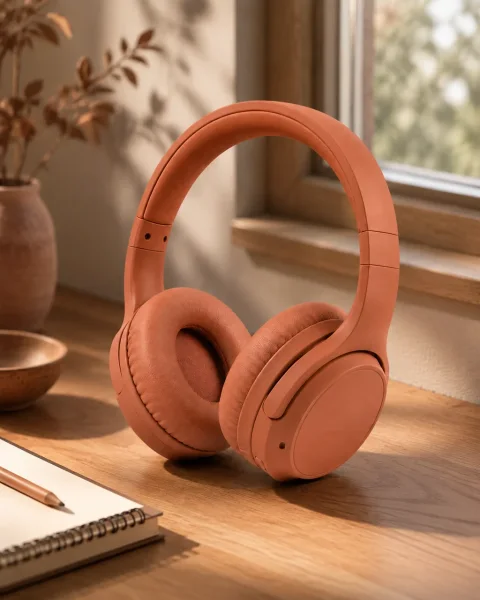
“Here is what comes in the box.”
Production challenge: Verify every included item. Opening packaging and revealing hidden surfaces often require real product footage.
Everyday scene integration
Show a product in a relevant setting.

“One small change to the desk setup.”
Production challenge: Keep the same product and character across the scene. A routine illustration is not evidence of daily personal use.
Problem–solution ad
Connect a context with an observable action.

“Too many tabs open?”
Production challenge: Do not imply the headphones cure distraction or improve productivity without evidence. The scene illustrates a reset ritual.
Virtual presenter + real product B-roll
Pair a consistent presenter with product evidence.

“Look closely at this detail.”
Production challenge: Match spoken claims to actual footage. License the footage and assemble the hybrid edit externally; no physical-product test is supplied here.
Product FAQ
Answer one documented purchase question.
“What does the earcup shape look like?”
Production challenge: Use supplied specifications for battery, compatibility or materials. Never infer these facts from an image.
UGC share of Collabstr campaigns
Share, percent · zero-based axis from 0% to 50%
| Year | Share | Scope |
|---|---|---|
| 2024 | 15% | Platform campaign share |
| 2025 | 35% | Platform campaign share |
The marketplace shift explains why content production deserves its own brief. It does not show that AI caused the change or that a synthetic presenter outperforms a human. The useful decision remains which production method can demonstrate your particular product truthfully.
Step-by-Step: From Product Brief to AI UGC
Approve the facts and the opening frame before buying more motion. Our running example is a desk-reset presentation with one fictional adult and a terracotta headphone design. The product is a synthetic, unbranded reference owned by the project—not evidence of a physical headphone’s specifications.
Campaign brief
CAMPAIGN BRIEF
Product: [PRODUCT + exact variant + authorized reference files]
Audience: [AUDIENCE + market + language]
Objective: [ONE COMMUNICATION OBJECTIVE]
Verified Claims: [FEATURE / EVIDENCE / OWNER / CHECKED DATE]
Creator: [SAVED FICTIONAL ADULT CHARACTER + approved reference]
Visible Action: [ONE PHYSICALLY READABLE ACTION]
Deliverables: [QUANTITY + duration + aspect ratio + sound/captions]
CTA: [CTA + destination]
Usage Rights: [CHANNELS + paid/organic + territory + term + permissions]
Approval owner: [NAME / ROLE]
Reject if: [PRODUCT OR CHARACTER DETAILS THAT MUST NOT CHANGE]
Choose the objective and audience
For the example, the audience is desk workers and the communication goal is to illustrate a short reset ritual. The action is adjusting one earcup, then returning attention to the desk. The success criterion at production stage is a readable, coherent clip—not increased productivity or sales.
Write the placement, language, intended duration and final destination before scripting. A product FAQ and a paid acquisition ad should not inherit the same CTA by default. Name an approval owner who can stop production when a claim or product detail is wrong.
Collect product facts and authorized references
Keep a clear product reference, exact variant, allowed logos or labels, and a short claim ledger: the fact, its supporting document, owner and checked date. Here we can describe the visible terracotta color and over-ear form. We cannot infer battery life, noise cancellation, comfort, materials or a focus benefit from the image.
Use Products to organize product references where available, or prepare authorized files for the chosen workflow. Enter checked facts manually. AI suggestions and extracted information are drafting aids, not evidence. For detailed product setup, follow the product-promotion workflow.
Choose and save the character
Build an original adult identity in My Influencers and keep a small set of approved references. Lock face, hair, apparent age and identifying details; choose clothing and setting to serve the brief. Save the actual reference asset you approved, not only the character’s name.
The recorded headphone example reused a concept reference and a refined opening frame. Its log does not contain a saved Studio character ID. For a new repeatable series, save the character first, then retain each approved product frame. A saved identity still needs visual review on every shot.

Input 1: creator + scene concept
Input 2: product reference

Reviewed opening frame → video input
Actual retained inputs and result from October 2. The concept already includes the presenter and headphones; the second reference specifies the product. These are synthetic original assets, not photographs of a customer or proof of a real product’s performance. Write the hook, script and shot plan
Separate what the generator should do from what the presenter should say. A useful structure is Hook → Problem/Context → Demonstration → Verified Benefit → CTA. Treat each beat as a job, not a mandatory number of seconds. If the benefit cannot be supported, remove it instead of filling the slot with a promise.
For this example, “Too many tabs open?” establishes context. The visible earcup adjustment supplies the demonstration. “Headphones on, playlist ready” describes a setup, not proof that the headphones improve attention. “Pick one task, and find your rhythm” is a lifestyle CTA, not a purchase claim.
Generate and review the product interaction
Open AI Product Image Generator for a creator-led product image. Its current interface says “Create product moments with your AI Influencer.” Supply the references supported by the workflow, write one action and check the selected model, dimensions and quote before generating. The linked product-promotion article also discusses the earlier “Creator + Product Photo” interface; use the current controls shown here.
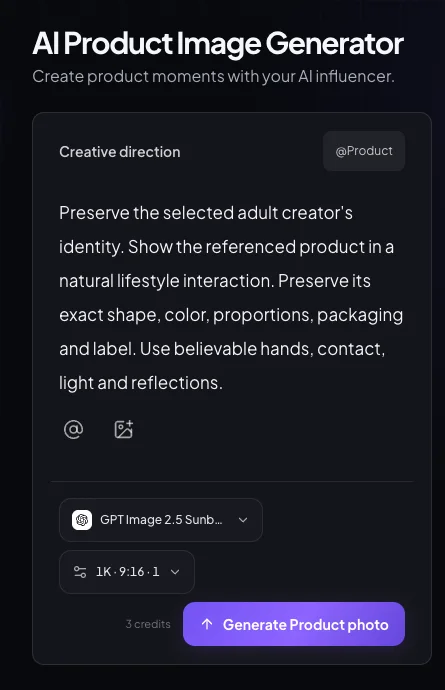
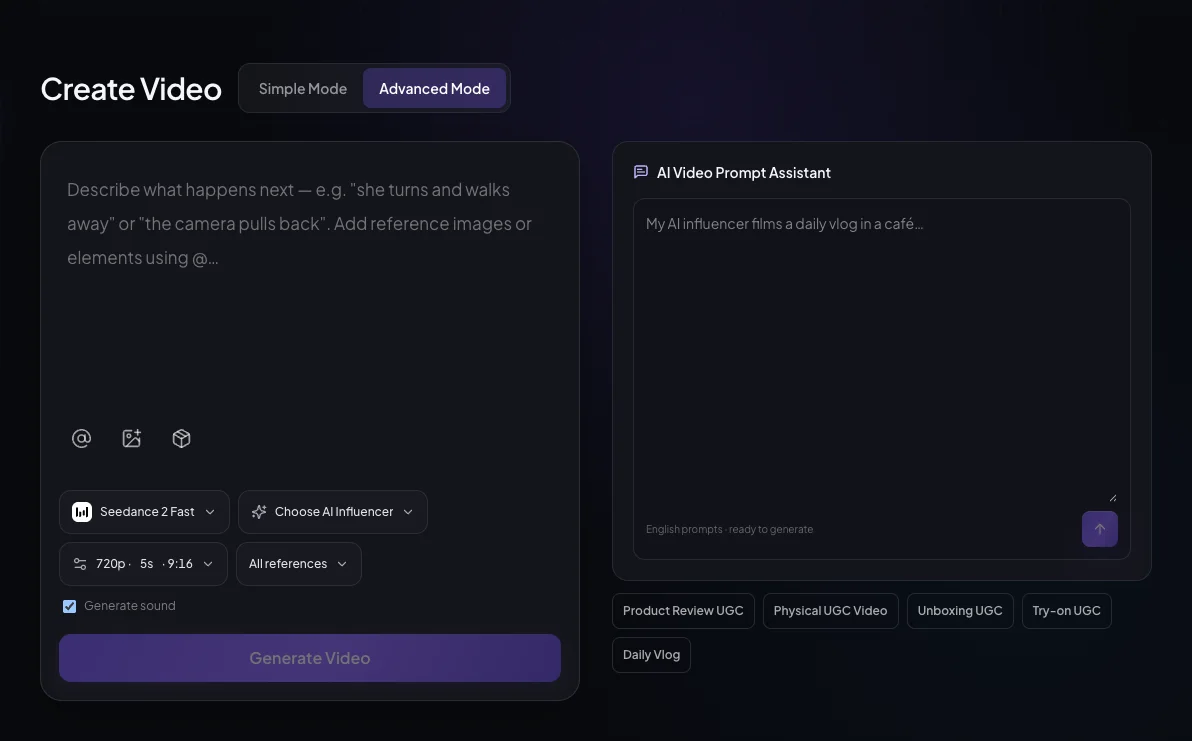
Actual Studio controls captured October 18, 2026. Unsubmitted setup; no product or character selected for this screenshot. The crop omits the template gallery. Tap the image for its full size. Next, open AI UGC Video Generator and choose the mode that fits your inputs. In the current Advanced Mode, available character/product references can be selected through the reference controls or @ menu when supported by the chosen model. A typed name alone does not attach a file. For an approved starting image, use a model and reference mode that accept a start frame.
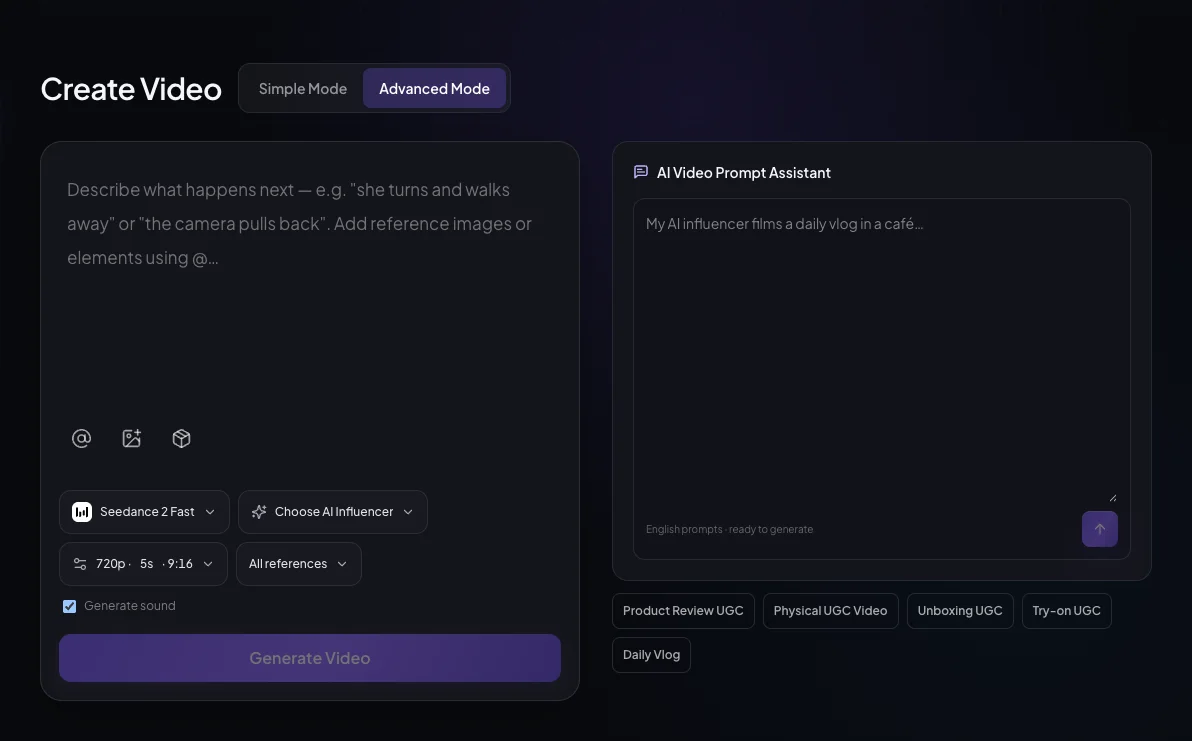
Current Advanced Mode, captured October 18. Model, reference compatibility, sound and duration are explicit choices. The visible default setup is not the archived demo’s 1080p, 15-second task or a promised price. Tap the image for its full size. Choose a duration actually offered for that model and resolution. Generate one continuous action per shot. If a 30-second script exceeds the selected limit, split it into reviewed short shots and assemble them externally. A prompt is not a guarantee of an edited multi-shot advertisement.
Add sound, captions and product evidence
The documented clip used its video model’s native generated audio. Other models may generate silent video or require a separate sound workflow. For an existing video with a new speech track, inspect AI Lip Sync Generator and the Lip Sync workspace; use video and audio you may lawfully reuse. Native speech generation and a separate lip-sync pass are different operations.
Assemble cuts, add or correct captions, insert authorized real-product footage and create the final ad export in an external editor. The tools shown here do not establish an end-to-end timeline, caption or ad-publishing workflow. Preview captions and platform overlays on the actual destination format, including its CTA area.
Review, export and prepare a controlled test
Watch the entire clip with sound, then scrub the interaction frame by frame. Review the mouth, fingers, product and captions together. Download the approved source result from the creation’s available result/History controls, keep the original, and export a separately named final edit. Preserve the script, references, permissions, settings and approval note with it.
A production-approved asset is not automatically an ad-approved asset. Apply destination-specific disclosures, check current ad rules, and submit through the brand’s actual ad account. No ad was placed for the example in this guide.
One Documented 15-Second Example
The complete example is one continuous generated shot with sound, not an assembled multi-camera ad. It was produced on October 2, 2026 through a recorded generation pipeline and re-reviewed for this guide. The contemporary Studio screenshots above illustrate new-project setup; they are not fabricated screenshots of those earlier jobs.
| Example timing | Spoken copy / job | Visible direction |
|---|---|---|
| 0–3 seconds | “Too many tabs open?” — hook and context | Look toward the camera; adjust the already-worn outer earcup once. |
| 3–7 seconds | “Try a little desk reset. Headphones on, playlist ready.” — demonstration/context | Lower the hand and glance toward the laptop. No claim about headphone performance. |
| 7–12 seconds | A visual pause; no unsupported benefit line | A small listening nod; keep the same headphones, framing and identity. |
| 12–15 seconds | “Pick one task, and find your rhythm.” — CTA | Return attention to the desk; small typing movement. |
The output’s speech timing does not match every intended beat: the retained transcript groups the opening sentences within approximately 0–6.08 seconds and the final sentence around 12–14.8 seconds. That difference is a review finding, not evidence that the written timings were followed exactly. The captions supplied with the player follow those observed speech segments.
Opening / interaction0 seconds · same finished take
Context / visual pause6 seconds · same finished take
Closing line12 seconds · same finished take
Read the finished spoken script
Too many tabs open? Try a little desk reset. Headphones on, playlist ready. Pick one task, and find your rhythm.
Background: a quiet instrumental pulse and room ambience. The fictional presenter wears the headphones at a desk, adjusts an earcup, lowers his hand and returns attention to the laptop. No physical product test or customer experience is shown.
Production record: what was actually measured
| Stage | Model & recorded settings | Attempts / consumption | Retained result / limits |
|---|---|---|---|
| Opening image | gpt-image-2-image-to-image; two input images; requested 2K, 9:16; output 1536 × 2736 | 1 recorded submitted task; 5 provider credits consumed | Approved opening frame. No rejected image task retained in this log. |
| Video + native sound | bytedance/seedance-2; first-frame input; 1080p, 9:16, 15s, generate_audio=true | 1 recorded submitted task; 1,530 provider credits consumed | Full 15.069s retained; original 1080 × 1920, web delivery 720 × 1280. No failed video task retained. |
| Total tracked generation | Two recorded provider tasks; original concept creation is outside this subtotal | 1,535 provider credits | Not a full production cost, current retail quote or industry average. |
| Time and cash cost | Submitted at 16:49:12 UTC (image) and 16:53:28 UTC (video), October 2 | Hands-on editing/review time and cash allocation: not recorded | Provider costTime fields are 104 and 507; the saved record does not preserve their unit, so they are not presented as measured production minutes. |
The record confirms these two tasks and their consumption. It does not prove there were no exploratory attempts outside the retained log. The approved review covered sampled temporal frames and the audio/script; we also checked the delivered player. No customer billing ledger, actual ad spend or campaign performance accompanies this example. Download the production record.
Three hook variants for the next test
- “Too many tabs open?”Tests a familiar problem cue. This is the hook in the supplied video.
- “One small change to the desk setup.”Tests a calmer, scene-led opening instead of a question. Proposed script only.
- “Start with the next task.”Tests an action-first opening. Proposed script only; no productivity benefit is promised.
For a hook comparison, hold the presenter, product, rest of the edit, placement and measurement definition steady. If regenerating the opening also changes the face, movement and delivery, the result is a comparison of two creative packages—not a clean wording-only test.
Copyable AI UGC Scripts and Prompts
Use placeholders to write a brief, then replace every bracket before generation. Select actual references in the editor as well. A direction such as “[PRODUCT]” is not an uploaded product, and a model may speak instructions if dialogue and direction are mixed together.
Product-image prompt
GENERATION DIRECTION — replace every bracket before submitting.
Use the approved [SUBJECT] identity reference and authorized [PRODUCT] reference in the selected workflow. A fictional adult creator in [SETTING] performs [ACTION]. Show one purposeful hand contact, with the whole contact point visible. Preserve the product silhouette, color, proportions, controls, label placement and exact visible wording. Preserve the creator's face, hair and identifying details. Frame for [ASPECT RATIO] with room for later captions. Use believable light, scale, contact shadows and reflections. Show only [VERIFIED FEATURE]; do not invent product results, certifications, logos or a customer experience. If exact label text cannot be preserved, use an authorized real-product cutaway in editing instead of an inaccurate generated close-up.
Do not put these instructions or placeholders in the image.
Single-shot video prompt
GENERATION DIRECTION — one continuous shot, not a multi-scene ad.
Use the approved opening frame of [SUBJECT] with [PRODUCT]. In [SETTING], [ACTION] happens once, slowly enough to review. Keep the product attached to the hand or surface; preserve shape, label, scale and the approved identity. Fixed phone-camera composition with subtle natural movement. No cuts, new props, duplicated products or invented performance effects. Duration: [SUPPORTED DURATION]; framing: [ASPECT RATIO].
If the selected model supports generated speech, use only this finished line: "[FINAL APPROVED SPOKEN LINE]". Otherwise generate the picture without speech and add an authorized voice track in a separate supported workflow or external editor.
Do not speak the direction, brackets or placeholder names.
Script and shot plan
SPOKEN COPY — replace brackets, fact-check, then read aloud.
Hook: "[AUDIENCE-SPECIFIC QUESTION OR OBSERVATION]"
Problem / context: "[SITUATION — no invented personal history]"
Demonstration: "[WHAT THE VIEWER CAN ACTUALLY SEE]"
Verified benefit: "[VERIFIED FEATURE + substantiated relevance, or omit]"
CTA: "[CTA]"

SHOT PLAN — directions, not spoken dialogue.
Opening: [SUBJECT] in [SETTING]; introduce the context.
Demo: one [ACTION] with [PRODUCT]; preserve contact and product detail.
Feature: show the evidence supporting [VERIFIED FEATURE]. Use real product B-roll if needed.
Close: return to the presenter or an authorized product view; leave safe space for [CTA].
Split this plan into shots that fit the selected model's duration limits. Assemble longer edits externally. An AI character must not claim it personally bought, tested or benefited from the product.
Read the final spoken line aloud and remove any word you cannot support. Do not force every image detail into dialogue. Keep continuity instructions with the generation direction and benefit evidence with the claim ledger. For additional format-specific starting points, use the UGC prompt creator guide.
Costs, Quality Checks and Testing
Measure cost per usable asset, not the price of one successful generation. An output that fails product, identity, audio or claim review still consumes production effort. Record rejected attempts alongside the clips you keep.
Cost per usable asset = (generation + retries + voice/editing + human review + licensed inputs) ÷ approved deliverables
Use one currency and a consistent cost basis for cash expenses. Track credits in a separate ledger; do not add credits to dollar amounts. If you allocate a subscription, record the actual plan, payment date, included credits and allocation method. The headphone record does not contain that cash evidence, so no dollar conversion is offered. Provider credits also must not be treated as this website’s customer credits.
If no asset passes review, cost per usable asset is undefined—not zero. Decide whether to simplify the shot, use physical-product footage or stop. For budgeting and scope planning, continue to the existing UGC pricing calculator; a proposed quote is different from measured production cost.
Inspect the product where generation can change it
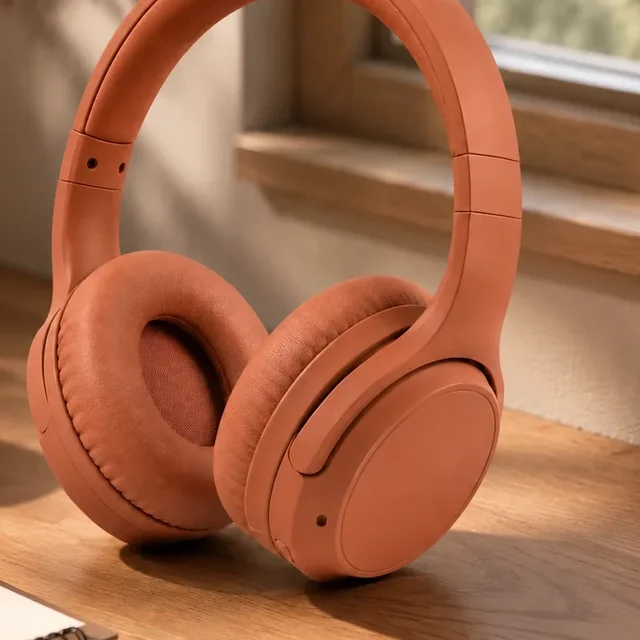
Original product-reference detail

Generated opening-frame contact detail
Pre-publication review checklist
- CharacterFace, hair, apparent age and identity remain coherent throughout.
- ProductCorrect variant, shape, color, scale, controls and label; no invented words or parts.
- Hands and contactStable fingers, realistic grip, occlusion and shadows; no slipping or merging.
- Speech and soundMouth matches the heard line; names, claims, pronunciation and sound rights checked.
- Captions and safe areasAccurate transcript, readable contrast, no clipped subtitles or covered product/CTA.
- FactsEvery factual or implied benefit has evidence; no invented customer experience.
- RightsReference, character, likeness, voice, audio, product art and reuse permissions documented.
- Disclosure and exportRequired AI/commercial labels, correct aspect ratio, approved version and destination reviewed.
Watch at normal speed first, then inspect contact and speaking moments slowly. A good poster can conceal a drifting face or malformed product later in the take. Reject unsupported label text rather than shrinking it until it becomes unreadable. Keep an approval note that identifies the actual export you reviewed.
GenAI share of buyers’ digital video ad assets
Share, percent · zero-based axis from 0% to 50%
| Year | Share | Status in July 2026 release |
|---|---|---|
| 2025 | ≈25% | Retrospective |
| 2026 | ≈33% | 2026 expectation |
| 2027 | 43% | 2027 projection |
GenAI adoption across video production is broader than virtual presenters: it can include editing and other AI-assisted work. The IAB figures do not measure the performance of our example, prove a cost advantage or establish an AI UGC conversion lift. They come from the July 2026 release; no older report forecast is spliced into this series.
Keep three kinds of evidence separate
| Layer | What to record | What it cannot establish alone |
|---|---|---|
| Material quality | Pass/fail review, readable product action, identity, audio, rights and claim accuracy | An approved file does not prove viewers will watch or buy. |
| Viewing performance | Video starts and viewing checkpoints using the chosen platform's exact definitions | Retention alone does not prove incremental purchases. |
| Commercial outcome | Defined destination clicks, attributed conversions, spend and an agreed attribution window | Attributed conversions are not automatically causal or incremental lift. |
Change one main variable at a time. For example, compare two hooks in the same TikTok Ads placement while holding audience, budget approach, destination and the rest of the asset steady. Use the same reporting dates, timezone, conversion event, attribution model and click/view windows. If delivery differs substantially, record that limitation instead of declaring a universal winner.
CTR here means destination clicks ÷ impressions × 100. CPA means spend ÷ attributed conversions for the chosen event and window. Platforms may use different click definitions; do not mix all clicks with destination clicks or compare inconsistent windows. If conversions are zero, CPA is undefined. The right sample size and decision window depend on your baseline, budget and objective; the example has no actual ad results.
Creative test record
CREATIVE TEST RECORD — blank template, not campaign results
Platform / account:
Campaign / placement / market:
Objective / conversion event:
Attribution model + click/view windows:
Reporting dates + timezone:
Control asset ID:
Variant asset ID:
One main variable changed:
Budget / audience / bid settings held constant:
Quality review outcome:
Impressions:
Video starts + platform definition:
Views at chosen checkpoint + definition:
Destination clicks:
Attributed conversions:
Spend + currency:
CTR = destination clicks / impressions × 100:
CPA = spend / attributed conversions:
Notes / uncertainty / decision:
Use “not available” for missing fields; do not turn zero conversions into a zero CPA.
Disclosure, Rights and Truthful Claims
Check synthetic identity, commercial relationships and permissions separately. An AI label explains how media was made. An advertising disclosure explains a material connection. Neither grants rights to a face, voice, logo, product photo or music track.
FTC: a US example, not a global rulebook
The FTC’s Consumer Reviews and Testimonials Rule Q&A says there is no blanket prohibition on AI-generated avatars in marketing. It also explains that fake or false underlying testimonials can be prohibited, and avatar use can be deceptive under the FTC Act. Do not turn a synthetic presenter into a purported buyer who personally used, loved or benefited from the product.
For paid endorsements or other material connections, review the FTC’s disclosure guidance. A clear disclosure belongs where people encounter the endorsement, with video disclosure in the video where applicable. Adding #ad or an AI label does not make a false statement truthful. Requirements outside the United States need their own local review.
TikTok: match the actual ad format
TikTok’s Ads Manager instructions, last updated September 2025 and checked October 18, 2026, describe an AI-generated-content disclaimer for qualifying non-Spark TikTok ads. The instructions separately direct Spark ads to the organic AI-content rules and warn that some disclaimer features may not be available to every advertiser. Check the applicable settings and current misleading-content policy for the actual placement; do not assume one toggle covers every format.
Obtain the rights the brief actually needs
Keep written permission for real people and voices; an upload is not consent. Clear the product artwork, reference images, footage, music and the generator’s commercial terms. Agree channels, territories, duration, paid reuse and whether edits are allowed. A fictional character avoids neither trademark conflicts nor misleading claims. For a sensitive claim or substantial campaign, obtain qualified advice for the intended market.
Frequently Asked Questions
What is AI influencer UGC?
AI influencer UGC is synthetic creator-style content made with a reusable virtual character. It can resemble a creator's product demonstration or ad, but it is not a real customer's independent review. The influencer is the reusable identity; UGC style describes the content format.
Do I need followers to create AI UGC?
No. Producing files for a brand's channels does not require an audience on your own account. Followers and audience quality matter when the agreement also sells publication or exposure on your creator account. Keep those two services separate.
Can AI UGC be used in ads?
It can be considered for ads when the asset, claims, references, likeness, audio and usage rights are cleared and the destination platform permits the creative. Apply the required AI and commercial disclosures separately. An AI label or #ad does not make a false testimonial or unsupported claim acceptable.
How do I keep the product and character consistent?
Reuse an approved character reference and an exact product reference, preserve a reviewed opening frame, and limit each shot to one readable action. Check the face, product silhouette, label and contact throughout the full video. Use real product B-roll when exact mechanics, text or performance cannot be reproduced accurately.
How much does AI UGC production cost?
Calculate the cost of all generation attempts, voice and editing, human review and licensed inputs, then divide by the number of approved deliverables. Keep provider credits, customer credits and cash expenses distinct. The recorded demo used 1,535 provider credits for its image and video tasks; it is one historical production record, not a customer price or industry average.
Do AI UGC videos need disclosure?
Disclosure depends on jurisdiction, destination and commercial context. Assess the synthetic identity, any advertising or material connection, and source/likeness permissions separately. For example, TikTok has an AI-content control for qualifying non-Spark ads and separate organic/Spark rules. US FTC rules also address fake or false testimonials.
Start with one frame you can approve
Create an original adult character, choose an authorized product reference and write one observable action. Review the still before motion, the full clip before delivery, and the actual evidence before making a claim. Keep the inputs and decisions with the result so the next variant can be compared fairly.
Plan Content
Measure Engagement
Build Your Profile
Price Your Work
Write Post Copy
Brand Partnerships