
Keira Wilson: an AI influencer template for trail navigation content
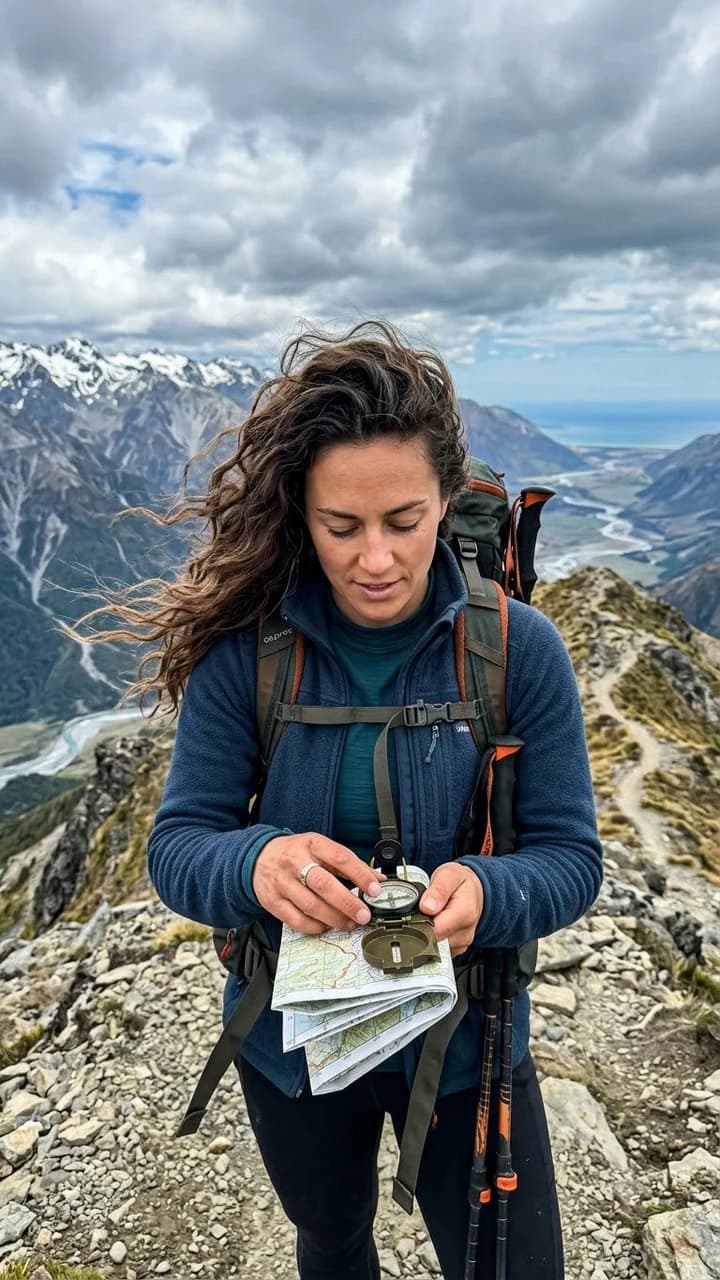
Start with a fictional adult creator built around trail navigation content. The reference shows checking a trail compass as wind moves her hair on a ridge.
Create with Keira Wilson →This is a fictional character template, not a real person, social account, or endorsement. Review the generation cost in Studio before submitting.
Is Keira Wilson right for your content?
Choose Keira for navigation-themed outdoor storytelling. The compass reference gives the account a recurring narrative moment: pausing to decide what comes next, rather than simply posing at a viewpoint.
This page helps you choose a specific identity for trail navigation content. For the overall creation workflow, explore the AI influencer generator. Start here when this character’s setting and creative direction fit the series you want to make.
What to post with Keira Wilson
Three editorial starting points for trail navigation content. These are suggested projects, not published results.
- Trail-planning carousel: studying a route, a supported compass pose, and a trailhead portrait.
- Outdoor-journal post: use the character to introduce your own reflections or a researched guide.
- Preparation-series cover: focus on checking equipment before an imagined walk.
What makes this identity recognizable?
- Character
- human · fictional adult
- Age range
- 25-34
- Hair
- dark brown, long beach waves
- Face
- soft oval
- Eyes
- brown
- Wardrobe
- practical adventure layers
Keep these traits and the original reference stable. Change the action, setting, or camera position one at a time, then check whether the result still reads as Keira Wilson.
Plan the next scene
Place Keira on a broad, stable trail with the compass held over an open palm. Keep the face visible and use a separate accurate diagram if you explain bearings.
Try this next-scene brief →This suggested brief opens photo creation with Keira Wilson selected. Review the prompt and cost before generating. To publish a carousel, create and review each scene, then add captions. For a Reel or TikTok, prepare and review the video or image edit separately; the template does not post to social accounts.
Direct your first scene
Choose Keira Wilson when your content centers on trail navigation content and the practical adventure layers styling fits your intended character. The reference is a starting point; the scene below is a creative direction, not an additional generated result.
checking a trail compass as wind moves her hair on a ridge. Vertical 9:16 candid creator frame, the face is fully visible from forehead through chin, one clear action, natural directional light, realistic hands and materials, no centered neutral standing pose, no text, logo, watermark, child, minor, or gore.
- Open the character in Studio. If you need to sign in, the selected starter and prompt travel with the link.
- Review the reference and edit the scene. Keep one clear action and a camera angle that shows the face.
- Review settings and credit cost, then generate. Inspect the face, hands, objects, and identity before downloading or reusing a result.
Before you publish
Character consistency needs review. A changed expression, crop, or outfit can alter the identity. For Keira Wilson, compare the soft oval face and dark brown hair against the starting reference.
This template does not represent a real person. Do not describe generated scenes as actual experiences, customer results, or product tests.
Check rights for anything you add, including products, voices, music, and references. Read commercial-use guidance and AI disclosure.
A question about trail navigation content
Can the compass image teach navigation?
Generated dial markings and orientation are not reliable. Use verified diagrams, real demonstrations, and appropriate navigation instruction for practical guidance.
Compare other starting characters
Keep Keira Wilson for trail navigation content. Consider these creators when a different recurring activity fits your series better.
Plan Content
Measure Engagement
Build Your Profile
Price Your Work
Write Post Copy
Brand Partnerships