
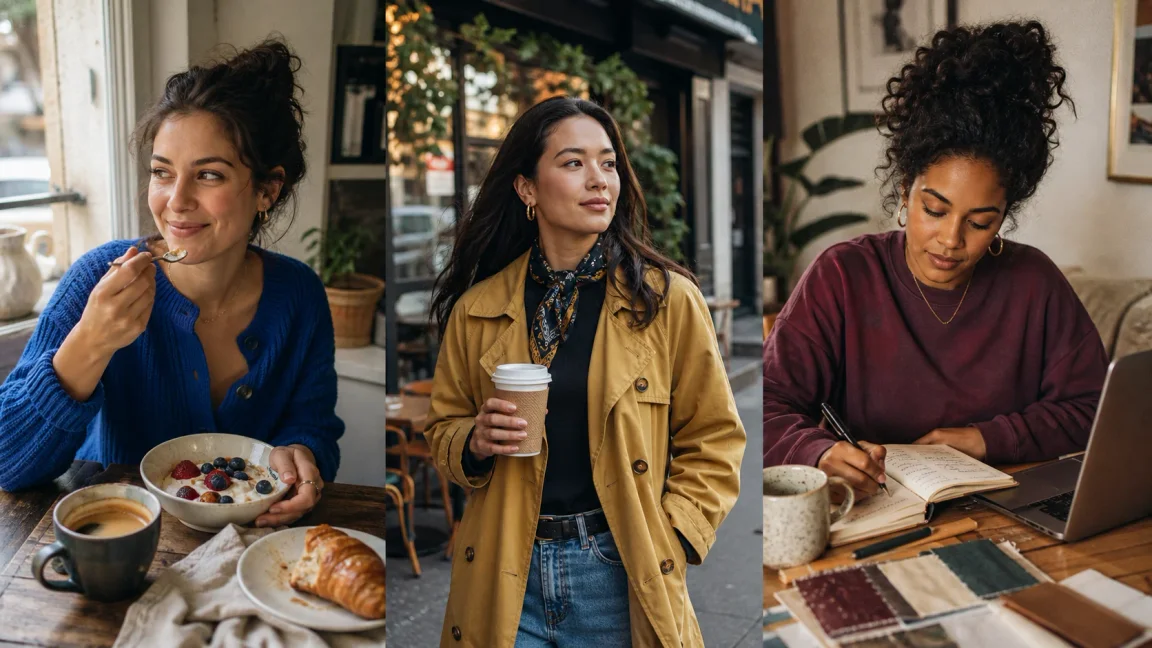
Creating an AI model of yourself means building a digital character that carries your visual identity across images and influencer-style content. With AI Influencer Generator, you do not need to train a complex model from scratch. Instead, you shape a reusable adult persona with one authorized reference image, clear prompts, visual direction, and repeatable workflows.
This guide shows how to create an AI model of yourself for personal branding, social content, portfolio visuals, or AI influencer content. You will learn how to plan your character, generate AI photos, keep the look steady, and publish content with care. You can also develop AI avatar ideas from the same base setup.
Before you start, you need a clear identity, one good photo you have the right to use, and a reason for the model. The clearer your plan is at the start, the easier it is to avoid a folder of random images later.
Decide what your AI self is for
Start by deciding what your AI self needs to accomplish. A professional creator may want clean headshots, lifestyle shots, or campaign-ready posts. A future AI influencer may need fashion looks, travel scenes, product images, captions, and repeat themes. AI Influencer Generator supports the visual character and content workflow; it does not publish to social platforms or verify campaign performance for you.
- A short persona description, including an adult age range, style, tone, and visual mood.
- One clear reference image that you own or have permission to use when creating your likeness.
- Content categories such as fitness, fashion, business, beauty, gaming, travel, or education.
- Wardrobe preferences, background styles, recurring colors, and intended publishing platforms.
- Boundaries for what the AI model must never depict, promote, or claim.
The first decision is whether the result should resemble you closely, feel like an idealized visual direction, or become a stylized fictional persona inspired by you. That choice shapes every prompt, image, and post that follows.
Write a practical persona profile
Write a simple profile for your AI self. Include stable physical features, personality, content niche, and signature details. Keep wardrobe flexible: identity continuity should protect the person, not force the character to wear the same outfit in every unrelated scene.
A wellness persona might feel calm and observant, while a streetwear creator may be direct, playful, and visually bold. A founder-style personal brand may use more structured portraits, workspace scenes, and educational posts. Specific direction makes the content feel planned without freezing every visual choice.
Choose one authorized reference image
If you want the AI model to resemble you, use an image you own and have permission to use. The Character from Image workflow begins with one adult reference image; it does not ask you to upload a large training set. Choose a clear face, natural light, limited filtering, and enough resolution to inspect important features.
Do not upload another person's photo without consent. Keep identity evidence separate from style inspiration: the authorized photo anchors the adult identity, while your written direction controls the outfit, place, action, light, and camera feel.
A reference image is guidance, not a guarantee. Review the generated face, hair, body proportions, hands, clothing, setting, and implied event before saving or publishing the result.
Use From image and review the save operation
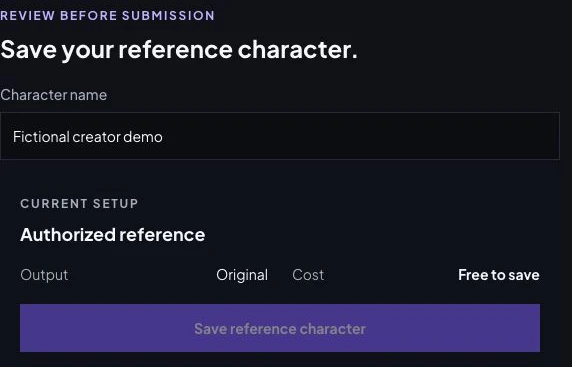
Open the character workspace and select From image. Use one JPEG, PNG or WebP up to 10 MB with a clear authorized adult face. Confirm the source rights, then review Character name and Save reference character. The current reference-save review displays Original and Free to save: this saves a reference, while later generated images have separate quotes. The captured session was already on the review step, so the upload step is not pictured. No personal photo was uploaded or saved for this demonstration; no verified self-likeness result is claimed.
Create your first AI photos
Once the persona and reference are ready, start with simple prompts before moving to complex scenes. Your first goal is not perfection. It is to find a repeatable look that feels clear and usable.
- The character's stable appearance and signature traits.
- A specific setting, such as a studio, cafe, beach, kitchen, or city street.
- An outfit that belongs to the activity, weather, and personality.
- One light source and a clear camera feeling.
- The intended use, such as a profile photo, social post, portfolio image, or story concept.
A useful starter direction could be: a professional lifestyle portrait of an adult creator in a quiet studio, expressive modern outfit, side-window light, and realistic editorial photography. If the face drifts, simplify the scene and return to the saved identity. If the result feels plain, strengthen the clothing, action, setting, or camera direction rather than adding unrelated cinematic effects.
Set up the first scene in Create Photos
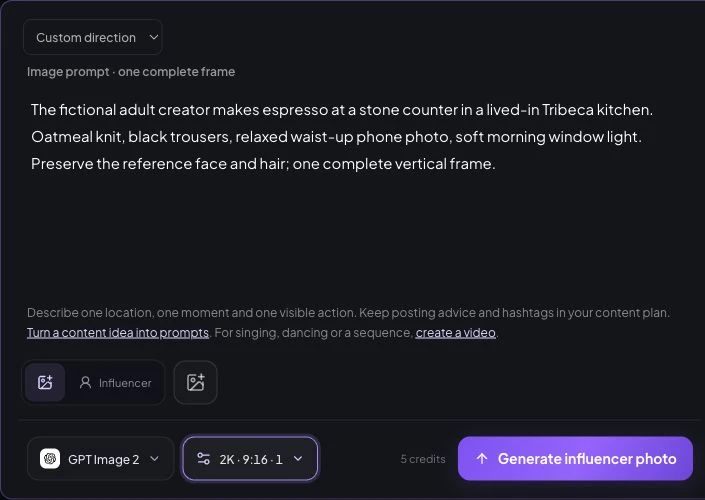
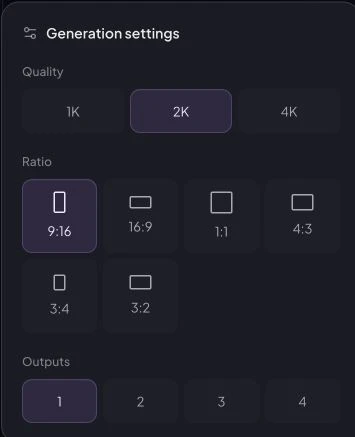
Choose the saved Influencer with Choose character, or Upload photo → Source image for the authorized portrait. Enter one scene in Direction; the screenshot uses an unsubmitted fictional espresso brief, not your likeness. Select GPT Image 2, 2K, 9:16 and one output. Its current quote is five credits. Check the attached identity and quote before Generate influencer photo, then compare the face and proportions against your source in History. A likeness test and its actual cost, time and retry data are still missing.
Keep the identity steady without repeating every scene
Consistency is what separates a useful AI model from unrelated images. Reuse the same saved character, keep the face, hair, skin tone, and proportions stable, and change one creative variable at a time. Outfit, pose, location, and lighting should evolve with the story.
Keep a small reference library of approved results. Compare every new image with that source of truth, and reject attractive images that no longer resemble the intended person. The Consistent Character Generator explains the reusable identity workflow; the AI Selfie Generator covers more casual, camera-facing compositions.
Make the pictures feel like real moments
Realistic AI photos rely on natural details rather than polished emptiness. Use practical poses, visible material texture, believable light, and objects connected to the action. Unbranded does not mean blank: a coffee cup can show texture and crema, a meal can be partly eaten, and a notebook can show use without displaying private or readable text.
Avoid stacking dramatic lighting, luxury styling, extreme beauty edits, complex backgrounds, and unusual poses into one prompt. Build the scene in layers: identity, outfit, setting, action, and mood. When something looks wrong, change one layer at a time.
Turn the character into a content system
After you have a steady visual character, move from portraits to a useful content library: lifestyle scenes, profile banners, campaign concepts, and short social sequences. Treat your AI self like a content brand, with recurring themes that stay familiar while individual images remain fresh.
A simple weekly plan can include one identity-reinforcing portrait, two lifestyle posts, one educational idea, one promotional image when appropriate, and one controlled experiment with a new outfit, place, or format. Every image should have a job.
If you later need motion, continue through the separate AI Image to Video Generator. Talking Avatar and Lip Sync are also separate workflows; creating the visual character does not clone your voice. Use a script, a built-in or saved voice, or audio you are authorized to use, then review the final speaking result.
Publish with consent, disclosure, and review
Avoid using your AI model in ways that could mislead people, invade privacy, or imply events and endorsements that did not happen. Even when the character is based on you, viewers should not be tricked into believing a fabricated location, testimonial, product experience, or statement is real.
The FTC's Disclosures 101 guidance explains clear disclosure for material relationships, while C2PA documents an open standard for content provenance. Requirements vary by market and platform, so use these as primary references rather than legal advice.
Review the site's AI disclosure guidance and commercial-use guidance before publishing realistic or promotional content. Keep the original source, approved results, prompts, and usage rights organized.
Frequently asked questions
Can I create an AI model of myself from one photo?
Yes. The Character from Image workflow starts from one clear image of an adult that you own or are authorized to use. Review the saved reference and each later generated image carefully before reusing them; one image does not guarantee perfect likeness in every later scene.
Do I need to train a custom AI model?
No. This workflow creates a reusable character reference without asking you to train a LoRA or upload a large image dataset. It is a visual character workflow, not custom foundation-model training.
Will my AI model look exactly like me every time?
No workflow can promise exact identity in every result. Reuse the saved character, change one creative variable at a time, and review the face, hands, body proportions, clothing, background, and claims before publishing.
Can the AI version speak in my voice?
Creating the visual character does not clone your voice. Talking Avatar and Lip Sync are separate workflows that use a script, a built-in or saved voice, or audio you are authorized to use.
Can I use the images commercially?
Commercial use depends on your rights to the source image, the generated content, depicted products, and any platform or campaign requirements. Review the commercial-use and AI-disclosure guidance before publishing.
Create one reusable identity, then build outward
Start with one purpose, one authorized adult reference, and one reviewable character. Save the strongest identity, then expand deliberately into new scenes, outfits, and formats. You can browse the complete AI creator tools when the visual persona is ready for its next asset.
Start your AI self in the character workspace
Plan Content
Measure Engagement
Build Your Profile
Price Your Work
Write Post Copy
Brand Partnerships